
Project management software in 2026 has evolved far beyond simple task lists and Kanban boards. Remote and hybrid work are permanent for most organizations. Projects are more cross-functional. And stakeholders expect real-time visibility into timelines, resources, costs, and outcomes rather than weekly status emails that are already outdated by the time they land in an inbox.
The market reflects this complexity. There are now hundreds of tools claiming to be the best, many of them indistinguishable from one another on their marketing pages. Choosing the wrong platform does not just waste your software budget. It creates adoption resistance, scattered communication, and the very chaos you were trying to eliminate.
This guide cuts through the noise. We tested 12 project management platforms across real team scenarios, from five-person startups to 200-person agencies, and evaluated each on flexibility, ease of adoption, AI capabilities, pricing transparency, and how well it scales as teams grow. Every recommendation includes the specific team type and workflow where that tool outperforms the alternatives, and the situations where you should look elsewhere.
Quick Comparison: Top 12 Project Management Tools for 2026
The table below summarizes each tool’s primary strength, pricing, and free plan details. Detailed reviews follow.
| Tool | Best For | Starting Price | Free Plan | AI Features | Our Rating |
| ClickUp | All-in-one work management | $7/user/mo | Yes (generous) | ClickUp Brain | 9.0/10 |
| Asana | Cross-functional team coordination | $10.99/user/mo | Yes (10 users) | Asana Intelligence | 8.8/10 |
| Monday.com | Visual workflow automation | $9/seat/mo | Yes (2 seats) | Monday AI | 8.6/10 |
| Notion | Docs + wikis + project management | $10/user/mo | Yes (personal) | Notion AI | 8.7/10 |
| Trello | Simple Kanban task management | $5/user/mo | Yes (generous) | Atlassian AI | 7.8/10 |
| Jira | Software development + agile | $8.15/user/mo | Yes (10 users) | Atlassian AI | 8.5/10 |
| Basecamp | Straightforward team communication | $15/user/mo | No | None | 7.5/10 |
| Wrike | Enterprise project portfolios | $10/user/mo | Yes (limited) | Wrike AI | 8.4/10 |
| Smartsheet | Spreadsheet-style project tracking | $9/user/mo | 30-day trial | Smartsheet AI | 8.2/10 |
| Teamwork | Client-facing agencies | $10.99/user/mo | Yes (5 users) | Teamwork AI | 8.3/10 |
| Linear | Modern software development | $8/user/mo | Yes (generous) | Built-in AI | 8.9/10 |
| Airtable | Flexible database-driven workflows | $20/user/mo | Yes (limited) | Airtable AI | 8.1/10 |
How We Evaluated These Project Management Tools
Every tool in this guide was assessed across six dimensions that determine whether a project management platform actually improves team productivity or just adds another layer of software overhead.
Ease of adoption: How quickly can a new team member start using the tool productively? We measured time-to-competence by having team members with no prior experience complete standard tasks: creating a project, assigning tasks, setting dependencies, and generating a status report.
Flexibility vs. complexity: Customization is valuable only when it does not overwhelm. We assessed whether each tool lets teams configure workflows without requiring a dedicated administrator or weeks of setup.
AI capabilities: In 2026, AI features have become a meaningful differentiator. We tested each tool’s AI for task summarization, workload balancing suggestions, status report generation, and natural language project queries.
Pricing transparency: Per-user pricing adds up fast. We calculated the true annual cost for teams of 10, 25, 50, and 100 users, including hidden costs for AI add-ons, guest seats, storage, and automation limits that many tools bury in footnotes.
Collaboration depth: Task management is table stakes. We evaluated how well each tool handles cross-team communication, document collaboration, client-facing sharing, and asynchronous workflows for distributed teams.
Scalability: A tool that works for a 10-person team but breaks down at 50 users wastes months of migration effort. We assessed performance, feature depth, and pricing trajectory as teams grow.
Why Project Management Tools in 2026 Demand More Than Task Tracking
Two shifts define the project management market in 2026. The first is the integration of AI as a core feature rather than a marketing checkbox. Tools like ClickUp Brain, Asana Intelligence, and Monday AI now generate task summaries, predict project risks based on historical patterns, auto-assign work based on team capacity, and draft status updates from project data. Teams that leverage these features report spending 30 to 40 percent less time on administrative project overhead.
The second shift is the collapse of tool boundaries. The distinction between project management, documentation, communication, and time tracking has blurred. ClickUp, Notion, and Monday.com now include built-in documents, chat, whiteboards, and time tracking. Teams are consolidating from four or five separate tools into one or two platforms that cover the full workflow, reducing context switching and the information fragmentation that kills productivity in distributed teams.
These shifts mean the best project management tool for your team in 2026 is not the one with the most features. It is the one that matches your team’s workflow complexity, adoption tolerance, and growth trajectory while minimizing the number of separate tools you need to manage.
Detailed Reviews: Best Project Management Tools for 2026
1. ClickUp — Best All-in-One Work Management Platform
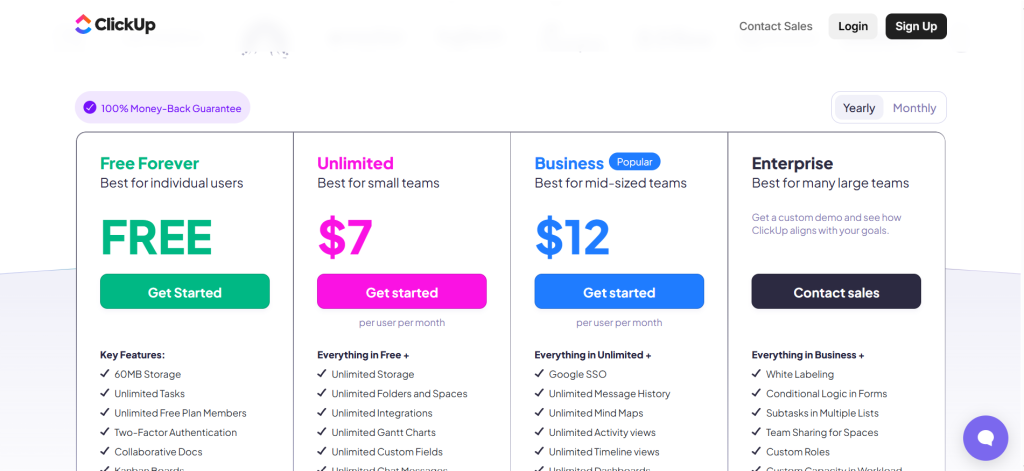
| Best For | Teams that want maximum flexibility and tool consolidation — PM, docs, chat, goals, time tracking, and AI in one platform |
| Pricing | Free Forever (unlimited users). Unlimited $7/user/mo. Business $12/user/mo. Enterprise custom ($25–40/user/mo) |
| AI Add-On | ClickUp Brain: $7–$9/user/mo (Standard) or $28/user/mo (Everything AI). Charged per paid seat, not per AI user |
| Free Plan | Yes — unlimited tasks and users. Limited storage (100MB), custom fields, and automation actions |
| Key Strengths | Most feature-rich PM tool available, 6+ views (list/board/Gantt/calendar/timeline/mind map), ClickUp Brain AI across entire platform, generous free tier |
| Key Weaknesses | Steep learning curve, performance slows with large workspaces, mobile app limited vs desktop, frequent updates introduce temporary bugs |
| Best For Teams | 10–100 person teams willing to invest 3–4 weeks configuring a unified workspace |
| Best Pairing | Slack for real-time chat if you don’t adopt ClickUp Chat |
ClickUp packs project management, document creation, goal tracking, time tracking, whiteboards, chat, and AI assistance into a single platform. The breadth is unmatched. You can plan projects in Gantt charts, track tasks on Kanban boards, collaborate in real-time documents, run video calls with SyncUps, and monitor everything through customizable dashboards without leaving the platform.
ClickUp Brain, the native AI layer, integrates with every component. It summarizes tasks and threads, generates subtasks from descriptions, drafts status updates, answers natural language questions about your project data, and can automate routine workflows through Autopilot Agents. The AI accesses multiple models including GPT-5 and Claude, and its Deep Search feature draws connections across your entire workspace history.
Custom automations reduce manual work by triggering actions based on status changes, due dates, and assignee updates. Every view, including list, board, Gantt, calendar, timeline, and mind map, lets each team member work in their preferred format while seeing the same underlying data.
Where ClickUp Falls Short
Feature density creates a genuine learning curve. New users report feeling overwhelmed by the number of options, settings, and views available. Teams that only need basic task management will find ClickUp’s complexity counterproductive. Performance slows with very large workspaces, particularly when running complex filtered views across thousands of tasks. The mobile app, while functional, lacks several desktop features. Frequent feature updates sometimes introduce temporary bugs that take days to resolve.
The AI pricing structure deserves scrutiny. ClickUp Brain is billed per paid member seat, not per actual AI user. For a 50-person team where only 15 people actively use AI features, you still pay for all 50 seats. At $7 to $9 per seat per month, this adds $4,200 to $5,400 annually on top of your base subscription.
The Verdict on ClickUp
ClickUp is the best choice for teams that want to consolidate multiple tools into a single platform and are willing to invest in setup and training. The value proposition is strongest for teams of 10 to 100 people who currently pay for separate project management, documentation, time tracking, and communication tools. If your team needs simplicity above all else, Trello or Basecamp will serve you better with far less friction.
2. Asana — Best for Cross-Functional Team Coordination
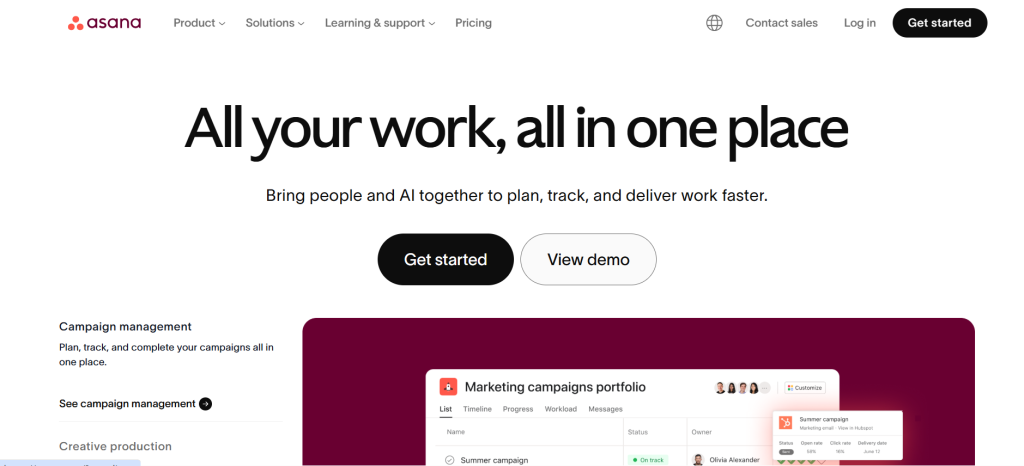
| Best For | Teams coordinating complex projects across multiple departments where visibility and accountability matter most |
| Pricing | Personal (free, up to 10 users). Starter $10.99/user/mo. Advanced $24.99/user/mo. Enterprise custom |
| AI Add-On | Asana Intelligence included in Starter+ plans. Advanced AI features require Advanced plan |
| Free Plan | Yes — up to 10 users. Includes unlimited tasks, projects, messages, and file storage (100MB per file) |
| Key Strengths | Excellent cross-team visibility, Portfolio view for multi-project tracking, Timeline shows dependencies/bottlenecks, workflow automation, clean balanced interface |
| Key Weaknesses | Free plan capped at 10 users, per-user pricing adds up, no built-in time tracking, reporting needs premium plans, less customizable than ClickUp |
| Best For Teams | Marketing, operations, and product teams of 15–200 people coordinating across departments |
| Best Pairing | Harvest or Toggl for time tracking, Slack for chat |
Asana excels at the specific problem most growing organizations struggle with: keeping multiple teams aligned on who owns what, when it is due, and how individual tasks connect to larger goals. The platform provides clear visibility into project status across departments without requiring every team to adopt the same workflow methodology.
Portfolio views let managers track the status of multiple projects simultaneously, surfacing which initiatives are on track, at risk, or behind schedule. Timeline views show dependencies between tasks, helping teams identify bottlenecks before they cause cascading delays. Workflow automation triggers actions automatically when tasks move between stages, eliminating the manual handoffs that create delays in cross-functional work.
Asana Intelligence, the platform’s AI layer, generates status updates, suggests task assignments based on team capacity, identifies project risks from historical data, and answers natural language questions about your projects. The AI features are included in paid plans rather than requiring a separate add-on, which keeps the cost structure simpler than ClickUp’s approach.
Where Asana Falls Short
The free plan’s 10-user cap forces growing teams to switch to paid plans earlier than competitors like ClickUp or Trello, which offer unlimited free users. Per-user pricing at $10.99 per month adds up quickly for larger teams: a 50-person team pays $6,594 annually on the Starter plan. There is no built-in time tracking, which means teams that need billable hours tracking must integrate a separate tool. Advanced reporting and custom fields require the Advanced plan at $24.99 per user per month, which doubles the per-seat cost.
The Verdict on Asana
Asana is the best choice for non-technical teams of 15 to 200 people who need cross-departmental visibility without the configuration complexity of ClickUp. Its strength is making project status immediately clear to everyone, from individual contributors to executives, without requiring deep customization. If your primary need is software development, Jira or Linear are better fits. If budget is the top concern, SE Ranking or ClickUp’s free tier provides more features at lower cost.
3. Monday.com — Best for Visual Workflow Automation
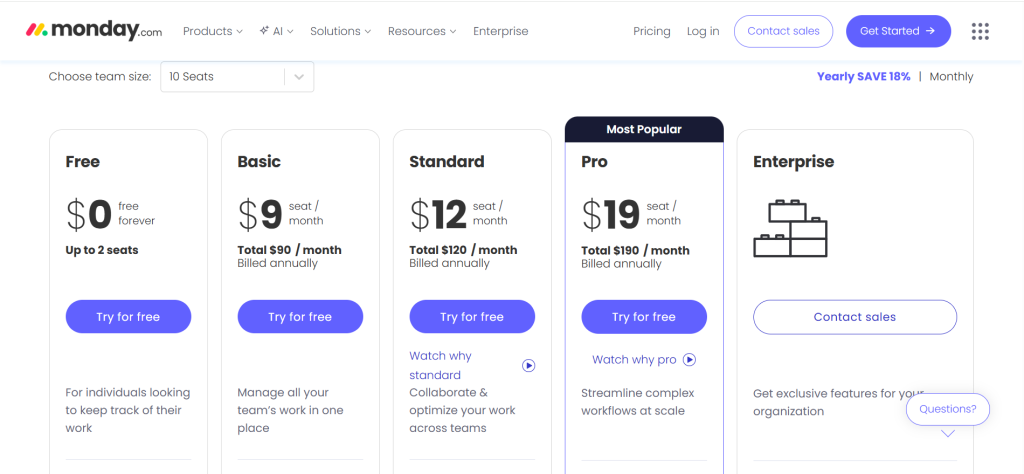
| Best For | Visual teams that want intuitive, drag-and-drop workflow automation with color-coded project boards |
| Pricing | Free (2 seats). Basic $9/seat/mo. Standard $12/seat/mo. Pro $19/seat/mo. Enterprise custom |
| AI Add-On | Monday AI included in Standard+ plans. App generation (Vibe tool) on paid plans |
| Free Plan | Yes — up to 2 seats only. Includes up to 3 boards, unlimited docs, 200+ templates |
| Key Strengths | Most visually intuitive interface, powerful no-code automations, WorkDocs for documentation, Vibe tool generates apps from prompts, strong marketplace |
| Key Weaknesses | Per-seat pricing expensive at scale, free plan extremely limited (2 seats), automations capped monthly per plan, performance lags with large boards |
| Best For Teams | Marketing teams, creative agencies, operations teams of 5–50 who value visual clarity |
| Best Pairing | Figma for design workflows, HubSpot for CRM integration |
Monday.com stands out through its visual approach to project management. Color-coded boards, drag-and-drop interfaces, and customizable widgets make project status immediately obvious without requiring users to interpret complex data views. The learning curve is among the shortest of any full-featured project management tool.
Workflow automations execute common sequences without coding: assign tasks when a status changes, send notifications when deadlines approach, update columns based on form submissions, and move items between boards based on trigger conditions. Monday AI assists with task creation, content drafting, and the Vibe tool, which generates custom mini-applications from simple language prompts directly within your workspace.
WorkDocs integrates document creation directly into project workflows, eliminating the need to switch to Google Docs or Notion for collaborative writing. The marketplace offers hundreds of integrations with tools like Slack, GitHub, Salesforce, and HubSpot, extending Monday’s capabilities without requiring custom development.
Where Monday.com Falls Short
Per-seat pricing gets expensive for larger organizations. A 50-person team on the Standard plan pays $7,200 annually. The free plan is limited to just 2 seats, making it impractical for team evaluation. Automations have monthly limits based on plan level: 250 actions per month on Standard, 25,000 on Pro. Teams that rely heavily on automation can hit these ceilings, forcing upgrades to higher tiers. Performance can lag with very large boards containing thousands of items.
4. Notion — Best for Combining Documentation, Wikis, and Project Management
| Best For | Teams that want documentation, knowledge management, and project management unified in one flexible platform |
| Pricing | Free (personal). Plus $10/user/mo. Business $15/user/mo. Enterprise custom |
| AI Add-On | Notion AI $10/user/mo add-on (writing, summarization, autofill, Q&A across workspace) |
| Free Plan | Yes — unlimited pages and blocks for personal use. Limited file uploads, no team features |
| Key Strengths | Unmatched flexibility with database system, beautiful page design, combines docs + wikis + PM, Notion AI for writing and Q&A, large template gallery |
| Key Weaknesses | Requires significant upfront configuration, performance slows with large databases, no native Gantt/timeline, learning curve for database relationships, limited mobile experience |
| Best For Teams | Startups, product teams, and knowledge-heavy organizations of 5–50 who think in documents and databases |
| Best Pairing | Linear or Jira for dedicated sprint management, Slack for real-time communication |
Notion blurs the line between project management, documentation, and knowledge management more effectively than any other tool. Databases form the foundation: you create tables that function as task lists, content calendars, CRM entries, sprint boards, or anything else your team needs. Each database can be viewed as a table, board, timeline, calendar, or gallery, and filtered by any property.
Pages combine text, embedded databases, images, code blocks, and interactive elements into living documents that serve as both project plans and knowledge repositories. The result is a workspace where your project roadmap, meeting notes, technical documentation, and task assignments live side by side, cross-referenced through database relations.
Notion AI, available as a $10 per user per month add-on, assists with writing, summarizing long documents, auto-filling database properties, and answering questions about content across your entire workspace. The AI Q&A feature is particularly useful for large teams: new members can ask questions and get answers sourced from existing documentation rather than interrupting colleagues.
Where Notion Falls Short
Notion’s flexibility is a double-edged sword. Building an effective workspace requires significant upfront investment in structure, naming conventions, and database design. Without deliberate architecture, Notion workspaces become disorganized quickly and turn into digital junk drawers rather than productivity systems. There is no native Gantt chart or timeline view without workarounds, which limits its usefulness for teams managing complex dependencies. Performance degrades with very large databases, and the mobile app feels limited compared to the desktop experience.
5. Trello — Best for Simple Kanban Task Management
| Best For | Small teams and individuals who prefer straightforward Kanban board organization without complexity |
| Pricing | Free (generous). Standard $5/user/mo. Premium $10/user/mo. Enterprise $17.50/user/mo |
| AI Add-On | Atlassian Intelligence included in Premium+ plans |
| Free Plan | Yes — unlimited cards, up to 10 boards per workspace, 1 Power-Up per board, 10MB file limit |
| Key Strengths | Simplest PM interface available, intuitive drag-and-drop Kanban boards, generous free tier, Power-Ups extend functionality, Butler automation |
| Key Weaknesses | Limited to Kanban view primarily, not suitable for complex dependencies, minimal reporting, scales poorly for large teams, free plan limits Power-Ups |
| Best For Teams | Freelancers, small teams of 2–10, and anyone who finds complex PM tools overwhelming |
| Best Pairing | Google Workspace for docs, Slack for communication |
Trello keeps project management simple with its signature Kanban board interface. Cards represent tasks, columns represent stages, and you drag cards between columns as work progresses. There is almost no learning curve. A new team member can start using Trello productively within five minutes of creating an account.
Power-Ups add functionality like calendar views, time tracking, voting, and integrations with hundreds of other tools. Butler automation handles repetitive actions based on triggers you define: move a card when its due date passes, assign a member when a label is added, or create a new card when a form is submitted. For teams that find complex project management platforms overwhelming, Trello provides exactly enough structure without unnecessary complexity.
The free tier is genuinely generous, offering unlimited cards, limited boards, and basic automation. For freelancers and small teams with simple workflows, the free plan covers most needs indefinitely. The Standard plan at $5 per user per month is among the most affordable paid options in the category.
Where Trello Falls Short
Trello’s simplicity becomes a limitation as projects grow in complexity. There is no native Gantt chart, timeline view, or meaningful dependency tracking without third-party Power-Ups. Reporting and analytics are minimal. The platform scales poorly for teams larger than 15 to 20 people or projects with dozens of interdependent tasks. Trello works brilliantly for what it is, a simple visual task manager, but it is not a substitute for a full project management platform.
6. Jira — Best for Software Development and Agile Teams
| Best For | Software development teams running Scrum or Kanban sprints with deep developer tool integration |
| Pricing | Free (up to 10 users). Standard $8.15/user/mo. Premium $16/user/mo. Enterprise custom |
| AI Add-On | Atlassian Intelligence included in Premium+ plans. Generates summaries, suggests assignments, drafts requirements |
| Free Plan | Yes — up to 10 users. Includes Scrum/Kanban boards, backlog, roadmap, 2GB storage |
| Key Strengths | Industry standard for agile development, deep GitHub/Bitbucket/CI-CD integrations, advanced sprint planning and backlog management, comprehensive reporting (velocity/burndown/flow) |
| Key Weaknesses | Complex interface intimidates non-technical users, heavy configuration needed, not suitable for non-dev teams, performance degrades with large backlogs, Atlassian ecosystem lock-in |
| Best For Teams | Development teams of 5–50 practicing Scrum, Kanban, or SAFe methodologies |
| Best Pairing | Confluence for documentation, Slack for team communication, Linear as a lighter alternative |
Jira is the industry standard for agile software development, and for good reason. The platform supports Scrum boards, Kanban boards, sprint planning, backlog management, release tracking, and bug tracking with a depth that no general-purpose project management tool matches. Issue types including stories, bugs, tasks, and epics organize work at multiple levels, from individual code changes to quarter-long initiatives.
Deep integrations with Bitbucket, GitHub, GitLab, and CI/CD tools connect project management directly to code repositories, build pipelines, and deployment workflows. When a developer creates a branch from a Jira ticket, the ticket automatically updates to show the branch, pull request status, and deployment state. This bidirectional connection eliminates the manual status updates that slow down development teams.
Advanced reporting includes velocity charts, burndown charts, cumulative flow diagrams, and sprint health reports that help teams measure and improve their development process over time. The free tier supports up to 10 users with full Scrum and Kanban functionality, making it accessible for small development teams.
Where Jira Falls Short
Jira’s power comes at the cost of complexity. The interface intimidates non-technical users, and optimal setup requires significant configuration that often demands a dedicated Jira administrator. The platform is not suitable for non-software teams; marketing, operations, and creative teams will find Monday.com or Asana far more intuitive. Performance degrades with very large backlogs, and the Atlassian ecosystem can create lock-in that makes future migration difficult. Newer alternatives like Linear offer a faster, more modern experience for teams that do not need Jira’s full enterprise feature set.
7. Basecamp — Best for Straightforward Team Communication and Simplicity
| Best For | Teams that value simplicity and structured communication over feature depth |
| Pricing | $15/user/mo. Basecamp Pro Max flat rate for unlimited users at higher price |
| AI Add-On | None — Basecamp has not added AI features |
| Free Plan | No — free trial available, no permanent free tier |
| Key Strengths | Deliberately simple interface, structured async communication (message boards, campfires), flat-rate pricing option for unlimited users, minimal learning curve |
| Key Weaknesses | No AI features, limited customization and automation, no Gantt/timeline/dependency views, fewer integrations than competitors, not suitable for complex projects |
| Best For Teams | Small to mid-size teams of 5–30 who prioritize simplicity and structured communication over feature depth |
| Best Pairing | Trello for visual task boards, Google Workspace for document collaboration |
Basecamp takes a deliberately opinionated approach to project management: less is more. Instead of offering dozens of views, customization options, and automation engines, Basecamp provides a focused set of tools, including message boards for structured discussions, to-do lists for tasks, campfires for real-time chat, schedules for deadlines, and docs for file sharing, all organized within project containers.
This simplicity is genuinely valuable for teams that have tried feature-rich platforms and found that the complexity created more overhead than it eliminated. Basecamp’s learning curve is measured in minutes, not weeks. Every team member, regardless of technical ability, can contribute from day one.
The flat-rate pricing option through Basecamp Pro Max eliminates per-user cost anxiety. For growing teams, the predictable pricing makes budgeting straightforward. However, the lack of AI features, limited automation, and absence of views like Gantt charts and timeline dependencies mean Basecamp is not suitable for teams managing complex, interdependent projects. It excels as a communication-first tool with task management attached, rather than a full-featured project management platform.
8. Wrike — Best for Enterprise Project Portfolio Management
| Best For | Enterprise teams managing multiple complex initiatives with advanced resource allocation and real-time analytics |
| Pricing | Free (limited). Team $10/user/mo. Business $24.80/user/mo. Enterprise and Pinnacle custom |
| AI Add-On | Wrike AI included in Business+ plans. Generates summaries, predicts risks, suggests resource reallocation |
| Free Plan | Yes — limited features, suitable for evaluation only |
| Key Strengths | Best-in-class real-time analytics and resource management, cross-functional workflow handling, advanced permissions, custom request forms, proofing tools for creative teams |
| Key Weaknesses | Pricing jumps significantly for needed features, complex interface, overkill for small teams, steep learning curve |
| Best For Teams | Enterprise teams of 50–500+ managing project portfolios across departments |
| Best Pairing | Slack for communication, Adobe Creative Cloud for creative workflow integration |
Wrike is built for the complexity that enterprises face when managing dozens of concurrent initiatives across multiple departments, each with their own workflows, resources, and stakeholders. The platform’s real-time analytics dashboard is among the best available, providing instant visibility into project health, resource utilization, budget tracking, and risk indicators without waiting for manual status reports.
Resource management goes beyond simple task assignment. Wrike maps team capacity, skills, and availability across projects, enabling managers to identify overloaded team members and reallocate work before burnout occurs. Custom request forms auto-route incoming work based on submission parameters, eliminating the manual triage that wastes hours in large organizations.
For creative teams, Wrike’s proofing tools allow stakeholders to annotate designs, videos, and documents directly within the platform, keeping feedback attached to the work rather than scattered across email threads and Slack messages. Wrike AI generates project summaries, predicts potential delays based on historical patterns, and suggests resource adjustments proactively.
Where Wrike Falls Short
Wrike’s pricing escalates substantially for the features most teams need. The Team plan at $10 per user per month is too limited for serious use, pushing most organizations to the Business plan at $24.80 per user per month or higher. For a 100-person team, that is nearly $30,000 annually before Enterprise features. The interface is complex and requires significant onboarding investment. For teams under 50 people with straightforward project needs, Wrike is overkill.
9. Smartsheet — Best for Spreadsheet-Style Project Tracking
| Best For | Teams comfortable with spreadsheets who want project management capabilities without abandoning familiar interfaces |
| Pricing | Pro $9/user/mo. Business $19/user/mo. Enterprise custom. 30-day trial (no permanent free tier) |
| AI Add-On | Smartsheet AI included in Business+ plans. Generates formulas, summarizes data, predicts outcomes |
| Free Plan | 30-day free trial only — no permanent free tier |
| Key Strengths | Familiar spreadsheet interface, powerful formulas and conditional logic, Gantt/card/calendar views, direct CSV/XLSX import, strong for PMOs and operations teams |
| Key Weaknesses | No permanent free tier, feels dated compared to modern PM tools, less intuitive for non-spreadsheet users, limited collaboration compared to Asana/ClickUp |
| Best For Teams | PMOs, finance teams, operations managers of 10–50 who already think in spreadsheets |
| Best Pairing | Slack for communication, Power BI for advanced reporting |
Smartsheet speaks the language of operations teams and project management offices that have run on spreadsheets for years. The interface looks and feels like a spreadsheet, with rows, columns, formulas, and conditional formatting, but adds project management capabilities including Gantt charts, card views, calendars, automated workflows, and resource management.
For teams migrating from Excel-based project tracking, Smartsheet eliminates the adoption friction that more modern tools create. Direct import of CSV and XLSX files means existing data transitions seamlessly. Formulas and conditional logic work similarly to Excel, reducing the learning curve for teams with strong spreadsheet skills.
Smartsheet AI, available on Business plans, generates formulas from natural language descriptions, summarizes sheet data, and predicts project outcomes based on historical patterns. The tool excels for structured, data-heavy project tracking where the underlying data model matters as much as the visual presentation.
10. Teamwork — Best for Client-Facing Agencies and Service Businesses
| Best For | Agencies, consultancies, and professional services firms managing client projects with billable hours and profitability tracking |
| Pricing | Free (5 users). Deliver $10.99/user/mo. Grow $19.99/user/mo. Scale custom |
| AI Add-On | Teamwork AI included in paid plans. Task prioritization, capacity insights, AI filter assistant |
| Free Plan | Yes — up to 5 users with basic project management features |
| Key Strengths | Built specifically for client-facing work, billable time tracking and invoicing, client permissions for stakeholder collaboration, profitability reporting, retainer management |
| Key Weaknesses | Less flexible than ClickUp or Monday for non-agency workflows, smaller integration ecosystem, less visual than Monday.com |
| Best For Teams | Agencies and consultancies of 5–50 managing multiple client engagements |
| Best Pairing | HubSpot or Salesforce for CRM, QuickBooks for invoicing |
Teamwork is built specifically for the workflow that agencies, consultancies, and professional services firms deal with daily: managing multiple client projects simultaneously while tracking billable hours, monitoring profitability, and giving clients appropriate visibility into project progress without exposing internal discussions or sensitive data.
Client permissions allow stakeholders to view project status, comment on deliverables, and approve work within the platform, keeping feedback centralized rather than scattered across email threads. Time tracking is built directly into tasks with billable and non-billable hour classification, enabling accurate invoicing without requiring a separate time tracking tool. Profitability reporting shows which clients and projects generate positive margins and which are consuming resources without adequate return.
Teamwork AI assists with task prioritization based on deadlines and team capacity, generates project status summaries, and provides an AI filter assistant that shows tasks based on individual team member priorities. For agencies managing retainer relationships, built-in retainer management tracks hours used against contracted hours with automatic alerts when utilization approaches limits.
11. Linear — Best Modern Alternative to Jira for Software Teams
| Best For | Software development teams that want Jira’s functionality with a modern, fast, keyboard-first interface |
| Pricing | Free (unlimited members, 250 issues). Standard $8/user/mo. Plus $14/user/mo. Enterprise custom |
| AI Add-On | Built-in AI included in all plans. Auto-assigns priorities, writes issue descriptions, generates release notes |
| Free Plan | Yes — unlimited members, up to 250 active issues, full feature access |
| Key Strengths | Fastest PM interface available, keyboard-first design, GitHub integration keeps branches linked to issues, cycles (sprints) with automated planning, AI included at no extra cost |
| Key Weaknesses | Software development only, not suitable for non-technical teams, relatively new with smaller community, limited reporting compared to Jira, no time tracking |
| Best For Teams | Engineering teams of 3–50 who value speed and modern UX over enterprise configurability |
| Best Pairing | Notion for documentation, Slack for team communication |
Linear represents what happens when you rebuild the agile project management experience from scratch with modern UX principles rather than layering features onto a 20-year-old architecture. The interface is the fastest in the category: actions that take three clicks in Jira take one keyboard shortcut in Linear. For development teams that live in their project management tool all day, this speed difference compounds into meaningful productivity gains.
GitHub integration keeps branches, pull requests, and deployments automatically linked to issues. Cycles function as sprints with automated planning that distributes unfinished work and suggests scope based on team velocity. Roadmaps provide product-level visibility across multiple projects and teams. The built-in AI assists with writing issue descriptions, suggesting priority levels, and generating release notes from completed work.
Linear’s free tier is notably generous: unlimited members with up to 250 active issues and full feature access. For small development teams, this covers months of work before requiring a paid plan. The Standard plan at $8 per user per month is more affordable than Jira’s comparable tier and includes AI features without an additional add-on.
Where Linear Falls Short
Linear is exclusively a software development tool. Non-technical teams, including marketing, operations, and creative departments, will find it confusing and ill-suited to their workflows. Reporting is less comprehensive than Jira’s enterprise-grade analytics. There is no built-in time tracking. The community and ecosystem are smaller than Jira’s, which means fewer integrations, plugins, and tutorials. For teams that need SAFe-level enterprise agile features, Jira remains the more complete option.
12. Airtable — Best for Flexible Database-Driven Project Workflows
| Best For | Teams that need relational database flexibility for project tracking, content pipelines, inventory, and custom workflows |
| Pricing | Free (limited). Team $20/user/mo. Business $45/user/mo. Enterprise custom |
| AI Add-On | Airtable AI included in Team+ plans. Generates summaries, categorizes records, suggests automations |
| Free Plan | Yes — 1,200 records per base, 5 bases, basic views and automations |
| Key Strengths | Most flexible data modeling of any PM tool, relational database with spreadsheet UX, rich field types (attachments/checkboxes/linked records), Interface Designer for custom apps, strong automations |
| Key Weaknesses | Expensive ($20/user/mo), free plan caps at 1,200 records, not intuitive as a pure PM tool, requires database thinking, automations limited on lower tiers |
| Best For Teams | Marketing ops, content teams, product teams of 5–50 who need custom data models |
| Best Pairing | Slack for notifications, Zapier for extended automations |
Airtable bridges the gap between spreadsheet familiarity and relational database power. You create bases with tables that can reference each other through linked records, enabling data models that are impossible in flat spreadsheets but would traditionally require a developer to build in a custom application. Rich field types including attachments, checkboxes, dropdowns, formulas, and rollup calculations make each base a custom application tailored to your workflow.
For project management, this flexibility means you can build exactly the tracking system your team needs rather than adapting to someone else’s predetermined structure. Content teams build editorial calendars with linked records connecting articles to authors, campaigns, and publication channels. Product teams track feature requests linked to customer accounts and development sprints. Operations teams manage inventory tied to suppliers, purchase orders, and fulfillment timelines.
Interface Designer lets you create custom front-end views for different team members, showing only the data and actions relevant to their role. Automations trigger actions based on record changes, schedules, or form submissions. Airtable AI generates summaries, categorizes records automatically, and suggests automation workflows based on your data patterns.
Where Airtable Falls Short
At $20 per user per month for the Team plan, Airtable is significantly more expensive than dedicated project management tools that offer more PM-specific features. The free plan’s 1,200-record cap forces upgrades faster than expected for active teams. Airtable requires database thinking that not every team member possesses, and without careful structure it becomes a disorganized mess. It is a powerful data platform that can do project management, but it is not a project management tool that also handles data.
Which Project Management Tool Should You Choose? A Decision Framework
Rather than declaring a single winner, the right choice depends on your team size, technical sophistication, and workflow complexity. Here are the clearest recommendations.
If you want one platform that replaces everything: ClickUp. Most features, best value per dollar, but requires setup investment. Willing to spend 3–4 weeks configuring it properly.
If you coordinate work across departments: Asana. Best cross-team visibility with the cleanest interface for mixed-skill teams. Portfolio views keep executives informed.
If your team values visual simplicity: Monday.com. Color-coded boards and no-code automations make project status instantly obvious to everyone.
If documentation and knowledge management matter as much as task tracking: Notion. Unmatched flexibility for teams that think in documents and databases.
If you just need simple task boards: Trello. Five-minute setup, near-zero learning curve. Best for teams under 15 with straightforward workflows.
If you run software sprints: Jira for enterprise teams with compliance needs. Linear for teams that value speed and modern UX over enterprise configurability.
If simplicity and communication matter most: Basecamp. Deliberately limited feature set eliminates complexity. Best for teams that tried feature-rich tools and got overwhelmed.
If you manage enterprise project portfolios: Wrike. Best real-time analytics and resource management for organizations with 50+ people across multiple departments.
If your team thinks in spreadsheets: Smartsheet. Familiar interface with PM capabilities layered on top. Lowest adoption friction for Excel-native teams.
If you run a client-facing agency: Teamwork. Built-in billable time tracking, client permissions, and profitability reporting that other tools lack.
If you need custom data workflows: Airtable. Most flexible data modeling, but expensive and requires database thinking.
Recommended Tool Stacks by Team Type
| Team Type | Primary Tool | Supporting Tools | Cost/User/Mo | Coverage |
| Startup (5–15) | ClickUp Free | Slack, Google Workspace | $0 | PM + Docs + Chat |
| Marketing Team | Asana Starter | Canva, HubSpot, Slack | $11–15 | PM + Design + CRM |
| Dev Team (small) | Linear Standard | Notion, GitHub, Slack | $8–18 | Sprints + Docs + Code |
| Dev Team (enterprise) | Jira Premium | Confluence, Bitbucket, Slack | $16–25 | Agile + Docs + CI/CD |
| Agency / Consultancy | Teamwork Deliver | Harvest, HubSpot, Slack | $11–20 | PM + Time + CRM |
| Enterprise (50–500) | Wrike Business | Slack, Power BI, Adobe CC | $25–40 | Portfolio + Analytics + Creative |
| Solo / Freelancer | Trello Free | Notion Free, Google Workspace | $0 | Tasks + Docs + Calendar |
AI Feature Comparison Across Project Management Tools
AI capabilities have become a meaningful differentiator in 2026. Here is how the major tools compare.
| Tool | Task AI | Status Reports | Workload AI | Pricing Model | AI Depth |
| ClickUp | Yes (Brain) | Auto-generated | Capacity suggestions | Add-on ($7–$28/user) | Deep |
| Asana | Yes | AI summaries | Assignment suggestions | Included in paid plans | Moderate |
| Monday.com | Yes | AI drafts | App generation (Vibe) | Included in Standard+ | Moderate |
| Notion | Yes | AI Q&A | Auto-fill properties | Add-on ($10/user) | Moderate |
| Jira | Yes | Sprint summaries | Issue suggestions | Premium+ plans | Moderate |
| Linear | Yes | Release notes | Priority suggestions | Included in all plans | Basic-Moderate |
| Wrike | Yes | Risk prediction | Resource reallocation | Business+ plans | Deep |
| Teamwork | Yes | Capacity insights | Filter assistant | Included in paid | Basic |
| Trello | Limited | No | No | Premium+ plans | Basic |
| Basecamp | No | No | No | N/A | None |
| Smartsheet | Yes | Data summaries | Outcome prediction | Business+ plans | Moderate |
| Airtable | Yes | Record summaries | Auto-categorization | Team+ plans | Moderate |
True Annual Cost Comparison: 25-Person Team
Per-user pricing can be misleading. Here is what each tool actually costs for a 25-person team on the plan most teams need, billed annually.
| Tool | Plan Needed | Per User/Mo | Annual (25 users) | Includes AI? |
| ClickUp | Business | $12 | $3,600 | No (+$2,100 for Brain) |
| Asana | Starter | $10.99 | $3,297 | Yes (basic) |
| Monday.com | Standard | $12 | $3,600 | Yes |
| Notion | Plus | $10 | $3,000 | No (+$3,000 for AI) |
| Trello | Standard | $5 | $1,500 | No |
| Jira | Standard | $8.15 | $2,445 | No |
| Linear | Standard | $8 | $2,400 | Yes |
| Basecamp | Per user | $15 | $4,500 | No AI available |
| Wrike | Business | $24.80 | $7,440 | Yes |
| Smartsheet | Business | $19 | $5,700 | Yes |
| Teamwork | Deliver | $10.99 | $3,297 | Yes (basic) |
| Airtable | Team | $20 | $6,000 | Yes |
Frequently Asked Questions
Which project management tool is best for remote teams?
ClickUp and Asana both excel for remote teams because they centralize communication, task management, and documentation in one platform. ClickUp offers more built-in features including chat, video calls, and docs. Asana provides a cleaner interface that distributed team members adopt faster. Both support the asynchronous workflows essential for teams spread across time zones. For remote teams that prioritize structured communication, Basecamp’s message board approach reduces notification overload.
Can I use a free project management tool for a growing team?
ClickUp’s free tier supports unlimited tasks and users, making it viable as teams grow beyond 15 to 20 people. Trello’s free plan works well for small teams with simple Kanban workflows. Linear’s free tier offers full features with generous issue limits. However, most free tiers limit automations, advanced views, reporting, and AI features that become essential as team size and project complexity increase. Teams typically outgrow free plans when they exceed 15 to 25 people or need cross-project visibility.
Should we use different tools for different departments?
It depends on how much cross-departmental collaboration you need. If departments work mostly independently, specialized tools can work: Jira for engineering, Asana for marketing, Teamwork for client services. If departments hand work off frequently, a single platform like ClickUp or Monday.com reduces handoff friction and provides organization-wide visibility. The hidden cost of multiple tools is fragmented information: status updates, decisions, and context scattered across platforms that do not communicate with each other.
What is the best project management tool for software development?
Jira remains the industry standard for enterprise development teams that need advanced sprint planning, compliance features, and deep integration with the Atlassian ecosystem. Linear is the strongest choice for smaller teams of 3 to 50 that value speed, modern design, and built-in AI without enterprise complexity. ClickUp can handle development workflows but lacks the developer-specific depth of dedicated tools. For teams practicing strict Scrum or SAFe methodologies, Jira’s feature set is unmatched.
How important are AI features in project management tools in 2026?
AI features save meaningful time on administrative overhead: generating status reports, summarizing long discussion threads, suggesting task assignments based on team capacity, and drafting project documentation. Teams that leverage AI report 30 to 40 percent less time spent on project administration. However, AI should not be the primary selection criterion. Choose the tool that matches your workflow first, then consider AI capabilities as a tiebreaker between similarly suitable options. Tools without AI like Basecamp and Trello remain excellent choices if their core functionality matches your needs.
What is the biggest mistake teams make when choosing a project management tool?
Choosing based on features rather than adoption. The most feature-rich tool in the world is useless if your team does not actually use it. Trello with full team adoption beats ClickUp that half the team avoids because it is too complex. Start with your team’s current workflow and tolerance for change. If they struggle with technology, choose something simple like Trello or Basecamp. If they embrace new tools and want consolidation, invest in ClickUp or Monday.com setup. The tool your team actually uses every day delivers more value than the tool with the highest review score.
Final Words: The Best PM Tool Is the One Your Team Actually Uses
The project management tools market in 2026 offers more capable options than at any point in the past. AI features are reducing administrative overhead. All-in-one platforms are eliminating the need for separate documentation, communication, and time tracking tools. Visual interfaces are making project status accessible to everyone, not just project managers.
But the fundamental challenge has not changed: the best tool is the one your team actually adopts and uses consistently. A simple Trello board that every team member updates daily is infinitely more valuable than an elaborately configured ClickUp workspace that half the team avoids because it feels overwhelming.
Two principles should guide your selection. First, match the tool to your team’s current workflow complexity and adoption tolerance, not to where you hope to be in two years. You can always migrate to a more capable platform later, but you cannot recover the months lost to a tool that creates more friction than it eliminates. Second, invest in setup and onboarding. Every tool on this list performs dramatically better when someone takes the time to configure it for your specific workflow rather than using default settings.
The Stack That Works for Most Teams
If you need a concrete recommendation, most teams of 10 to 50 people perform well with one primary project management tool (ClickUp for maximum features, Asana for cross-team clarity, or Monday.com for visual simplicity), Slack for real-time communication, and Google Workspace or Notion for documentation. Total monthly cost per user: $10 to $25 depending on the primary tool selected.
For development teams, replace the general PM tool with Linear or Jira, add Notion or Confluence for documentation, and keep Slack for communication. For agencies, Teamwork replaces the general PM tool and adds built-in time tracking that eliminates the need for Harvest or Toggl.
The project management tool you choose shapes how your team communicates, collaborates, and tracks progress. Choose the one that matches how your team actually works, not the one with the most impressive feature list. Then invest the time to set it up properly, train your team, and build habits around consistent usage. That investment pays dividends that no amount of software features can replace.

![Marketing Automation Case Study: 12 Real Examples, Strategy & ROI Results [2026]](https://marketingcasestudy.io/wp-content/uploads/2026/05/marketing-automation-case-study-featured-768x403.png "Marketing Automation Case Study: Real Examples, Strategy & ROI Results [2026] 6")

