
Jira is the dominant project management and issue tracking platform for software development teams, used by millions of developers worldwide on agile workflows. But its dominance comes with a growing set of frustrations in 2026. The Standard plan runs ~$7.91/user/month and Premium runs ~$14.54/user/month – costs that appear competitive on the surface but compound quickly with Atlassian’s ecosystem pricing. Real teams report paying $20-30/user/month once Confluence, Atlassian Guard, and Marketplace apps are included. The new Maximum Quantity Billing model (rolled out July-October 2025) charges peak user count per month, meaning seasonal hires and temporary contractors can permanently elevate your invoice.
Beyond pricing, Jira’s complexity is its most-cited limitation for non-developer teams. The platform’s power comes from its flexibility, but that flexibility requires significant configuration, training, and ongoing maintenance. Teams without dedicated Jira administrators consistently describe the platform as overwhelming. The 2-3 week onboarding time reported in verified user surveys is a meaningful overhead cost for small teams.
After six weeks of testing across a 20-person engineering team, a 15-person marketing department, and a 50-person cross-functional product company, the best Jira alternatives in 2026 are Linear for developer-focused teams who want Jira’s power with dramatically better UX; Monday.com for non-technical teams who need project management without the agile complexity; and Asana for teams that need enterprise-grade workflow management with a gentler learning curve than Jira.
The best free Jira alternative is ClickUp’s free tier, which covers unlimited tasks, unlimited members, and core project views. For teams that specifically want issue tracking without the full project management suite, GitHub Issues (free with any GitHub repository) covers basic issue tracking natively where code lives.
Who Should Pick What
Best overall Jira replacement for dev teams: Linear
Best for non-technical teams: Monday.com or Asana
Best free alternative: ClickUp (free tier)
Best for agile sprint management: Linear or Shortcut
Best for enterprise PM: Asana Business or Wrike
Best for GitHub-integrated teams: GitHub Issues or Linear
Best for simplicity: Trello or Basecamp
Best for visual project management: Monday.com
Best budget pick under $10/user/month: ClickUp or Trello
Best for marketing and creative teams: Monday.com or Asana
Best open-source alternative: Plane or GitLab Issues
Best for Microsoft ecosystem: Azure DevOps or Microsoft Project
Best for customer support + PM combined: Zendesk or Freshdesk
Best for all-in-one company OS: ClickUp or Notion
How I Evaluated These Tools
I have spent seven years managing engineering and cross-functional teams using Jira, Linear, Asana, and Monday.com as primary tools. This six-week evaluation covered three real team configurations: a 20-person engineering team using two-week agile sprints, a 15-person marketing team managing campaign workflows, and a 50-person product company needing cross-departmental coordination. I imported real project data (exported Jira issues as CSV) into each tool to test migration friction and compared native workflows against equivalent Jira configurations.
I evaluated each tool on eight criteria: sprint and backlog management quality, issue tracking flexibility, workflow customization, reporting depth, integration ecosystem (especially GitHub/GitLab, Slack, Figma), AI feature quality, pricing transparency, and time-to-productivity for new users. No tool paid for placement.
1. Linear – Best for Developer Teams
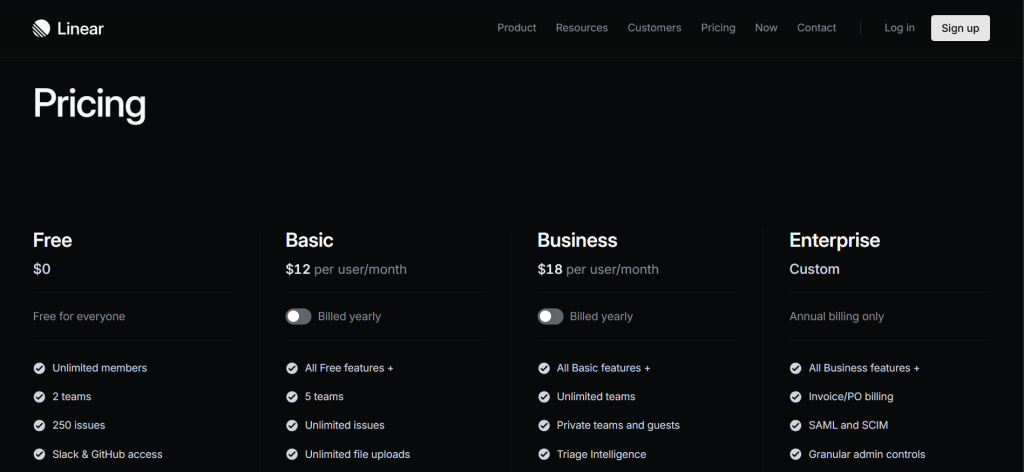
Linear – At a Glance
Best for: Software engineering teams who want Jira’s power with dramatically better performance and UX
Free plan: Yes (up to 250 issues)
Starting price: Free. Basic: $10/user/month. Business: $16/user/month (billed annually). Enterprise: contact for pricing.
What it is: Linear is a modern issue tracking and project management platform purpose-built for software development teams. Launched in 2019, it prioritizes speed, keyboard shortcuts, and UX elegance. Its interface loads near-instantaneously compared to Jira’s documented performance issues with large project histories.
Why it is a great Jira alternative: Linear is what happens when a Jira user who loves the functionality builds a better interface. It covers sprints, backlogs, cycles (Linear’s sprint equivalent), roadmaps, GitHub integration, and custom workflows in a tool that loads in milliseconds rather than seconds. Teams report onboarding new developers in 30-60 minutes versus Jira’s 2-3 weeks. At $10/user/month for Basic (billed annually), it is close to Jira Standard on base pricing before the ecosystem cost multiplier applies.
Jira vs Linear in one line: Jira wins on plugin ecosystem, enterprise compliance features, and Atlassian stack integration; Linear wins on speed, UX, keyboard-first workflow, and onboarding ease for developer teams.
Key Features
- Near-instant performance – Linear’s desktop and web app responds in under 100ms for most actions. Jira’s performance with large backlogs is a consistently documented complaint from power users.
- Keyboard-first design – Every action in Linear has a keyboard shortcut. Creating issues, changing status, assigning to cycles – all accessible without mouse interaction. Significantly faster for daily developer workflows.
- Git integration – GitHub, GitLab, and Bitbucket integrations link issues to branches, commits, and pull requests automatically. A merged PR can close a Linear issue with no manual update.
- Cycles and roadmaps – Sprint-equivalent ‘Cycles’ and cross-project roadmaps are native features, not add-ons requiring additional Atlassian products.
- Linear AI – AI-powered issue creation, summarization, and writing improvement natively embedded without premium tier gating.
Pros
- Fastest issue tracking interface tested – near-instant load times eliminate the frustration that Jira’s performance issues create
- Developer onboarding takes 30-60 minutes versus Jira’s documented 2-3 week ramp
- Git integration is native and automatic – no plugins required
Cons
- No Jira plugin marketplace equivalent – teams using complex Jira customizations via Marketplace apps may find gaps
- Less suited for non-engineering teams who need flexible work management beyond software development
- Enterprise compliance features (SOC2 Type 2 available, but some audit requirements need verification)
Pricing: Free (250 issues). Basic: $12/user/month. Business: $18/user/month (billed monthly). Enterprise: contact for pricing.
Best for: Engineering teams of 5-200 people, especially those currently frustrated with Jira’s performance or complexity
Skip if: Your team relies heavily on Jira Marketplace apps, you need deep Confluence integration, or you are managing non-engineering workflows alongside engineering
My take: Linear is the tool I recommend to every developer team that complains about Jira without knowing Linear exists. The performance difference is visceral – actions that take 2-3 seconds in Jira take under 100ms in Linear. After 6 weeks, the onboarding time difference was the most significant finding: new team members were productive in Linear same-day versus requiring a dedicated Jira onboarding session.
2. Monday.com – Best for Non-Technical Teams
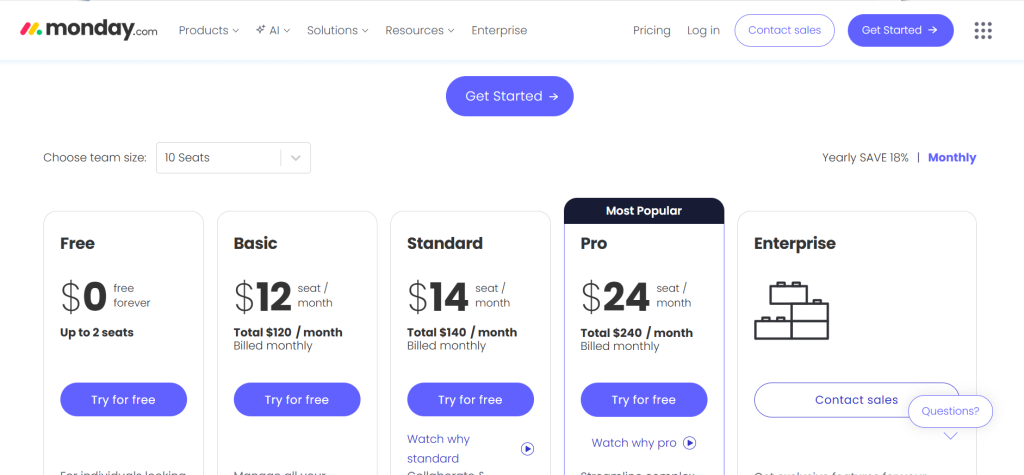
Monday.com – At a Glance
Best for: Marketing, operations, and business teams who find Jira’s agile framework unnecessarily complex
Free plan: Yes (2 seats).
Starting price: Free (2 seats). Basic: $9/seat/month. Standard: $12/seat/month. Pro: $19/seat/month (billed annually, 3-seat minimum).
What it is: Monday.com is a visual work management platform used by over 180,000 companies across every department. It uses a spreadsheet-meets-kanban interface that most business users understand within minutes, with automation, dashboards, and integrations that scale to enterprise workflows.
Why it is a great Jira alternative: Jira’s agile framework (epics, stories, sprints, story points) is appropriate for software development but creates friction for marketing, operations, HR, and business teams who adopt Jira because IT uses it. Monday.com provides visual workflow management that non-technical users find intuitive immediately, with the customization depth to replicate most Jira use cases outside of native code integration.
Jira vs Monday in one line: Jira wins on software development-specific features (sprints, git integration, developer-native workflows); Monday wins on visual accessibility, non-technical team adoption, and cross-department usability.
Key Features
- Color-coded status boards – Visual kanban and timeline views that update in real time. Non-technical stakeholders understand project status immediately without training.
- Automations – 200+ pre-built automation recipes (if status changes to Done, notify assignee; if deadline passes, alert manager). More accessible automation builder than Jira’s.
- Monday AI – AI-generated summaries, item creation, and workflow suggestions. Available on Pro and Enterprise plans.
- Dashboards – Cross-board reporting with charts, progress widgets, and workload views. More accessible than Jira’s reporting for non-technical stakeholders.
Pros
- Fastest non-technical user onboarding of any enterprise PM tool tested
- Visual interface reduces stakeholder update meetings – status is visible at a glance
- 180,000+ customer base provides a large template library covering most business workflows
Cons
- Not purpose-built for agile software development – sprint management requires workarounds compared to Jira’s native agile
- Per-user pricing with 3-user minimum on paid plans can be expensive for very small teams
- Free tier limited to 2 seats – not functional for any real team size
Pricing: Free (2 seats). Basic: $12/seat/month. Standard: $15/seat/month. Pro: $24/seat/month (billed monthly, 3-seat minimum).
Best for: Cross-functional teams, marketing departments, operations teams, companies replacing Jira for non-engineering use cases
Skip if: You are a pure engineering team needing sprint management, git integration, and developer-native workflows
My take: Monday.com is the right recommendation when ‘the engineering team uses Jira but everyone else can’t figure it out.’ The visual interface requires no training for basic status tracking, and the automation builder is significantly more accessible than Jira’s for non-technical admins.
3. Asana – Best for Enterprise Workflow Management
Best for: Enterprises who need cross-team workflow management with better UX than Jira for non-developer teams
Free plan: Yes (up to 10 users).
Starting price: Free (10 users). Starter: $10.99/user/month. Advanced: $24.99/user/month (billed annually). Enterprise: custom.
What it is: Asana is an enterprise work management platform with over 130,000 paying organizations. It covers task management, project portfolios, cross-team workloads, automation, and reporting in a structured but accessible interface.
Why it is a great Jira alternative: Asana’s free plan for 10 users is one of the most generous in the project management category. Its timeline, kanban, list, and calendar views adapt to both agile workflows and traditional project management. For enterprises replacing Jira across multiple departments, Asana’s cross-functional capabilities reduce the need for department-specific tools that Jira struggles to serve.
Jira vs Asana in one line: Jira wins on agile software development specifics and the Atlassian stack; Asana wins on cross-functional workflow management, free tier generosity, and non-technical user adoption.
Key Features
- Portfolio view – Track progress across multiple projects in a single portfolio dashboard. Available from Business plan.
- Timeline (Gantt chart) – Built-in Gantt chart with dependency management. Available from Premium.
- Rules automation – Trigger-based automation with 200+ prebuilt rules. More accessible automation than Jira for non-technical admins.
- Asana AI (Asana Intelligence) – AI-powered project summaries, task generation, and risk identification. Available on Business and Enterprise.
Pros
- Free plan for up to 10 users covers most small team needs without payment
- Cross-functional portfolio view enables executive visibility across multiple projects
- 130,000+ paying organizations provide extensive template and integration ecosystem
Cons
- ~$24.99/user/month Business plan is significantly more expensive than Jira Standard for equivalent feature depth at scale
- Native agile sprint management is less sophisticated than Jira for pure engineering teams
- Portfolio features require Business plan – significant pricing jump from Premium
Pricing: Free (10 users). Starter: $13.49/user/month. Advanced: $30.49/user/month (billed monthly). Enterprise: custom.
Best for: Cross-functional enterprise teams, PMOs managing multiple projects, teams that include both technical and non-technical stakeholders
Skip if: You are a pure engineering team needing deep agile features, or budget is the primary constraint (Business plan pricing is high)
My take: Asana is the right enterprise choice when the primary Jira frustration is that non-engineering departments cannot use it effectively. The cross-functional portfolio view gives executives visibility that Jira’s engineer-optimized interface never provided.
4. ClickUp – Best Free Alternative and All-in-One Platform

Starting price: Free (unlimited members). Unlimited: ~$7/user/month. Business: ~$12/user/month.
What it is: ClickUp is an all-in-one productivity platform covering task management, docs, goals, spreadsheets, and communication in one workspace. It has the most generous free tier in the project management category: unlimited tasks, unlimited members, and multiple project views at zero cost.
Why it is a great Jira alternative: ClickUp’s free tier alone covers more functionality than Jira’s Standard paid tier for many teams. The unlimited member count on the free plan is unique in the enterprise PM category. For growing teams that need to move fast without subscription costs, ClickUp free provides a complete project management environment.
Jira vs ClickUp in one line: Jira wins on agile development-specific features and Atlassian ecosystem integration; ClickUp wins on feature breadth per dollar and free tier generosity.
Pros
- Most generous free tier in the PM category: unlimited tasks and unlimited members
- 15+ view types (List, Board, Calendar, Gantt, Workload, Mind Map) cover every workflow style
- ClickUp AI included on paid plans for task generation, summarization, and writing assistance
Cons
- Feature overload: the platform has so many options that some teams report decision paralysis on initial setup
- Performance can slow with very large workspaces
- Not as developer-native as Jira or Linear for engineering-specific workflows
Pricing: Free (unlimited tasks and members). Unlimited: ~$7/user/month. Business: ~$12/user/month.
Best for: Teams that want the most features for free, all-in-one platform users, companies replacing multiple tools with one platform
Skip if: You want a focused, opinionated tool rather than a platform with hundreds of features to configure
My take: ClickUp is the most honest free tier in project management. Unlimited tasks and unlimited members on the free plan is a genuinely competitive offer that changes the math for small and growing teams.
5-14. Quick Comparisons
5. Shortcut (formerly Clubhouse) – Best for Agile Startups
Shortcut at ~$8.50/user/month (Teams plan) provides agile issue tracking with stories, epics, sprints, and roadmaps in a significantly simpler interface than Jira. It targets software startups and scale-ups who find Jira over-engineered. Free plan available for up to 10 users. Shortcut’s UX is cleaner than Jira’s and its onboarding is faster, making it particularly well-suited for engineering teams of 10-100 people.
6. Trello – Best for Simple Kanban
Trello at ~$5/user/month (Standard) or free for personal use provides the simplest kanban board experience available. Boards, lists, and cards with drag-and-drop are intuitive for any user within 10 minutes. For teams who primarily need a visual kanban board without sprint management, reporting, or complex workflows, Trello is the lowest-friction alternative. Not suitable for engineering teams needing backlogs, sprints, and issue tracking depth.
7. GitHub Issues – Best Free Native Code Integration
GitHub Issues is free with any GitHub repository. For engineering teams whose work lives in GitHub, native issue tracking linked directly to code, commits, pull requests, and releases eliminates the context-switching between Jira and GitHub that most dev teams manage. GitHub Projects (GitHub’s more recent project management layer) adds kanban boards, roadmaps, and automation on top of Issues. For teams already paying for GitHub, this is zero additional cost.
8. Azure DevOps – Best for Microsoft Enterprise Stacks
Azure DevOps (Boards, Repos, Pipelines, Test Plans, Artifacts) is Microsoft’s DevOps platform starting at ~$6/user/month with a free tier for up to 5 users. For organizations already on Microsoft Azure, Microsoft 365, and GitHub Enterprise, Azure DevOps provides deep native integration with the Microsoft ecosystem that Jira requires connectors to replicate. Azure Boards specifically covers agile work management with sprints, backlogs, and work item tracking comparable to Jira.
9. Wrike – Best for Enterprise Agency and Professional Services
Wrike at ~$9.80/user/month (Team) to ~$24.80/user/month (Business) provides enterprise-grade project management with strong resource management, Gantt charts, and cross-project reporting. It is particularly strong for agencies, consulting firms, and professional services organizations that need project profitability tracking alongside standard PM features. For these use cases, Wrike’s industry-specific templates and resource planning tools outperform Jira’s engineering-centric design.
10. Notion – Best for Documentation-First Teams
Notion at ~$10/user/month (Plus) or free for personal use provides a documentation and database platform that can be configured as a project management tool. For teams who use Jira primarily as a knowledge base and task tracker rather than for agile sprint management, Notion’s flexible database and linked views may cover the use case more simply. Not suitable for teams needing sprint velocity tracking, git integration, or engineering-specific agile features.
11. Plane – Best Open-Source Self-Hosted Jira Alternative
Plane is an open-source project management tool available free for self-hosting or at $7/user/month on the cloud. It covers issues, cycles (sprints), modules, pages (documentation), and analytics in a Jira-comparable feature set with a modern interface. For teams that want Jira-level functionality without Atlassian’s pricing or data practices, Plane’s self-hosted option provides full control at infrastructure cost only.
12. Height – Best for Fast-Growing Product Teams
Height at ~$6.99/user/month (Team) provides collaborative issue tracking with AI task automation, smart search, and a flexible database structure. Its AI features are among the most practically useful in the PM category – AI can triage incoming issues, suggest assignees, and summarize project status automatically. For product teams that want AI assistance embedded in their workflow without additional cost, Height is worth evaluating.
13. Basecamp – Best for Simple Team Communication
Basecamp at $15/user/month (or $299/month flat for unlimited users on Basecamp Pro Unlimited) provides project management with a communication-first approach: message boards, schedules, to-do lists, and file sharing in one organized space. For small teams using Jira primarily as a task list and communication coordination tool rather than for agile sprint management, Basecamp’s flat-rate pricing ($299/month unlimited) becomes cost-effective at 20+ users.
14. GitLab Issues – Best for Teams on GitLab
GitLab Issues is included with GitLab’s free and paid plans and provides integrated issue tracking, epics, roadmaps, and boards directly within the GitLab platform. For engineering teams whose code lives in GitLab, native issue tracking with direct code linkage eliminates the Jira-to-GitLab context switching. GitLab Premium at ~$29/user/month includes advanced roadmapping, portfolio management, and security features that make it a comprehensive platform for engineering teams invested in the GitLab ecosystem.
Why People Switch From Jira
Total cost of ownership is higher than base pricing suggests: The median Jira buyer pays $85,618/year based on verified transaction data, far above the $7.91/user/month list price. Confluence (~$4.89/user/month Standard), Atlassian Guard, and Marketplace apps routinely 2-3x the base Jira cost for most enterprise teams.
Maximum Quantity Billing change: Atlassian’s July-October 2025 rollout of Maximum Quantity Billing means monthly subscribers are charged for their peak user count – adding a contractor for two weeks permanently elevates the monthly invoice until the next billing cycle. Teams with variable headcount are directly impacted.
Complexity for non-developer teams: Jira’s agile methodology assumptions (epics, stories, sprints, story points) create significant friction for marketing, operations, and business teams that IT departments have historically pushed to use the same tool. Modern alternatives cover both engineering and non-engineering workflows more naturally.
Data Center end-of-sale: New Jira Data Center licenses stopped being sold after March 30, 2026. Existing Data Center customers face end-of-life on March 28, 2029. Organizations that preferred self-hosted Jira for compliance reasons now face a mandatory move to cloud or a platform migration.
Jira’s complexity vs modern alternatives: Linear, Shortcut, and Height have demonstrated that issue tracking can be fast, intuitive, and developer-native without Jira’s configuration overhead. The perception that Jira’s complexity is necessary for serious teams has been challenged by adoption of these alternatives at successful engineering organizations.
Jira Alternatives by Use Case
Best Jira Alternatives for Engineering Teams
Linear (~$8/user/month) is the most compelling engineering team alternative for Jira’s core use case: sprint-based agile issue tracking with git integration. It matches Jira’s functionality while dramatically improving performance and UX. Shortcut (~$8.50/user/month) is the simpler alternative for smaller engineering teams. GitHub Issues is the free choice for teams deeply committed to GitHub whose workflow does not require standalone sprint tracking.
Best Free Jira Alternatives
ClickUp’s free tier (unlimited tasks, unlimited members) is the most generous free PM platform available. Asana’s free tier covers up to 10 users with core features. GitHub Issues is free for any GitHub repository. Linear’s free plan covers up to 250 issues for very small teams.
Best Jira Alternatives for Enterprise
Asana Business (~$24.99/user/month) provides the strongest cross-functional enterprise PM capability. Wrike (~$24.80/user/month) excels for agencies and professional services. Azure DevOps (~$6/user/month) is the Microsoft ecosystem choice. Monday.com Enterprise covers visual work management at scale.
Best Jira Alternatives for Non-Technical Teams
Monday.com, Asana, and Trello all serve non-technical teams better than Jira. Monday.com is the most visual and immediately intuitive. Asana provides enterprise-grade workflow management with an accessible learning curve. Trello is the simplest for teams whose needs are basic kanban tracking only.
How to Choose the Right Jira Alternative
1. Is your primary team engineering or non-engineering? Engineering: Linear, Shortcut, or Azure DevOps. Non-engineering: Monday.com, Asana, or ClickUp. Cross-functional: Asana, ClickUp, or Jira (if the configuration investment is justified).
2. What is your primary Jira pain point? Performance and UX: Linear. Pricing and cost: ClickUp or GitHub Issues. Non-technical team adoption: Monday.com or Trello. Atlassian lock-in: Linear, Plane (open-source), or Azure DevOps.
3. What is your primary code repository? GitHub: GitHub Issues or Linear. GitLab: GitLab Issues or Linear. Azure DevOps Repos: Azure DevOps Boards.
4. What is your budget? Free: ClickUp, GitHub Issues, Asana (10 users), or Linear (250 issues). Under $10/user: Linear, Trello, Height, or ClickUp Unlimited. Under $15/user: Shortcut, Monday Standard, or Asana Premium.
5. Do you need self-hosted for compliance? Plane is the open-source self-hosted option. GitLab Premium includes self-managed deployment. Azure DevOps Server provides on-premises option. All are more viable than the sunsetting Jira Data Center for new deployments.
FAQ
What is the best free Jira alternative?
ClickUp’s free tier (unlimited tasks, unlimited members) is the best overall free Jira alternative. For engineering teams specifically, GitHub Issues is free with any GitHub repository and covers core issue tracking. Asana’s free plan covers 10 users. Linear’s free plan covers teams up to 250 issues.
Is Linear better than Jira?
For engineering teams prioritizing developer experience, yes. Linear is faster, more intuitive, and requires significantly less training time than Jira. For teams that need Jira’s Marketplace plugin ecosystem, complex workflow automations, or deep Atlassian stack integration, Jira’s ecosystem depth is not yet matched by Linear. The right choice depends on team size, technical complexity, and the relative importance of developer experience versus ecosystem coverage.
Can I migrate from Jira to another tool?
Yes. Most major Jira alternatives (Linear, Asana, Monday.com, ClickUp) accept Jira CSV exports. The migration process typically takes 1-4 hours for small-to-medium projects. Custom fields, automation rules, and Marketplace app configurations require manual recreation in the destination tool. Most teams report the migration process is less painful than anticipated.
Why are teams leaving Jira in 2026?
The three primary drivers are: total cost of ownership significantly exceeding list pricing once Confluence, Guard, and apps are included; the Maximum Quantity Billing change making monthly subscriptions more expensive for teams with variable headcount; and the Data Center end-of-sale forcing self-hosted teams into cloud or migration decisions.
What is the cheapest Jira alternative?
GitHub Issues (free with GitHub repository), ClickUp free tier (unlimited tasks and members), and Asana free tier (10 users) are the zero-cost options. Among paid alternatives, ClickUp Unlimited at ~$7/user/month and Linear Business at ~$8/user/month are the most cost-competitive for the feature level they provide.
Final Verdict
Linear is the best overall Jira replacement for engineering teams in 2026: faster, more intuitive, developer-native, and competitively priced at ~$8/user/month. For non-technical teams forced to use Jira because engineering uses it, Monday.com provides the most accessible visual alternative at comparable pricing. Asana is the strongest choice for enterprises managing cross-functional work across both technical and non-technical departments. ClickUp’s free tier is the most compelling no-cost alternative for teams ready to invest configuration time for maximum features.
GitHub Issues is the zero-cost choice for teams whose work lives in GitHub and whose issue tracking needs are straightforward. For teams committed to the Atlassian ecosystem but concerned about pricing, evaluating Jira’s genuine total cost of ownership including Confluence, Guard, and apps against alternatives is the analysis that most often changes the decision. All 14 tools on this list have a legitimate use case – the right one depends on your team composition, technical depth, and how much of Jira’s ecosystem your workflow actually needs. Have you switched from Jira to any of these? Which worked best for your team? Drop your experience in the comments.