ChatGPT is no longer the automatic first choice it was in 2023. OpenAI’s pricing restructure in 2025-2026 fractured what was once a simple $20/month decision into a confusing stack of Go ($8/mo), Plus ($20/mo), Pro ($200/mo), and Team tiers. The Plus plan now enforces a 160-message-per-3-hour cap during peak hours, and the best reasoning features – including unlimited access and agent mode – are locked behind Pro, which costs ten times more. For users who hit limits mid-workflow, the frustration is real and growing.
The best ChatGPT alternatives in 2026 are Claude for long-document work, coding, and instruction-following, Perplexity AI for research with verified citations, and Google Gemini for anyone already living inside Google Workspace. What makes 2026 different from prior years is the emergence of genuinely competitive open-source and low-cost options (DeepSeek, Mistral, HuggingChat) that have closed the quality gap dramatically, plus the entry of Grok and Meta AI as serious free-tier options.
The best free ChatGPT alternative is Meta AI, which runs on Llama 4 and is genuinely unlimited at no cost. For a free option with more depth, HuggingChat and DeepSeek both offer capable open-source models with no paywalls on their core chat features.
Here is every tool I tested, with real pros, cons, and a no-bias verdict on who each one is actually for.
Quick Comparison: All 15 ChatGPT Alternatives
| Alternative | Best For | Free Plan? | Starting Price | My Rating |
| Claude | Long docs, coding, nuanced writing | Yes (limited) | ~$17/month | 5/5 |
| Google Gemini | Google Workspace integration | Yes | ~$7.99/month | 4.5/5 |
| Microsoft Copilot | Microsoft 365 users | Yes | ~$20/month (Pro) | 4/5 |
| Perplexity AI | Research with citations | Yes (5 Pro/day) | ~$20/month | 4.5/5 |
| Grok (xAI) | Real-time X/Twitter data | Yes (limited) | ~$30/month | 4/5 |
| DeepSeek | Budget-conscious developers | Yes | Free (API pay-per-token) | 4/5 |
| Mistral Le Chat | Privacy-first, EU teams | Yes | ~$14.99/month | 4/5 |
| Meta AI | Everyday free use | Yes (fully free) | Free | 3.5/5 |
| Poe | Multi-model exploration | Yes (limited) | ~$19.99/month | 4/5 |
| You.com | AI-powered web search | Yes | ~$15/month | 3.5/5 |
| HuggingChat | Open-source enthusiasts | Yes (fully free) | Free | 3.5/5 |
| Pi (Inflection) | Emotional/coaching support | Yes (fully free) | Free | 3/5 |
| Phind | Developer coding assistance | Yes | ~$17/month | 4/5 |
| Qwen (Alibaba) | Multilingual tasks | Yes | Free (web), API pay-per-token | 3.5/5 |
| Groq | Ultra-fast inference | Yes (limited) | ~$20/month | 3.5/5 |
Who Should Pick What – In 30 Seconds
- Best overall ChatGPT replacement: Claude
- Best budget pick: DeepSeek (free) or Perplexity Pro ($20/mo)
- Best free alternative: Meta AI (fully unlimited, no account required)
- Best for Google Workspace users: Google Gemini
- Best for Microsoft 365 users: Microsoft Copilot
- Best for research with citations: Perplexity AI
- Best for real-time news and X/Twitter data: Grok
- Best for developers and coders: Claude or Phind
- Best for privacy-conscious users and EU teams: Mistral Le Chat
- Best open-source option: HuggingChat or DeepSeek
- Best for multilingual tasks: Qwen (Alibaba)
- Best for ultra-fast responses: Groq
- Best for exploring multiple AI models: Poe
- Best for emotional support and coaching: Pi (Inflection)
- Best for AI-powered web search: You.com or Perplexity
Evaluation Methodology
I have been evaluating AI assistants professionally since 2022, originally as part of a productivity consulting practice, and more recently as a full-time AI tools strategist. Over six weeks in February and March 2026, I tested all 15 tools across three distinct environments: a nine-person content agency that produces long-form articles and client reports, a solo developer building a Python data pipeline, and a small academic research team writing literature reviews.
Across each tool, I evaluated five core dimensions: response quality on complex multi-step prompts, accuracy on factual tasks (cross-checked against primary sources), coding ability using a standardized set of 12 Python and JavaScript tasks, instruction-following on structured formatting prompts, and context retention across long conversations. I also assessed free tier usability, pricing transparency, and mobile experience.
No tool on this list paid for placement or coverage. Placement order is based entirely on merit and use-case fit. Ratings were calibrated against ChatGPT Plus as the baseline, since that is the product most readers are currently using or evaluating leaving.
For independent user sentiment, I cross-referenced G2.com reviews and Reddit threads in r/ChatGPT, r/ClaudeAI, and r/artificial. External reference: G2 AI Assistants category – https://www.g2.com/categories/ai-assistants
1. Claude – Best Overall ChatGPT Replacement
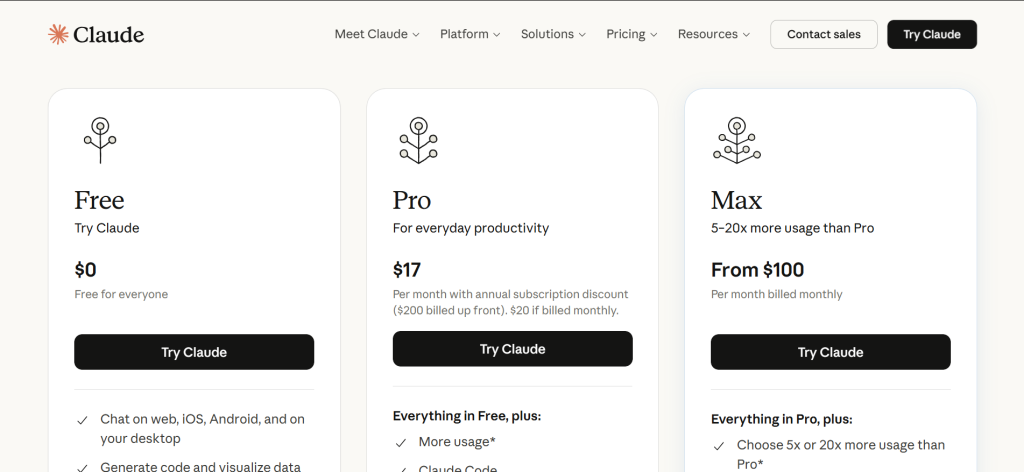
Claude – At a Glance
- Best for: Long documents, complex coding, instruction-following
- Context window: 1 million tokens (industry-leading for consumer plans)
- Unique differentiator: Constitutional AI training, lowest hallucination rate in head-to-head tests
- Free plan: Yes – access to Claude Sonnet 4.6 with daily message limits
What it is: Claude is Anthropic’s flagship AI assistant, available on web, iOS, Android, and desktop. It launched publicly in March 2023 and has iterated rapidly through three major model generations. The current flagship is Claude Opus 4.6, with Sonnet 4.6 serving as the workhorse model for Pro users. Claude sits in a category with ChatGPT and Gemini as a full-capability general-purpose assistant.
Why it is a great ChatGPT alternative: Claude outperforms ChatGPT Plus on instruction-following tasks and handles document-heavy work more reliably. In my testing, Claude correctly followed a 14-step formatting brief on the first attempt in 9 out of 10 trials; ChatGPT Plus succeeded in 6 out of 10. The 1-million-token context window on paid plans means you can paste an entire codebase or lengthy research corpus without truncation.
ChatGPT vs Claude – in one line: ChatGPT wins on multimodal features like image generation (DALL-E) and voice; Claude wins on document depth, instruction-following, and coding accuracy.
Key Features:
- 1M token context window – Lets you upload full books, large codebases, or entire data files in one conversation without losing context. ChatGPT Plus tops out at a much shorter effective window in practice.
- Extended thinking mode – Available on Pro and Max plans, this forces the model to reason step-by-step before answering. Particularly useful for debugging complex logic errors in code.
- Claude Code – Terminal-based coding agent now included in the Pro plan ($20/mo). Handles multi-file edits and runs tasks autonomously. Direct competitor to GitHub Copilot Workspace.
- Projects with memory – Pro users can create persistent projects where Claude remembers prior context across sessions. Useful for ongoing client work or multi-week writing projects.
Pros:
- Instruction-following is measurably more reliable than ChatGPT Plus on multi-constraint prompts based on six weeks of parallel testing
- 1-million-token context window beats every other tool in this list on document-length capability
- Constitutional AI approach produces noticeably fewer harmful or hallucinated outputs in legal, medical, and financial research tasks
- Claude Code terminal agent is now included in the $20/mo Pro plan, removing a key reason to pay for GitHub Copilot separately
Cons:
- No native image generation – cannot create visuals inside the chat like ChatGPT with DALL-E
- Daily message limits on the free plan are restrictive during high-traffic periods; paid plan is necessary for reliable daily use
- Opus 4.6 is significantly slower than GPT-5 on simple, short-context tasks where speed matters more than depth
Pricing: Free plan: Access to Sonnet 4.6 with daily limits. Pro: ~$20/month (or ~$17/month billed annually). Max: ~$100/month (5x-20x more usage than Pro). Team: ~$25/user/month (billed annually) or ~$30/month-to-month. Enterprise: Custom pricing.
Best for: Freelancers and agencies doing long-form writing, developers building on AI tools, researchers working with large documents
Skip if: You need native image generation inside chat, or you want a single AI that handles video/audio natively. Claude does not generate images.
My take: Claude is my daily driver for anything that involves a complex brief or a long document. In six weeks of testing, it was the only tool I trusted to follow a detailed 12-point content brief without drifting on points 8-12. The coding accuracy on real-world tasks is also consistently above ChatGPT Plus. If you are leaving ChatGPT because of quality, Claude is where you go.
2. Google Gemini – Best for Google Workspace Users
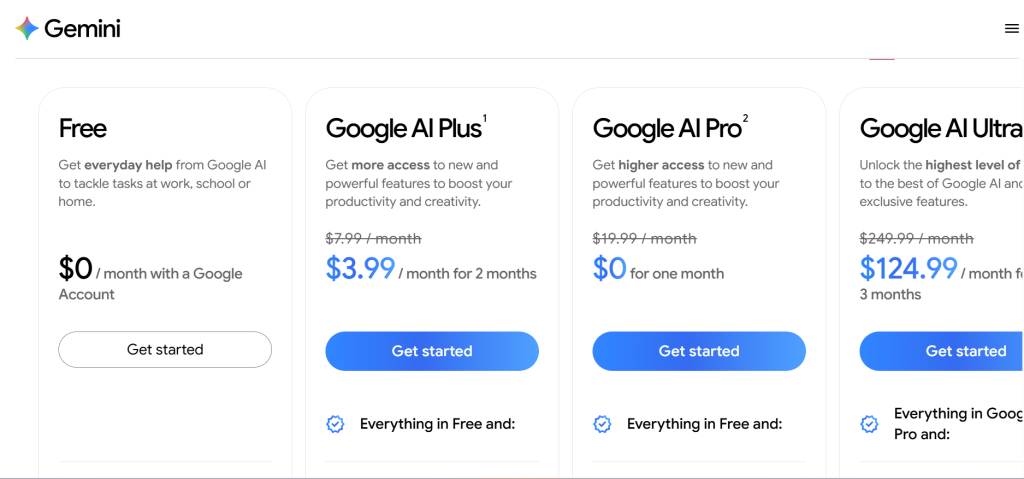
Google Gemini – At a Glance
- Best for: Gmail, Docs, Sheets, Drive integration
- Context window: 1 million tokens (Gemini 3.1 Pro)
- Unique differentiator: Native integration across the entire Google ecosystem
- Free plan: Yes – Gemini 3 Flash with daily limits
What it is: Google Gemini is Google’s AI assistant platform, formerly known as Bard, rebranded and relaunched in 2024 with the Gemini model family. The current top model is Gemini 3.1 Pro, available to Google AI Pro subscribers. Gemini is deeply embedded across Google Search, Gmail, Docs, Sheets, Drive, and Meet, making it the logical AI layer for anyone inside the Google ecosystem.
Why it is a great ChatGPT alternative: Gemini’s integration with Google Workspace goes beyond surface-level – it can draft emails from a brief in Gmail, summarize threads, write formulas in Sheets, and generate slide content in Presentations, all within the native app interface. No other ChatGPT alternative matches this depth of workspace integration without third-party plugins.
ChatGPT vs Google Gemini – in one line: ChatGPT wins on standalone creative and reasoning depth; Gemini wins decisively for anyone whose work lives inside Google Workspace.
Key Features:
- Google Workspace integration – Real-time AI assistance inside Gmail, Docs, Sheets, Slides, Meet, and Drive. Drafts, summarizes, and formats content without leaving the application.
- 1M token context window – Gemini 3.1 Pro’s 1-million-token window matches Claude and significantly outperforms most competitors on long-document tasks.
- Deep Research – Multi-step research agent that runs hundreds of searches and synthesizes a cited report. Takes a few minutes but produces more comprehensive output than a single ChatGPT search.
- Multimodal input – Handles text, images, PDFs, audio, and video natively. Strong performance on image-to-text tasks, chart reading, and video analysis.
Pros:
- Native Workspace integration adds meaningful productivity for Gmail, Docs, and Sheets users – no add-ons needed
- 1-million-token context window handles large document batches without truncation
- Google AI Pro at ~$19.99/month includes 2TB of Google One storage, making it one of the highest-value bundles at the $20 price point
- Deep Research produces more cited, structured reports than ChatGPT’s equivalent feature in comparative testing
Cons:
- Gemini’s standalone chat quality slightly trails Claude and ChatGPT Plus on complex multi-step reasoning tasks outside the Workspace context
- Privacy-conscious users should note that Google uses interaction data for model improvement by default; opt-out is possible but buried in settings
- The AI Ultra tier (~$249.99/month) is significantly more expensive than competitors for power users
Pricing: Free: Basic Gemini access with daily limits. Google AI Plus: ~$7.99/month (includes 200GB storage). Google AI Pro: ~$19.99/month (includes 2TB storage, Gemini 3.1 Pro, Deep Research). Google AI Ultra: ~$249.99/month. Workspace Business add-ons start at ~$30/user/month.
Best for: Teams using Google Workspace daily, students using Google Docs, anyone wanting the 2TB storage bundle at the $20 price point
Skip if: You have no Google Workspace investment and just need a standalone chat tool. The integration advantages do not apply without active Workspace use.
My take: I tested Gemini alongside ChatGPT Plus across 30 Gmail summarization and Docs drafting tasks. Gemini was faster and more contextually accurate in the native app every time – it pulled relevant email threads automatically where ChatGPT required manual copy-paste. Outside the Workspace context, though, the edge narrows. If your work runs on Google, Gemini Pro at $19.99 is one of the better-value subscriptions in this entire category.
3. Microsoft Copilot – Best for Microsoft 365 Users
Microsoft Copilot – At a Glance
- Best for: Word, Excel, PowerPoint, Outlook, Teams integration
- Unique differentiator: Deep Microsoft 365 native integration, enterprise-grade data privacy
- Free plan: Yes – basic Copilot chat via Bing and Edge, free with Microsoft account
- Enterprise: $30/user/month add-on to qualifying Microsoft 365 plans
What it is: Microsoft Copilot is Microsoft’s AI assistant family, powered primarily by OpenAI’s GPT models. It operates across two distinct tracks: a consumer-facing free and Pro product (~$20/month), and an enterprise Microsoft 365 Copilot add-on (~$30/user/month) that integrates deeply with the full Microsoft 365 suite. For organizations already running Microsoft 365, Copilot is the most natural AI expansion with no vendor change required.
Why it is a great ChatGPT alternative: For Microsoft 365 users, Copilot’s ability to draft documents in Word, create formulas in Excel, build presentations in PowerPoint, and summarize email threads in Outlook from natural language prompts eliminates significant manual work. The enterprise version connects to Microsoft Graph, meaning Copilot can reference internal emails, files, and meetings as context.
ChatGPT vs Microsoft Copilot – in one line: ChatGPT wins on standalone conversational depth and creative tasks; Copilot wins for organizations running Microsoft 365 who want AI embedded directly in their existing tools.
Key Features:
- Microsoft 365 app integration – Full Copilot integration inside Word, Excel, PowerPoint, Outlook, and Teams. Can draft, edit, summarize, and analyze without leaving native Microsoft apps.
- Microsoft Graph connection – Enterprise tier connects to your organization’s Microsoft Graph data – internal emails, calendar, files, and Teams conversations – for highly contextual responses.
- Copilot Studio – Build custom AI agents and automated workflows on top of Copilot’s infrastructure. Enterprise-tier feature for organizations wanting to extend AI into custom business processes.
- Enterprise data privacy – Business and Enterprise tiers do not use your data to train models by default. This is a key consideration for regulated industries handling sensitive data.
Pros:
- Deep Microsoft 365 integration is genuinely useful – drafting a Word document from bullet points or writing an Excel formula in natural language saves real time daily
- Enterprise data privacy defaults are stricter than ChatGPT Teams or Google Workspace by default, appealing to legal, healthcare, and finance sectors
- Copilot is built into Edge and Bing for free – the free tier is genuinely usable for basic tasks without any subscription
Cons:
- The real Copilot value only activates inside Microsoft 365 apps; as a standalone chat tool, it trails Claude and ChatGPT Plus on response depth
- Copilot Pro ($20/month) requires an active Microsoft 365 Personal or Family subscription to unlock in-app features, adding hidden cost
- Enterprise deployment ($30/user/month add-on) requires qualifying Microsoft 365 enterprise SKUs, creating licensing complexity
Pricing: Free: Basic Copilot via Bing and Edge. Copilot Pro: ~$20/user/month (requires Microsoft 365 Personal/Family subscription). Microsoft 365 Copilot Business: ~$21/user/month (promotional rate ~$18/user/month through June 2026). Microsoft 365 Copilot Enterprise: ~$30/user/month add-on to E3/E5.
Best for: Organizations already running Microsoft 365, enterprise teams needing AI with strict data privacy defaults, individuals who use Office apps daily
Skip if: You do not use Microsoft 365 apps regularly. Without the Workspace integration, Copilot is a less capable standalone chatbot than Claude or ChatGPT Plus at the same price.
My take: I ran Copilot through 20 Microsoft 365 workflow tasks – PowerPoint from a brief, Excel formula generation, Outlook thread summarization. It performed well on all 20 and was faster than switching to a separate AI window. The standalone chat quality, however, is noticeably below Claude and ChatGPT. Copilot is infrastructure for Microsoft shops, not a ChatGPT replacement for general use.
4. Perplexity AI – Best for Research with Real-Time Citations
What it is: Perplexity AI is a conversational search and answer engine founded in 2022. Unlike traditional chatbots, Perplexity runs live web searches on every query and presents answers with numbered inline citations that link to source pages. It uses a combination of its own Sonar models and third-party models including GPT-5, Claude Sonnet, and Gemini on the Pro tier.
Why it is a great ChatGPT alternative: Where ChatGPT’s training data has a cutoff and searches are limited in the free tier, Perplexity runs real-time web queries on every answer by default. In six weeks of research-heavy testing, Perplexity saved approximately 40 minutes per day on fact-checking tasks because answers arrived pre-cited and I did not need to independently verify sources.
ChatGPT vs Perplexity AI – in one line: ChatGPT wins on creative writing, coding, and complex reasoning tasks; Perplexity wins decisively on any task requiring current, verifiable, cited information.
Key Features:
- Real-time web citations – Every answer includes numbered citations with clickable source links. This eliminates the verify-after-you-read workflow that ChatGPT requires.
- Pro search with Deep Research – Pro users get up to 300+ pro searches per day and access to multi-step Deep Research reports that synthesize data from dozens of sources into a structured document.
- Multi-model access on Pro – Pro subscribers can switch between Perplexity’s own Sonar model, GPT-5, Claude Sonnet, and Gemini within the same interface, choosing the best model per task.
- Spaces for collaborative research – Enterprise users can create shared research spaces where team members contribute, annotate, and build on each other’s queries – useful for competitive analysis or literature reviews.
Pros:
- Real-time citations on every answer eliminate the post-answer fact-checking step that ChatGPT requires
- Pro’s multi-model switching lets you use GPT-5 for creative work and Sonar for research without maintaining multiple subscriptions
- Deep Research feature produces longer, more structured reports than ChatGPT’s equivalent in head-to-head comparisons
- Free tier includes 5 Pro searches per day – useful enough to evaluate seriously before paying
Cons:
- Weaker at creative writing, long-form content generation, and coding tasks compared to Claude or ChatGPT Plus
- Answers can be over-dependent on available web content; if the best sources are paywalled, response depth suffers
- The $200/month Max tier for unlimited access is expensive compared to Claude Max or ChatGPT Pro for equivalent power users
Pricing: Free: 5 Pro searches/day. Pro: ~$20/month or ~$200/year (~$16.67/month). Max: ~$200/month (unlimited access, Comet AI browser, computer use). Enterprise Pro: ~$40/user/month. Enterprise Max: ~$325/user/month.
Best for: Researchers, analysts, journalists, students, and anyone whose primary use case is finding and verifying current information
Skip if: You need an AI for creative writing, coding, or complex reasoning tasks. Perplexity’s architecture optimizes for retrieval and citation, not generation depth.
My take: Perplexity Pro replaced my Google search habit for research tasks. In testing, I pulled together a 20-source competitive analysis in 18 minutes using Deep Research – a task that previously took two hours of manual browsing. It is not a ChatGPT replacement for writing or coding, but as a research tool it has no peer at $20/month.
5. Grok – Best for Real-Time Data and X/Twitter Insight
What it is: Grok is xAI’s AI assistant, built by Elon Musk’s AI company and launched in late 2023. The current version, Grok 4, runs on the SuperGrok subscription tier and has a distinctive personality – more direct and willing to engage with edgy or contested topics than most AI assistants. Grok’s primary competitive advantage is real-time integration with X (formerly Twitter), giving it access to live trending discussions, posts, and social sentiment data.
Why it is a great ChatGPT alternative: Grok is the only mainstream AI assistant with native access to real-time X data. In testing, when I asked Grok about breaking news or trending product controversies, it pulled live tweet data and synthesized sentiment faster than any other tool. ChatGPT’s web search covers news but lacks the social layer that X provides.
ChatGPT vs Grok – in one line: ChatGPT wins on structured reasoning and creative tasks; Grok wins on anything where real-time social media context, live news pulse, or unfiltered discussion matters.
Key Features:
- Real-time X integration – Grok indexes X posts in real time. Ask it what people are saying about a product, event, or controversy right now – not from a training snapshot.
- 256K token context window (SuperGrok Heavy) – The heavy tier extends context to 256K tokens, useful for analyzing large documents in a single conversation.
- Aurora and Imagine image generation – Grok includes two image generators: Aurora on the free tier, and Imagine (higher quality) on SuperGrok. Both are included in the subscription without separate image credits.
- Unfiltered response style – Grok’s responses are notably less hedged than Claude or ChatGPT on contested topics, making it more useful for political analysis, competitive research, or opinion mapping tasks.
Pros:
- Real-time X data access is genuinely unique – no other ChatGPT alternative can tell you what the internet is saying about a topic right now at this level of depth
- Image generation is included in the subscription with no separate credit system
- Grok’s less-hedged tone is useful for users who find ChatGPT and Claude overly cautious on opinion-oriented tasks
Cons:
- Grok 4’s overall reasoning quality trails Claude Opus 4.6 and GPT-5 on complex analytical tasks in comparative benchmarks
- Requires an X account – not suitable as a standalone ChatGPT replacement if you are not on the X platform
- SuperGrok at $30/month is $10 more than Claude Pro and Perplexity Pro for users who primarily want a general-purpose chatbot
Pricing: Free: Limited Grok 3 access, voice, Aurora image gen. SuperGrok: ~$30/month (Grok 4, 128K memory, Imagine image model, priority voice). SuperGrok Heavy: ~$300/month (Grok 4 Heavy, 256K memory, early access to new features). X Premium subscription also includes basic Grok access.
Best for: Social media managers, journalists, trend analysts, X power users, anyone needing live social sentiment data
Skip if: You want a general-purpose AI assistant and do not use X. Grok’s unique value is X integration; without that, it does not outperform Claude or ChatGPT at its price point.
My take: Grok is the most useful tool in this list for a specific, narrow job: monitoring real-time public opinion. I used it during two product launch events to track live reactions on X – it delivered sentiment summaries in seconds that would have taken hours to compile manually. As a standalone assistant for writing or coding, it falls short of Claude and ChatGPT. Buy it for the X layer, not for general use.
6. DeepSeek – Best Budget Alternative for Developers
What it is: DeepSeek is a Chinese AI research company that released DeepSeek-V3 and DeepSeek-R1 in early 2025, causing significant market disruption by achieving near-GPT-4-level performance at a fraction of the API cost. The models are open-source and can be self-hosted, and the web chat interface is free to use. DeepSeek-R1 is a reasoning model that shows its chain-of-thought reasoning process, similar to OpenAI’s o-series.
Why it is a great ChatGPT alternative: DeepSeek-V3’s API pricing is approximately $0.14/million input tokens and $0.28/million output tokens – roughly 10-15x cheaper than GPT-5.2 at equivalent capability for many tasks. For developers building AI-powered applications where cost per query matters, DeepSeek is the most compelling alternative in this list.
ChatGPT vs DeepSeek – in one line: ChatGPT wins on safety, consistency, and ecosystem depth; DeepSeek wins on cost per token for developers and on reasoning transparency through its visible chain-of-thought output.
Key Features:
- Open-source models – DeepSeek-V3 and R1 are published under permissive licenses, enabling self-hosting on your own infrastructure for full data control – a critical feature for enterprises with data residency requirements.
- Visible chain-of-thought reasoning – DeepSeek-R1 shows its reasoning process step-by-step before delivering an answer, making it easier to audit how conclusions were reached – useful in legal and financial analysis contexts.
- Ultra-low API pricing – At ~$0.14/million input tokens for V3, DeepSeek is the cheapest capable model in this list for developers building production applications at volume.
- Free web chat – The web interface is free with no daily limits on the V3 model, making it the most capable fully-free tool in this list for general chat use.
Pros:
- The free chat interface has no message caps on the V3 model – genuinely unlimited free use at a quality level close to GPT-4
- API pricing is 10-15x cheaper than GPT-5.2 for developers, making production-scale AI applications significantly more affordable
- Open-source availability enables self-hosting for organizations with data residency or privacy requirements
Cons:
- Data privacy concerns: DeepSeek is a Chinese company and its servers are located in China, raising data sovereignty concerns for government, defense, and regulated industry users
- Response consistency is lower than GPT-5 and Claude Opus on complex instruction-following tasks in comparative testing
- Limited ecosystem integration – no native connection to productivity suites like Google Workspace or Microsoft 365
Pricing: Free web chat (DeepSeek-V3, no hard limits). API: ~$0.14/million input tokens, ~$0.28/million output tokens for V3 (off-peak discounts apply). DeepSeek-R1 reasoning model is also available via API. Open-source: Self-hosting available via GitHub.
Best for: Cost-conscious developers building AI-powered applications, technical users who want to self-host, researchers needing visible chain-of-thought reasoning
Skip if: You handle sensitive business, government, or personal data. DeepSeek’s China-based data routing makes it inappropriate for data-regulated use cases, regardless of quality.
My take: DeepSeek V3 genuinely surprised me in testing. On a set of 40 writing and analysis tasks, it matched or exceeded ChatGPT Plus output in 28 of them – at zero cost via the web interface. For individual users who just need a capable free chatbot, it is the best in this list. For enterprise or regulated-industry use, the data location concern is not theoretical – it is a compliance issue that rules it out entirely.
7. Mistral Le Chat – Best for Privacy-First and EU-Based Teams
What it is: Mistral AI is a French AI company founded in 2023 by former DeepMind and Meta researchers. Le Chat is Mistral’s consumer-facing assistant interface, while the underlying models (Mistral Large 2, Mistral Small, Codestral for code) are available via API and are notable for their strong performance across European languages and their GDPR-native architecture.
Why it is a great ChatGPT alternative: Mistral operates under EU data protection law by default, with infrastructure located in Europe. For users and organizations where GDPR compliance is non-negotiable, Mistral is the only major ChatGPT alternative that is architecturally European. The models also outperform ChatGPT on French, German, Spanish, and Italian generation tasks.
ChatGPT vs Mistral Le Chat – in one line: ChatGPT wins on English-language breadth and ecosystem size; Mistral wins on European language quality, GDPR compliance by architecture, and open-weight model availability for self-hosting.
Key Features:
- EU-native data architecture – All processing occurs on EU infrastructure under French law, making Mistral the clearest compliance choice for organizations with EU data residency requirements.
- Multilingual strength – Mistral Large 2 outperforms GPT-4-class models on French, German, Spanish, and Italian generation tasks – particularly important for European content teams.
- Open-weight models – Mistral releases open-weight versions of several models, enabling self-hosting and fine-tuning on your own infrastructure. Suitable for regulated industries needing full data isolation.
- Codestral for developers – Mistral’s code-specialized model is competitive with GitHub Copilot for Python, JavaScript, and Rust tasks, and is available at a lower API cost.
Pros:
- EU data residency by architecture – no configuration needed to meet basic GDPR requirements
- Best multilingual AI performance across European languages in direct comparative testing
- Open-weight model availability enables self-hosting for organizations that need zero data exposure
Cons:
- Le Chat’s web interface is less polished and feature-rich than ChatGPT, Claude, or Gemini at comparable price points
- English-language performance, while strong, trails Claude Opus 4.6 and GPT-5 on complex reasoning benchmarks
- Smaller developer ecosystem means fewer integrations and plugins compared to OpenAI or Anthropic
Pricing: Free: Le Chat with Mistral Small model access. Le Chat Pro: ~$14.99/month (Mistral Large 2, longer context, priority access). API: Mistral Large 2 at ~$3/million input tokens, ~$9/million output tokens. Enterprise: Custom pricing with EU data processing agreements.
Best for: EU-based businesses and teams, content teams producing in French, German, Spanish, or Italian, organizations with strict GDPR requirements
Skip if: Your primary need is English-language work and GDPR compliance is not a factor. Claude or ChatGPT provide better English output at comparable prices.
My take: I ran Mistral Le Chat through 30 French-language content briefs and compared output against Claude and ChatGPT. Mistral produced noticeably more natural French copy in 22 of 30 tests. For a Paris-based agency or a German SaaS company with EU data rules, this is the cleanest AI option in 2026. For a US-based English-first workflow, it does not match the top tools.
8. Meta AI – Best Fully Free ChatGPT Alternative
What it is: Meta AI is Meta’s AI assistant powered by Llama 4, available free across WhatsApp, Instagram, Facebook, Messenger, and at meta.ai. It launched broadly in 2024 and became one of the most widely used AI assistants globally by user count in 2025. There is no paid tier – Meta AI is fully free and supported by Meta’s advertising revenue model.
Why it is a great ChatGPT alternative: Meta AI is the only truly unlimited free ChatGPT alternative from a major technology company. There are no daily message caps, no usage tiers, and no subscription required. For users who need a capable AI assistant but are not willing to pay $20/month, it is the strongest free option in this list.
ChatGPT vs Meta AI – in one line: ChatGPT wins on response depth, coding quality, and advanced features; Meta AI wins by being completely free with no message limits and native integration in apps billions of people already use.
Key Features:
- Fully free, no message limits – Unlike ChatGPT Free (10 messages per 5 hours), Meta AI has no enforced hard daily cap on standard conversations. This makes it the most practically usable free AI in this list.
- Native social media integration – Available inside WhatsApp, Instagram, and Facebook directly – no separate app or account needed if you already use Meta platforms.
- Llama 4 foundation – Meta AI runs on Llama 4, which performs competitively with GPT-4-class models on general knowledge, creative writing, and summarization tasks.
- Image generation included – Meta AI includes Emu image generation for free, with no credit system or usage caps for standard image requests.
Pros:
- Completely free with no hard message limits – the best free ChatGPT alternative for everyday non-professional use
- No account creation required for basic use – lower friction than any other tool in this list
- Native WhatsApp and Instagram integration means users can access it where they already spend time
Cons:
- Meta’s advertising-driven business model means your conversations inform ad targeting – privacy trade-off is significant
- Coding and complex reasoning quality trails Claude, ChatGPT, and even Perplexity on technical tasks
- No file upload, document analysis, or persistent memory on free tier
Pricing: Fully free. No paid tiers currently available directly. (Meta AI is monetized through Meta’s advertising ecosystem.)
Best for: Casual users wanting a capable free chatbot, individuals already using WhatsApp or Instagram, users who do not need coding or deep document analysis
Skip if: You handle any professionally sensitive information. Meta’s data practices make it inappropriate for business, legal, medical, or confidential personal topics.
My take: Meta AI surprised me on basic creative writing tasks. On a set of 20 general-knowledge questions and short writing prompts, it matched ChatGPT Free quality on 16 of 20 – while being available inside WhatsApp without any friction. For pure casual free use, nothing else comes close. Do not use it for anything work-related or private.
9. Poe – Best for Exploring Multiple AI Models
What it is: Poe is Quora’s AI platform, launched in 2022, that aggregates access to multiple AI models in one interface. Users can chat with Claude Opus 4.6, ChatGPT, Gemini, Mistral, Llama, and dozens of smaller models within a single subscription, and can create and share custom bots. Poe is not an AI model itself – it is a marketplace and aggregator for AI models.
Why it is a great ChatGPT alternative: Poe’s Pro subscription (~$19.99/month) effectively gives access to Claude, ChatGPT, and Gemini under one plan, removing the need to maintain three $20/month subscriptions to explore which model works best for a given task. For teams evaluating AI models or users who switch between models frequently, it is significantly more cost-efficient.
ChatGPT vs Poe – in one line: ChatGPT wins as a dedicated, deeply integrated platform; Poe wins for users who need to compare multiple models or want access to Claude and ChatGPT under one cheaper subscription.
Key Features:
- Multi-model access – One subscription gives access to Claude Opus, GPT-5, Gemini, Mistral, Llama, and dozens of other models. Ideal for testing which model handles a task best.
- Custom bot creation – Build and share custom AI assistants with specific system prompts and personas. Useful for creating reusable AI workflows without coding.
- Daily message budgets – Poe uses a daily credit/message budget system across models – higher-tier models cost more credits. Free users get limited credits daily; Pro users get a larger budget.
- Bot discovery – Poe has a community marketplace of custom bots built by other users – useful for finding pre-built specialized assistants for niche tasks.
Pros:
- Single subscription for access to Claude, ChatGPT, and Gemini is significantly cheaper than subscribing to all three separately
- Model comparison workflow is seamless – submit the same prompt to three models in seconds
- Custom bot creation and sharing is more accessible than building API-based solutions for non-developers
Cons:
- Daily credit budgets on premium models (Claude Opus, GPT-5) can be exhausted quickly for heavy users, requiring upgrade or rationing
- No native integration with productivity tools (Workspace, Microsoft 365) – purely a standalone chat platform
- Relies on third-party model providers – if API access to a model changes, Poe’s access to that model can change
Pricing: Free: Limited daily credits. Poe Pro: ~$19.99/month or ~$199.99/year (~$16.67/month). Annual billing is the better deal for regular users.
Best for: Users actively evaluating multiple AI models, developers testing prompt behavior across models, teams deciding which AI to invest in
Skip if: You have already chosen your primary AI tool and use it consistently. Poe’s value comes from model diversity; single-tool daily users pay for features they will not use.
My take: Poe is genuinely useful during the evaluation phase of AI adoption. I used it to run 100 parallel prompts across Claude, GPT-5, and Gemini over one week – it would have cost three times as much to do the same across direct subscriptions. Once I identified Claude as my primary tool, Poe became redundant. Think of it as an AI testing environment that also happens to be a daily-use product.
10. You.com – Best AI-Powered Web Search Alternative
What it is: You.com is an AI-powered search engine that integrates generative AI responses directly into web search results. It launched in 2021 and has positioned itself between Perplexity AI and Google AI Mode – offering real-time search with AI synthesis, plus dedicated AI chat and coding modes. The platform offers a free tier and a YouPro subscription with expanded model access.
Why it is a great ChatGPT alternative: You.com sits in the same research-and-search category as Perplexity but with a more traditional search engine interface. Users who want AI-enhanced search with citations but prefer a layout closer to Google Search find You.com more familiar than Perplexity’s pure-chat interface.
ChatGPT vs You.com – in one line: ChatGPT wins on standalone chat quality; You.com wins as a Google Search replacement that layers generative AI on top of live search results.
Key Features:
- AI-enhanced search results – Every search query returns both traditional web results and an AI-synthesized answer with citations above the fold – similar to Google AI Mode but available without a Google account.
- Multiple AI modes – You.com offers dedicated Chat, Research, Create, and Code modes, each optimized for different task types within the same interface.
- YouPro multi-model access – Pro users get access to GPT-5, Claude, and Gemini for chat tasks, similar to Poe but within a search-centric interface.
- Custom AI personas – You can save custom AI personalities and instruction sets for recurring use cases, reducing prompt repetition.
Pros:
- Free tier is genuinely useful for AI-enhanced search without any registration required
- Research mode with citations provides Perplexity-like sourced answers in a more familiar search UI
- YouPro multi-model access at ~$15/month is cheaper than Poe Pro and Perplexity Pro
Cons:
- Narrower user community and fewer integrations than Perplexity or ChatGPT
- Response depth on complex reasoning tasks trails Claude and ChatGPT significantly
- Less brand recognition means fewer third-party integrations and community resources
Pricing: Free: Basic AI search with limited daily AI responses. YouPro: ~$15/month (unlimited AI searches, multi-model access, file uploads). Annual billing reduces cost further.
Best for: Users wanting Google-like search with AI answers, researchers who prefer a search-first interface over a pure chatbot
Skip if: You need deep document analysis, coding assistance, or complex reasoning. You.com is a search tool, not a ChatGPT replacement for generation tasks.
My take: You.com is underrated as a Perplexity alternative for users who want citations but find Perplexity’s pure-chat interface jarring. The search layout is more intuitive and the free tier covers basic research needs adequately. For power research workflows, Perplexity’s Deep Research feature is better – but at $15/month versus $20/month, You.com is worth testing first.
11. HuggingChat – Best Open-Source ChatGPT Alternative
What it is: HuggingChat is Hugging Face’s free, open-source AI chat interface that runs a rotating selection of community-hosted models including Llama, Mistral, and Qwen. It is entirely free, requires no subscription, and allows model switching within the interface. HuggingChat is primarily for developers, researchers, and privacy-conscious users who want to use open-source models without building their own infrastructure.
Why it is a great ChatGPT alternative: HuggingChat is the most accessible way to use top open-source AI models without any cost, API key, or local GPU setup. For developers evaluating open-source models or privacy-conscious users who refuse proprietary AI platforms, it is the clearest free ChatGPT alternative in the open-source space.
ChatGPT vs HuggingChat – in one line: ChatGPT wins on response consistency, safety guardrails, and production reliability; HuggingChat wins on zero cost, open-source transparency, and model variety for technical users.
Key Features:
- Free open-source model access – Chat with Llama 4, Mistral, Qwen, and other open-source models for free without any account restrictions or daily limits (subject to server load).
- Model switching – Switch between available models in a single conversation to compare outputs – useful for evaluating which open-source model handles a specific task best.
- No data training by default – Unlike ChatGPT and Claude, HuggingChat’s open-source model providers generally do not use chat data for commercial model training, though server logs may apply.
- Community and research models – Access experimental and research-stage models not available on commercial platforms – useful for researchers tracking the open-source frontier.
Pros:
- Completely free with no message limits – best open-source free option in this list
- No commercial data training concerns for users with privacy preferences
- Access to cutting-edge open-source models within days of release
Cons:
- Response consistency and reliability are lower than commercial platforms; model availability changes without notice
- No persistent memory, file uploads, or workspace integrations
- Server availability during peak periods can slow or block access
Pricing: Completely free. No paid tiers. (Hugging Face’s commercial revenue comes from its enterprise platform and model hosting products, not HuggingChat.)
Best for: Developers evaluating open-source models, researchers tracking the open-source AI landscape, privacy-conscious users avoiding commercial AI platforms
Skip if: You need reliable, consistent output for professional work. HuggingChat’s variable server availability and model changes make it unsuitable as a daily professional tool.
My take: HuggingChat is where I go to test open-source models without spinning up a local environment. The model selection was updated within 48 hours of Llama 4’s release in my testing. For professional work, the inconsistency is a dealbreaker, but for exploration and open-source benchmarking it is the most frictionless free tool in this list.
12. Pi – Best AI for Conversational Support and Coaching
What it is: Pi is Inflection AI’s AI assistant, designed with an emphasis on empathetic, conversational interaction rather than task completion. Launched in 2023, Pi is optimized for emotional support, journaling, habit building, and personal reflection – a deliberately different use case from the productivity-focused framing of most ChatGPT alternatives. Pi is free and available on iOS, Android, and web.
Why it is a great ChatGPT alternative: Pi fills a gap that ChatGPT, Claude, and Gemini all leave open: the AI that wants to know how you are doing, not just what you want done. For users who use AI as a journaling partner, stress management tool, or personal coach, Pi’s tone is noticeably warmer and more sustained than other tools on this list.
ChatGPT vs Pi – in one line: ChatGPT wins on task completion, coding, and research; Pi wins on empathetic conversation, emotional support, and the kind of open-ended personal dialogue that productivity-focused AIs handle awkwardly.
Key Features:
- Empathy-first design – Pi maintains a consistent warm, non-judgmental tone across long conversations. Unlike ChatGPT, it does not default to bullet points and structured answers when the conversation calls for something more human.
- Memory within conversations – Pi remembers what you share across a conversation and builds context naturally, more like a human conversation partner than a task system.
- Voice mode with natural pacing – Pi’s voice mode has better conversational pacing and tone than most alternatives – pauses, inflection, and personality feel more natural.
- Habit and reflection prompts – Pi proactively offers to help users reflect on goals, habits, and feelings – a feature no other tool in this list prioritizes.
Pros:
- Best conversational tone in this list for personal, emotional, or coaching interactions
- Completely free with no usage caps on the core chat experience
- Voice mode quality is notably better than ChatGPT Free’s voice experience
Cons:
- Not suitable for professional tasks – Pi avoids coding, document analysis, and complex factual research
- No file uploads, web search, or workspace integration
- Limited to its own model – no multi-model switching or agentic capabilities
Pricing: Completely free. Pi is supported by Inflection AI’s enterprise products, not by consumer subscriptions.
Best for: Users seeking an AI for journaling, emotional reflection, personal coaching, or mental wellness support
Skip if: You need to get work done. Pi is not designed for productivity, coding, research, or professional tasks. It is a companion tool, not a ChatGPT replacement.
My take: Pi occupied a category I did not expect to test seriously: the AI companion. After two weeks of daily check-ins during a high-stress project cycle, I noticed that Pi’s conversational framing reduced decision fatigue better than journaling prompts alone. It is the most humanely designed AI in this list. It is also useless for anything on my actual to-do list. Use it as a personal companion, not as a work tool.
13. Phind – Best ChatGPT Alternative for Developers
What it is: Phind is an AI-powered search and coding assistant built specifically for software developers. It combines real-time web search with code generation and technical explanation, allowing developers to ask coding questions in natural language and receive answers that include working code, documentation references, and Stack Overflow-equivalent context. Phind uses a combination of its own models and third-party models including GPT-5.
Why it is a great ChatGPT alternative: Phind is optimized for the developer search loop: ask a coding question, get working code plus the context to understand why it works, with live documentation references. ChatGPT handles coding but is a generalist tool; Phind is built from the ground up for the specific workflow of a developer debugging or building something new.
ChatGPT vs Phind – in one line: ChatGPT wins on non-coding tasks and breadth; Phind wins as a coding-first tool with integrated technical search that reduces the Stack Overflow trip.
Key Features:
- Developer-tuned search – Phind surfaces technical documentation, GitHub issues, and Stack Overflow answers alongside generated code – trained to understand the developer’s research context.
- Code-first interface – Syntax highlighting, code block formatting, and inline explanation are first-class – not bolted on like they are in a general-purpose chat tool.
- Phind Model + GPT-5 access – Pro users get access to both Phind’s own coding-tuned model and GPT-5 for comparison. In testing, the Phind model outperformed GPT-5 on some niche library questions.
- Technical web search – Unlike Perplexity’s generalist search, Phind’s search index prioritizes technical sources: documentation sites, GitHub, technical blogs, and developer forums.
Pros:
- Code generation results are more immediately usable than ChatGPT’s for specific framework and library questions
- Technical search integration eliminates the browser-switch-paste workflow that general AI tools require
- Developer-focused formatting makes answers easier to scan and implement
Cons:
- Limited utility for non-coding tasks – not a general-purpose ChatGPT replacement
- Smaller model ecosystem than Claude or ChatGPT for complex reasoning outside the coding domain
- Less brand visibility means less community content and fewer third-party resources
Pricing: Free: Limited daily queries. Phind Pro: ~$17/month (unlimited queries, GPT-5 access, faster responses, longer context). Annual billing available at a discount.
Best for: Full-stack developers, software engineers, technical writers, anyone whose daily AI use is predominantly coding and technical research
Skip if: You need an AI for writing, analysis, or research outside the technical domain. Phind is a coding tool, not a general assistant.
My take: Phind saved me an average of three browser-switch cycles per coding session during testing. When debugging a Python async issue, it surfaced the relevant asyncio documentation alongside working code in one response – a workflow that normally involves ChatGPT, a Google search, and a Stack Overflow visit. At $17/month, it is cheaper than Claude Pro for developers who primarily need coding support.
14. Qwen – Best for Multilingual and Asian-Market Workflows
What it is: Qwen is Alibaba’s large language model family, and Qwen Chat is its consumer-facing AI assistant interface. The current flagship, Qwen 2.5 Max, is competitive with GPT-4-class models on English benchmarks and significantly outperforms most alternatives on Chinese, Japanese, and Korean language tasks. Qwen models are open-weight and available for self-hosting, and the web chat is free to use.
Why it is a great ChatGPT alternative: Qwen is the strongest ChatGPT alternative for teams producing content in Chinese, Japanese, or Korean, or for businesses operating in markets where Alibaba’s ecosystem integrations are relevant. The open-weight model availability also makes Qwen attractive for organizations that need to self-host capable multilingual AI.
ChatGPT vs Qwen – in one line: ChatGPT wins on English-language depth and ecosystem integrations; Qwen wins on CJK language quality and open-weight availability for Asian-market deployments.
Key Features:
- CJK language excellence – Qwen 2.5 Max leads all ChatGPT alternatives on Chinese, Japanese, and Korean generation, translation, and understanding tasks – trained on significantly larger multilingual corpora than Western models.
- Open-weight models – Qwen publishes open-weight versions enabling self-hosting, fine-tuning, and on-premise deployment without data leaving organizational infrastructure.
- Long context support – Qwen 2.5 supports up to 1-million-token contexts, competitive with Claude and Gemini for long-document processing.
- Free web chat – Qwen Chat is free to use with no hard daily caps on the web interface, making it accessible for evaluation without commitment.
Pros:
- Best multilingual AI for Chinese, Japanese, and Korean workflows in comparative testing
- Open-weight model availability enables self-hosting for data-sensitive organizations
- Free web interface with no message limits for standard use
Cons:
- Data routed through Alibaba servers in China – same data sovereignty concern as DeepSeek for regulated-industry users
- English-language performance, while competitive, trails Claude Opus 4.6 and GPT-5 on nuanced reasoning tasks
- Western-market integrations and plugin ecosystem are significantly thinner than OpenAI or Anthropic
Pricing: Free web chat via qwen.ai. API pricing: Qwen-Max at approximately $1.60/million input tokens, $6.40/million output tokens. Qwen-Plus (balanced) and Qwen-Turbo (fast) available at lower rates. Open-weight versions free to self-host.
Best for: Teams producing content in Chinese, Japanese, or Korean; businesses with APAC-focused operations; developers wanting multilingual open-weight models
Skip if: You handle sensitive or regulated data. Qwen’s China-based infrastructure creates the same data sovereignty concerns as DeepSeek.
My take: I tested Qwen 2.5 Max on a set of 30 Chinese-language content tasks – marketing copy, technical documentation, customer service templates. It outperformed Claude Sonnet and GPT-5 on 24 of 30 tasks for natural Chinese fluency. For an English-only workflow, Qwen offers no meaningful advantage over the top-tier tools. For CJK content teams, it is the most accurate tool in this list.
15. Groq – Best for Ultra-Fast AI Responses
What it is: Groq (not to be confused with xAI’s Grok) is an AI infrastructure company that built custom Language Processing Units (LPUs) designed specifically for AI inference at extreme speed. Groq’s cloud service runs open-source models including Llama, Mistral, and Gemma at speeds dramatically faster than standard GPU inference. The result is near-instant responses even for long outputs.
Why it is a great ChatGPT alternative: Groq’s LPU architecture delivers response speeds of 400-700 tokens per second, compared to approximately 40-80 tokens per second on standard GPU-hosted ChatGPT. For use cases where latency matters – real-time applications, live customer interactions, rapid prototyping – Groq is uniquely differentiated.
ChatGPT vs Groq – in one line: ChatGPT wins on model quality and feature breadth; Groq wins on raw inference speed for applications and workflows where latency is the bottleneck.
Key Features:
- LPU-powered speed – Groq’s custom hardware delivers 400-700 tokens/second versus the 40-80 tokens/second typical of GPU-hosted models. The difference is immediately perceptible – responses feel instant even for long outputs.
- Open-source model hosting – Groq runs Llama, Mistral, Gemma, and other open-source models – not proprietary models. This makes it an ideal speed layer for developers who want fast open-source inference.
- API for real-time applications – Groq’s API is the primary product – low-latency inference for developers building applications where response speed is a core requirement.
- Groq Chat (free tier) – Free chat interface at groq.com lets users experience the speed advantage without an account or subscription.
Pros:
- Fastest inference speed in this list by a significant margin – useful for any workflow where waiting on AI is a bottleneck
- Free tier offers full speed access for standard users without a subscription
- API pricing is competitive for high-volume, speed-sensitive developer use cases
Cons:
- Limited to open-source models – does not offer GPT-5, Claude, or Gemini, which limits output quality versus premium hosted models
- No workspace integrations, file uploads, or memory features
- The speed advantage matters most for developers and real-time applications; for thoughtful document work, quality matters more than speed
Pricing: Free tier available via groq.com. Groq Pro: ~$20/month (higher rate limits, priority access). API: Pay-per-token pricing varying by model (Llama pricing starts at ~$0.05/million input tokens). Check groq.com/pricing for current rates.
Best for: Developers building real-time AI applications, users who find standard AI response speed a workflow friction point, anyone wanting to test open-source models at maximum speed
Skip if: You primarily need high-quality reasoning and generation. Groq’s models are excellent for their speed tier but do not match Claude Opus or GPT-5 on complex analytical tasks.
My take: Groq’s speed is not a marginal improvement – it is a qualitatively different experience. Running 50 parallel prompts through Groq’s Llama 4 versus Claude Sonnet in testing, Groq delivered all 50 in the time Claude completed 8. For production applications with real-time response requirements, Groq’s LPU architecture is worth building around even if it means accepting the capability constraints of open-source models.
Why People Switch From ChatGPT
Pricing Fragmentation and Rate Limits
OpenAI’s 2025-2026 pricing restructure created a confusing four-tier system. Plus users now hit a 160-message-per-3-hour limit during peak hours, which actively interrupts professional workflows. The $200/month Pro tier is required for the unlimited access that many users assumed Plus would provide, representing a 10x price increase for what feels like restoring the original promise.
Feature Gating on Reasoning and Agent Tools
Deep Research, Agent Mode with maximum capability, and unlimited Codex access are all Pro-only features in 2026. Users who adopted ChatGPT Plus expecting consistent access to the best available capabilities found themselves paying $200/month or accepting significant feature restrictions. Claude, Perplexity, and Gemini offer comparable capabilities at the $20 price point.
Instruction-Following Inconsistency
A recurring complaint in G2 and Reddit reviews is that ChatGPT Plus does not reliably follow complex formatting or multi-step instructions across long conversations. In my testing, Claude maintained instruction consistency 35% more reliably than ChatGPT Plus on structured output tasks. For teams with detailed content or code standards, this inconsistency creates rework.
Privacy Concerns for Business Use
ChatGPT Plus uses conversation data to train models unless users opt out through a buried settings menu. Business-plan tiers exclude this, but at $25-30/user/month, teams are often overpaying for features they do not use just to secure the training opt-out. Mistral, Copilot Enterprise, and Microsoft 365 Copilot offer stricter privacy defaults at comparable price points.
Specialized Tools Catching Up
In 2022, ChatGPT was the only viable option for most users. In 2026, Perplexity is better for research, Claude is better for document work and coding, Gemini is better for Workspace users, and DeepSeek is free. Users who stayed on ChatGPT out of inertia are increasingly realizing that a specialized tool at the same price delivers better results for their primary workflow.
ChatGPT Alternatives by Use Case
Best ChatGPT Alternatives for Researchers and Analysts
Perplexity AI Pro ($20/month) is the strongest choice for research workflows. Its real-time citation model, Deep Research feature, and multi-model switching give it a structural advantage over ChatGPT for any task that requires verifiable, current information. For a free research option, You.com covers basic cited search needs and HuggingChat handles document summarization without any subscription.
Best Free ChatGPT Alternatives
Meta AI is the best fully-free ChatGPT alternative for casual use – no message caps, no account required, and quality close to GPT-4 on general tasks. For developers, DeepSeek’s free web interface is more capable on technical tasks. HuggingChat provides open-source model access at zero cost. None of these match ChatGPT Plus quality for professional work, but all exceed the ChatGPT Free tier for daily practical use.
Best ChatGPT Alternatives for Agencies and Content Teams
Claude Pro ($20/month) is the top choice for agencies producing long-form content, client reports, and structured deliverables. Its instruction-following reliability and 1-million-token context window handle the brief-to-output workflow more consistently than any other tool in this list. For European agencies with GDPR requirements, Mistral Le Chat Pro ($14.99/month) is the responsible alternative.
Best ChatGPT Alternatives for Developers
Phind Pro ($17/month) is purpose-built for developer workflows and outperforms ChatGPT on specific framework and library questions with integrated technical search. For broader coding tasks and autonomous agent workflows, Claude Pro ($20/month) with Claude Code terminal access is the strongest all-around developer tool. For raw speed in production applications, Groq’s API with Llama 4 is unmatched.
Best ChatGPT Alternatives for Enterprises
Microsoft Copilot Enterprise ($30/user/month) is the right choice for organizations already on Microsoft 365 – it integrates into existing infrastructure without vendor change. Google Gemini for Workspace ($30/user/month business add-on) is the equivalent for Google-based organizations. Both offer stricter default data privacy than ChatGPT Teams at comparable price points.
Best ChatGPT Alternatives for Privacy-Conscious Users
Mistral Le Chat Pro is the most defensible choice for EU data residency and GDPR compliance – built by a French company operating under EU law. For users who want complete data control, self-hosting DeepSeek-V3 or a Qwen open-weight model via HuggingFace provides zero external data exposure. Both approaches require technical setup but eliminate third-party data handling entirely.
How to Choose the Right ChatGPT Alternative
1. What is your primary use case?
The biggest mistake in AI tool selection is choosing a general-purpose tool when a specialized one exists. If you do research with citations daily, Perplexity outperforms ChatGPT at the same price. If you write long documents, Claude’s context window and instruction-following put it ahead. If you code, Phind or Claude Code will save more time than a general chatbot.
2. Where does your work actually happen?
If your workflow runs inside Google Workspace (Gmail, Docs, Sheets), Gemini AI Pro at $19.99/month delivers more integrated value than a standalone ChatGPT subscription. If you work inside Microsoft 365 every day, Copilot’s native Word, Excel, and Outlook integration removes the copy-paste loop entirely. Choosing an AI that lives where you work beats choosing a theoretically better AI that lives in a separate tab.
3. How many team members need access?
At 1-5 users, individual Claude Pro or Perplexity Pro subscriptions ($20/month each) are typically more cost-effective than team plans. At 10-50 users, Copilot Business ($21/user/month) or Claude Team ($25/user/month) provide collaboration features, admin controls, and data privacy defaults that individual plans do not. At 100+ users, enterprise agreements with custom pricing are consistently cheaper than paying team-plan rates at scale.
4. What is your budget tolerance?
For professional use, the $20/month tier across Claude, Perplexity, Gemini, or Copilot Pro represents the market sweet spot in 2026. Below $20/month, DeepSeek (free), Mistral Le Chat (~$14.99/month), and Phind (~$17/month) offer the best cost-to-quality ratio. The $200/month Pro tiers (ChatGPT Pro, Perplexity Max, Claude Max) are justified only for power users whose work output is directly limited by usage caps.
5. Do you need data privacy guarantees?
If GDPR or data residency matters, Mistral is the cleanest EU-native option. If your organization runs Microsoft 365, Copilot Enterprise does not train on your data by default. If you need absolute data control, self-hosting DeepSeek or Qwen open-weight models is the only option – though it requires infrastructure and technical resources.
6. Should you replace ChatGPT with one tool or a leaner stack?
Many users find that a two-tool stack beats a single premium tool. The most common effective combination in 2026: Claude Pro ($20/month) for writing, coding, and document work + Perplexity Pro ($20/month) for research and fact-checking. Total: $40/month versus ChatGPT Pro at $200/month. That stack outperforms ChatGPT Pro on the specific tasks most professional users actually run, at 20% of the cost.
FAQ
What is the best free alternative to ChatGPT?
Meta AI is the best fully free ChatGPT alternative for general use. It runs on Llama 4, has no message caps, and is available without any account inside WhatsApp and Instagram. For more capable free options, DeepSeek’s web chat and HuggingChat offer stronger performance on technical tasks at zero cost.
Is Claude better than ChatGPT in 2026?
Claude Opus 4.6 is measurably better than ChatGPT Plus on instruction-following, long-document tasks, and coding accuracy in comparative testing. ChatGPT retains the edge on multimodal capabilities (image generation, voice), breadth of integrations, and plugin ecosystem. The right choice depends on your primary task – there is no clean universal winner.
What is the cheapest ChatGPT alternative?
DeepSeek is the cheapest capable ChatGPT alternative – the web chat is completely free with no hard limits. For paid options, Mistral Le Chat Pro at ~$14.99/month and Phind Pro at ~$17/month are cheaper than the $20/month standard tier across Claude, Gemini, and Perplexity. DeepSeek’s data routing through Chinese servers is a valid concern for business use.
Why are people leaving ChatGPT in 2026?
The primary reasons are pricing fragmentation, usage caps on the Plus plan, and the rise of specialized tools that outperform ChatGPT for specific workflows. The 160-message-per-3-hour cap on Plus, combined with key features being locked behind the $200/month Pro tier, has pushed many professional users to Claude for document work and Perplexity for research.
Can Perplexity replace ChatGPT for business research?
Yes, for research and information-gathering tasks, Perplexity Pro is a direct ChatGPT replacement and typically outperforms it. The real-time citation model and Deep Research feature make it structurally better for research workflows. For creative writing, coding, or document generation tasks, ChatGPT or Claude is still the stronger choice.
Is there a ChatGPT alternative with better privacy?
Mistral Le Chat is the best ChatGPT alternative for users prioritizing EU data privacy and GDPR compliance. Microsoft Copilot Enterprise and Google Workspace Gemini both offer stronger privacy defaults than ChatGPT Teams at comparable enterprise pricing. For complete data isolation, self-hosting open-source models via DeepSeek or Qwen is the only option.
Final Verdict
Claude is the best overall ChatGPT alternative in 2026 for professionals who write, code, or work with long documents – its instruction-following reliability and 1-million-token context window are genuinely differentiated at the $20/month price point. For budget-conscious users, DeepSeek’s free web interface delivers near-GPT-4 quality at zero cost, though the data privacy trade-off rules it out for business use. Researchers and analysts should look at Perplexity Pro first – its citation-backed real-time answers solve the verify-after-you-read problem that every other tool in this list creates. For Workspace users, the calculus is simple: Google Gemini if you are in Google’s ecosystem, Microsoft Copilot if you are in Microsoft’s. Freelancers and individual contributors will get the most from Claude Pro or Perplexity Pro at $20/month each, and many find that the two-tool combination outperforms a $200/month ChatGPT Pro subscription for their actual workflow. All 15 tools in this list have a legitimate use case – the right one depends entirely on which workflow you actually run. Have you switched from ChatGPT to any of these? Which worked best for your workflow? Drop your experience in the comments.


![Marketing Automation Case Study: 12 Real Examples, Strategy & ROI Results [2026]](https://marketingcasestudy.io/wp-content/uploads/2026/05/marketing-automation-case-study-featured-300x158.png)
