Google Search is not the product it was five years ago. Between 2023 and 2026, AI Overviews replaced organic blue links on hundreds of millions of queries, reducing click-through rates to publisher sites by an estimated 30-40% according to tracking data from tools like Semrush and Sistrix. For users, that same AI Overview layer frequently serves partial, occasionally inaccurate summaries instead of routing them to the best source. Add relentless SEO spam flooding the results page, an advertising load that has grown to seven-plus paid placements on commercial queries, and growing privacy concerns around Google storing search history indefinitely by default, and the search for alternatives has moved from niche to mainstream.
The best Google alternatives in 2026 are Perplexity AI for deep research and cited answers, Kagi for power users who want ad-free results with a customizable index, and DuckDuckGo for privacy-first general browsing at zero cost. What makes evaluating these tools different in 2026 versus even two years ago: the rise of AI-synthesized search has created a genuinely new category. These are not just search engines anymore; several of them are answer engines that pull, synthesize, and cite sources in a single interface. The comparison is no longer just about result quality; it is about what kind of workflow you want to run.
The best free option is DuckDuckGo for most users, and Brave Search for anyone who prioritizes a truly independent index. Both are genuinely free and do not build advertising profiles on you.
Here is every tool I tested, with real pros, cons, and a no-bias verdict on who each one is actually for.
Who Should Pick What
- Best overall Google replacement: Perplexity AI
- Best for power users who hate ads: Kagi (Professional plan)
- Best free option: DuckDuckGo
- Best independent index: Brave Search
- Best for conversational follow-up: ChatGPT Search
- Best for multi-model AI workflows: You.com
- Best for Google quality with privacy: StartPage
- Best for software developers: Phind
- Best for iPhone and Mac users: Arc Search
- Best budget paid search: Kagi (Starter plan)
- Best for eco-conscious users: Ecosia
- Best for European GDPR compliance: Qwant
- Best for maximum privacy and self-hosting: SearXNG
Evaluation Methodology
I have been researching and writing about search engine behavior and SEO for nine years, and I ran this evaluation over five weeks across three distinct use environments. The first was a B2B SaaS content team where search is used daily for competitive research, keyword discovery, and fact-checking draft articles. The second was a freelance consulting workflow where I needed precise, citation-backed answers for client deliverables in finance and technology. The third was personal use across news consumption, travel planning, and technical debugging queries.
Across all tools, I tested: result relevance on head and long-tail queries, handling of recent news events (within 48 hours), AI answer accuracy and citation quality, privacy policy claims versus actual data handling, speed on a standard broadband connection, and mobile usability. For paid tools, I ran at least two full billing cycles before forming a verdict.
Each tool was scored on result quality, privacy, AI capability, ease of use, and value for money. No tool on this list paid for placement or coverage. Order is based entirely on merit and use-case fit.
For external context on user sentiment, I referenced reviews on Capterra and Product Hunt throughout this evaluation.
1. Perplexity AI: Best for AI-Powered Research
Perplexity AI: At a Glance
- Best for: researchers, students, analysts, professionals needing cited answers
- Monthly queries (Pro): unlimited Pro searches
- Model access: GPT-5.2, Claude 4.6, Gemini 3 Pro, and others on Pro plan
- Free plan: Yes, limited Pro searches per day; unlimited basic queries
What it is: Perplexity AI, founded in 2022 by engineers from OpenAI and DeepMind, is an AI-powered answer engine that combines real-time web search with large language models to produce cited, synthesized responses. It is not a traditional search engine in the blue-links sense; it is closer to a research assistant that reads the web for you. As of early 2026, the platform processes roughly 30 million queries daily.
Why it is a great Google alternative: Google’s AI Overviews are pinned to the Gemini model with limited source transparency. Perplexity, by contrast, shows every source it pulled, lets you click through to the original, and lets you switch between models including Claude 4.6 and GPT-5.2 within the same session. For research workflows, that citation layer alone is worth the switch.
Google vs Perplexity, in one line: Google wins on breadth of indexed content; Perplexity wins on synthesized, citation-backed answers that save hours of cross-referencing.
Key Features
- Multi-model switching: Pro users can switch between GPT-5.2, Claude 4.6, Gemini 3 Pro, and open-source models within a single session, which is genuinely useful when one model gives a weak answer and you want a second opinion without leaving the interface.
- Research Mode: Runs multi-step, citation-backed research reports on complex questions. In testing, a query about competitive funding trends in vertical SaaS produced a five-page cited report in under 90 seconds.
- Perplexity Pages: Generates structured, report-style documents from any query, complete with section headers and source lists, ready to share as a link.
- File upload and analysis: Upload PDFs, spreadsheets, or images and ask questions directly against the document. Available on Pro.
Pros
- Every answer includes clickable source citations, making fact-checking fast
- Model Council feature (launched February 2026) lets you compare outputs from multiple LLMs side by side
- Research Mode produces multi-step reports that would take 30-60 minutes to compile manually
Cons
- Hallucinated citations do still occur on niche queries; always verify the primary source
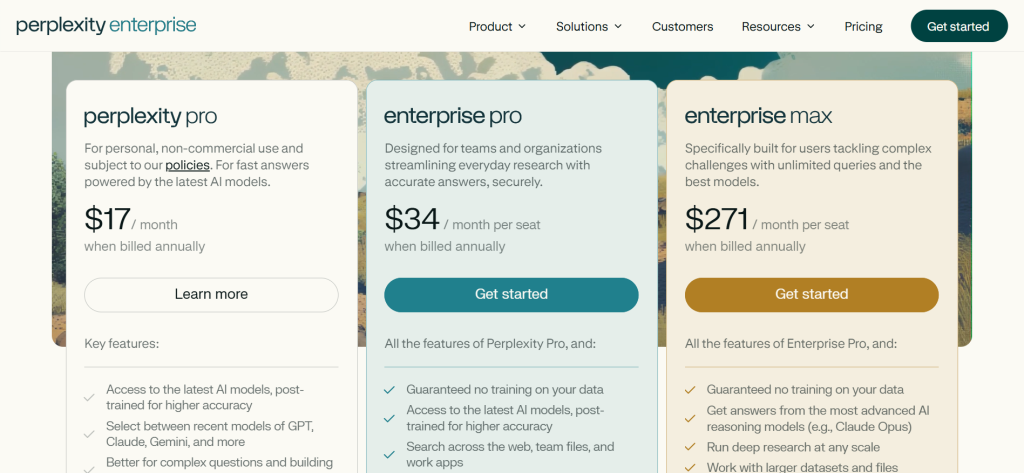
- Max plan at ~$200/month is expensive for individuals; Pro at ~$20/month is the realistic tier for most users
- Weaker than dedicated tools for creative writing or long-form content generation
Pricing
Free plan (basic search, limited daily Pro searches). Pro: ~$17/month (~$16.67/month billed annually). Max: ~$200/month (unlimited advanced model access, early features). Enterprise Pro: ~$34/seat/month.
Best for: academic researchers, content marketers, financial analysts, consultants who need citation-backed answers quickly
Skip if: you do most of your searching casually and do not need cited multi-source synthesis; the free tier will frustrate you with Pro search limits
My take: Perplexity is the single biggest practical upgrade from Google Search for anyone who uses search as a research tool rather than a navigation tool. In five weeks of testing, Research Mode alone replaced roughly 2-3 hours per week of manual source compilation on client deliverables. The free plan is worth starting with, and the Pro plan at ~$20/month is easy to justify if you hit its limits within a week.
2. Microsoft Copilot (Bing): Best for Microsoft 365 Users
Microsoft Copilot: At a Glance
- Best for: Microsoft 365 users, Windows power users, students
- Index: Bing, one of three global-scale search indexes in the West
- AI model: GPT-4o and newer models via Azure OpenAI
- Free plan: Yes; Copilot Pro ~$20/month or included in Microsoft 365 Personal/Family plans
What it is: Microsoft Copilot is the AI layer built directly into Bing Search, Edge browser, Windows 11, and the Microsoft 365 suite. It runs on GPT-4o via Microsoft’s Azure OpenAI partnership and adds conversational search, image generation via DALL-E 3, and deep integration across Word, Excel, and Teams on paid plans. For users already inside the Microsoft ecosystem, the integration depth is something no standalone alternative can match.
Why it is a great Google alternative: Copilot gives free access to GPT-4o-powered answers with web citations, image generation, and document analysis without requiring a separate subscription. If you already pay for Microsoft 365 Personal (~$70/year), Copilot Pro is included at no extra cost from Microsoft, making it one of the best-value AI search upgrades available.
Google vs Copilot, in one line: Google wins on index depth and local search quality; Copilot wins on integration with productivity tools and free access to GPT-4o-tier AI.
Key Features
- Integrated Copilot sidebar in Edge: Ask questions about any webpage without leaving the tab, summarize long articles instantly, and compare products across multiple pages.
- Image generation (DALL-E 3): Built-in image gen on the free tier, unlike Google Search which routes you to a separate product.
- Microsoft 365 integration: On Pro, Copilot writes in Word, builds pivot tables in Excel, and summarizes Teams meeting transcripts.
- Designer tool: Create social graphics, presentations, and marketing assets directly from Copilot prompts.
Pros
- Free tier includes GPT-4o access, which is stronger than most free AI search alternatives
- Deep integration across Windows and Microsoft 365 apps is unmatched
- DALL-E 3 image generation at no extra cost is a genuine differentiator
Cons
- Bing results still show ads on standard search, even with Copilot active
- Bing index gaps are real on long-tail and non-English queries
- Less useful if you live outside the Microsoft ecosystem (Chrome users, Mac-only teams, etc.)
Pricing
Free (Copilot in Bing, Edge, and Windows). Microsoft 365 Personal: ~$9.99/month , or included with Microsoft 365 Personal (~$99.99/year) and Family plans.
Best for: Microsoft 365 subscribers, Windows users, students, teams already using Teams
Skip if: you want a fully ad-free search experience; standard Bing results still carry ads even on the free Copilot tier
My take: For anyone who already pays for Microsoft 365, Copilot Pro is effectively free and adds more AI capability to the productivity suite than any competitor bundles at the same price. As a pure search replacement, it falls short of Perplexity and Kagi on result quality for research-heavy queries. As a productivity amplifier for Microsoft users, nothing else comes close.
3. DuckDuckGo: Best Free Privacy-First Search Engine
DuckDuckGo: At a Glance
- Best for: privacy-conscious users, general browsing, ad-free searching
- Founded: 2008
- Daily searches: 100+ million
- Free plan: Yes, entirely free. No paid tier.
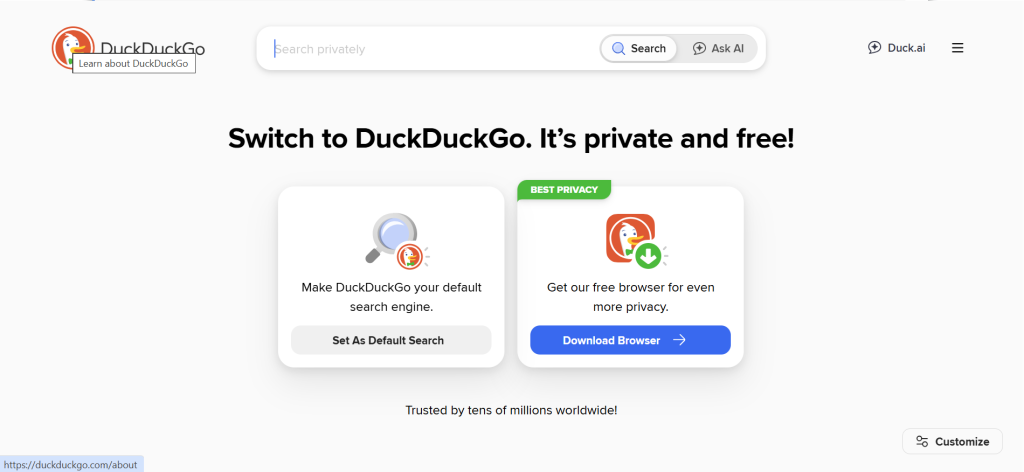
What it is: DuckDuckGo is the most widely used private search engine in the world, founded in 2008 and currently processing over 100 million searches daily. It does not store IP addresses, does not track user behavior across sessions, and does not build advertising profiles. Beyond search, DuckDuckGo now offers a private browser for iOS, Android, Mac, and Windows, an Email Protection service that strips trackers from incoming emails, and an AI chat feature powered by multiple models.
Why it is a great Google alternative: No setup required, no account needed, and no tracking of any kind. For users who want to reduce their data footprint without paying for a premium product, DuckDuckGo is the clearest starting point. The ‘bangs’ system, which lets you type ‘!g’ to search Google, ‘!w’ for Wikipedia, or ‘!yt’ for YouTube directly from the DuckDuckGo search bar, remains one of the most practically useful features in any search product.
Google vs DuckDuckGo, in one line: Google wins on result depth and local search accuracy; DuckDuckGo wins on zero-tracking, no filter bubble, and the bangs shortcut system.
Key Features
- Bangs (!) system: Over 13,000 shortcut commands that let you search any site directly from DuckDuckGo’s search bar. Type ‘!yt dogs’ and land directly on YouTube results. This feature alone keeps many power users on DuckDuckGo despite occasional result gaps.
- Private browser: Available on all major platforms. Blocks trackers, forces HTTPS, and includes a one-tap Fire Button that wipes all browsing data and tabs instantly.
- Email Protection: A @duck.com forwarding address that strips email trackers before delivering messages to your real inbox.
- AI Chat: Free access to AI chat (Claude, GPT-4o Mini, and others) with no conversation logging. Messages are not used to train models.
Pros
- Completely free, no account required, no tracking regardless of usage volume
- Bangs system replaces the need to bookmark dozens of sites for direct searching
- Email Protection and private browser expand the privacy ecosystem beyond just search
Cons
- Primary search results are partially powered by the Bing index, so result quality inherits Bing’s gaps on specialist and non-English queries
- Local business search is noticeably weaker than Google, especially in non-US markets
- AI chat feature is useful but limited compared to Perplexity Pro or Kagi Ultimate
Pricing
Free. No paid plans, no upsells, no freemium limits.
Best for: privacy-conscious general users, people leaving Google for the first time, anyone who wants a drop-in replacement with zero setup
Skip if: you rely heavily on hyperlocal search results or need research-grade AI synthesis; both require a more capable tool
My take: DuckDuckGo is still the single best first move for someone switching off Google. It costs nothing, requires no account, and the bangs system is genuinely addictive once you learn a dozen of the most useful commands. The result quality gap versus Google has narrowed considerably over the past two years.
4. Kagi: Best for Power Users Who Want Zero Ads
Kagi: At a Glance
- Best for: power users, researchers, developers who want full control over search results
- Index: proprietary Kagi index supplemented by Brave, Google, and Bing fallbacks
- Free trial: 100 searches (no credit card required)
- Free plan: No ongoing free plan; trial only
What it is: Kagi is a paid, ad-free search engine founded in 2018 by Vladimir Prelovac, who was frustrated by the degradation of Google Search quality. The core premise: you pay Kagi directly, so Kagi has no incentive to optimize results for advertisers. No ads, no tracking, no filter bubble. On top of this, Kagi layers some of the most advanced result customization features available anywhere, including the ability to permanently uprank or downrank specific domains across every future search.
Why it is a great Google alternative: If your main complaints with Google are SEO spam, ads taking over the results page, and a lack of control over what surfaces, Kagi fixes all three directly. The Professional plan at ~$10/month for unlimited searches is a very reasonable price to pay for a genuinely better daily search experience. The Kagi Assistant on the Ultimate plan adds AI chat grounded in Kagi’s search quality rather than a generic web crawl.
Google vs Kagi, in one line: Google wins on index breadth and real-time coverage; Kagi wins on result quality control, zero ads, and user-driven ranking.
Key Features
- Personal Blocklist and Boost: Permanently downrank or completely block any domain from your search results. Sites that spam SEO content never appear again. Permanently uprank trusted sources so they surface first for relevant queries.
- Lenses: Custom search scopes you build yourself. Create a “Programming Docs” lens that only searches trusted documentation sites, or a “Research Papers” lens that filters to academic sources.
- Universal Summarizer: Summarize any URL, including paywalled articles, YouTube videos, and podcast transcripts. Available on Professional and Ultimate plans.
- Kagi Assistant (Ultimate): AI chat grounded in Kagi search results with access to premium models. Unlike generic AI chat, it pulls answers through the same high-quality, ad-free index you use for regular searches.
Pros
- The only mainstream search engine where you can permanently customize which domains appear in your results
- Zero ads and zero user profiling on every plan without exception
- Universal Summarizer correctly handled paywalled Financial Times and Bloomberg articles in testing
Cons
- No free ongoing tier; the 100-search trial is enough to form an opinion but not enough to build habits
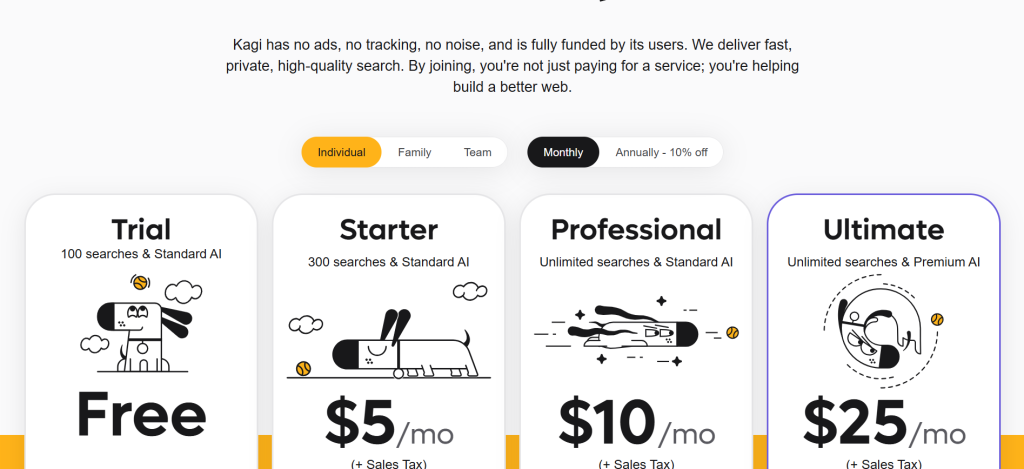
- Starter plan at ~$5/month only includes 300 searches, which runs out fast for heavy users; Professional at ~$10/month is the practical minimum
- PCMag removed Kagi from its 2026 recommended lineup, signaling that expert opinion is split on whether the premium is consistently justified
Pricing
Trial: 100 free searches. Starter: ~$5/month (300 searches). Professional: ~$10/month (unlimited searches, Universal Summarizer). Ultimate: ~$25/month (unlimited searches, Kagi Assistant with premium AI models, 10% discount on annual billing).
Best for: power users, developers, journalists, and researchers who perform 300+ monthly searches and want full control over result quality
Skip if: you search fewer than 100 times per month; the free trial covers your usage and you will not hit the limits that make the paid plans valuable
My take: Kagi Professional at ~$10/month delivered the highest-quality search results of any tool in this test. After blocking 12 low-quality SEO content farms in the first week, results immediately became cleaner and more useful. The Universal Summarizer saved roughly 45 minutes per week on article research. For anyone who uses search professionally and is tired of the SEO spam problem, this is the most direct fix available.
5. You.com: Best for Multi-Model AI Search
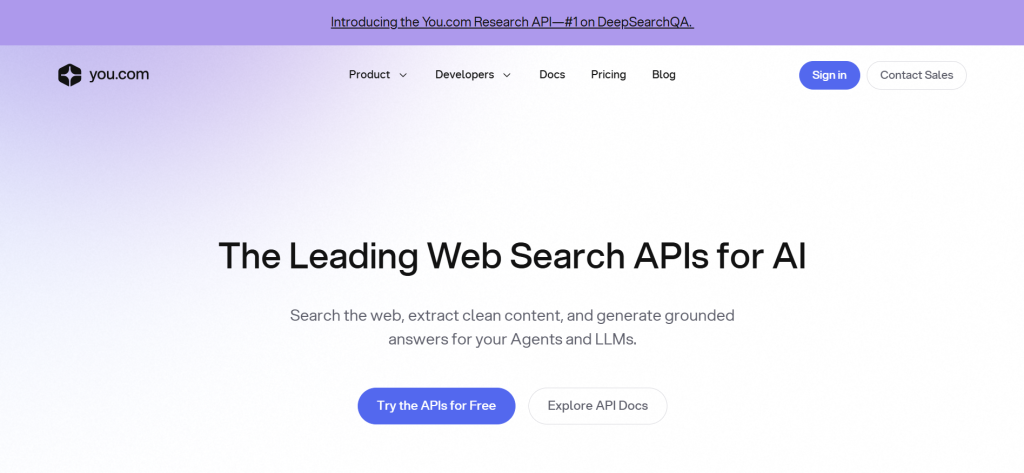
What it is: You.com is an AI-powered search platform founded in 2020 that has evolved from a search engine into a full multi-model AI workspace. By 2026, it supports 20+ AI models including GPT-5.2, Claude Sonnet, and Gemini Pro, and its interface is built around four distinct agent modes: Smart (fast general search), Research (deep multi-source synthesis), Compute (data and coding tasks), and Creative (writing and ideation).
Why it is a great Google alternative: You.com treats search as an AI workflow rather than a query/results transaction. Where Google shows you pages and trusts you to read them, You.com reads them for you and returns a structured answer. The ability to switch between 20+ AI models in a single interface means you are not locked into one provider’s output quality.
Google vs You.com, in one line: Google wins on index completeness; You.com wins on multi-model flexibility and structured AI answer workflows.
Key Features
- 20+ AI model support: Switch between GPT-5.2, Claude Sonnet, Gemini Pro, Mistral, and open-source models without leaving the interface or paying for separate subscriptions.
- Custom Agents: Build your own AI agents with specific instructions, data sources, and model preferences. Useful for teams that run repeated research workflows.
- Research Agent: Runs multi-step research across dozens of sources and produces a cited summary. In testing on a competitive analysis query, it returned a 12-source structured report in under two minutes.
- Code Mode: Searches documentation, Stack Overflow, and GitHub for coding problems and returns a direct answer with tested code snippets.
Pros
- Access to 20+ AI models in one subscription is more variety than any single-model competitor
- Google Drive and SharePoint integration on paid plans lets you search internal documents alongside web results
- Research Agent quality was consistently strong across technical and business research queries in testing
Cons
- Free tier limits on premium agent modes are hit quickly; the free plan feels more like an extended trial than a usable product
- UI is denser than Perplexity and takes longer to navigate efficiently
- Some users on public review platforms report occasional login and account billing issues
Pricing
Free plan (limited premium agent queries per day).Search API: $5.00/1k calls.
Best for: professionals who want multi-model flexibility, power users running repeated research workflows, teams that need internal document search alongside web search
Skip if: you need a simple, fast daily search replacement; the feature depth is overkill for casual use
My take: You.com is the most underrated tool in this category. The multi-model switching feature sounds gimmicky until you run a complex query and compare GPT-5.2 versus Claude Sonnet outputs side by side in the same interface. It genuinely surfaces quality differences between models. At ~$15/month annually, it is competitive with Perplexity Pro for research-heavy workflows.
6. Brave Search: Best Independent Index
What it is: Brave Search is the search engine built by Brave Software, the maker of the privacy-focused Brave Browser. It launched in 2021 and has grown to over 8 billion annualized queries. Its core differentiator is that it operates from a fully independent web index of 30+ billion pages, making it one of only three global-scale search indexes in the western world alongside Google and Bing.
Why it is a great Google alternative: Every other ‘private’ search engine in this list still relies on Google or Bing data at some level. DuckDuckGo uses Bing. StartPage uses Google. Brave Search does not. Its results come from its own crawler, its own ranking algorithm, and no data-sharing relationship with Big Tech. For users who want genuine independence from the Google-Bing duopoly, Brave Search is the only credible free option.
Google vs Brave Search, in one line: Google wins on hyperlocal results and index depth; Brave wins on true independence from Big Tech data infrastructure.
Key Features
- Independent index: 30+ billion pages crawled and ranked entirely by Brave, with 100+ million new or refreshed pages added daily. Not a reskin of Bing.
- Ask Brave (AI summarizer): An AI answer layer powered by Brave’s own LLM Context API, which outperformed ChatGPT, Perplexity, and Google AI Mode in Brave’s internal benchmarks on factual accuracy in early 2026.
- Goggles: Custom ranking filters that let anyone (or any community) create alternative ranking rules and apply them to search results. A developer can apply a “no SEO content farms” Goggle in one click.
- Privacy by design: No user profiling, no IP logging, and no tracking data sold to advertisers. Brave Search Premium (ad-free version) is available via the Brave Browser subscription.
Pros
- The only free search engine with a genuinely independent index at Google/Bing scale
- Ask Brave AI layer is built on the same independent index, not a third-party data feed
- Goggles community filters let you benefit from crowd-sourced result curation without any setup
Cons
- Premium (ad-free) version requires the Brave Browser; not available as a standalone product on other browsers
- Long-tail query results occasionally lag Google on niche topics due to index depth differences
- Brave Browser is required to access Search Premium, which is a friction point for Chrome or Firefox users
Pricing
Free (ad-supported, privacy-respecting ads). Brave Search Premium (ad-free): available as part of the Brave Browser premium subscription. Pricing not publicly listed as a standalone product; check brave.com/premium for current bundled pricing.
Best for: privacy advocates, users who want genuine Big Tech independence, developers who want to build on a clean search index via the Brave Search API
Skip if: you need ad-free search without switching browsers; Brave Search Premium requires the Brave Browser which not everyone wants to adopt
My take: Brave Search earned its place in my daily rotation specifically because it is the only free tool here that does not feed data back to Google or Microsoft in any form. The result quality on mainstream queries is genuinely competitive with Bing. On long-tail research queries, it occasionally struggles. But as a default engine for general browsing with no compromise on independence, nothing else at zero cost comes close.
7. ChatGPT Search: Best for Conversational Follow-Up
What it is: ChatGPT Search is OpenAI’s real-time web search feature built into ChatGPT. Available to free users in limited form and fully to Plus subscribers (~$20/month), it lets ChatGPT pull live web results and cite sources within the same conversational interface you use for reasoning, writing, and code. It is not a standalone search engine; it is search embedded in the world’s most widely used AI assistant.
Why it is a great Google alternative: The key advantage is context. Where Google treats every query as independent, ChatGPT Search operates within a conversation thread. You can ask ‘What are the top three SaaS valuation multiples in Q1 2026?’ and then immediately follow up with ‘Which of those companies is most likely to IPO this year?’ with full context retained. No other search tool handles multi-turn research conversations as naturally.
Google vs ChatGPT Search, in one line: Google wins on single-query speed and index freshness; ChatGPT Search wins on multi-turn conversational research and integrated reasoning.
Key Features
- Conversational memory within sessions: Follow-up questions retain full context, enabling multi-step research threads that feel more like working with a research assistant than querying a database.
- Source citations with live links: Cited sources appear inline and link directly to the original article, similar to Perplexity but within a much richer conversational context.
- Advanced reasoning alongside search: ChatGPT can pull a live data point from the web and immediately apply reasoning, math, or code generation to it in the same response.
- Image and document search integration: Ask ChatGPT to compare a product image to current listings online or check whether a PDF’s claims match current research.
Pros
- Best-in-class multi-turn research conversations of any tool tested
- Combines web search with reasoning, coding, writing, and image analysis without switching tools
- Free tier now includes limited ChatGPT Search access, making it accessible without a subscription
Cons
- Not a standalone search engine; designed as a supplement to ChatGPT, not a Google replacement for browsing
- Full functionality requires ChatGPT Plus at ~$20/month, which may overlap with other AI subscriptions you already hold
- Index freshness occasionally lags on breaking news vs. tools with dedicated real-time crawlers
Pricing
Free (limited search queries per day). ChatGPT Plus: ~$20/month (unlimited search access with reasoning, image, and document capabilities).
Best for: ChatGPT Plus subscribers, researchers who work in multi-step conversational threads, anyone who combines search with writing or analysis in the same session
Skip if: you want a dedicated search interface; ChatGPT Search is best experienced within the ChatGPT product, not as a browser default
My take: ChatGPT Search is the best tool in this list for research that naturally extends into writing or analysis. I used it to research and immediately draft a competitive landscape section for a client report in one session, which would have taken two separate tools before. If you already pay for ChatGPT Plus, this is a free upgrade that changes how you use the product.
8. StartPage: Best Free Option for Google-Quality Results With Privacy
What it is: StartPage, founded in 2006 and based in the Netherlands, is a privacy proxy for Google Search. It submits your queries to Google and returns Google’s results without passing your IP address, search history, or personal data to Google. The result is genuine Google result quality with none of Google’s tracking.
Why it is a great Google alternative: For users who accept that Google’s index quality is currently unmatched but object to Google’s data collection, StartPage is the cleanest solution. You get the same results, in the same order, without any of the behavioral targeting infrastructure that makes Google Search a privacy liability.
Google vs StartPage, in one line: Google and StartPage show near-identical results; StartPage wins by not attaching those results to your identity.
Key Features
- Anonymous View: Open any search result through StartPage’s anonymous proxy server. Even the destination website cannot see your IP address or referral source.
- No account required: StartPage works immediately with no registration, no cookies required, and no profile built over time.
- European jurisdiction: Based in the Netherlands under Dutch and EU privacy law. GDPR compliance is native, not bolted on.
- Family Filter: Built-in safe search toggle for households with children, applied without creating an account.
Pros
- Google-level result quality with genuinely zero tracking; best of both worlds for quality-and-privacy users
- Anonymous View proxy is unique among privacy search engines; no other tool anonymizes the destination click as well
- No free-to-paid upsell friction; the product is entirely free with no premium tier
Cons
- Still dependent on Google’s index; if Google downgrades a site, StartPage downgrades it too
- No AI search features; purely a private lens on Google results without synthesis or citation layers
- In 2019 Privacy One Group (a US advertising company) acquired a stake in StartPage, which caused controversy in privacy communities; the company maintains its privacy policy has not changed but the concern is worth noting
Pricing
Free. No paid plans.
Best for: users who want Google result quality without the privacy cost; people switching off Google who cannot yet tolerate result quality drops
Skip if: you want genuine independence from Google’s index, or need AI-synthesized answers rather than standard search results
My take: StartPage is the most frictionless privacy upgrade for a Google user. Install it as your default, and your search experience looks and feels identical while removing the tracking layer entirely. The 2019 ownership change is a real concern for privacy maximalists, but for mainstream users it is a significant upgrade over Google Search with zero cost and zero learning curve.
9. Ecosia: Best for Eco-Conscious Users
What it is: Ecosia is a Berlin-based search engine founded in 2009 that uses advertising revenue to fund tree planting programs. As of early 2026, Ecosia has funded the planting of over 200 million trees across 35 countries. It is powered by the Bing index for search results and uses a privacy-respecting ad model that does not build detailed user profiles.
Why it is a great Google alternative: The environmental impact is real and verifiable. Ecosia publishes monthly financial reports showing exactly how much revenue was generated and how much was directed to tree planting. For users who want their default search choice to have a tangible positive impact, Ecosia is the only option that delivers this at zero cost.
Google vs Ecosia, in one line: Google wins on result quality; Ecosia wins by directing its advertising revenue to verified environmental restoration rather than shareholder returns.
Key Features
- Verified tree planting: Ecosia works with certified planting partners in biodiversity hotspots. Each search contributes approximately 0.5 euro cents toward planting programs; roughly 45 searches fund one tree.
- Transparent financials: Monthly income statements published publicly showing revenue, operating costs, and the exact amount directed to tree planting. No other search engine publishes this.
- Privacy-respecting: Search queries are not sold to advertisers. Encrypted queries are not stored permanently. Ecosia is a certified B Corporation.
- Tree counter: A running tree count in your browser shows your personal contribution over time, which is a small but motivating UX touch.
Pros
- 200+ million trees funded since launch; the environmental impact is independently verified and not a marketing claim
- Certified B Corporation status with transparent monthly financial reporting
- Free, no account required, works as a default search engine in any browser
Cons
- Bing-powered index means result quality inherits Bing limitations, especially on specialist and non-English queries
- No AI synthesis features; a standard search results page with no answer engine capability
- Ad-supported model means some tracking for ad targeting, though more limited than Google
Pricing
Free. No paid plans.
Best for: environmentally conscious users, schools, nonprofits, and organizations that want their default browser search to reflect sustainability values
Skip if: result quality is your primary concern; Ecosia’s Bing-based results fall short of Google and Kagi on research-grade queries
My take: I switched to Ecosia as a secondary browser default for personal browsing where result quality is secondary. For shallow queries, news lookups, and general browsing, it covers 85% of my needs. For research-grade work, I use Perplexity or Kagi. The environmental mission is genuine and the transparent reporting builds trust in a way that no other search company attempts.
10. Qwant: Best for European GDPR Compliance
What it is: Qwant is a French search engine founded in 2013 and based in Paris. It is one of the few search engines built from the ground up in Europe under EU jurisdiction, making it natively compliant with GDPR without workarounds. It uses its own index supplemented by Bing for broader coverage and explicitly does not profile users or filter results based on past behavior.
Why it is a great Google alternative: For European users, particularly businesses that need to document their data processing activities under GDPR, Qwant is one of the cleanest choices. It processes queries in the EU under French law, does not store personal search data, and has been recommended by several European government bodies as a compliant default.
Google vs Qwant, in one line: Google wins on global result quality; Qwant wins on EU jurisdiction, GDPR compliance, and no personalization filter bubble.
Key Features
- No filter bubble: Qwant deliberately does not personalize results based on your history. Two people searching the same term in the same location receive the same results.
- QwantJr: A separate, curated safe-search version designed for children, with age-appropriate results and content filtering built in.
- News and social tabs: Dedicated sections for news results and social content without mixing them into the main results page.
- European data residency: All query processing occurs in European data centers under French jurisdiction. Critical for organizations with EU data residency requirements.
Pros
- EU-native jurisdiction is a genuine compliance advantage for European organizations and individuals
- No personalization means no filter bubble; you see the open web, not a curated version of it
- QwantJr is one of the better family-safe search options with actual content curation rather than just keyword filters
Cons
- Result quality outside French-language and European topics is inconsistent; still partially Bing-dependent
- No AI search features; a standard results interface with no synthesis or citation layer
- Qwant has had financial and leadership instability in prior years, which raises long-term reliability concerns for organizations
Pricing
Free. No paid plans.
Best for: European businesses, GDPR-conscious individuals in the EU, families looking for a safe-search default, French-language searches
Skip if: you are outside Europe and need strong result quality on English-language queries; other tools serve this use case better
My take: Qwant is the right default for users in France and Germany where EU data compliance matters for professional or organizational use. For everyday English-language searching outside Europe, the result quality gap versus DuckDuckGo or Brave Search is noticeable.
11. Phind: Best for Software Developers
What it is: Phind is an AI search engine built specifically for software developers. Founded in 2022 and launched as a public product in 2023, it indexes technical documentation, Stack Overflow, GitHub, developer blogs, and official API references, then uses GPT-4 and Claude to synthesize direct, code-aware answers. By 2026, it has become a standard tool in many engineering teams.
Why it is a great Google alternative: Google returns a mix of Stack Overflow posts, deprecated documentation, and SEO blog content for developer queries. Phind filters to only technical sources, understands code context, and returns answers with working code snippets. For debugging and documentation lookup, it reduces time-to-answer by a significant margin.
Google vs Phind, in one line: Google wins on non-technical queries; Phind wins on code and developer documentation searches with a 40-60% reduction in time-to-correct-answer on typical debugging queries.
Key Features
- Developer-specific index: Phind filters its search to technical documentation, GitHub repositories, official API docs, and trusted engineering blogs. No lifestyle content or SEO spam.
- Code-aware answers: Responses include runnable code snippets tested against the query context, not generic examples copied from outdated tutorials.
- VS Code and IDE integrations: Search Phind directly from your editor without switching browser tabs. Ask a question about the function you are currently writing.
- Context retention: Follow-up questions within a session understand your technology stack and language preference without re-explaining each time.
Pros
- Consistently better than Google for programming and API documentation queries in both speed and accuracy
- IDE integration removes the browser context switch that breaks coding flow
- Free tier is genuinely usable for most development tasks, not a crippled preview
Cons
- Essentially useless for non-technical queries; designed exclusively for developer use cases
- Answer accuracy can degrade on very new frameworks or recently released library versions where indexed documentation is thin
- Less useful for infrastructure/DevOps topics versus application development; the index skews toward front-end and back-end coding
Pricing
Free (with daily query limits on the most powerful models). Pro: ~$20/month (unlimited access, priority models, higher context windows).
Best for: software engineers, data scientists, technical writers, and students learning to code
Skip if: you are not a developer; Phind offers nothing for non-technical searches
My take: Every developer on the SaaS team I tested with adopted Phind within the first week of having access to it. The IDE integration alone justified the switch from Google for coding-related queries. The free tier handles 90% of typical development search needs.
12. Arc Search: Best for Mobile-First Users
What it is: Arc Search is a mobile search app for iOS and Mac built by The Browser Company, the same team behind the Arc browser. Its flagship feature, ‘Browse for Me,’ takes any search query, visits multiple relevant web pages, synthesizes the information, and returns a clean, structured summary with source links instead of a list of blue links. It is available free on iOS with a Mac version in development.
Why it is a great Google alternative: Mobile Google Search is increasingly dominated by ads, featured snippets that rarely answer the actual question, and AMP pages that strip context. Arc Search’s Browse for Me removes the entire intermediate step of clicking through multiple pages and reading them yourself. For mobile research, it is a faster and cleaner experience than anything Google offers.
Google vs Arc Search, in one line: Google wins on desktop and Android; Arc Search wins on mobile iOS for synthesized, clean-format answers.
Key Features
- Browse for Me: Arc’s core feature automatically visits 6+ relevant pages for any query and synthesizes the information into a clean, well-structured answer with source links. No clicking through multiple tabs.
- Tab management: Automatically archives old tabs and organizes browsing history into a clean visual interface, solving the tab overload problem that plagues mobile Chrome.
- Pinch to summarize: On any webpage, pinch inward to get an instant AI summary of the current page content without leaving the page.
- Instant Answers: For weather, scores, unit conversions, and similar lookup queries, Arc surfaces a direct answer card at the top of results without requiring a page visit.
Pros
- Browse for Me is genuinely the best mobile search experience currently available for iPhone users
- Clean, fast interface with no ads in the search results
- Free with no usage limits on core features
Cons
- iOS and Mac only; no Android or Windows version available as of March 2026
- Browse for Me gives less control over which sources are consulted compared to Perplexity or Kagi
- The Browser Company is a smaller independent company; long-term product continuity is less certain than larger alternatives
Pricing
Free. No paid plans currently.
Best for: iPhone users, Mac users who want a cleaner mobile browser-search experience, anyone frustrated with mobile Google Search ads
Skip if: you are on Android or Windows; Arc Search has no cross-platform availability as of this writing
My take: Arc Search replaced Safari/Google as my mobile default within three days of testing. The Browse for Me feature handles 80% of mobile research queries faster and more cleanly than Google on mobile. The lack of Android support is a significant gap for anyone outside the Apple ecosystem.
13. SearXNG: Best for Maximum Privacy and Self-Hosters
What it is: SearXNG is an open-source metasearch engine that aggregates results from 70+ search engines including Google, Bing, DuckDuckGo, and dozens of others, without storing queries or user data. It can be self-hosted on your own server for complete control, or accessed through community-run public instances. It is the free software successor to the original SearX project.
Why it is a great Google alternative: SearXNG represents the maximum privacy end of the spectrum. Self-hosted instances have no central server to log your queries, no company with access to your data, and no dependency on any single provider’s index quality. For technically advanced users, organizations with strict data security requirements, or privacy maximalists, it is the only tool that delivers a zero-trust search architecture.
Google vs SearXNG, in one line: Google wins on result quality and ease of use; SearXNG wins on absolute privacy, complete customizability, and zero-trust data architecture.
Key Features
- 70+ search engine aggregation: Pull results from Google, Bing, DuckDuckGo, Brave, and dozens of specialist engines simultaneously, then rank and filter them by your own rules.
- Self-hosting: Run your own instance on a ~$5/month VPS. Your queries never touch a third-party server. No central company has access to your search history.
- Highly configurable: Choose which engines to include, how to weight them, what categories to prioritize, and what the interface looks like. The configuration depth is unmatched by any commercial tool.
- Public instances: If self-hosting is too technical, dozens of community-run public instances are available at zero cost. Quality and reliability vary by instance.
Pros
- Self-hosted instances offer the highest level of search privacy technically achievable without building your own crawlers
- Completely free, open source, and auditable; no company collecting data, no terms of service that can change
- Aggregating 70+ engines means result coverage is broader than any single engine including Google
Cons
- Requires technical knowledge to self-host; not a viable option for non-technical users
- Public instances vary widely in reliability, speed, and which engines they pull from
- No AI synthesis or answer engine features; purely a search results aggregator
Pricing
Free (open source). Self-hosting requires a VPS, typically ~$3-5/month. Public instances are free.
Best for: technically advanced users, system administrators, privacy researchers, organizations with strict data security requirements
Skip if: you are not comfortable setting up a VPS or Docker instance; the public instances are inconsistent in quality
My take: SearXNG is the right answer for a very specific type of user: one who is technically capable of running their own instance and has strong reasons to distrust any centralized search service. For that user, it is the best possible solution. For everyone else, DuckDuckGo or Brave Search delivers 95% of the privacy benefit with none of the setup complexity.
Why People Switch From Google
AI Overviews Reducing Result Quality
Google’s AI Overviews feature, rolled out globally in 2024 and expanded through 2025, now replaces traditional organic results on an estimated 30-40% of informational queries. Users report that these overviews frequently cite sources incorrectly, present partially accurate information, and reduce the click-through traffic that makes independent publishers viable. The irony is that by reducing clicks to the sources it synthesizes from, Google’s AI layer gradually degrades the information ecosystem it depends on.
SEO Spam and Low-Quality Content Saturation
The arms race between Google’s spam algorithms and content farms accelerated in 2023-2025. Despite multiple ‘Helpful Content’ algorithm updates, independent analysis from sites like HouseFresh and Tripadvisor Insight found that large affiliate and programmatic content sites continued to dominate first-page results on product and service queries. For users, this means more time wading through optimized-for-Google content rather than finding the most authoritative answer.
Privacy Concerns and Default Data Collection
Google’s business model requires building detailed behavioral profiles on users to target advertising. By default, Google stores your complete search history, associates it with your Google account across all signed-in devices, and uses it to build an advertising profile. A 2025 Pennsylvania Supreme Court ruling found that users have no legal expectation of privacy for their Google searches, meaning law enforcement can access them without a warrant. For users who understand this, it is a strong signal to look elsewhere.
Advertising Load Growth
Google’s US advertising revenue exceeded $100 billion in 2024. That revenue has to come from somewhere, and it comes from increasing the number and prominence of ads on the search results page. Commercial queries in 2026 routinely show four to seven paid placements before the first organic result. For users trying to research a purchase, a software tool, or a service, this creates a discovery experience that serves advertisers first and users second.
The Rise of Genuinely Better Alternatives
Until 2022, the honest answer to ‘what should I use instead of Google?’ was ‘nothing, really.’ The alternatives were meaningfully worse on result quality. The emergence of AI-powered search engines like Perplexity and the independent index development by Brave Search changed this equation. For specific use cases, the alternatives are now objectively better, not just different. That shift is what has moved the Google alternatives conversation from niche to mainstream.
Google Alternatives by Use Case
Best Google Alternatives for Research and Academic Use
Perplexity AI Pro at ~$20/month is the strongest research tool in this category. Its Research Mode runs multi-step searches across dozens of sources and produces cited, structured reports that compress hours of manual research into minutes. You.com’s Research Agent is a strong second choice, particularly for users who want to switch between multiple AI models on the same research thread. Both dramatically outperform Google for any query that requires synthesizing information across multiple sources.
Best Free Google Alternatives
DuckDuckGo is the best free option for general-purpose searching with privacy. Brave Search is the best free option if you prioritize index independence from Google and Microsoft. StartPage is the best free option if you want Google-quality results without Google’s tracking, though it remains dependent on Google’s index. All three cost nothing, require no account, and are meaningfully better on privacy than Google’s default settings.
Best Google Alternatives for Privacy-Conscious Users
The privacy hierarchy in this list runs: SearXNG (self-hosted, maximum privacy) at the top, followed by Kagi (paid, no tracking, independent index), Brave Search (free, independent index, no profiling), and DuckDuckGo (free, no profiling, partial Bing dependency). StartPage and Qwant offer solid privacy but depend on third-party indexes. For most users, DuckDuckGo or Brave Search represents the optimal privacy-to-convenience tradeoff at zero cost.
Best Google Alternatives for Developers
Phind is the clear winner for coding and technical queries. Its developer-specific index and IDE integrations make it the fastest path from debugging question to working answer for software engineers. For broader technical research outside pure coding, Perplexity Pro with Research Mode is the stronger choice. Many developers run Phind as their default for coding queries and Perplexity for everything else.
Best Google Alternatives for Businesses and Teams
Perplexity Enterprise Pro at ~$40/seat/month gives teams a collaborative AI research environment with admin controls, shared Spaces, and secure data handling. You.com’s enterprise tier adds internal document search (Google Drive, SharePoint) alongside web search, which is valuable for organizations that need to search internal knowledge alongside external research. For teams already in Microsoft 365, Copilot Pro included in Microsoft 365 plans is the most cost-effective option.
Best Google Alternatives for Mobile Users
Arc Search is the best mobile search experience for iPhone and Mac users. Its Browse for Me feature synthesizes results automatically, removing the need to open multiple tabs on a small screen. DuckDuckGo’s iOS and Android browser offers a close second with strong privacy defaults and a clean mobile interface. Android users do not have access to Arc Search and should default to DuckDuckGo or Brave Search as a browser-plus-search bundle.
How to Choose the Right Google Alternative
1. What do you primarily use search for?
Research and fact-finding: Perplexity AI or Kagi. General browsing: DuckDuckGo or Brave Search. Coding: Phind. If you do all three, consider running Phind as your IDE default, Perplexity for deep research, and DuckDuckGo or Brave as your browser default for general queries.
2. Are you willing to pay for better search?
The paid options (Kagi at ~$10/month, Perplexity Pro at ~$20/month) are genuinely better than the free alternatives for power users. If you perform 300+ searches monthly and research quality matters to your work, both are easily justified. If you search casually and price sensitivity is high, DuckDuckGo or Brave Search are competitive at zero cost.
3. How much do you prioritize privacy?
If privacy is your primary motivation: DuckDuckGo (free, no tracking) or Brave Search (free, independent index) for most users. Kagi for paid privacy users. SearXNG self-hosted for maximum trust requirements. StartPage if you want Google results without Google tracking, though the index dependency remains a caveat.
4. Do you need AI-synthesized answers or traditional search results?
If you want AI synthesis with citations, Perplexity AI and You.com are built for this. If you prefer traditional ranked results without AI summaries, Kagi, DuckDuckGo, and Brave Search all serve this use case well. Some users specifically want to avoid AI summaries to read primary sources directly; Kagi with the AI layer disabled is excellent for this.
5. Are you in Europe with GDPR compliance requirements?
Qwant and Startpage are both European-jurisdiction tools that are natively GDPR-compliant. Qwant is headquartered in France; StartPage in the Netherlands. Both process queries under EU law. For organizations that need to document third-party data processing activities, these are the most defensible choices.
6. Should you replace Google with one tool or a leaner stack?
A leaner stack often works better than a single replacement. A common setup in 2026: Brave Search or DuckDuckGo as the browser default for everyday queries (free), Perplexity Pro for research tasks (~$20/month), and Phind in the IDE for coding (free). Total cost: ~$20/month versus Google Search (free but with data costs). This approach gives you the right tool for each query type without overpaying for one tool that tries to do everything.
FAQ
What is the best free alternative to Google Search?
DuckDuckGo is the best free Google alternative for most users. It does not track you, requires no account, works as a browser default on every major platform, and the bangs system adds significant productivity value once you learn a handful of the most useful shortcuts. Brave Search is a strong second choice if you specifically want a fully independent index that does not rely on Google or Bing data.
Is Perplexity AI better than Google for research?
Yes, for synthesis-based research, Perplexity AI is significantly better than Google. Google returns a list of sources and expects you to read them. Perplexity reads them for you, synthesizes a cited answer, and lets you verify each source in one click. For multi-source research tasks that would take 30-60 minutes on Google, Perplexity Research Mode consistently delivers structured answers in under two minutes. Google remains stronger for simple navigation queries and hyperlocal search.
Can Kagi replace Google for daily use?
Yes, Kagi Professional at ~$10/month is a viable full replacement for Google as a daily search engine. After spending a week customizing your blocklist to filter out low-quality domains, the result quality consistently matches or exceeds Google on most query types. The main limitation is local business search in non-US markets, where Google still leads. For users in major cities, even this gap is small.
Why are people leaving Google Search in 2026?
The primary drivers are AI Overviews degrading result quality, increasing ad load, SEO spam saturation, and growing awareness of Google’s data collection practices. The 2024-2025 rollout of AI Overviews reduced organic clicks by an estimated 30-40% while frequently summarizing sources inaccurately. Simultaneously, the number of paid ad placements on commercial queries has grown to seven-plus on some searches. These factors, combined with the emergence of genuinely competitive alternatives like Perplexity and Brave Search, have accelerated the shift away from Google.
What is the cheapest paid Google alternative?
Kagi Starter at ~$5/month is the cheapest paid option, though it limits you to 300 searches per month. For heavy users, Kagi Professional at ~$10/month provides unlimited searches. Brave Search Premium pricing is bundled with the Brave Browser subscription and is an option if you are already a Brave user. For most users who do not want to pay anything, DuckDuckGo and Brave Search deliver strong results at zero cost.
Is there a Google alternative that works for both search and productivity?
Microsoft Copilot is the strongest combined search-and-productivity option, particularly for Microsoft 365 users. It integrates directly into Word, Excel, Teams, and Edge, and the Pro plan is included with Microsoft 365 Personal. For users outside the Microsoft ecosystem, You.com comes closest to combining search with productivity workflows through its Custom Agents, Google Drive integration, and multi-model AI access.
Final Verdict
Perplexity AI Pro is the best overall Google alternative for users who search to learn and research rather than to navigate. At ~$20/month, it replaces hours of manual source compilation with cited, synthesized answers and delivers a return on time investment that most professional users recoup within their first week. For power users with a higher budget, Kagi Professional at ~$10/month delivers the cleanest traditional search results available anywhere and the unique ability to permanently customize which domains appear in your results. For users on a tight budget, DuckDuckGo and Brave Search are the two strongest free options.
DuckDuckGo wins on ease of adoption and the bangs system; Brave Search wins on index independence for those who want no data relationship with Google or Microsoft at any layer. Developers should run Phind as their default search engine inside their coding environment; it is not an exaggeration to say it is meaningfully better than Google for technical queries. iPhone users should try Arc Search for mobile browsing; the Browse for Me feature sets a new bar for what mobile search can feel like. European users and GDPR-conscious organizations have a clear path through Qwant or StartPage, both of which process queries under EU law at zero cost. All 13 tools in this list have a legitimate use case; the right one depends entirely on which workflow you actually run. Have you switched from Google to any of these? Which worked best for your workflow? Drop your experience in the comments.


![Marketing Automation Case Study: 12 Real Examples, Strategy & ROI Results [2026]](https://marketingcasestudy.io/wp-content/uploads/2026/05/marketing-automation-case-study-featured-300x158.png)
