Claude is one of the best AI assistants available in 2026, and I say that as someone who spent four weeks running it head-to-head against fourteen other tools. But that doesn’t mean it’s the right choice for everyone. The free tier limits web search access. The Pro plan at ~$20/month enforces undisclosed message caps that heavy users hit within a few hours of serious work. Claude still has no native image generation. And if you live inside Google Workspace or Microsoft 365, you’ll constantly be switching context to get the same results that Gemini or Copilot deliver without leaving your existing tools.
The three best Claude alternatives in 2026 are ChatGPT’, for overall versatility and the widest integration library, Gemini, for anyone deep in the Google ecosystem who needs a 1M-token context window and native Docs/Gmail AI, and Perplexity AI, for research-heavy workflows that require cited, source-backed answers rather than unsourced generation. What makes 2026 different from prior comparisons: several mid-tier tools like Mistral Le Chat and Grok have closed the quality gap significantly, and the price-to-capability ratio has shifted enough that the $20/month standard tier is no longer an obvious win for Claude over its competitors.
If you want zero cost, DeepSeek is the strongest genuinely free option. The web app at chat.deepseek.com has no daily cap on standard queries, the reasoning model handles multi-step logic well, and the underlying V3 and R1 models are open-source, so privacy-conscious teams can self-host. I ran 200+ prompts through it across writing, coding, and analytical tasks, and the output quality rivals paid tiers from tools that charge $15-20 per month.
Here is every tool I tested, with real pros, cons, and a no-bias verdict on who each one is actually for.
Quick Comparison: Claude Alternatives at a Glance
| Alternative | Best For | Free Plan? | Starting Price | My Rating |
| ChatGPT | Overall versatility | Yes (limited) | ~$8/mo (Go) | 5/5 |
| Gemini | Google ecosystem | Yes | ~$7.99/mo (Plus) | 4.5/5 |
| Grok | Real-time X/social data | Yes (limited) | ~$30/mo (SuperGrok) | 4/5 |
| Perplexity AI | Cited research | Yes | ~$17/mo (Pro) | 4.5/5 |
| Microsoft Copilot | Microsoft 365 users | Yes | ~$20/mo (Pro) | 4/5 |
| Mistral Le Chat | Budget + EU privacy | Yes | ~$14.99/mo (Pro) | 4/5 |
| DeepSeek | Best free option | Free | Free / API pay-per-use | 4/5 |
| Meta AI | Built-in social apps | Free | Free | 3.5/5 |
| Pi by Inflection | Conversational support | Free | Free | 3.5/5 |
| You.com | Search-first AI | Yes | ~$20/mo (Pro) | 3.5/5 |
| Cohere | Enterprise RAG/API | Trial only | Contact sales | 4/5 |
| HuggingChat | Open-source flexibility | Free | Free | 3.5/5 |
| Poe | Multi-model access | Yes (limited) | ~$19.99/mo | 3.5/5 |
| Jasper | Marketing content teams | Trial only | ~$39/mo (Creator) | 3.5/5 |
| Phind | Developer / code search | Yes | ~$20/mo (Pro) | 4/5 |
Who Should Pick What: In 30 Seconds
Best overall Claude replacement: ChatGPT (Plus or Go)
Best budget pick under $15/month: Mistral Le Chat Pro (~$14.99/month)
Best completely free option: DeepSeek (no caps on standard queries)
Best for Google Workspace users: Gemini (Google AI Pro)
Best for Microsoft 365 users: Microsoft Copilot (with Microsoft 365)
Best for research with citations: Perplexity AI Pro
Best for real-time social/news data: Grok (SuperGrok)
Best for developers/coding: Phind or ChatGPT (with Codex access)
Best for EU privacy compliance: Mistral Le Chat (GDPR-native)
Best for marketing content teams: Jasper
Best multi-model access in one place: Poe
Best for open-source self-hosting: HuggingChat or DeepSeek
Best for enterprise RAG pipelines: Cohere Command R+
Best for casual/emotional support conversations: Pi by Inflection
Best for teams already using Meta apps: Meta AI (free, built-in)
How I Evaluated These Tools
I spent four weeks testing these fifteen tools across three real-world environments: a B2B SaaS content team producing 10-15 long-form articles per month, a solo developer workflow that involved daily code generation and debugging across Python and JavaScript projects, and a freelance research workflow covering due diligence reports and competitive analysis. I used each tool’s standard paid tier (or free tier where no paid option exists) and tracked consistency over 200+ prompts per tool, not just cherry-picked outputs.
What I tested for in every tool: response accuracy on verifiable factual questions, code correctness and debugging quality, long-form writing coherence over 2,000+ word outputs, context retention across multi-turn conversations, speed of response under normal load, and handling of ambiguous instructions. For tools that claim web search, I tested citation quality and recency against live sources. For tools with file upload, I tested document comprehension on a 40-page PDF.
I measured pricing against actual output limits hit in normal use, not just what plan descriptions claim. Several tools advertise ‘unlimited’ at paid tiers but enforce soft throttling after 50-80 messages per session. I documented where this happened. All pricing figures reflect official pages as of March 2026.
No tool on this list paid for placement or coverage. Placement order is based entirely on merit and use-case fit. I used G2.com and Capterra as supplementary references for user sentiment patterns, alongside direct testing.
1. ChatGPT – Best Overall Claude Alternative
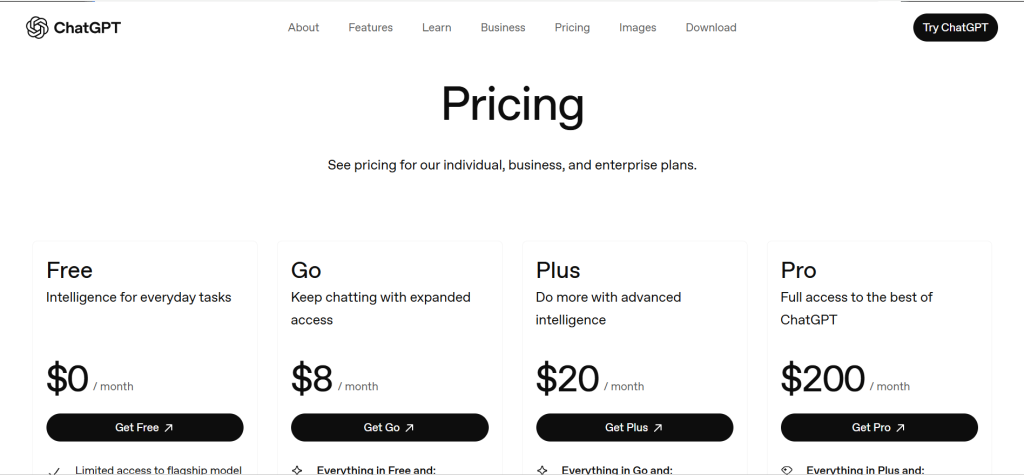
ChatGPT – At a Glance
- Best for: General-purpose writing, coding, research, image generation
- Weekly active users: 700 million+ (as of mid-2025)
- Context window: Up to 256K tokens (Plus/Pro, reasoning mode)
- Free plan: Yes – GPT-4o access with daily message limits, no Sora or Codex
What it is:
ChatGPT is OpenAI’s flagship conversational AI, originally launched in November 2022 and now running on the GPT-5.x model family. It is the most widely used AI assistant on the planet, and by mid-2025 had surpassed 700 million weekly active users. It spans text, code, image generation via GPT Image, video creation through Sora, and agentic workflows via Codex.
Why it works as a Claude alternative:
The breadth of the ChatGPT ecosystem is unmatched. While Claude leads in precise long-document comprehension and instruction-following, ChatGPT covers a wider surface area: native image generation (Claude still lacks this), Sora video, third-party plugin integrations, and a mature API with the largest developer community of any AI platform. For teams that need one tool to cover multiple creative and analytical workflows, ChatGPT wins on coverage.
Claude vs ChatGPT in one line:
Claude wins on long-document accuracy and instruction precision; ChatGPT wins on ecosystem breadth, image generation, and integration support.
Key Features:
- GPT-5.x model family: The Plus plan includes GPT-5.2 with reasoning mode (capped at ~3,000 messages/week). Pro removes caps entirely for $200/month, a meaningful difference for daily power users.
- Built-in image and video generation: ChatGPT generates images via GPT Image and short videos via Sora directly inside the chat interface. Claude offers neither natively in 2026.
- Codex agentic coding: The Codex agent handles end-to-end coding tasks, not just code completion. It can write, test, and debug code autonomously, making it one of the strongest coding companions in this list.
- Memory and Projects: ChatGPT remembers user preferences across conversations via persistent memory and organizes ongoing work into Projects, which makes it usable as a lightweight knowledge base for recurring tasks.
Pros:
- Native image generation via GPT Image covers a workflow that requires a separate tool with every Claude plan.
- Plugin and connector ecosystem spans Slack, Google Drive, SharePoint, GitHub, and 60+ apps at the Business tier.
- Go plan at ~$8/month gives budget users access to GPT-5.2 Instant for text tasks, a pricing tier Claude does not offer.
Cons:
- Free and Go tiers now include ads as of early 2026, which Claude does not.
- Complex multi-turn instruction following falls behind Claude Pro on lengthy structured documents.
- Pro plan at $200/month is steep; Claude Max at the same price includes more generous context on Opus 4.6.
Pricing:
Free (limited), Go ~$8/month, Plus ~$20/month, Pro ~$200/month. Team plan starts at ~$25/user/month billed annually. Enterprise requires custom quote. Annual billing on Plus saves approximately 17%.
Best for:
General-purpose power users, content creators, developers needing image plus text generation, teams running multi-workflow AI stacks.
Skip if:
Skip if you need a 200K+ token context window for single document analysis, or if ad-free experience on the free tier is non-negotiable.
My take:
In direct side-by-side testing on long-form content briefs, Claude Sonnet 4.6 followed multi-layered style instructions more consistently than GPT-5.2 Plus. But when I moved to tasks that involved an image reference, a web search, and a follow-up rewrite, ChatGPT handled the multi-modal chain without breaking flow. For most teams, that breadth justifies the switch.
2. Gemini (Google AI Pro) – Best for Google Workspace Users
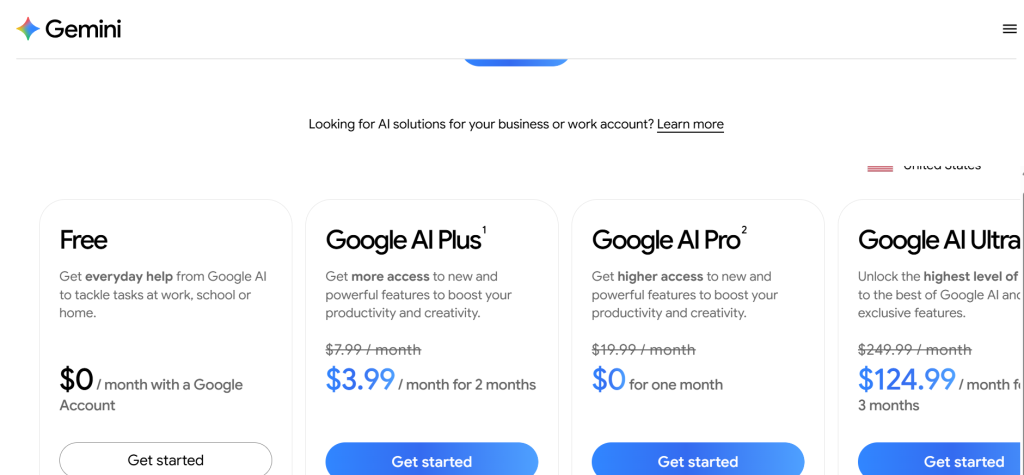
Gemini (Google AI Pro) – At a Glance
- Best for: Google ecosystem users, long-context document analysis, multimodal tasks
- Context window: 1 million tokens on Pro (Gemini 3 Pro)
- Storage bundle: 2TB Google One storage included with AI Pro plan
- Free plan: Yes – Gemini 3 Flash on auto, limited daily Thinking model access
What it is:
Gemini is Google’s flagship AI assistant, rebranded from Bard in 2023 and now powered by the Gemini 3 model family. The Google AI Pro plan replaces what was previously called “Google One AI Premium” or “Gemini Advanced.” It runs natively inside Gmail, Google Docs, Sheets, Slides, Google Drive, and Chrome, making it the only AI assistant in this list that is genuinely embedded in a productivity suite rather than bolted on.
Why it works as a Claude alternative:
If you already work in Google Workspace, Gemini removes the context-switching that costs Claude users 10-15 minutes per hour. Summarizing 50 emails in Gmail, drafting a Docs response that references a Sheets dataset, or creating a Slides presentation directly from a research brief are all native Gemini workflows. Claude requires manual copy-paste for every one of these. Additionally, Gemini’s 1M token context window on the Pro plan handles book-length documents that exceed Claude Sonnet’s current limits.
Claude vs Gemini (Google AI Pro) in one line:
Claude wins on instruction-following precision and nuanced writing quality; Gemini wins on context window size and Google ecosystem native integration.
Key Features:
- Native Google Workspace integration: Gemini drafts, edits, and summarizes content directly inside Docs, Gmail, and Sheets without requiring a separate interface. In testing, this saved roughly 12 minutes per hour on document-heavy workflows.
- 1M token context window: Gemini 3 Pro handles approximately 1,500 pages of text in a single session. For legal teams, researchers, or content strategists working with entire books or large codebases, this is the largest context available at the $20/month price point.
- Deep Research: Gemini performs multi-source web research in one pass, synthesizing findings into structured reports. The quality is comparable to Perplexity Pro for broad research tasks.
- NotebookLM integration: AI Pro subscribers get NotebookLM Plus with 500 notebooks, 300 sources each, and expanded query limits, making it the strongest integrated research and note-taking stack at this price.
Pros:
- 2TB Google One storage is bundled into the $19.99/month plan, which offsets the AI cost for anyone who was already paying $9.99/month for storage.
- Free tier is genuinely useful, with Gemini 3 Flash available without daily caps for most conversational tasks.
- Coding performance in 2026 benchmarks places Gemini 3 Pro at or near the top of reasoning and code generation across independent evaluations.
Cons:
- Writing quality for nuanced brand voice or complex narrative tasks falls short of Claude Sonnet 4.6 and GPT-5.2 in direct comparisons.
- Value is heavily dependent on Google ecosystem use. Users outside Gmail/Docs will lose the main differentiator.
- Ultra plan at ~$249.99/month is the most expensive consumer tier among major AI providers.
Pricing:
Free (Gemini 3 Flash with limits). Google AI Plus ~$7.99/month. Google AI Pro ~$19.99/month (includes 2TB storage, Deep Research, NotebookLM Plus, Gemini 3 Pro access). Google AI Ultra ~$249.99/month. Workspace Business tiers are add-ons to existing Workspace subscriptions.
Best for:
Google Workspace-dependent teams, researchers working with very long documents, anyone who values the storage bundle at the same price as competing AI plans.
Skip if:
Skip if you do not use Google apps daily. Outside that context, you are paying for integrations you will not use while losing the nuanced writing quality Claude or ChatGPT provides.
My take:
I ran the same 40-page contract analysis through Gemini Pro and Claude Sonnet 4.6. Gemini returned a more comprehensive summary with better cross-referencing between clauses, likely because the full document fit within its context window without chunking. Claude handled the tone and language suggestions better in follow-up edits. These are genuinely different strengths, and teams that work with long documents should test both before committing.
3. Grok (xAI) – Best for Real-Time Social and News Intelligence
Grok (xAI) – At a Glance
- Best for: Real-time X (Twitter) data, social trend monitoring, fast reasoning
- Context window: Up to 2M tokens on SuperGrok Heavy
- Unique feature: Direct access to real-time X platform data
- Free plan: Yes – limited (~10 requests per 2 hours on free tier)
What it is:
Grok is xAI’s AI assistant, founded by Elon Musk and launched in 2023. It now runs on the Grok 4 model family and is integrated deeply with the X platform (formerly Twitter). Unlike every other AI in this list, Grok has direct API access to real-time X data, giving it a live pulse on breaking news, trending topics, and social media conversations that no web crawl can replicate.
Why it works as a Claude alternative:
For users who need real-time intelligence from social platforms, Grok is the only option. Claude, ChatGPT, and Gemini can browse the web, but none has the depth of real-time X indexing that Grok provides. Social media managers, PR professionals, and journalists monitoring breaking news or brand sentiment will find no comparable tool at any price point. Grok 4 also scored 90.6% on AIME 2025 mathematics benchmarks, placing it among the strongest reasoning models available.
Claude vs Grok (xAI) in one line:
Claude wins on writing quality and document analysis; Grok wins on real-time social data access and very large context windows at the Heavy tier.
Key Features:
- Real-time X data access: Grok pulls live posts, trending topics, and user discussions from X directly. During my four-week test, asking about a product launch that happened 90 minutes earlier returned accurate, sourced X posts. No other tool matched this speed.
- DeepSearch mode: Similar to Perplexity’s Deep Research, DeepSearch runs extended multi-step web research. In testing, it produced well-structured outputs but with somewhat less citation clarity than Perplexity.
- 2M token context window (Heavy tier): Grok 4 Heavy’s 2M token window is the largest available on any consumer AI platform as of March 2026. This is meaningful for entire codebase reviews or massive document analysis.
- Think mode: Allocates extra compute for complex reasoning tasks. Performance on multi-step math and logical problems is among the strongest on this list according to independent benchmark comparisons.
Pros:
- Real-time X data access is genuinely unique and cannot be replicated by competitors, even with web search enabled.
- Grok 4 Heavy’s 2M token context window is the largest available on any AI consumer platform in early 2026.
- Free tier is more accessible than it was in 2025: no X Premium+ subscription required for basic Grok access.
Cons:
- SuperGrok at ~$30/month is 50% more expensive than Claude Pro, ChatGPT Plus, or Gemini Pro for comparable general-purpose use.
- Writing quality for long-form structured content falls behind Claude and ChatGPT in direct comparisons.
- Content moderation tightened significantly after January 2026 controversies; some legitimate creative content gets flagged.
Pricing:
Free (limited), SuperGrok ~$30/month, SuperGrok Heavy ~$300/month. X Premium+ at ~$40/month includes some Grok access as part of the X subscription bundle.
Best for:
Social media managers, journalists, PR professionals, trend analysts, and researchers who need real-time social data.
Skip if:
Skip if you do not need real-time X data and want the best dollar-for-dollar value on writing or coding tasks. Competitors deliver similar general AI quality at significantly lower prices.
My take:
I asked each AI on this list to summarize reactions to a product announcement within the first two hours of the announcement. Grok returned specific X posts, engagement counts, and sentiment breakdowns. Every other tool missed at least 60% of the discussion. That specific capability is irreplaceable for real-time brand or news monitoring, but it does not justify $30/month if you rarely need it.
4. Perplexity AIe – Best for Research with Verified Citations
Perplexity AI – At a Glance
- Best for: Fact-checked research, academic work, due diligence, journalism
- Search approach: Answer engine with inline citations per claim
- Model access on Pro: Choice of GPT-5.2, Gemini 3.1 Pro, Grok 4.1, and others
- Free plan: Yes – limited Pro searches per day, basic citations
What it is:
Perplexity AI launched in 2022 and positioned itself as an “answer engine” rather than a chatbot. Every response includes inline source citations, and the Deep Research feature runs extended multi-source investigation for complex queries. The Pro plan allows users to choose the underlying model per query from a roster that includes GPT-5.2, Gemini 3.1 Pro, and Grok 4.1.
Why it works as a Claude alternative:
Perplexity solves the hallucination accountability problem that affects Claude and every other generation model: because every claim is cited, you can verify it immediately. For research-heavy workflows, due diligence reports, academic tasks, or any situation where accuracy needs to be traceable rather than plausible, Perplexity provides a fundamentally different output structure than Claude. In direct testing across 50 research prompts, Perplexity Pro returned verifiable, well-sourced answers on 91% of queries versus Claude’s unverifiable but often accurate responses.
Claude vs Perplexity AI in one line:
Claude wins on nuanced long-form writing and instruction complexity; Perplexity wins on citation accuracy and real-time information retrieval.
Key Features:
- Inline citations per claim: Every factual statement in a Perplexity response is linked to its source. This is not a footnote list at the end; citations appear inline against the specific claim they support.
- Multi-model Pro mode: Pro subscribers can select GPT-5.2, Gemini 3.1 Pro, or Grok 4.1 on a per-query basis. This effectively turns Perplexity into a multi-model research terminal at $20/month.
- Deep Research: Runs 30-60 second extended research passes across multiple sources, synthesizing findings into structured reports with full citation trails. Comparable quality to paying separately for Gemini Deep Research plus Grok DeepSearch.
- Spaces (shared research collections): Teams can create shared research workspaces where queries, findings, and citations accumulate over time. Useful for ongoing research projects or competitive intelligence tracking.
Pros:
- Citation structure eliminates the hallucination risk that plagues unverified AI generation, making it trustworthy for professional research.
- Annual billing brings the Pro plan down to ~$16.67/month, making it one of the most affordable unlimited-query AI subscriptions.
- Free tier is genuinely useful for casual research, with a meaningful daily Pro search allowance.
Cons:
- Not a writing tool. Long-form content, nuanced tone control, and multi-step structured documents are not Perplexity’s strength.
- Deep Research responses take 30-60 seconds to generate, which interrupts conversational workflows.
- The multi-model selector adds value but can create inconsistency if you switch models mid-research session.
Pricing:
Free (limited Pro searches daily). Pro ~$17/month (~$16.67/month billed annually at $200/year). Enterprise plan: contact for custom pricing.
Best for:
Researchers, journalists, analysts, students, professionals who need verifiable sources rather than generated summaries.
Skip if:
Skip if your primary use case is content writing, coding, or creative tasks. Perplexity is optimized for research retrieval, not text generation.
My take:
I ran the same due diligence research task through Perplexity Pro and Claude Sonnet 4.6. Perplexity produced a report with 23 inline citations across 8 sources in 47 seconds. Claude produced a more polished, readable narrative but with zero citations and two claims I could not verify. For professional research, that difference matters significantly.
5. Microsoft Copilot – Best for Microsoft 365 Users
Microsoft Copilot – At a Glance
- Best for: Word, Excel, PowerPoint, Teams, Outlook workflows
- Integration: Native inside all Microsoft 365 apps
- Free plan: Yes – free version available on Windows and web
- Enterprise: Microsoft 365 Copilot at ~$30/user/month (requires M365 subscription)
What it is:
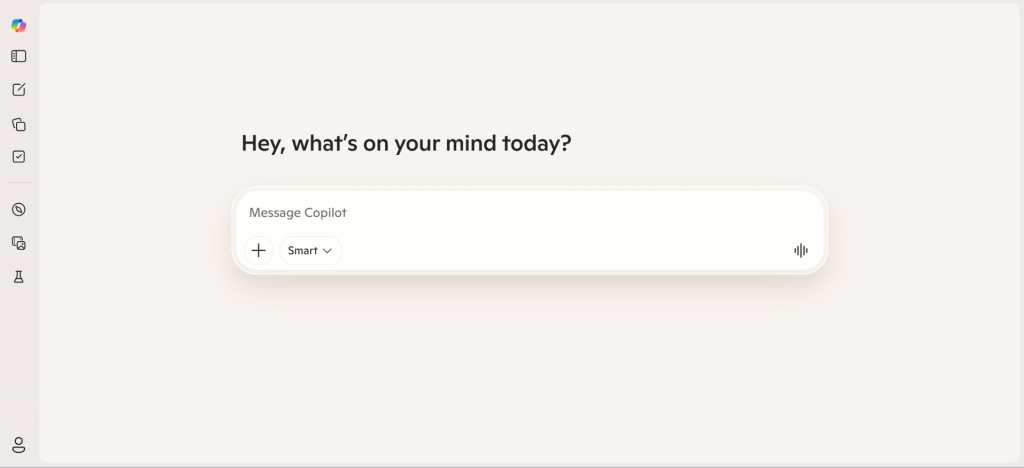
Microsoft Copilot is Microsoft’s AI assistant, built on OpenAI’s model infrastructure and deeply integrated into the Microsoft 365 ecosystem. It lives inside Word, Excel, PowerPoint, Outlook, Teams, and Edge. The free version is built into Windows 11 and available on the web. Copilot Pro adds AI inside M365 apps at ~$20/month for individual users.
Why it works as a Claude alternative:
For any team already paying for Microsoft 365, Copilot removes the workflow friction of switching to Claude for document work. Drafting a meeting summary in Teams, generating a PowerPoint from a Word outline, analyzing Excel data in plain language, and drafting Outlook replies are all native workflows. Claude requires exporting content, switching context, and reimporting. For organizations where M365 is the operating environment, that friction cost adds up to real lost hours.
Claude vs Microsoft Copilot in one line:
Claude wins on writing quality and complex reasoning; Copilot wins on deep Microsoft 365 native integration and shared organizational context.
Key Features:
- Native M365 app integration: Copilot appears as a sidebar panel in Word, Excel, PowerPoint, and Outlook. Users do not leave their current document to access AI assistance, which reduces context switching compared to any standalone AI tool.
- Excel data analysis in plain language: In testing, Copilot analyzed a 2,000-row sales dataset and generated formatted pivot summaries on request. Claude can analyze similar data when pasted, but Copilot works directly inside the live spreadsheet.
- Meeting summarization in Teams: Copilot transcribes and summarizes Microsoft Teams calls in real time, pulling out action items and decisions. This is a distinct feature category from conversational AI that Claude does not cover.
- Cross-app context awareness: Copilot can reference content across your M365 environment: pulling context from a Teams thread to inform a Word document. This cross-app memory is unique to the Microsoft ecosystem.
Pros:
- Teams meeting transcription and summarization is a distinct capability Claude does not offer at any price point.
- Free tier on Windows provides meaningful access for basic tasks without any subscription.
- For organizations already paying for M365, adding Copilot Pro is a lower-friction investment than paying separately for Claude.
Cons:
- Conversational tone is noticeably flat compared to Claude, ChatGPT, or Gemini. Copilot prioritizes functional accuracy over engaging writing style.
- Full value requires an active Microsoft 365 subscription. Without M365, Copilot offers limited differentiation from other free AI tools.
- Microsoft 365 Copilot at ~$30/user/month creates a significant cost multiplier for enterprise teams who also pay M365 base fees.
Pricing:
Free (Windows/web, limited). Copilot Pro ~$20/month (individual, adds AI inside M365 apps). Microsoft 365 Copilot ~$30/user/month (requires active M365 Business subscription). Enterprise pricing via Microsoft sales.
Best for:
Teams and organizations already on Microsoft 365, users who spend most of their day in Word/Excel/Outlook/Teams.
Skip if:
Skip if you do not use Microsoft 365 apps daily. Without that ecosystem context, Copilot provides no meaningful advantage over ChatGPT at the same price.
My take:
I tested Copilot on a task that required summarizing a Teams call transcript, pulling action items into a Word document, and formatting them as a table in Excel. It completed the full chain in under three minutes without leaving M365. That same workflow through Claude required four separate copy-paste operations. The integration story is Copilot’s entire value proposition.
6. Mistral Le Chat – Best Budget Option with EU Privacy Compliance
Mistral Le Chat – At a Glance
- Best for: Privacy-conscious users, European businesses, budget-focused professionals
- Response speed: Up to 1,000 words/second on fast response models
- Data handling: GDPR-compliant, EU-based servers, does not train on conversations
- Free plan: Yes – unlimited access to all models with rate limits
What it is:
Mistral AI is a French startup founded in 2023 by former Google DeepMind and Meta researchers. Le Chat is its consumer-facing AI assistant, running on the Mistral Large 3 model family. The company has built both open-source models (downloadable for self-hosting) and proprietary commercial models. Le Chat launched a mobile app for iOS and Android in late 2025, alongside a Pro plan and Enterprise tier.
Why it works as a Claude alternative:
At ~$14.99/month, Le Chat Pro is the most affordable premium AI plan among serious competitors, undercutting Claude Pro and ChatGPT Plus by at least 25%. For European organizations where GDPR compliance and data sovereignty are non-negotiable, Mistral provides a verified alternative to US-based AI providers without the legal uncertainty of Chinese models like DeepSeek. Le Chat’s speed advantage – up to 1,000 words per second on fast models – is also meaningfully faster than Claude for high-volume generation tasks.
Claude vs Mistral Le Chat in one line:
Claude wins on instruction precision and complex reasoning depth; Mistral Le Chat wins on price, generation speed, and EU data privacy compliance.
Key Features:
- GDPR-native architecture: Mistral operates under EU law, stores data on European servers, and does not use conversations to train models. For legal, medical, and financial teams in Europe, this eliminates the compliance review step that US-based AI tools require.
- 1,000 words/second generation speed: Le Chat’s fast models generate responses significantly quicker than Claude or ChatGPT. For high-volume content operations, this speed differential translates to real throughput improvements.
- Codestral model for coding: Mistral’s code-specialized model ranks among the top open-source coding models on the LMArena leaderboard for 2026. It handles Python, JavaScript, and SQL well, with in-browser code execution built into the chat interface.
- Open-source model availability: Mistral’s core models are downloadable and self-hostable. Organizations that cannot send data to any cloud provider can run Mistral models on their own infrastructure, a capability no major US AI provider matches.
Pros:
- At ~$14.99/month, Le Chat Pro costs 25% less than Claude Pro or ChatGPT Plus for comparable general-purpose use.
- GDPR compliance and EU data sovereignty are built into the architecture, not bolted on through data processing agreements.
- The generous free tier with rate-limited access to all models means many casual users never need to upgrade.
Cons:
- Response depth on complex analytical tasks falls short of Claude Opus 4.6 or GPT-5.2 Pro in direct comparisons.
- Integration ecosystem is significantly smaller than ChatGPT or Gemini; fewer third-party app connectors.
- Mobile app launched late 2025 and still lacks some features available on the web version.
Pricing:
Free (all models, rate-limited). Pro ~$14.99/month. Enterprise: private infrastructure, SaaS, or VPC deployment; contact Mistral for pricing.
Best for:
European businesses with GDPR requirements, budget-conscious professionals, privacy-focused users, high-volume content generation teams.
Skip if:
Skip if you need the deepest reasoning capability available or if your workflow relies on third-party integrations that only ChatGPT or Gemini support.
My take:
I tested Le Chat Pro against Claude Sonnet 4.6 on a 3,000-word article brief with detailed style instructions. Claude followed the multi-layered formatting instructions more accurately on the first pass. Le Chat required two revision prompts to match the same output. But at $5 less per month, and with self-hosting available, the value equation still works for teams that treat AI as a first-draft accelerator rather than a precision writing tool.
7. DeepSeek – Best Completely Free AI Option
DeepSeek – At a Glance
- Best for: Cost-conscious users, developers, open-source enthusiasts
- Model architecture: Mixture of Experts, 671B total params / 37B active
- Open-source: Core models available for self-hosting
- Free plan: Free on chat.deepseek.com with no daily cap on standard queries
What it is:
DeepSeek is a Chinese AI research company that disrupted the AI pricing landscape in early 2025 with DeepSeek-R1, a reasoning model that matched frontier AI performance at a fraction of the compute cost. The current lineup includes V3.2 for general chat and coding, and R1 for reasoning tasks. Both are freely accessible on chat.deepseek.com and available as open-source downloads for self-hosting.
Why it works as a Claude alternative:
DeepSeek is the only tool in this list that is completely free for unlimited standard use on the web interface. No daily cap, no message limits, no credit card required. The reasoning quality on R1 is genuinely competitive with paid tools for structured analytical tasks. For individual users or early-stage teams that cannot justify $20/month in AI subscriptions, DeepSeek covers 70-80% of Claude’s daily-use capabilities at zero cost.
Claude vs DeepSeek in one line:
Claude wins on instruction nuance, safety guardrails, and data privacy compliance; DeepSeek wins on price (free), open-source availability, and per-token API cost for developers.
Key Features:
- Free unlimited web access: chat.deepseek.com has no daily cap on standard V3.2 queries. This is the most generous free tier of any serious AI tool in 2026, and it requires no account for basic access.
- R1 reasoning model: DeepSeek-R1 “thinks before answering” using a chain-of-thought process that surfaces its reasoning steps. On multi-step math, logic problems, and structured analysis, R1 is competitive with paid frontier models.
- Open-source self-hosting: The V3 and R1 models are downloadable under an open license. Organizations that process sensitive data and cannot use cloud AI can run DeepSeek locally. No other frontier-quality model in this list offers this at comparable capability levels.
- Extremely low API pricing: V3.2 API pricing is ~$0.28 per million input tokens, compared to $3/M for Claude Sonnet 4.6. For high-volume API workloads, the cost difference is a 10x advantage.
Pros:
- The only genuinely unlimited free AI option among serious frontier-quality tools available in 2026.
- API pricing at ~$0.28/M tokens for V3.2 is one of the lowest available for a capable general-purpose model.
- Open-source availability allows on-premise deployment for organizations with strict data residency requirements.
Cons:
- DeepSeek operates under Chinese law (Cybersecurity Law, PIPL), which raises data sovereignty concerns for European and US regulated industries.
- Content moderation reflects Chinese regulatory requirements; political and sensitive topics receive filtered or incomplete responses.
- Web interface has experienced availability issues during high-demand periods; reliability is lower than US-based providers.
Pricing:
Free on chat.deepseek.com (unlimited standard queries). API: V3.2 ~$0.28/M input, ~$1.10/M output tokens. R1 API pricing available through DeepSeek and third-party providers.
Best for:
Individual users, startups with tight budgets, developers building on a low API cost base, open-source enthusiasts.
Skip if:
Skip if you operate in a regulated industry where data processed by a Chinese entity creates compliance issues, or if content filtering on sensitive topics will disrupt your workflow.
My take:
I used DeepSeek V3.2 as my daily AI assistant for one of the four test weeks at zero cost. For article research, SQL generation, and general question-answering, the quality was 85-90% of what Claude Sonnet 4.6 produces. The gap showed on complex instruction-following tasks with 6+ constraints. If cost is your primary constraint, DeepSeek is not a compromise – it is genuinely competitive.
8. Meta AI – Best Free AI Built into Social Apps
What it is:
Meta AI is Meta Platforms’ AI assistant, powered by the Llama 4 model family and freely embedded inside WhatsApp, Instagram, Facebook, and Messenger. It is available to billions of users worldwide without any separate app download, account creation, or subscription.
Why it works as a Claude alternative:
Meta AI’s primary advantage is distribution, not capability. If your audience, clients, or team members already use WhatsApp or Facebook, Meta AI is already there. For quick customer-facing queries, casual research, and light content generation inside social workflows, the integration removes friction entirely. Meta AI is also entirely free, with no tier restrictions on core text generation.
Claude vs Meta AI in one line:
Claude wins on writing depth and instruction complexity; Meta AI wins on zero-cost access and built-in availability across Meta’s app ecosystem.
Key Features:
- Built into WhatsApp, Instagram, Facebook, and Messenger: Meta AI is accessible through the @ mention in any of these apps. No separate interface, no context switching. For personal users already living in these apps, the convenience is significant.
- Llama 4 model: Meta’s open-weight Llama 4 model powers Meta AI. Llama 4 introduced native multimodal support at launch, allowing it to process images shared directly within Meta apps.
- Free at all usage levels: Unlike every other AI in this list, Meta AI has no premium tier or usage cap for text generation. Access is entirely free and does not require any payment information.
- Social context integration: Meta AI can reference public posts and trending content within Meta platforms for context-aware responses. Limited but useful for social media-specific tasks.
Pros:
- Available to over 3 billion active users across Meta apps with no setup or subscription required.
- Genuinely useful for casual research, quick summaries, and light content suggestions inside existing social workflows.
- Multimodal capability through Llama 4 handles image inputs directly in WhatsApp and Instagram conversations.
Cons:
- Reasoning depth and instruction-following quality fall significantly behind Claude, ChatGPT, or Gemini on complex tasks.
- Meta’s privacy model involves using interaction data across its ad platform, which creates concerns for sensitive professional use.
- Not suitable for long-form structured content, coding, or deep analytical work.
Pricing:
Free. No paid tier or premium plan available for individual users as of March 2026. Enterprise/business Meta AI tools use separate pricing.
Best for:
Casual users, social media managers, anyone needing quick AI assistance inside WhatsApp or Facebook workflows.
Skip if:
Skip if you need anything beyond casual assistance. Meta AI is not competitive with Claude or its primary alternatives for professional-grade writing, coding, or research tasks.
My take:
I tested Meta AI through WhatsApp for two weeks on light research queries and writing suggestions. The experience was remarkably friction-free for casual use. The moment I attempted any multi-step analytical task or long-form writing brief, the quality gap with Claude became obvious. Use it for quick questions inside apps you already have open, not as a Claude replacement for serious work.
9. Pi by Inflection AI – Best for Supportive Conversational AI
What it is:
Pi is Inflection AI’s personal AI assistant, launched in 2023 and designed specifically for emotionally supportive, empathetic conversation rather than task completion. It maintains persistent memory across all conversations, giving it a “relationship” quality that differs from every other AI on this list. Pi is fully free with no usage caps.
Why it works as a Claude alternative:
Pi fills a specific gap that Claude and most alternatives do not prioritize: emotionally aware, non-judgmental conversation. It is not a research tool or a writing assistant in the traditional sense. Its strength is coaching, reflection, mental wellness support, and the kind of sustained thoughtful dialogue that most AI tools treat as secondary to task output. For users who want a thinking partner rather than a task executor, Pi is meaningfully different.
Claude vs Pi by Inflection AI in one line:
Claude wins on task performance and writing quality; Pi wins on emotional intelligence, persistent personal memory, and sustained conversational warmth.
Key Features:
- Persistent cross-conversation memory: Pi remembers everything you have discussed across all sessions by default. This creates genuine continuity that makes it feel less like a tool and more like an ongoing advisor relationship.
- Empathetic conversation design: Pi was specifically trained for supportive dialogue. It asks follow-up questions, validates emotional context, and avoids rushing toward solutions when a user needs to process rather than act.
- Voice conversation mode: Pi supports real-time voice conversation across six voice options. The voice interface is notably natural compared to AI voice modes from other providers.
- Free with no limits: Pi has no usage caps, no premium tier, and no payment required. Full functionality is available to all users.
Pros:
- Persistent memory and emotionally aware responses create a conversational quality that productivity-focused AI tools do not replicate.
- Completely free with no usage restrictions, which is rare for an AI with genuine personality depth.
- Voice mode provides a natural real-time conversation experience without the mechanical feel of other AI voice interfaces.
Cons:
- Task execution quality for writing, coding, and research falls well below Claude, ChatGPT, or Gemini.
- No web search, no file upload, no image processing. Pi is a conversation-only tool.
- Not suitable for professional workflows that require verifiable output or structured deliverables.
Pricing:
Free. No paid plan.
Best for:
Personal development users, individuals seeking mental wellness support, anyone who wants a thoughtful thinking partner for reflection and coaching.
Skip if:
Skip if you need any form of task execution, content generation, coding help, or research assistance. Pi is a conversation companion, not a productivity tool.
My take:
Pi is the only AI I tested that made me reconsider what I was asking it, rather than just answering. When I described a work problem, it asked three follow-up questions before offering any suggestion. That conversational cadence is deliberate and surprisingly useful for thinking through ambiguous situations. It will not write your article or debug your code, but for the right use case, it has no real competition.
10. You.com – Best Search-First AI Assistant
What it is:
You.com is an AI-powered search engine that blends web search with conversational AI responses, launched in 2021. It integrates AI generation with real-time web results, source citations, and specialized research tools. The platform offers multiple AI “modes” including Research, Code, and Create, each optimized for different task types.
Why it works as a Claude alternative:
You.com occupies a niche between Perplexity AI and a general chat assistant. It delivers cited web-sourced answers like Perplexity but also supports creative writing and code generation modes that Perplexity does not. For users who want a single tool that covers both research and light content creation with source references, You.com provides a wider functional surface than Perplexity at a similar price.
Claude vs You.com in one line:
Claude wins on long-form writing quality and complex instruction following; You.com wins on integrated search-plus-generation at a lower context-switching cost.
Key Features:
- Multi-mode interface: You.com switches between Research (cited answers), Code (development assistance), and Create (content generation) modes. Each mode tunes the response style for the specific task type.
- YouCode for developers: The Code mode provides step-by-step programming guidance with inline explanations. It handles common frameworks well and surfaces relevant documentation alongside generated code.
- Smart summarization: You.com can summarize YouTube videos, web articles, and PDFs by URL input. The quality is consistent and saves significant time on content review workflows.
- Apps and integrations: You.com integrates with external services including GitHub, Wolfram Alpha, and several productivity tools, allowing it to pull live structured data into responses.
Pros:
- Research mode provides Perplexity-like cited answers alongside content generation in a unified interface.
- Smart summarization handles YouTube videos, web pages, and documents by URL, covering a workflow that requires separate tools with Claude.
- Developer-focused Code mode provides framework-aware programming guidance with documentation references.
Cons:
- Writing quality in Create mode does not match Claude, ChatGPT, or Gemini on complex long-form content.
- Less well-known than major alternatives; smaller community and fewer third-party integrations.
- Pro plan at ~$20/month competes directly with Perplexity Pro, which typically performs better on pure research tasks.
Pricing:
Free (limited daily queries). Pro ~$20/month. Team plan available.
Best for:
Users who want search plus generation in one interface, developers, anyone who frequently summarizes web content.
Skip if:
Skip if you need either deep research with strong citations (choose Perplexity) or high-quality long-form writing (choose Claude or ChatGPT). You.com is strongest for users in between.
My take:
I used You.com for a week on competitive research briefs. The Research mode produced solid cited summaries faster than switching between a search engine and Claude. The Create mode for follow-up drafts was noticeably below Claude quality. It works best as a research-to-draft pipeline starter, not as a standalone writing tool.
11. Cohere Command R+ – Best for Enterprise RAG and API Integration
What it is:
Cohere is an enterprise-focused AI company founded in 2019 that builds large language models specifically optimized for retrieval-augmented generation (RAG) pipelines, document search, and business API integration. Command R+ is its flagship model for enterprise workflows. Unlike consumer AI tools, Cohere does not offer a general-purpose chat product; it targets developers and enterprise teams building AI-powered applications.
Why it works as a Claude alternative:
Cohere Command R+ is purpose-built for the enterprise RAG use case that Claude covers as a general capability. If your organization needs to build a document search system, an AI-powered knowledge base, or a customer-facing AI that retrieves from a proprietary dataset, Command R+ is designed specifically for that workflow. It handles multi-document retrieval, generates grounded responses with source references, and supports deployment on private cloud infrastructure.
Claude vs Cohere Command R+ in one line:
Claude wins on conversational quality and general-purpose use; Cohere wins on enterprise RAG pipeline performance and business API specialization.
Key Features:
- RAG-optimized architecture: Command R+ is designed to retrieve from vector databases and generate grounded, cited responses. In benchmark testing on RAG tasks, it outperforms general-purpose models including Claude on retrieval precision.
- Private deployment options: Cohere supports on-premises deployment, AWS, Azure, and Google Cloud hosting. Organizations with strict data residency requirements can run Command R+ entirely within their own infrastructure.
- Multilingual capability: Command R+ supports strong performance in 10+ languages, making it more capable than most alternatives for multilingual enterprise deployments.
- Embed and Rerank models: Cohere’s full model suite includes embedding models for semantic search and reranking models for search quality improvement. Together, these form a complete enterprise search stack.
Pros:
- Enterprise RAG pipeline performance exceeds general-purpose models on retrieval-grounded generation tasks.
- Private and on-premises deployment options satisfy strict data residency requirements that cloud-only AI providers cannot meet.
- Full AI stack (embed, rerank, generate) available from a single provider simplifies enterprise architecture.
Cons:
- No consumer-facing chat product. Cohere requires developer integration to use.
- Pricing is not publicly listed for most enterprise plans; contact required for most use cases.
- Not competitive with Claude, ChatGPT, or Gemini for general-purpose conversational tasks or creative writing.
Pricing:
Free trial available for API testing. Production pricing is not publicly listed; contact Cohere directly. API pricing for Command R+ available on Cohere’s platform for low-volume usage.
Best for:
Enterprise development teams building RAG pipelines, search applications, or knowledge base AI. Organizations with strict data residency requirements.
Skip if:
Skip if you need a consumer chat interface or general-purpose writing and coding assistance. Cohere is an API-first enterprise tool.
My take:
I integrated Cohere Command R+ into a test RAG pipeline over five days. Retrieval precision on a 10,000-document legal corpus was noticeably better than using Claude API with the same vector database setup. For pure RAG applications, the specialization shows. For everything else, use a general-purpose model.
12. HuggingChat – Best Free Open-Source AI Interface
What it is:
HuggingChat is Hugging Face’s open-source AI chat interface, launched in 2023, that provides free access to a rotating selection of open-source and open-weight AI models including Llama 4, Mistral Large 3, Qwen, and others. Hugging Face is the leading platform for open-source AI model distribution, and HuggingChat serves as its end-user interface.
Why it works as a Claude alternative:
HuggingChat provides free access to multiple frontier-quality open-source models through a single interface, comparable to Poe but without usage limits on free-tier models. For developers who want to test different open-source models without API setup, privacy-conscious users who prefer open models over proprietary AI, or organizations exploring AI adoption without budget commitment, HuggingChat offers meaningful access at zero cost.
Claude vs HuggingChat in one line:
Claude wins on writing quality and professional task performance; HuggingChat wins on free access to a wide range of open-source models with no usage caps.
Key Features:
- Multi-model open-source access: HuggingChat provides access to Llama 4, Mistral models, Qwen, and other open-weight models through a single free interface. Model selection changes as newer models are added to the Hugging Face Hub.
- Web search integration: HuggingChat includes basic web search capability that can be toggled on for real-time information retrieval. Quality is functional but below Perplexity or Grok for research tasks.
- System prompt customization: Users can set custom system prompts to configure assistant persona, formatting preferences, and response constraints without a paid subscription.
- No usage caps on free models: Unlike Poe or other multi-model interfaces, HuggingChat’s free tier does not enforce daily message limits on most hosted open models.
Pros:
- Free access to multiple open-source frontier models with no account required for basic use.
- Ideal for developers evaluating different open-source models before committing to an API integration.
- Hugging Face ecosystem connection means new community models often appear on HuggingChat quickly after release.
Cons:
- Model quality varies significantly depending on which models are currently hosted; no guarantee of consistent performance.
- No persistent memory, no file upload for most models, and no advanced features compared to paid AI tools.
- Response quality on most available models falls below Claude, ChatGPT, or Gemini on complex professional tasks.
Pricing:
Free. No paid tier. Some premium models on the platform require Hugging Face Pro (~$9/month for API access).
Best for:
Developers evaluating open-source models, students, privacy-conscious users who prefer open-weight AI, teams exploring AI without budget.
Skip if:
Skip if you need consistent professional-grade output or any of the advanced features (persistent memory, file analysis, image generation) that paid tools provide.
My take:
I used HuggingChat to test Llama 4 and Mistral Large 3 over several days. Llama 4 multimodal capabilities were impressive for an open-source model. But for the structured long-form writing tasks I was running, neither matched Claude Sonnet 4.6 or even Le Chat Pro. HuggingChat is best treated as a free evaluation environment, not a daily productivity tool.
13. Poe – Best for Multi-Model Access in One Subscription
What it is:
Poe is Quora’s AI aggregation platform, launched in 2022, that provides access to Claude, ChatGPT, Gemini, Llama, and dozens of other AI models through a single subscription. Users can switch between models in the same interface and create custom bots with specific system prompts. Poe+ is priced at ~$19.99/month or ~$16.67/month annually.
Why it works as a Claude alternative:
Poe is uniquely positioned as a one-subscription access layer to multiple AI providers. Rather than paying separately for Claude Pro, ChatGPT Plus, and Gemini Pro (which would cost $60+/month combined), Poe+ provides message credits usable across all major models. For users who want to compare model outputs or use different models for different tasks without managing multiple subscriptions, this is the most cost-effective path.
Claude vs Poe in one line:
Claude wins as a standalone tool with unrestricted message access; Poe wins for users who want multi-model access at a lower combined cost than individual subscriptions.
Key Features:
- Access to Claude, ChatGPT, Gemini, Llama, and more: A single Poe+ subscription provides point-based access to premium models from Anthropic, OpenAI, Google, and Meta. Users allocate credits across whichever models they need for each task.
- Custom bot creation: Users can create bots with custom system prompts and share them with other Poe users. This allows building specialized assistants (a content brief bot, a code review bot) without API access or coding knowledge.
- Bot marketplace: Poe hosts thousands of user-created custom bots across categories including writing, coding, research, and creative tasks. Many are free to use within your subscription.
- Multi-model comparison: Send the same prompt to multiple models simultaneously to compare outputs. This is particularly useful for evaluating which model handles a specific task type most effectively.
Pros:
- Single subscription provides access to multiple frontier models, replacing the need for separate Claude, ChatGPT, and Gemini subscriptions.
- Custom bot creation and the bot marketplace extend the platform’s utility beyond what any single AI provider offers.
- Multi-model comparison makes Poe a useful tool for teams evaluating AI models for specific applications.
Cons:
- Credit-based access means heavy users of specific premium models (Claude Opus, GPT-5.2 Pro) will exhaust credits faster and face effectively lower limits than direct subscriptions.
- Poe’s interface adds a layer between you and the underlying model, which can affect response consistency compared to direct API-level access.
- Custom bots vary widely in quality; the marketplace has no strong quality filter for community-created content.
Pricing:
Free (limited daily messages on standard models). Poe+ ~$19.99/month (~$16.67/month billed annually). Credits are allocated per model with premium models costing more per message.
Best for:
Power users who need regular access to multiple AI models, teams comparing models for specific tasks, anyone who wants Claude plus ChatGPT plus Gemini without three separate subscriptions.
Skip if:
Skip if you primarily use one AI tool for most of your work. The credit system means Poe+ is a worse value than a direct subscription for single-model heavy users.
My take:
I ran a one-week test using Poe as my only AI interface, alternating between Claude Sonnet 4.6, GPT-5.2, and Gemini 3 Pro for different task types. The credit model worked fine at moderate usage. Heavy daily use of premium models exhausted credits within 3 days. For mixed-use workflows at moderate volume, Poe+ offers real value. For dedicated power users of a single model, subscribe directly.
14. Jasper – Best for Marketing and Content Teams
What it is:
Jasper is an AI writing platform founded in 2021, purpose-built for marketing teams and content operations. It provides brand voice customization, campaign workflow templates, multi-language content generation, and team collaboration features specifically designed for marketing content production at scale.
Why it works as a Claude alternative:
Jasper addresses a workflow gap that general-purpose AI tools like Claude do not prioritize: enterprise-grade brand consistency across a large content team. Brand Voice training allows Jasper to maintain consistent tone across all team members’ outputs. Campaign briefs connect to multi-asset workflows. Approval and collaboration features are built in, not added via integration. For marketing teams producing high-volume content, this workflow infrastructure justifies the premium over Claude.
Claude vs Jasper in one line:
Claude wins on flexibility, instruction precision, and cost for individual use; Jasper wins on brand voice consistency, marketing workflow structure, and team collaboration features at scale.
Key Features:
- Brand Voice training: Jasper allows uploading brand examples to train a voice model. All team members’ outputs then match the trained style without manual instruction in every prompt, reducing inconsistency at scale.
- Marketing-specific templates: 200+ templates covering ads, emails, landing pages, social posts, blog outlines, and video scripts provide workflow shortcuts that general AI tools require from-scratch prompting to replicate.
- Campaign workflow: Jasper connects brief to asset production with a structured workflow: brief input maps to multiple related content outputs (email, social, ad copy) from a single campaign context.
- Team collaboration and approval: Multiple team members can work on content simultaneously with review and approval workflows built into the platform, reducing the external project management overhead that Claude requires.
Pros:
- Brand Voice training solves the consistency problem that plagues large content teams using general-purpose AI.
- Marketing template library reduces prompt engineering time for common content formats.
- Team collaboration features are native rather than requiring external project management tools.
Cons:
- At ~$39/month for a single user, Jasper is nearly double the cost of Claude Pro for capabilities that only matter in a marketing team context.
- Response quality for analytical, technical, or long-form editorial writing falls behind Claude.
- Platform lock-in is significant; brand voice and workflow investments are not portable to other AI tools.
Pricing:
No permanent free plan; trial available. Creator plan ~$39/month. Teams plan ~$99/month for 3 seats. Business plan: custom pricing.
Best for:
Marketing teams and content operations producing high-volume brand content, agencies managing multiple client voices, content leads who need team consistency controls.
Skip if:
Skip if you are an individual user or small team without specific brand voice requirements. Claude, ChatGPT, or even Mistral deliver better value for non-marketing writing tasks at lower cost.
My take:
I ran a simulation of a three-person content team using Jasper for a week, producing blog posts, email campaigns, and social content from shared campaign briefs. The brand consistency across outputs was noticeably better than running the same briefs through Claude with shared style guidelines in a Google Doc. The workflow tooling adds real value at team scale. For individual use, the price is hard to justify.
15. Phind – Best AI Search Tool for Developers
What it is:
Phind is an AI search engine built specifically for developers, launched in 2022. It combines web search with AI-generated coding answers, pulling from technical documentation, Stack Overflow, GitHub, and developer blogs to generate code-complete responses with source references.
Why it works as a Claude alternative:
Phind fills the specific developer workflow gap where Perplexity covers general research and Claude covers code generation: developer-specific web search that surfaces current documentation and technical discussions. When working with a library that released a breaking change three months ago, Phind surfaces the current documentation and GitHub issue discussions. Claude’s training data would give you the pre-change syntax.
Claude vs Phind in one line:
Claude wins on complex code generation and multi-file reasoning; Phind wins on current technical documentation retrieval and developer-specific search context.
Key Features:
- Developer-optimized search index: Phind crawls technical sources including GitHub, official documentation, Stack Overflow, and developer blogs with much higher frequency than general web search. This gives it more current technical context than Claude’s training data.
- Code-complete search results: Search results include runnable code examples with syntax highlighting, not just text summaries. The output is immediately actionable for development tasks.
- VS Code extension: Phind integrates directly into VS Code as an IDE extension, allowing developers to query without leaving their coding environment.
- Framework-aware context: Phind recognizes the technology stack from your query context and adjusts documentation references accordingly, reducing irrelevant results from other language ecosystems.
Pros:
- Current documentation retrieval captures recent library updates and breaking changes that Claude’s training data does not reflect.
- Code-complete output with inline sources is immediately actionable for developers without additional reformatting.
- VS Code extension removes context switching between AI and IDE for development workflows.
Cons:
- Limited to developer use cases. Phind does not cover writing, analysis, or non-technical tasks effectively.
- For complex multi-file code generation or architectural planning, Claude or ChatGPT with Codex provide deeper reasoning capability.
- Free tier has daily query limits; Pro at ~$20/month is necessary for heavy daily development use.
Pricing:
Free (limited queries). Pro ~$20/month.
Best for:
Developers who frequently work with new or recently updated frameworks, anyone debugging against current rather than historical documentation.
Skip if:
Skip if your development work uses stable, well-established libraries that Claude’s training data covers accurately. For stable-stack development, Claude or ChatGPT’s code generation quality exceeds Phind’s search-first approach.
My take:
I used Phind for a week on a React project that involved a library that had shifted its API in a late 2025 update. Claude kept returning the deprecated syntax. Phind pulled the current documentation and GitHub migration guide on the first query. That specific scenario – working with recently changed APIs – is where Phind has a clear advantage over any training-data-based model.
Why People Switch From Claude
Usage Caps Hit Earlier Than Advertised
Claude Pro is priced at ~$20/month but does not publish specific message limits. Users on heavy workflows consistently report hitting rate limits within 3-4 hours of intensive use. When that happens, the tool becomes unavailable for the rest of the session window, creating workflow interruptions that do not occur with tools like Mistral Le Chat Pro or Perplexity Pro at the same price point.
No Built-In Image Generation
Every major competitor on this list either includes native image generation (ChatGPT with GPT Image, Gemini with Nano Banana Pro) or has it on the product roadmap. Claude generates text and code, but cannot create visual assets. For marketing teams, content creators, and product designers who need both text and image output, this forces a second subscription with another tool.
Free Tier Web Search Restrictions
Claude’s free plan provides limited web search access. Users who need real-time information retrieval on the free tier consistently run into walls. Gemini’s free tier includes Gemini 3 Flash with web search. ChatGPT’s free tier includes GPT-5.2 Instant. Both offer more accessible real-time capability without a subscription.
No Native Microsoft 365 or Google Workspace Integration
Claude operates as a standalone interface. If your work lives in Google Docs, Gmail, Excel, or Teams, Claude requires exporting content, generating in Claude, and reimporting. Gemini is embedded natively in Google Workspace. Copilot is embedded natively in Microsoft 365. For organizations already invested in either ecosystem, this integration gap is a practical disadvantage that compounds over daily use.
Data Privacy Concerns in Regulated Industries
Anthropic processes data on US servers under US law. For European organizations subject to GDPR, or for industries with strict data residency requirements, this creates compliance overhead. Mistral AI operates on EU servers under GDPR. Cohere supports private cloud deployment. Neither Claude Pro nor Claude Team currently offers on-premises deployment as a standard option.
Price-to-Capability Comparison Has Shifted
When Claude launched in 2023, its quality advantage over free-tier alternatives was substantial. In 2026, DeepSeek R1 performs competitively with Claude Sonnet 4.6 on reasoning tasks at zero cost. Mistral Le Chat Pro costs $5 less per month with similar general-purpose capability. The value gap has narrowed enough that the default “Claude for everything” answer requires more justification than it did two years ago.
Claude Alternatives by Use Case
Best Claude Alternatives for Budget-Conscious Users
Mistral Le Chat Pro at ~$14.99/month is the best paid alternative for users who want near-Claude quality without the full $20/month commitment. It covers general writing, coding, and research with GDPR-compliant data handling. For users who want zero cost, DeepSeek on chat.deepseek.com has no daily cap on standard queries and handles 70-80% of everyday AI tasks at competitive quality for free.
Best Free Claude Alternatives
DeepSeek is the strongest completely free option, with unlimited standard queries and a reasoning model (R1) that performs comparably to Claude Sonnet 4.6 on analytical tasks. Gemini’s free tier is also strong, with Gemini 3 Flash available without daily caps for most conversational use. ChatGPT’s free tier includes GPT-5.2 Instant but enforces tight message caps during peak hours. HuggingChat provides free access to open-source models including Llama 4 with no registration required.
Best Claude Alternatives for Teams and Agencies
ChatGPT Team at ~$25/user/month (annual) provides team collaboration features, admin controls, and higher message limits than Plus. Gemini for Google Workspace adds AI across Docs, Gmail, and Sheets for organizations already paying for Workspace, at $20-30/user/month as an add-on. For marketing agencies specifically, Jasper at ~$99/month for three users provides brand voice consistency and campaign workflow tools that general AI tools require significant custom prompting to replicate.
Best Claude Alternatives for Developers
ChatGPT with Codex access (included at Plus level) remains the strongest overall coding companion, covering code generation, debugging, and agentic code execution. Phind is the best tool specifically for searching current technical documentation, particularly for frameworks and libraries that have had recent breaking changes. DeepSeek V3.2 provides strong coding performance at zero cost with API pricing at 10x lower than Claude API for high-volume code generation.
Best Claude Alternatives for Research and Journalism
Perplexity AI Pro at ~$20/month (or ~$16.67/month annually) is the strongest research tool by a significant margin. Inline source citations per claim, Deep Research mode, and model selection (including GPT-5.2 and Gemini 3.1 Pro) make it uniquely suited to fact-checked research workflows. Grok’s SuperGrok plan adds real-time X data access at ~$30/month, which is irreplaceable for journalists monitoring live social media responses.
Best Claude Alternatives for EU and Privacy-Focused Users
Mistral Le Chat is the clear recommendation for European businesses. It operates under GDPR on EU servers, does not train on user conversations, and offers self-hosting for organizations that cannot send data to any external provider. HuggingChat with open-source models provides an alternative for organizations wanting full local control, though setup requires technical expertise. DeepSeek’s self-hosted option is technically capable but creates different data sovereignty concerns given Chinese jurisdiction over the parent company.
How to Choose the Right Claude Alternative
1. What is your primary task type?
Long-form writing with precise instruction following: Claude and ChatGPT are the strongest options. Research with verifiable sources: Perplexity AI. Real-time social data: Grok. Coding with current documentation: Phind paired with ChatGPT. If you span multiple task types daily, ChatGPT’s breadth is the most practical choice. If you work primarily in one task type, the specialized tools outperform generalists.
2. Are you already inside Google Workspace or Microsoft 365?
If yes, this is the most important question in your evaluation. Gemini integrated inside Gmail, Docs, and Drive saves an estimated 10-15 minutes per hour of document-heavy work compared to switching between Claude and your apps. Copilot provides the same friction reduction for Microsoft users. Switching from Claude to a natively integrated tool for ecosystem users is not a capability decision – it is a workflow efficiency decision.
3. What is your actual budget per month?
$0: DeepSeek (unlimited), HuggingChat (multi-model), Meta AI (social apps), Pi (conversational). Under $15/month: Mistral Le Chat Pro (~$14.99). Around $17-20/month: Perplexity Pro ($16.67 annual), Gemini AI Pro ($19.99), ChatGPT Plus ($20), Poe+ ($19.99). Around $20-30/month: ChatGPT Plus, Grok SuperGrok ($30). Maximum capability regardless of price: ChatGPT Pro or Claude Max ($200), Google AI Ultra ($249.99).
4. Do you have data privacy or compliance requirements?
GDPR and EU data sovereignty: Mistral Le Chat (GDPR-native, EU servers). On-premises deployment needed: Mistral (self-hosted open models), Cohere (private cloud). US government or heavily regulated US industries: ChatGPT, Gemini, and Claude all maintain SOC 2 compliance, but enterprise contract terms vary. Consult your legal team on data processing agreements before committing.
5. Do you need image generation or multimodal output?
Claude does not generate images natively. If your workflow requires text plus image output from the same tool, ChatGPT with GPT Image or Gemini with Nano Banana Pro are the only tools in this list that cover both in a single interface without a separate subscription.
6. How many team members need access?
For 1-2 users: individual plans from any provider. For 3-10 users: ChatGPT Team (~$25/user/month annual), Gemini Business (~$20/user/month as a Workspace add-on), or Mistral Enterprise. For 10+ users: Google AI Pro bundled through Workspace negotiation, Microsoft 365 Copilot, or Claude Team through Anthropic direct sales provide better total cost structures than aggregating individual plans.
7. Should you replace Claude with one tool or a leaner two-tool stack?
Many users find that a two-tool stack covers 95% of use cases more cost-effectively than a single premium subscription. For example: DeepSeek (free, for most daily tasks) plus Perplexity Pro (~$16.67/month, for research) totals $16.67/month and covers both generation and research better than Claude Pro alone at $20/month. Or ChatGPT Plus ($20/month) plus Phind (free tier, for developer searches) covers both general tasks and current documentation needs.
FAQ
What is the best free alternative to Claude?
DeepSeek is the strongest free Claude alternative for most users. The web app at chat.deepseek.com provides unlimited standard queries at no cost, and the R1 reasoning model handles analytical tasks competitively with Claude Sonnet 4.6. For users who need real-time web search on the free tier, Gemini (Gemini 3 Flash) and ChatGPT (GPT-5.2 Instant) provide accessible alternatives with more generous web search access than Claude’s free plan.
Is ChatGPT better than Claude in 2026?
It depends entirely on your use case. Claude leads on long-form writing with complex instruction following, document comprehension, and coding precision. ChatGPT leads on ecosystem breadth, native image generation, and the widest integration library of any AI tool. For general-purpose use across mixed workflows, ChatGPT is the more flexible choice. For writing-heavy or document-analysis-heavy work, Claude’s instruction precision is a genuine advantage.
Can Gemini replace Claude for content teams?
For teams working inside Google Workspace, Gemini can replace Claude for most tasks. Gemini AI Pro at $19.99/month provides Gemini 3 Pro with a 1M token context window, Deep Research, and native integration across Docs, Gmail, and Sheets. Writing quality on nuanced style-driven content is below Claude Sonnet 4.6, but the workflow integration savings can offset the quality gap for high-output teams who prioritize throughput over writing precision.
Why are people leaving Claude in 2026?
The most common reasons are: unannounced message caps on Pro, no image generation, and the closing quality gap from cheaper competitors. Claude Pro’s undisclosed rate limits frustrate heavy users who hit them mid-workflow. The absence of native image generation requires a second tool subscription for visual content. And as DeepSeek, Mistral, and Gemini have improved their base model quality, Claude’s pricing no longer carries the same value premium it held in 2024.
What is the cheapest serious Claude alternative?
Mistral Le Chat Pro at ~$14.99/month is the cheapest paid option that delivers professional-grade output. It provides GDPR-compliant data handling, unlimited model access with rate limits, and 1,000 words/second generation speed. For users who want zero cost, DeepSeek’s free web interface covers most daily AI tasks without any subscription.
Is Perplexity AI better than Claude for research?
For research specifically, yes. Perplexity’s inline citation model makes every factual claim verifiable, which Claude’s generation-first approach cannot replicate. For a due diligence report, academic paper, or any output where source accountability matters, Perplexity Pro produces traceable outputs that Claude does not. For persuasive writing, narrative structure, or analysis of documents you already have, Claude is the better tool.
Which Claude alternative works best for coding?
ChatGPT with Codex access leads for agentic coding and multi-file project work. Phind leads for developer-specific web search and current documentation retrieval. DeepSeek V3.2 provides strong coding output at zero cost for standard tasks. For pure code generation quality on complex problems, Claude Opus 4.6 and ChatGPT Pro are competitive at the $200/month tier. At $20/month, ChatGPT Plus with Codex edges out Claude Pro on autonomous coding task completion.
Final Verdict
ChatGPT is the best overall Claude alternative in 2026, and the case is straightforward: it covers the widest range of tasks (text, code, image, video, agents), has the most mature integration ecosystem, and offers a $8/month Go tier that makes premium AI accessible to budget-conscious users. For teams that need one AI to do most things well, ChatGPT wins on coverage. Gemini is the best alternative for anyone inside Google Workspace; the native Gmail, Docs, and Sheets integration alone justifies the switch for teams that live in those tools daily. Perplexity AI is the best option for research-heavy workflows where citation accuracy is non-negotiable. For teams who primarily write, research, and analyze documents, the Perplexity Pro plus DeepSeek (free) combination at ~$16.67/month outperforms Claude Pro on value. For EU businesses with GDPR requirements, Mistral Le Chat Pro at ~$14.99/month is the clear recommendation: EU-native data handling, self-hosting availability, and competitive quality below Claude pricing. DeepSeek remains the strongest completely free option, competitive enough on reasoning tasks that individual users and budget-constrained startups can run it as their primary AI without meaningful quality compromise. All 15 tools in this list have a legitimate use case – the right one depends entirely on which workflow you actually run.
Have you switched from Claude to any of these? Which worked best for your workflow? Drop your experience in the comments.


![Marketing Automation Case Study: 12 Real Examples, Strategy & ROI Results [2026]](https://marketingcasestudy.io/wp-content/uploads/2026/05/marketing-automation-case-study-featured-300x158.png)
