The best project tracking tools help teams plan, monitor, and deliver projects on time by providing clear visibility into task progress, dependencies, resource allocation, and deadlines. Whether you’re managing a marketing campaign with dozens of deliverables, coordinating a software sprint with development and QA teams, or overseeing an enterprise portfolio of concurrent initiatives, project tracking in 2026 goes far beyond simple task lists. AI now predicts delays before they happen, automates status updates, and optimizes resource allocation across teams. The best platforms provide multiple views — Kanban, Gantt, timeline, calendar, and workload — so every stakeholder sees project status in the format that makes sense for their role. We evaluated 12 platforms across tracking depth, view flexibility, reporting quality, scalability, and real-world team adoption.
Quick Comparison
| Tool | Best For | Starting Price | Free Plan | Rating |
| Asana | Cross-functional team alignment with goal tracking | Free | $10.99/user/mo | Yes (10 users) | 9.4 |
| Monday.com | Visual, customizable project boards for non-technical teams | Free | $9/seat/mo | Yes (2 seats) | 9.2 |
| Jira | Agile software development with Scrum and Kanban | Free | $7.91/user/mo | Yes (10 users) | 9.0 |
| ClickUp | All-in-one project tracking with 15+ views | Free | $7/member/mo | Yes | 8.8 |
| Smartsheet | Spreadsheet-style project management for enterprise | $7/user/mo | 30-day trial | 8.6 |
| Trello | Simple Kanban boards for lightweight project tracking | Free | $5/user/mo | Yes | 8.4 |
| Wrike | Enterprise project management with advanced reporting | Free | $10/user/mo | Yes | 8.2 |
| Notion | Flexible database-driven project tracking | Free | $10/seat/mo | Yes | 8.0 |
| Basecamp | Simple all-in-one project collaboration | $15/user/mo | $299/mo flat | No (trial) | 7.8 |
| Zoho Projects | Affordable project tracking for SMBs | Free | $4/user/mo | Yes (3 users) | 7.6 |
| Teamwork | Agency project tracking with time and billing | Free | $11/user/mo | Yes (5 users) | 7.4 |
| Microsoft Project | Enterprise scheduling and portfolio management | $10/user/mo (Plan 1) | No | 7.2 |
Why 2026 Is Different
AI Predicts Project Risks Before They Materialize
Asana Intelligence flags at-risk projects before deadlines slip. Monday.com’s AI suggests workflow optimizations. Smartsheet predicts resource conflicts. The best project tracking tools in 2026 use AI to shift from reactive project management — discovering problems after they happen — to proactive intelligence that surfaces risks early enough to prevent them.
Multiple Views Became Table Stakes
Every serious project tracking tool now offers Kanban boards, Gantt charts, timeline views, calendar views, and workload views. The best project tracking tools in 2026 compete on how seamlessly teams switch between views and how well each view serves its intended audience — executives want dashboards, project managers want Gantt charts, and individual contributors want task lists.
Goal Alignment Connected Daily Tasks to Strategy
Asana’s Goals, Monday.com’s OKRs, and ClickUp’s Goals connect individual tasks to team objectives and company strategy. The best project tracking tools in 2026 answer not just ‘what’s the status of this task?’ but ‘how does this work contribute to our quarterly goals?’ — giving leadership visibility from company objectives down to individual deliverables.
Asana
| Best For | Cross-functional team alignment with goal tracking |
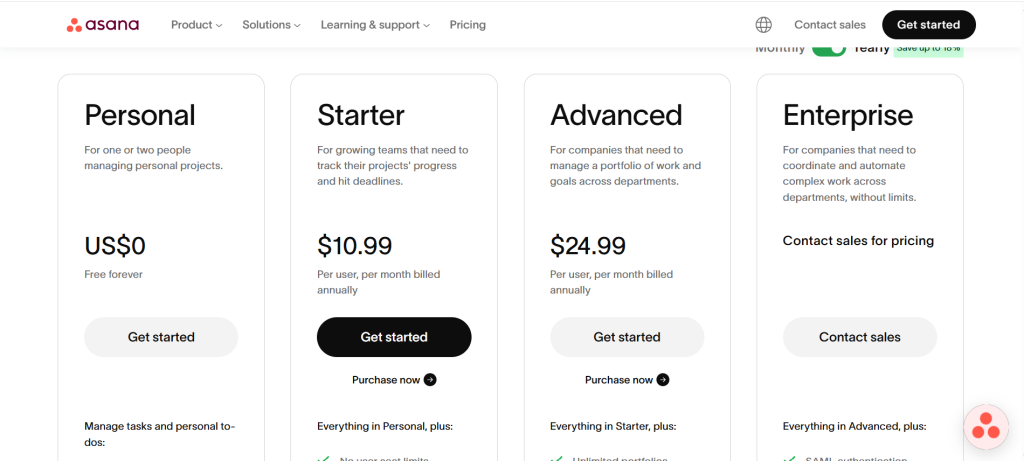
| Pricing | Free (10 users) | Starter $10.99/user/mo | Advanced $24.99/user/mo | Enterprise custom |
| Free Plan | Yes — up to 10 users with unlimited tasks |
| Key Strength | Best goal-to-task alignment connecting company strategy to daily execution |
| Features | Tasks, projects, portfolios, goals, timeline, workload, AI Intelligence, workflow builder, 200+ integrations |
| Our Rating | 9.4/10 |
Asana provides the best goal-to-task alignment among project tracking tools through its Work Graph architecture connecting company objectives to portfolios, projects, and individual tasks. Goals and OKRs track strategic progress. Portfolios provide executive-level visibility across all initiatives. Workflow Builder automates routine processes. AI Intelligence surfaces at-risk projects and suggests optimizations. Trusted by 85% of Fortune 100 companies. For cross-functional teams managing strategic initiatives where connecting daily work to company goals matters as much as tracking task status, Asana delivers the most strategically aligned project tracking tools experience.
Falls Short: Advanced features like Goals and Portfolios locked to $25/user/month tier. Each task can only have one assignee. Time tracking requires integrations. Pricing complexity with seat minimums. Verdict: Best project tracking tools choice for organizations connecting daily execution to strategic company goals.
Monday.com
| Best For | Visual, customizable project boards for non-technical teams |
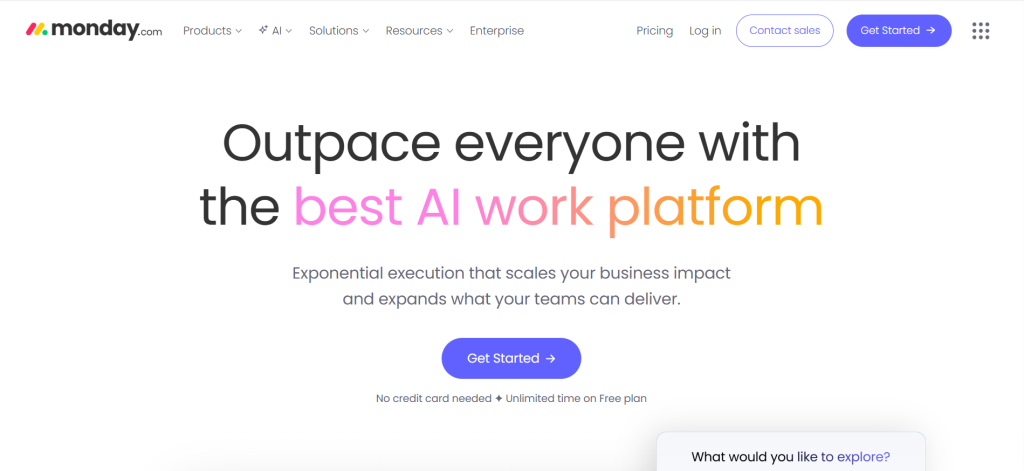
| Pricing | Free (2 seats) | Basic $9/seat/mo | Standard $12/seat/mo | Pro $19/seat/mo |
| Free Plan | Yes — up to 2 seats with 3 boards |
| Key Strength | Most visually engaging interface with colorful boards that make project tracking feel intuitive |
| Features | Custom boards, 8+ views, automations, dashboards, integrations, Monday AI, workdocs |
| Our Rating | 9.2/10 |
Monday.com provides the most visually engaging project tracking among project tracking tools with colorful, customizable boards that make complex work easy to understand at a glance. Over 180,000 customers. 250+ ready-made templates for fast starts. Automation rules handle repetitive tasks with simple if-then logic. Custom dashboards show project health in real time. For creative, marketing, and operations teams wanting visual project tracking without the learning curve of technical tools, Monday.com delivers the most approachable project tracking tools experience.
Falls Short: Minimum 3 seats on paid plans. Per-seat pricing escalates quickly for larger teams. Advanced features locked to higher tiers. Less suitable for software development compared to Jira. Verdict: Best project tracking tools choice for non-technical teams wanting visual, customizable project boards.
Jira
| Best For | Agile software development with Scrum and Kanban workflows |
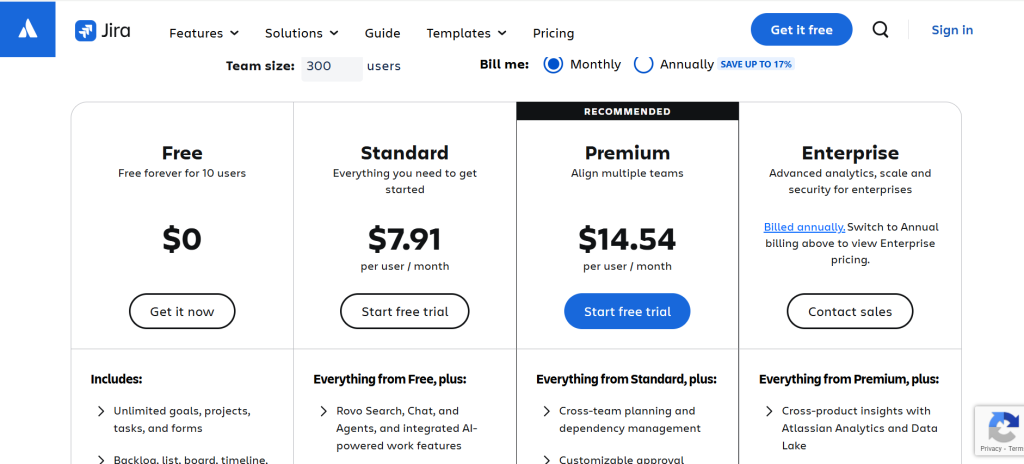
| Pricing | Free (10 users) | Standard $7.91/user/mo | Premium $14,54/user/mo | Enterprise custom |
| Free Plan | Yes — up to 10 users |
| Key Strength | Industry standard for Agile project tracking with Scrum boards, sprint planning, and backlog management |
| Features | Scrum/Kanban boards, sprints, backlogs, roadmaps, release tracking, Confluence integration, automation |
| Our Rating | 9.0/10 |
Jira provides the industry-standard Agile project tracking among project tracking tools with purpose-built Scrum boards, sprint planning, backlog management, and velocity reporting that software teams rely on worldwide. Bug tracking, release management, and deep developer tool integration with GitHub and Bitbucket. Atlassian ecosystem connects Jira to Confluence for documentation. For software development teams practicing Agile methodologies where sprint-based tracking and developer workflow integration are essential, Jira delivers the most development-focused project tracking tools experience.
Falls Short: Overwhelming for non-technical teams. Interface complex and not as intuitive as visual tools. Pricing climbs quickly for larger teams. Less suitable for marketing, creative, or operational projects. Verdict: Best project tracking tools choice for software development teams practicing Agile with Scrum or Kanban.
ClickUp

| Best For | All-in-one project tracking with maximum view flexibility |
| Pricing | Free | Unlimited $7/member/mo | Business $12/member/mo | Enterprise custom |
| Free Plan | Yes — unlimited tasks and members |
| Key Strength | Most views (15+) and most features in a single project tracking platform |
| Features | 15+ views, tasks, docs, goals, time tracking, whiteboards, dashboards, AI, automations |
| Our Rating | 8.8/10 |
ClickUp provides the most views and features among project tracking tools with 15+ ways to visualize work including list, board, Gantt, timeline, calendar, workload, table, and map views. Everything — docs, goals, time tracking, whiteboards, chat — lives in one platform. Free plan includes unlimited tasks and members. For teams wanting to consolidate multiple project tracking tools into one feature-rich platform with maximum flexibility, ClickUp delivers the most comprehensive project tracking tools experience.
Falls Short: Feature overload creates learning curve. Users report performance and stability issues. Requires significant setup to match specific workflows. Interface density can overwhelm new users. Verdict: Best project tracking tools choice for teams wanting maximum features and view flexibility in one platform.
Smartsheet
| Best For | Spreadsheet-style project management for enterprise teams |
| Pricing | Pro $7/user/mo | Business $25/user/mo | Enterprise custom |
| Free Plan | 30-day trial |
| Key Strength | Most familiar interface for spreadsheet users with enterprise-grade portfolio management |
| Features | Grid view, Gantt charts, resource management, portfolio dashboards, Control Center, automations |
| Our Rating | 8.6/10 |
Smartsheet provides the most familiar interface among project tracking tools for organizations where spreadsheet thinking prevails. The grid-based view feels like Excel enhanced with Gantt charts, resource management, and automated workflows. Portfolio prioritization matrices help leadership make data-driven decisions. Control Center standardizes project templates across the organization. For finance teams, operations managers, and enterprise PMOs who think in rows and columns but need collaboration beyond shared spreadsheets, Smartsheet delivers the most scalable project tracking tools experience.
Falls Short: Desktop and mobile apps feel dated. Pricing scales quickly beyond 10 users. Steep learning curve for advanced features like cross-sheet linking. Less intuitive collaboration than modern visual tools. Verdict: Best project tracking tools choice for enterprise teams wanting spreadsheet-familiar project management with portfolio oversight.
Trello
| Best For | Simple Kanban boards for lightweight project tracking |
| Pricing | Free (unlimited boards) | Standard $5/user/mo | Premium $10/user/mo | Enterprise custom |
| Free Plan | Yes — unlimited boards and members |
| Key Strength | Simplest drag-and-drop Kanban experience for teams wanting minimal complexity |
| Features | Kanban boards, cards, checklists, Power-Ups, Butler automation, calendar/timeline views |
| Our Rating | 8.4/10 |
Trello provides the simplest project tracking among project tracking tools through drag-and-drop Kanban boards that anyone can learn in minutes. Cards move through columns representing workflow stages. Checklists track subtasks. Power-Ups add functionality like calendar views, voting, and integrations. Butler automation handles repetitive card movements. For small teams, personal projects, and anyone who wants visual project tracking without setup complexity, Trello delivers the most intuitive project tracking tools starting point.
Falls Short: Limited beyond Kanban without Power-Ups. No native Gantt charts on free plan. Scales poorly for complex projects with many dependencies. Less reporting than dedicated project tools. Verdict: Best project tracking tools choice for small teams wanting simple, visual Kanban-based project tracking.
Wrike
| Best For | Enterprise project management with advanced reporting and proofing |
| Pricing | Free (limited) | Team $10/user/mo | Business $25/user/mo | Enterprise custom |
| Free Plan | Yes — limited features |
| Key Strength | Best built-in proofing and approval workflows for creative and marketing teams |
| Features | Gantt charts, Kanban, workload, time tracking, proofing, custom request forms, advanced reporting |
| Our Rating | 8.2/10 |
Wrike provides the best built-in proofing and approval among project tracking tools with visual markup directly on images, videos, and documents within the project workflow. Custom request forms standardize intake. Advanced reporting with cross-project analytics. Resource management visualizes team capacity. For marketing agencies, creative teams, and professional services organizations where file review and approval are integral to project delivery, Wrike delivers the most creative-workflow-integrated project tracking tools experience.
Falls Short: Interface not as intuitive as Asana or Monday. Pricing comparable to competitors for similar features. Free plan very limited. Learning curve for full functionality. Verdict: Best project tracking tools choice for creative and marketing teams needing built-in proofing and approval workflows.
Notion
| Best For | Flexible database-driven project tracking combined with documentation |
| Pricing | Free | Plus $10/seat/mo | Business $20/seat/mo |
| Free Plan | Yes — unlimited pages and databases |
| Key Strength | Most flexible project tracking through customizable databases linked to documentation |
| Features | Databases, multiple views, templates, Notion AI, wikis, timeline, calendar, board views |
| Our Rating | 8.0/10 |
Notion provides the most flexible project tracking among project tracking tools through customizable databases that you design from scratch. Create task databases with custom properties, then view them as boards, tables, timelines, or calendars. Link project tasks directly to documentation, meeting notes, and specifications. For teams wanting project tracking seamlessly integrated with knowledge management and documentation, Notion delivers the most connected project tracking tools information experience.
Falls Short: Requires building your own project system from scratch — no built-in project management guardrails. No native dependencies, resource management, or advanced reporting. Performance issues on large databases. Verdict: Best project tracking tools choice for teams wanting project tracking integrated with flexible documentation and knowledge management.
Basecamp
| Best For | Simple all-in-one project collaboration with flat-rate pricing |
| Pricing | $15/user/mo | Pro Unlimited $299/mo (unlimited users) |
| Free Plan | No — trial available |
| Key Strength | Simplest all-in-one project collaboration with unique flat-rate unlimited option |
| Features | To-dos, message boards, schedules, docs, group chat, hill charts, check-ins |
| Our Rating | 7.8/10 |
Basecamp provides the simplest all-in-one project collaboration among project tracking tools with to-dos, message boards, schedules, document storage, and group chat bundled together without complexity. Hill Charts provide a unique visual representation of project progress. The $299/month flat-rate option gives unlimited users — rare among project tools. For teams wanting straightforward project collaboration without feature overload and predictable pricing regardless of team size, Basecamp delivers the most simplified project tracking tools experience.
Falls Short: No Gantt charts, Kanban boards, or workload views. Limited customization. No time tracking. Less suitable for complex, multi-phase projects. Verdict: Best project tracking tools choice for teams wanting simple project collaboration with predictable flat-rate pricing.
Zoho Projects
| Best For | Affordable project tracking for small and mid-sized businesses |
| Pricing | Free (3 users, 2 projects) | Premium $4/user/mo | Enterprise $9/user/mo |
| Free Plan | Yes — 3 users, 2 projects |
| Key Strength | Most affordable full-featured project tracking with Zoho ecosystem integration |
| Features | Tasks, Gantt charts, time tracking, issue tracking, Blueprints automation, Zoho ecosystem integration |
| Our Rating | 7.6/10 |
Zoho Projects provides the most affordable full-featured project tracking among project tracking tools at just $4/user/month for the Premium plan. Gantt charts, task dependencies, time tracking, issue tracking, and Blueprints automation included. Deep integration with Zoho CRM, Zoho Analytics, and other Zoho products. For small to mid-sized businesses wanting comprehensive project tracking without enterprise pricing, especially those already using Zoho products, Zoho Projects delivers the most cost-effective project tracking tools experience.
Falls Short: Interface looks dated compared to modern competitors. Smaller integration ecosystem outside Zoho. Less intuitive than Asana or Monday. Support quality varies. Verdict: Best project tracking tools choice for budget-conscious SMBs wanting full project tracking at the lowest price.
Teamwork
| Best For | Agency project tracking with time tracking and client billing |
| Pricing | Free (5 users) | Deliver $11/user/mo | Grow $20/user/mo | Scale custom |
| Free Plan | Yes — 5 users |
| Key Strength | Best agency-focused project tracking combining project delivery with time tracking and billing |
| Features | Tasks, milestones, time tracking, budgeting, client access, invoicing, resource management |
| Our Rating | 7.4/10 |
Teamwork provides the best agency-focused project tracking among project tracking tools by combining project delivery with time tracking, budgeting, and client billing in one platform. Client access lets customers view project progress without full platform access. Resource management tracks team utilization. Invoicing converts tracked time into client bills. For agencies and consultancies where billable hours and client visibility drive profitability, Teamwork delivers the most client-oriented project tracking tools experience.
Falls Short: Less feature-rich than ClickUp for general project management. Interface less modern than Monday.com. Time tracking adds complexity. Better for agencies than internal teams. Verdict: Best project tracking tools choice for agencies needing project tracking combined with time tracking and client billing.
Microsoft Project
| Best For | Enterprise scheduling and portfolio management |
| Pricing | Plan 1 $10/user/mo | Plan 3 $30/user/mo | Plan 5 $55/user/mo |
| Free Plan | No |
| Key Strength | Most advanced scheduling engine with critical path analysis and enterprise portfolio management |
| Features | Gantt charts, critical path, resource management, portfolio dashboards, Power BI integration, timesheets |
| Our Rating | 7.2/10 |
Microsoft Project provides the most advanced scheduling engine among project tracking tools with critical path analysis, resource leveling, and what-if scenario modeling that enterprise PMOs rely on for complex, multi-phase initiatives. Portfolio dashboards aggregate status across hundreds of projects. Power BI integration creates custom analytics. Deep Microsoft 365 integration connects to Teams, SharePoint, and Outlook. For enterprise PMOs managing large project portfolios where scheduling precision and resource optimization matter most, Microsoft Project delivers the most enterprise-grade project tracking tools capability.
Falls Short: Complex interface with steep learning curve. Expensive at higher tiers. Overkill for simple project tracking. Less collaborative than modern cloud-first tools. Verdict: Best project tracking tools choice for enterprise PMOs needing advanced scheduling, resource management, and portfolio oversight.
Frequently Asked Questions
What are the best project tracking tools?
Asana is best for goal-aligned cross-functional teams. Monday.com is best for visual, non-technical teams. Jira is best for Agile software development. ClickUp is best for maximum features in one platform. Smartsheet is best for spreadsheet-oriented enterprise teams. The right choice depends on team size, technical comfort, project complexity, and whether you need Agile-specific or general project tracking.
What is the best free project tracking tool?
Asana’s free plan supports 10 users with unlimited tasks. Trello’s free plan offers unlimited Kanban boards. ClickUp’s free plan includes unlimited tasks and members. Jira’s free plan covers 10 users with Scrum and Kanban boards. Zoho Projects offers free access for 3 users. For most small teams, these free plans provide more than enough project tracking capability.
How much do project tracking tools cost?
Free plans cover small teams. Budget options ($4–10/user/month) include Zoho Projects, Trello Standard, and Jira Standard. Mid-range ($10–25/user/month) covers Asana, Monday.com, ClickUp, and Wrike. Enterprise ($25–55+/user/month) includes Smartsheet Business, Microsoft Project, and custom plans. Calculate total cost per team member rather than headline price, as minimum seat requirements and feature gating affect real costs.


![Marketing Automation Case Study: 12 Real Examples, Strategy & ROI Results [2026]](https://marketingcasestudy.io/wp-content/uploads/2026/05/marketing-automation-case-study-featured-300x158.png)
