Remote work in 2026 is no longer a temporary adjustment or a benefit reserved for a few roles. It is the default operating model for a growing majority of knowledge-work organizations. Engineering teams are distributed across six time zones. Marketing departments run sprints without ever sharing an office. Customer success teams close tickets and build client relationships entirely through screens. The companies that have figured out distributed work are not succeeding despite being remote. They are succeeding because they chose the right tools and built the right habits around them.
The problem is not a shortage of remote team tools. Every productivity category now has twenty competing options. Project management alone has Asana, Monday, Linear, ClickUp, Notion, Basecamp, Jira, and a dozen others all competing for the same budget. Choosing wrong means your team adopts a tool that creates more coordination overhead than it eliminates, generates friction that drives people back to email and Slack DMs, and quietly costs you thousands of hours per year in inefficiency that never shows up on any report.
This guide cuts through that noise. We tested 12 remote team tools across the full collaboration workflow: synchronous and asynchronous communication, project and task management, documentation, video meetings, whiteboarding, HR and onboarding, and AI-assisted work. Every recommendation below includes exactly when that tool is the right choice for a distributed team — and when you should look elsewhere.
Quick Comparison: Top 12 Tools for Remote Teams in 2026
| Tool | Primary Use | Starting Price | Free Tier | Best Feature | Our Rating |
| Slack | Team communication | Free / $8.75/mo | Yes (limited) | Organized async communication | 9.2/10 |
| Notion | Docs, wiki & project hub | Free / $12/mo | Yes (generous) | Single source of truth for teams | 9.1/10 |
| Linear | Engineering project management | Free / $10/mo | Yes (limited) | Fast, opinionated issue tracking | 9.3/10 |
| Loom | Async video messaging | Free / $18/mo | Yes (25 videos) | Replaces status meetings with recordings | 9.2/10 |
| Zoom | Video meetings | Free / $13.32/mo | Yes (40-min cap) | Reliable large-scale video conferencing | 8.8/10 |
| Figma | Collaborative design | Free / $12/mo | Yes (limited) | Real-time multiplayer design tool | 9.0/10 |
| Miro | Visual collaboration & whiteboarding | Free / $8/mo | Yes (3 boards) | Async visual brainstorming at any scale | 8.9/10 |
| Deel | Global HR & contractor payments | Custom pricing | No | Compliant international hiring in 150+ countries | 9.0/10 |
| 1Password Teams | Password & credential management | $19.95/mo (5 users) | No (14-day trial) | Secure shared credential access for teams | 8.8/10 |
| Gather | Virtual office & casual interaction | Free / $7/mo | Yes (25 users) | Spatial video for spontaneous team connection | 8.5/10 |
| Claude | AI assistant for team work | Free / $20/mo | Yes (limited) | Long documents, writing, and team knowledge | 9.0/10 |
| Asana | Cross-functional project management | Free / $10.99/mo | Yes (capable) | Visual project tracking across departments | 8.9/10 |
How We Evaluated These Remote Team Tools
Every tool in this guide was assessed across five dimensions that matter specifically to distributed teams — not solo professionals or co-located offices.
Async-first design: Remote teams operate across time zones. Tools built for synchronous, in-person workflows create bottlenecks and exclusion when applied to distributed teams. We weighted tools that enable meaningful work contribution without requiring everyone to be online at the same time.
Onboarding friction: A remote team tool that takes three weeks and a dedicated administrator to set up is a liability, not an asset. We evaluated how quickly a new team member could be productive with each tool from first login, with no in-person training available.
Communication clarity at distance: Remote work amplifies communication ambiguity. Written messages lose tone. Decisions made in Slack threads are harder to audit than decisions made in meetings. We evaluated which tools actively reduce miscommunication rather than creating new surfaces for it.
Integration with the broader stack: No remote team uses a single tool. We assessed how well each platform connects with the surrounding ecosystem — whether it surfaces information where people already work rather than requiring them to context-switch to another application.
Free tier viability for early-stage teams: Many distributed teams are startups or small organizations watching costs carefully. We used each free tier for a full two-week sprint and documented where limitations became genuine workflow blockers.
Why the Remote Team Tools Landscape Has Changed in 2026
Three shifts define the remote collaboration tools market in 2026 that distinguish it from even two years earlier.
The first is the maturation of async-first communication. In 2020, remote teams tried to replicate the office experience online — more video calls, longer standups, always-on Slack. By 2026, the most effective distributed teams have moved in the opposite direction. They have replaced synchronous status meetings with Loom recordings, replaced Slack threads with Notion documentation, and replaced calendar-heavy coordination with structured async rituals. The tools that support this shift have pulled decisively ahead of those designed around synchronous workflows.
The second is AI integration across every collaboration layer. Meeting summaries are generated automatically. Project updates are drafted by AI from task status changes. Documentation writes itself from Slack threads. For remote teams where the cost of poor documentation is higher than in co-located environments — because people cannot tap a colleague on the shoulder for context — AI-assisted knowledge capture is shifting from nice-to-have to operational necessity.
The third is the consolidation of the remote work infrastructure problem. Compliant international hiring, contractor payments, equipment provisioning, and benefits administration used to require multiple vendors and significant legal overhead. Platforms like Deel have collapsed this into a single workflow that lets a team of 10 hire a developer in Brazil and a designer in Poland in the same week without retaining international employment lawyers. For distributed teams, this infrastructure maturation has removed the last major barrier to hiring globally.
Detailed Reviews: Best Tools for Remote Teams in 2026
1. Slack — Best Communication Platform for Distributed Teams
| Best For | Distributed teams who need organized, searchable, channel-based communication as their primary coordination layer |
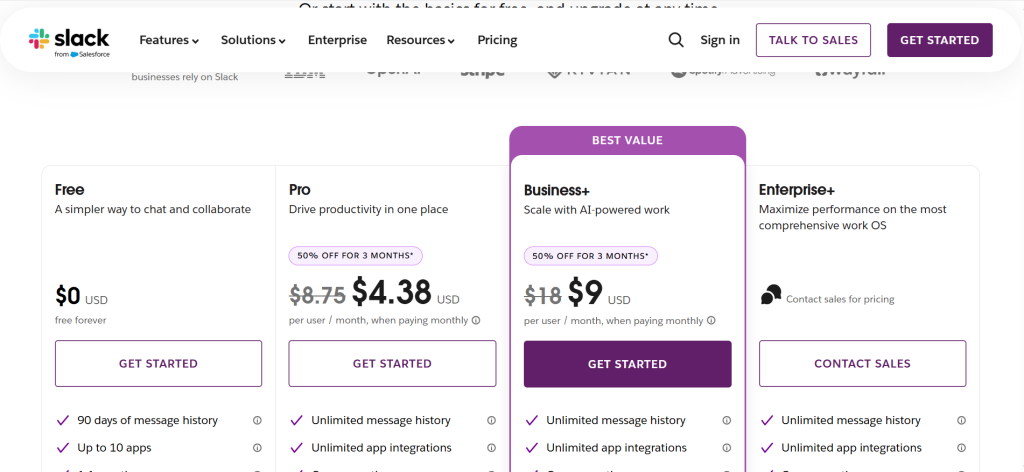
| Pricing | Free (90-day history). Pro $8.75/mo/user. Business+ $18/mo/user. Enterprise Grid custom |
| Free Tier | Yes — 90 days of message history, 10 app integrations, 1:1 calls; sufficient for small teams testing the platform |
| Key Strengths | Channel organization, threaded replies, 2,600+ integrations, Workflow Builder automation, searchable message archive, Huddles for quick audio calls |
| Key Weaknesses | 90-day history limit on free tier, creates always-on expectations without deliberate norms, notification management required to protect focus time |
| Best For Teams | Engineering, product, marketing, and operations teams of 5 to 500 who want channel-based async communication |
| Output Consistency | Very high — message delivery, search, and notification reliability are industry-leading |
| Best Pairing | Notion for documentation that comes out of Slack discussions, Loom for video updates shared in channels, Linear for engineering team issue linking |
Slack is the communication backbone of most distributed teams, and when implemented with deliberate structure, it earns that position. Channel-based organization separates strategic conversation from tactical project work from social connection. Threaded replies keep context attached to the message it responds to rather than fragmenting across a flat feed. The searchable archive means a decision made in a Slack thread six months ago is retrievable in under a minute — a capability that transforms the platform from a chat tool into an organizational memory layer.
For remote teams specifically, the channel structure provides the project visibility that office hallway conversations previously created passively. A developer browsing the #product channel sees the feature debate. A designer monitoring #engineering understands the technical constraints shaping their work. This ambient awareness — the informal understanding of what the rest of the organization is working on — does not happen automatically in distributed environments. Slack’s channel architecture is the best available substitute when it is set up thoughtfully.
Huddles, Slack’s lightweight audio channel feature, addresses one of the persistent frictions of remote work: the quick 2-minute clarification that used to happen by leaning over a desk but becomes a calendar invite in distributed environments. Huddles require no scheduling, no video setup, and no meeting link — open a channel, click the headphone icon, and anyone in that channel can join. For engineering teams doing code review or design teams iterating on a concept, this frictionless audio layer eliminates significant scheduling overhead.
Where Slack Falls Short
Slack is the productivity tool that most frequently becomes an anti-productivity tool when used without deliberate team norms. Without explicit guidelines on response time expectations, channel naming conventions, and off-hours availability, Slack creates an always-on environment that fragments focus across the entire team. Remote teams that implement Slack before establishing those norms typically find that it increases communication volume without increasing communication clarity — the worst possible outcome.
The free tier’s 90-day message history limit is a genuine operational risk for remote teams. Decisions, agreements, and institutional knowledge that lives only in Slack becomes inaccessible after three months. Important decisions made in Slack should always be documented in Notion or a shared wiki. The Pro plan removes the history limit and is a practical necessity for any team using Slack as a serious collaboration tool.
The Verdict on Slack
Slack is the right communication platform for distributed teams that commit to building deliberate norms alongside the tool — clear channel structures, explicit response time expectations, designated focus hours, and a policy of documenting important decisions in a searchable wiki rather than leaving them in chat threads. With those norms, it is the best team communication tool available.
2. Notion — Best Documentation and Team Knowledge Hub for Remote Teams
| Best For | Remote teams who need a single, accessible source of truth for documentation, project management, and team knowledge |
| Pricing | Free (limited). Plus $12/mo/user. Business $24/mo/user. Enterprise custom |
| Free Tier | Yes — generous personal tier; team collaboration features require Plus |
| Key Strengths | Flexible pages and databases, team wikis, project tracking, meeting notes, AI writing assistant, strong template library, real-time collaboration |
| Key Weaknesses | Setup overhead for new teams, AI add-on costs extra, performance can lag with very large workspaces, offline access limited |
| Best For Teams | Product, operations, and content teams; startups building internal documentation from scratch; any remote team where tribal knowledge is a risk |
| Output Consistency | High once the workspace structure is established — depends on team adoption consistency |
| Best Pairing | Slack for communication, Linear or Asana for structured task tracking, Loom for embedding video updates in project pages |
The most persistent operational risk for remote teams is institutional knowledge that lives inside individual heads rather than in shared documentation. When a co-located team member leaves, colleagues absorb their knowledge through proximity over the following months. When a remote team member leaves, that knowledge often leaves with them entirely. Notion is the tool that most effectively addresses this risk by making documentation so low-friction that teams actually maintain it.
The key differentiator from traditional wikis and document storage is the connected database structure. A product roadmap database links to individual spec pages which link to design files and engineering issue trackers. A client database connects to project pages, meeting notes, and invoice records. The relationships between pieces of information are part of the structure rather than an afterthought. For remote teams where context-switching between tools is a constant tax, this connected workspace reduces the number of places a team member needs to look to understand the full picture of any project.
Meeting notes in Notion change the remote team meeting dynamic specifically. A shared template pre-populated before every call with agenda items, attendee names, and linked relevant pages means the meeting starts with everyone oriented rather than spending the first five minutes recapping. Action items captured inline link to the relevant task tracker. Decisions documented in the meeting notes become searchable institutional knowledge rather than fading from memory by the following week.
Where Notion Falls Short
Notion requires significant upfront investment to build a workspace that actually reflects how the team works. A half-configured Notion workspace — pages with no structure, databases with no consistent schema, a home page that nobody maintains — is worse than no documentation at all because it creates the false impression that documentation exists. Remote teams need to appoint someone responsible for Notion architecture and maintenance, which is an operational cost that smaller teams sometimes underestimate. Notion is also not a strong project management tool for engineering teams who need sprint boards, issue tracking, and git integration — Linear or Jira serve that workflow better.
The Verdict on Notion
Notion is the strongest team documentation and knowledge management platform available for remote teams who invest in building it properly. For startups and small distributed teams building their internal knowledge base from scratch, the Plus plan at $12 per user per month provides an extremely capable collaborative workspace. Pair it with a dedicated project management tool for engineering work and a communication tool for real-time coordination.
3. Linear — Best Project Management Tool for Remote Engineering Teams
| Best For | Engineering and product teams who want fast, opinionated issue tracking designed specifically for software development workflows |
| Pricing | Free (up to 250 issues). Basic $12/mo/user. business $18/mo/user |
| Free Tier | Yes — 250 issues adequate for small teams; growing teams will need Standard quickly |
| Key Strengths | Extremely fast interface, git integration, automated workflows, cycle and sprint management, roadmap views, built-in SLA tracking, keyboard-first design |
| Key Weaknesses | Built for engineering — limited value for non-technical teams, opinionated structure limits customization, free tier issue cap |
| Best For Teams | Engineering teams of 3 to 300, product teams running software development sprints, technical startups |
| Output Consistency | Very high — Linear’s performance and reliability are the best in the project management category |
| Best Pairing | GitHub or GitLab for code linkage, Slack for notifications, Notion for product specs linked from issues |
Linear exists because every engineer who has used Jira for six months has imagined building something faster, cleaner, and less cluttered with enterprise features nobody asked for. Linear is that tool. It is opinionated about how software teams should work — cycles instead of sprints, issues instead of tickets, clean hierarchies of teams, projects, and cycles — and that opinionation is the source of both its best quality and its primary limitation.
The interface speed is a meaningful productivity factor that sounds trivial until you experience it. Linear loads instantly. Keyboard shortcuts navigate the entire application without touching a mouse. Creating an issue, assigning it, setting priority, and linking it to a cycle takes under 10 seconds from any view. For engineering teams processing hundreds of issues per week, this efficiency compounds into hours recovered from project management overhead every sprint.
The git integration automatically updates issue status when branches are created, commits reference the issue, and pull requests are merged. A developer who opens a pull request with “fixes LIN-247” in the description closes the issue in Linear when the PR merges. For remote engineering teams where project visibility depends on disciplined manual status updates — which most developers find tedious and therefore skip — this automation provides project managers and engineering managers with accurate real-time visibility without adding any burden to the people doing the work.
Where Linear Falls Short
Linear is an engineering tool, and it makes no attempt to be anything else. Marketing, operations, HR, and customer success teams will find it too constrained for their workflows. Remote teams that need a single project management platform for cross-functional work — where engineering shares a tool with design, marketing, and operations — should look at Asana or Notion instead. Linear’s opinionated structure also means teams that have non-standard development processes will sometimes find themselves working around the tool rather than with it.
The Verdict on Linear
Linear is the best project management tool for remote engineering and product teams, and it is not close. The combination of interface speed, git integration, and automated workflow management reduces project management overhead to the minimum viable level. For technical distributed teams specifically, where sprint visibility depends on async status updates from developers in multiple time zones, Linear’s automation provides the project transparency that manual processes cannot reliably deliver.
4. Loom — Best Async Video Tool for Replacing Remote Status Meetings
| Best For | Remote teams who want to communicate complex information asynchronously without scheduling synchronous calls |
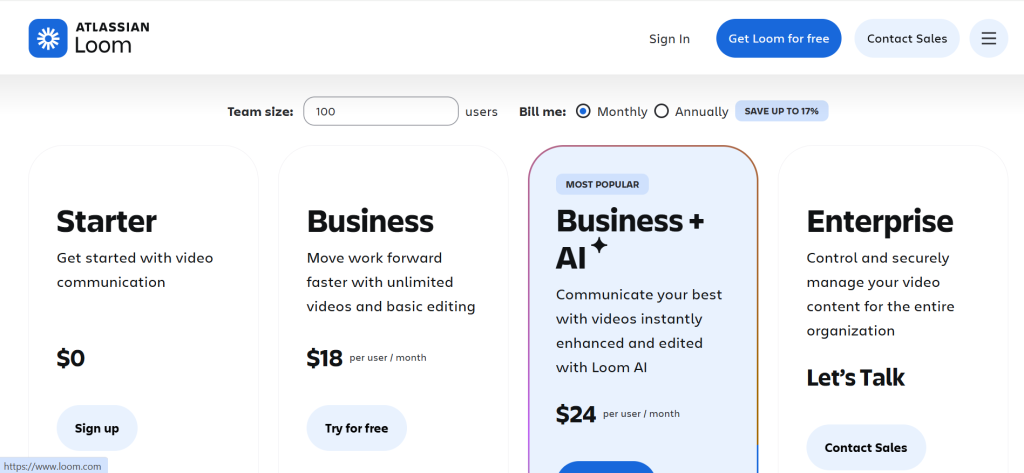
| Pricing | Starter free (25 videos, 5-min cap). Business $18/mo/user. Enterprise custom |
| Free Tier | Yes — 25 videos adequate for team-wide testing; production use requires Business plan |
| Key Strengths | Screen + face recording, instant shareable link, auto-transcript and captions, viewer analytics, timestamped comments, Slack and Notion integration |
| Key Weaknesses | Free tier video and length caps, 5-minute limit on free recordings, not suited to all communication cultures |
| Best For Teams | Product teams presenting features, engineering teams doing code review, design teams sharing mockups, managers giving team updates |
| Output Consistency | Very high — recording, processing, and link generation are consistently reliable across all browsers and operating systems |
| Best Pairing | Slack for sharing recordings in team channels, Notion for embedding walkthroughs in project documentation |
Loom has become one of the most practically impactful remote collaboration tools available because it solves the meeting problem at its root rather than making meetings slightly more bearable. The default response to needing to communicate something complex in a distributed team is to schedule a call. Loom makes the better alternative — recording a clear, watchable explanation — so fast and frictionless that teams who adopt it collectively reclaim significant calendar space within the first month.
A product manager who records a 6-minute walkthrough of a new feature spec, with screen and face recording running simultaneously, delivers more context than a 45-minute kickoff call. Every participant watches it at their own convenience, pauses at the complicated diagram, re-watches the requirements section, and leaves timestamped comments on specific moments. The async nature means the developer in Berlin and the designer in Buenos Aires both get the same briefing without anyone needing to find an overlap in two inconvenient time zones.
The viewer analytics add accountability to async communication in a way that email and documentation cannot. A manager who sends a critical process change as a Loom knows who watched it, how much of it they watched, and which sections they rewatched. A team that sends a client proposal as a Loom knows whether the client opened it and engaged with it before the follow-up call. This feedback loop changes how remote teams communicate at the organizational level.
Where Loom Falls Short
The free tier’s 25-video cap and 5-minute per-video limit means any team planning to use Loom as a primary communication layer will need the Business plan quickly. The $12.50 per user per month cost adds up for larger teams. Some corporate cultures — particularly in legal, financial services, and formal client relationships — find video communication less appropriate than written documentation, and teams operating in those environments need to read their audience before defaulting to Loom for every complex communication.
The Verdict on Loom
Loom is a non-negotiable tool for remote teams serious about reducing meeting overhead. The ROI is straightforward: if a team of five replaces three 30-minute status meetings per week with 6-minute Loom recordings, they recover 12+ hours of collective synchronous time weekly. The Business plan cost per user is recovered within a single recovered meeting for most teams. Start with the free tier, run a two-week experiment replacing specific recurring meetings with Loom recordings, and measure the calendar time recovered.
5. Zoom — Best Video Conferencing Tool for Reliable Remote Meetings
| Best For | Remote teams who need reliable, high-quality video conferencing for synchronous collaboration, all-hands meetings, and client calls |
| Pricing | Free (40-min group calls). Pro $13.32/mo/user. Business $18.32/mo/user |
| Free Tier | Yes — 40-minute cap on group meetings; unlimited 1:1 calls; free tier covers light team use |
| Key Strengths | Reliable connection quality at scale, breakout rooms, recording with transcription, webinar capability, whiteboard, AI meeting summaries |
| Key Weaknesses | 40-minute free tier cap forces upgrades quickly, UI has become cluttered with features, can enable excessive meeting culture |
| Best For Teams | All remote teams — Zoom is the baseline standard for video conferencing regardless of company size or industry |
| Output Consistency | Very high — connection reliability and feature consistency are the best in the video conferencing category |
| Best Pairing | Notion for storing meeting notes and action items, Loom for async alternatives to recurring meetings, Calendly for frictionless meeting booking |
Zoom occupies a specific and non-negotiable position in the remote team toolkit: it is the baseline. Not the most innovative tool on this list, not the most transformative, but the one that every remote team needs to function and that every client, partner, and external stakeholder expects to find in a meeting invite. Its reliability, cross-platform stability, and universal recognition make it the safe choice for any synchronous communication that cannot be handled asynchronously.
The AI meeting summary feature, added in 2024 and meaningfully improved in 2025, automatically generates a post-call summary with key decisions, action items, and next steps. For remote teams where meeting notes have historically been either absent or inconsistently maintained, this automation provides a consistent documentation layer without requiring any team member to divide their attention between listening and writing. The summaries integrate with Notion, Slack, and most major project management tools.
Breakout rooms remain the most underutilized Zoom feature for remote teams. Large all-hands meetings that split into 4-person working groups for 20 minutes before returning to the main session replicate the workshop dynamic that co-located teams take for granted. For remote teams that have struggled to generate the collaborative energy of in-person offsites in a distributed format, structured breakout sessions represent the most accessible improvement available without leaving the video conferencing interface.
Where Zoom Falls Short
Zoom’s 40-minute group call cap on the free plan is the most aggressive free tier restriction on this list relative to practical utility — a single team standup exceeds the limit. Any team using Zoom for regular meetings will need the Pro plan. The platform has also become dense with features that most users never touch, and navigating to the capabilities you actually use requires ignoring a significant amount of interface noise. For small teams prioritizing simplicity, Google Meet’s interface is cleaner. For scale and reliability above all, Zoom remains the standard.
The Verdict on Zoom
Zoom is not the most exciting recommendation on this list, but it is among the most necessary. Every remote team needs reliable video conferencing, every external stakeholder expects a Zoom link, and the AI meeting summary feature now provides enough additional value to justify the Pro plan beyond the basic 40-minute cap removal. Use it for the synchronous collaboration that genuinely requires real-time interaction, and use Loom to eliminate the meetings that do not.
6. Figma — Best Collaborative Design Tool for Distributed Creative Teams
| Best For | Design and product teams who need real-time multiplayer design collaboration across distributed locations |
| Pricing | Free (3 projects, 3 editors). Professional $12/mo/editor. Organization $45/mo/editor |
| Free Tier | Yes — 3 active projects and 3 editors free; growing teams will need Professional |
| Key Strengths | Real-time multiplayer editing, prototyping, developer handoff with inspect mode, design system libraries, FigJam for whiteboarding, branching for design version control |
| Key Weaknesses | Organization plan expensive for large teams, performance can lag on complex files, steep learning curve for non-designers using it for review |
| Best For Teams | Product design teams, UX teams, any cross-functional team that includes designers working with product managers and engineers |
| Output Consistency | Very high — collaboration features are reliable and performant for most file complexities |
| Best Pairing | Linear or Asana for linking designs to engineering issues, Notion for design documentation and decision records, Loom for async design review walkthroughs |
Before Figma, remote design collaboration was a pain point that most distributed teams managed rather than solved. Designers would share static files, product managers would annotate PDFs with comments, engineers would build from screenshots rather than specifications, and multiple versions of the same design would exist simultaneously in different locations with no authoritative source. Figma collapsed all of this by making design inherently multiplayer — everyone sees the same file, in real time, with no export-import cycle required.
The developer handoff capability removes one of the most persistent sources of remote team friction: the gap between what a designer specified and what an engineer implemented. Instead of exporting assets and writing handoff documentation, Figma’s Inspect panel gives any developer access to exact measurements, CSS properties, color values, and exportable assets directly from the design file. Remote design-to-engineering collaboration becomes a matter of sharing a Figma link rather than a 45-minute handoff call.
FigJam, Figma’s whiteboarding tool, serves a different but equally important function for remote teams: the collaborative brainstorming and diagram session that co-located teams run on physical whiteboards. Product roadmap planning, architecture diagrams, user flow mapping, and retrospective exercises all work in FigJam with the same real-time multiplayer dynamic as the design tool. For teams with a Figma subscription, FigJam is included and eliminates the need for a separate whiteboarding tool.
Where Figma Falls Short
Figma’s power for design teams does not extend well to non-design use cases. Product managers and engineers who use it primarily for reviewing designs find the interface more complex than necessary for their role. The Organization plan’s price point — $45 per editor per month — is difficult to justify for smaller design teams. File performance degrades noticeably on very large or complex design systems, and the browser-based approach can feel limiting for designers used to native applications.
The Verdict on Figma
Figma is the essential tool for any remote team with a design function. The free tier covers small teams testing the workflow. The Professional plan at $12 per editor per month is justified from the first week of use for any design team doing serious work. For distributed product teams where the design-to-engineering handoff has historically been a coordination bottleneck, Figma alone removes more friction than any other single tool change available.
7. Miro — Best Visual Collaboration Tool for Remote Brainstorming and Planning
| Best For | Remote teams who want an infinite digital whiteboard for brainstorming, planning, retrospectives, and visual workshops |
| Pricing | Free (3 editable boards). Starter $8/mo/user. Business $16/mo/user |
| Free Tier | Yes — 3 boards is sufficient for light use; teams running regular workshops need Starter |
| Key Strengths | Infinite canvas, real-time and async editing, 300+ templates for workshops and planning sessions, sticky notes, voting, timer, Talktrack for async walkthroughs |
| Key Weaknesses | Can become cluttered without board hygiene, Starter plan required for unlimited boards, not a replacement for structured project management |
| Best For Teams | Product teams running discovery workshops, agile teams doing retrospectives, cross-functional teams doing strategic planning |
| Output Consistency | High — canvas performance is reliable; output quality depends on how well facilitators structure sessions |
| Best Pairing | Zoom for running live Miro sessions with video, Notion for documenting decisions and outputs from Miro workshops, Slack for sharing board links |
Miro solves the most aesthetically important problem in remote collaboration: the whiteboard. The physical whiteboard in a meeting room is the tool that remote teams most frequently cite as irreplaceable — the surface where ideas become visible, where spatial arrangement communicates relationships, where someone picks up a marker and draws the thing that 20 minutes of verbal explanation failed to convey. Miro is the only digital tool that comes close to replicating that dynamic for distributed teams.
The template library covers every collaborative workshop format that product and agile teams run regularly: sprint retrospectives, user story mapping, affinity diagrams, journey maps, design thinking workshops, OKR planning sessions, and stakeholder mapping. For remote team facilitators who have spent hours building these templates from scratch in PowerPoint or Google Slides, arriving at a Miro template that is purpose-built, visually clean, and immediately usable represents a significant practical improvement.
The Talktrack feature enables async walkthroughs of Miro boards — recording a narrated tour of a complex diagram or planning canvas that stakeholders can view on their own schedule. For remote teams building strategic plans, architecture diagrams, or research synthesis boards that need to be shared across the organization, Talktrack provides the same context transfer that a live board presentation would deliver without requiring everyone to be available simultaneously.
Where Miro Falls Short
Miro boards accumulate clutter without active maintenance. A board that starts as a clean sprint retrospective becomes a document graveyard within three months if nobody is responsible for archiving completed sessions. Teams that use Miro heavily need a designated board owner and a regular archiving practice. The free tier’s 3-board limit is sufficient for occasional workshops but restricts any team running regular collaborative sessions. For pure design collaboration, Figma’s FigJam is included in the Figma subscription and covers most whiteboarding needs without adding another tool.
The Verdict on Miro
Miro is the right whiteboarding tool for remote teams running regular workshops, retrospectives, and planning sessions that require visual spatial thinking. The Starter plan at $8 per user per month is justified for any team running more than two collaborative sessions per month. Teams already on Figma should evaluate FigJam before adding Miro — for design-adjacent workflows, FigJam may cover enough ground to avoid the additional subscription.
8. Asana — Best Cross-Functional Project Management for Remote Teams
| Best For | Remote teams managing cross-functional projects that span multiple departments and require clear task ownership and deadline visibility |
| Pricing | Free (basic). Starter $10.99/mo/user. Advanced $24.99/mo/user |
| Free Tier | Yes — unlimited tasks and projects for up to 10 users; sufficient for small teams |
| Key Strengths | Multiple project views (list, board, timeline, calendar), workload management, goal tracking, workflow automation, portfolio view, strong integration library |
| Key Weaknesses | Can feel heavy for engineering-specific workflows, free tier limited to 10 users, reporting requires Advanced plan |
| Best For Teams | Operations, marketing, HR, and cross-functional product teams running multi-stakeholder projects |
| Output Consistency | High — project tracking and notification delivery are reliable; output quality depends on team adoption consistency |
| Best Pairing | Slack for notifications from Asana task updates, Notion for project documentation linked from tasks, Zoom for project kickoff and review calls |
Asana occupies the cross-functional project management position that Linear does not — the tool for the projects that span engineering, design, marketing, and operations simultaneously. A product launch involves engineering building the feature, design creating the assets, marketing writing the copy and scheduling the campaign, and operations coordinating the customer success team. Asana provides the shared project layer where every function can see the full work, track their dependencies, and understand the critical path without requiring everyone to be in the same meeting at the same time.
The timeline view is where Asana delivers specific value for remote teams. Seeing the complete project schedule as a Gantt chart, with task dependencies visualized as connectors and the critical path clearly marked, gives distributed team leads the project visibility that proximity previously provided passively. A remote project manager can look at the timeline on a Tuesday morning and immediately understand which tasks are at risk, which have unresolved dependencies, and which are blocking downstream work — without requiring a status call.
Asana’s workflow automation removes the administrative overhead that makes project management feel like a second job. When a task moves to “In Review,” Asana automatically notifies the reviewer, sets a due date, and creates a follow-up task for the original assignee if the review is not completed within 48 hours. These workflows, built once, execute consistently for every project that uses the template — eliminating the repetitive communication overhead that typically falls to the project manager.
Where Asana Falls Short
Asana is not the right tool for engineering teams who need git integration, sprint boards with velocity tracking, and issue-level work management. Linear handles that workflow better. For very small teams under five people, Asana’s feature depth is more overhead than benefit — Notion’s task database or Todoist handles the workflow at lower cost and complexity. The reporting functionality that provides the clearest project visibility requires the Advanced plan at $24.99 per user per month, which adds significant cost for teams that need portfolio-level dashboards.
The Verdict on Asana
Asana is the best cross-functional project management tool for remote teams running multi-stakeholder projects across departments. The free tier covers teams under 10 people adequately for basic project tracking. For distributed teams where project visibility across functions is a consistent pain point — where things fall through the cracks because nobody has a clear picture of the full work — Asana’s timeline view and workflow automation deliver measurable coordination improvement.
9. Deel — Best Global HR and Contractor Payment Platform for Distributed Teams
| Best For | Remote-first companies who need to hire, pay, and manage contractors and employees across multiple countries compliantly |
| Pricing | Contractors from $49/mo per contractor. EOR (Employer of Record) from $599/mo per employee. Custom enterprise pricing |
| Free Tier | No — no free tier; Deel Engage (HR features) available at separate pricing |
| Key Strengths | Compliant hiring in 150+ countries, Employer of Record service, contractor management, multi-currency payroll, equity management, built-in compliance and contracts |
| Key Weaknesses | EOR pricing is significant for small teams, not a performance management tool, customer support response times vary by plan |
| Best For Teams | Remote-first companies of any size hiring internationally, startups scaling globally, any team with a distributed workforce across jurisdictions |
| Output Consistency | Very high for payments and compliance — contract generation and payroll processing are reliable across all supported countries |
| Best Pairing | Notion for employee onboarding documentation, Slack for team integration, any HRIS tool for performance management |
Deel solves the problem that prevented most small and medium companies from hiring globally: the compliance complexity and legal risk of employing or contracting people in jurisdictions where you have no local entity or expertise. Before platforms like Deel, hiring a developer in Germany or a designer in Brazil required either establishing a local legal entity — expensive, time-consuming, and legally complex — or navigating contractor relationships that carried misclassification risk. Deel collapses this into a workflow that takes under a day.
The Employer of Record service is the most significant infrastructure component for remote teams that want to hire full employees internationally rather than contractors. Deel becomes the legal employer in the destination country, handles all local employment law compliance, manages payroll in local currency, administers local benefits, and manages the termination process in accordance with local labor regulations. The hiring company maintains operational control and day-to-day management while Deel bears the legal employment relationship and all compliance obligations. For remote-first companies that want to access global talent without establishing legal entities in every country, this service removes the final major barrier.
For teams with international contractors, Deel’s contract management, compliance verification, and multi-currency payment processing eliminate the operational overhead of managing dozens of individual contractor relationships across different banking systems and regulatory environments. Contractors receive payments in their local currency through their preferred method. The hiring company manages everything from a single dashboard. The compliance documentation that satisfies tax authorities in both jurisdictions is generated automatically.
Where Deel Falls Short
Deel is infrastructure, not a team management tool. It handles the legal and financial layer of the employment relationship but does not provide performance management, learning and development, or team engagement capabilities. Remote-first companies that need those functions require a separate HRIS tool. The EOR service pricing, while competitive for what it provides, is a significant per-employee monthly cost that small teams need to weigh carefully against the legal risk of operating without it.
The Verdict on Deel
Deel is the essential compliance and payment infrastructure for any remote team that hires or contracts across international borders. For teams operating purely in a single jurisdiction, it adds cost without value. For distributed teams with even one international employee or contractor, the compliance risk reduction and operational simplification it provides justifies the cost from the first hire.
10. 1Password Teams — Best Security Tool for Distributed Team Credential Management
| Best For | Remote teams who need secure, organized sharing of passwords, API keys, and credentials without the security risks of informal sharing |
| Pricing | Teams $19.95/mo (up to 10 users). Business $7.99/mo/user. Enterprise custom |
| Free Tier | No — 14-day free trial |
| Key Strengths | Secure shared vaults by team and project, granular access controls, travel mode, breach alerts, SSO integration, audit logs |
| Key Weaknesses | No free tier, business plan required for advanced features, requires cultural adoption to deliver full security benefit |
| Best For Teams | Any remote team with shared service credentials, engineering teams managing API keys and server access, operations teams managing vendor accounts |
| Output Consistency | Very high — credential sync and vault access are reliable across all platforms and browsers |
| Best Pairing | Any SSO provider for enterprise login, Slack for security alert notifications, Notion for documenting what is stored and why |
Password security is the remote team risk that receives the least attention until something goes wrong. In co-located environments, credential sharing happens informally — a colleague reads a password over someone’s shoulder, a sticky note on a monitor serves as the de facto shared credential store. In remote environments, the equivalent is a Slack DM containing a production API key, a Google Doc with a column of plaintext passwords, or the same login shared across a team with no audit trail. Each of these is a security incident waiting to happen.
1Password Teams replaces all of these with a structured, encrypted credential management system that makes the secure behavior easier than the insecure behavior. Shared vaults organize credentials by team, project, or permission level. A developer joining the engineering team gets access to the engineering vault automatically. A contractor working on a specific project gets access to that project’s credentials and nothing else. When the contractor’s engagement ends, revoking their access is a single click that removes every credential they had access to simultaneously.
The audit log capability is particularly valuable for remote teams managing compliance requirements. Every credential access, modification, and sharing event is logged with timestamp and user identity. When a security audit requires demonstrating that access to specific systems is controlled and documented, 1Password’s logs provide the evidence without any manual tracking effort. For remote teams operating in regulated industries — finance, healthcare, legal — this audit trail shifts from nice-to-have to compliance requirement.
Where 1Password Falls Short
1Password delivers its security value only if the entire team adopts it consistently. A team that stores 80 percent of credentials in 1Password and the remaining 20 percent in Slack messages has not solved the security problem — it has just complicated it. Driving full team adoption requires executive sponsorship and a clear policy that informal credential sharing is prohibited. The Teams plan’s $19.95 per month flat fee is reasonable for teams under 10, but growing teams quickly move to the $7.99 per user Business plan.
The Verdict on 1Password Teams
1Password Teams is non-negotiable security infrastructure for any remote team with shared service credentials. The cost is trivial relative to the risk of a single credential compromise. Teams that have not yet formalized credential management should treat this as a Week 1 infrastructure tool alongside communication and project management setup, not an afterthought added after a security incident prompts it.
11. Gather — Best Virtual Office Tool for Remote Team Connection and Culture
| Best For | Remote teams who want to recreate the casual, spontaneous interaction of a physical office in a virtual environment |
| Pricing | Free (up to 25 users). Pro $7/mo/user. |
| Free Tier | Yes — 25 users free permanently; adequate for small teams |
| Key Strengths | Spatial video that enables proximity-based conversations, customizable office maps, persistent virtual spaces, casual drop-in interaction, event hosting |
| Key Weaknesses | Requires buy-in from the full team, browser-based performance limits, feels unusual initially, less suited to focused work time |
| Best For Teams | Remote-first companies building team culture, small distributed teams missing casual office interaction, teams running virtual events and offsites |
| Output Consistency | Moderate — technical performance varies; culture impact depends heavily on team adoption and usage norms |
| Best Pairing | Slack for task-oriented communication alongside Gather for social and casual interaction, Zoom for formal all-hands |
Gather addresses the problem that every honest remote team leader eventually acknowledges: the tools that make distributed work operationally efficient do not make it socially fulfilling. Slack replaces the team standup. Loom replaces the status meeting. Linear replaces the sprint board. But none of them replace the moment when you walk past a colleague’s desk, notice they look stuck, and have a five-minute conversation that unblocks them — or the Friday afternoon where half the team ends up in the kitchen talking about nothing work-related and leaves feeling connected to each other.
Gather creates a persistent virtual space that operates on proximity mechanics. Team members move avatar representations through a customizable office map, and when two avatars are close enough to each other, their video and audio connect automatically. This proximity-based video replicates the spatial logic of physical office interaction — you do not interrupt someone’s focused work by entering their office, you wander past and the conversation starts only if you are both near enough. The social logic of office interaction, stripped of the commute.
For remote teams that run virtual events — all-hands meetings, team socials, onboarding days, or annual offsites — Gather provides a significantly more engaging environment than a standard video call. Breakout spaces, lounge areas, game rooms, and themed event spaces create the spatial variety that makes events feel different from regular meetings. Teams that have run Gather-based quarterly events consistently report higher engagement and better team connection outcomes than equivalent Zoom sessions.
Where Gather Falls Short
Gather requires genuine team adoption to deliver its social value — a virtual office that two people use while the rest of the team stays in Slack is not a virtual office. Driving adoption requires executive modeling (the CEO being visibly present in Gather during focus hours signals that it is a real space, not an experiment) and explicit norms about when Gather is the right environment versus Slack or Zoom. The browser-based performance can feel choppy on slower connections, and the initial spatial navigation feels unusual until it becomes familiar.
The Verdict on Gather
Gather is the best available tool for remote teams who have solved the operational problems of distributed work and are now focused on the cultural and human connection problem. For teams that regularly hear “I miss the office” in team surveys, Gather is a more structural solution than more frequent video calls. The free tier up to 25 users makes it low-risk to trial.
12. Claude — Best AI Assistant for Remote Team Knowledge Work and Communication
| Best For | Remote teams who want AI assistance for writing, documentation, research synthesis, and complex communication at scale |
| Pricing | Free (limited). Pro $20/mo. Max $100/mo. Team plans available |
| Free Tier | Yes — capable model with message limits; sufficient for occasional use |
| Key Strengths | Best writing quality among AI tools, 200K token context for long documents, style customization, Cowork for multi-step automation, precise instruction following |
| Key Weaknesses | Free tier message limits, no project management features, web research less reliable than Perplexity |
| Best For Teams | Content teams, product teams writing specs and documentation, operations teams synthesizing research, any remote team with high writing and documentation load |
| Output Consistency | Highest among AI tools — follows complex multi-step instructions consistently across repeated runs |
| Best Pairing | Notion for organizing AI-generated documentation, Slack for sharing Claude outputs with the team, Perplexity for research that requires current web sources |
Remote teams have a documentation problem that co-located teams do not experience at the same scale. In an office, institutional knowledge spreads through conversation — the hallway explanation, the lunch discussion, the whiteboard session that three people remember differently but that collectively conveys the concept. In a distributed team, if it is not written down, it does not exist. Claude is the AI tool that most effectively lowers the friction of creating the documentation that remote teams depend on for operational continuity.
For product and engineering teams, Claude accelerates the most time-consuming documentation tasks: writing comprehensive product requirement documents from bullet-pointed notes, synthesising user research findings from interview transcripts, drafting technical architecture documentation from an engineer’s shorthand, and generating onboarding documentation from existing process notes. The 200,000-token context window means Claude can ingest an entire codebase README, a collection of meeting transcripts, and a product strategy document simultaneously and synthesise them into a coherent new document that reflects the full context.
For distributed team communication specifically, Claude handles the written interactions where precision and tone most directly affect outcomes: communicating difficult feedback across cultural and language differences, drafting the all-hands update that needs to motivate a team in four countries, writing the client communication that represents the entire company’s professionalism, or structuring the performance review documentation that needs to be simultaneously honest, fair, and legally considered. Remote work places more weight on written communication quality than office environments, and Claude raises that quality consistently.
Where Claude Falls Short
Claude is an AI writing and reasoning tool, not a team collaboration platform. It does not manage projects, track tasks, send meeting notifications, or store team knowledge. Remote teams need to integrate Claude into their existing workflows — typically using it to create content that lives in Notion, Slack, or email — rather than treating it as a standalone tool. The free tier’s message limits mean teams who want consistent AI assistance across their entire organization will need to evaluate team plan pricing.
The Verdict on Claude
Claude is the best AI productivity tool for remote teams whose work output is primarily linguistic — writing, analysis, documentation, and communication. For distributed teams specifically, where the quality of written communication determines the quality of coordination, AI assistance that reliably produces clear, professional, well-structured written output delivers operational value that compounds across every team interaction.
Which Remote Team Tool Should You Choose? A Decision Framework
The right remote team tool depends on which specific coordination failure is most limiting your team’s performance. Here are the clearest recommendations based on two weeks of testing across a distributed team workflow.
If your team has no reliable communication layer: Start with Slack Pro. Establish channel naming conventions, response time expectations, and focus hours before inviting the full team. The norms matter as much as the tool.
If institutional knowledge is leaving with every departing team member: Implement Notion as your team wiki before the next person joins. Build a documentation habit from day one rather than retrofitting it onto an established culture.
If your engineering team’s project visibility is poor across time zones: Adopt Linear. The git integration provides automated status updates that eliminate the need for developers to manually communicate progress.
If your team calendar is dominated by status meetings: Run a two-week Loom experiment. Replace three recurring status meetings with recorded updates. Measure the calendar time recovered and the quality of communication compared to the meetings they replaced.
If you are hiring internationally: Implement Deel before the first international hire, not after. The compliance risk of operating without it is not worth the setup delay.
If your team is struggling with culture and connection: Try Gather for one month with full team participation and executive presence in the virtual space. Evaluate whether the connection improvement justifies the ongoing adoption overhead.
If writing and documentation quality is a consistent bottleneck: Claude Pro for team members who produce significant written output daily. The quality differential compounds across every proposal, specification, and communication the team produces.
Recommended Remote Team Stacks by Team Type
| Team Type | Primary Tools | Supporting Tools | Monthly Cost (10 users) | Coverage |
| Early-Stage Startup | Slack Pro + Notion | Zoom, Loom, Linear | $200–250 | Communication + Docs + Video + Async + Engineering |
| Product & Engineering | Linear + Notion | Slack Pro, Figma, Loom | $250–380 | Issues + Docs + Communication + Design + Async |
| Creative & Marketing | Notion + Slack Pro | Loom, Miro, Claude | $200–320 | Docs + Communication + Async + Visual + AI Writing |
| Globally Distributed | Deel + Slack Pro | Notion, Zoom, 1Password | $700–1000+ | HR/Compliance + Communication + Docs + Security |
| Remote-First Culture | Gather + Slack Pro | Notion, Loom, Zoom | $200–300 | Culture + Communication + Docs + Async + Meetings |
| Zero-Budget Team | Slack Free + Notion Free | Zoom Free, Loom Free, Miro Free | $0 | Covers core remote needs within free tier limits |
Head-to-Head: Which Tool Wins Each Category?
| Category | Winner | Runner-Up | Notes |
| Team Communication | Slack | Microsoft Teams | Slack on UX and integrations; Teams on Microsoft 365 fit |
| Documentation & Wiki | Notion | Confluence | Notion on flexibility and UX; Confluence on enterprise features |
| Engineering Project Mgmt | Linear | Jira | Linear on speed and UX; Jira on enterprise customization |
| Cross-Functional Project Mgmt | Asana | Monday.com | Asana on workflow automation; Monday on visual dashboards |
| Async Video | Loom | Claap | Loom dominates — no close second in the category |
| Video Conferencing | Zoom | Google Meet | Zoom on reliability and features; Meet on Google Workspace fit |
| Design Collaboration | Figma | Sketch | Figma on multiplayer and handoff; Sketch on native performance |
| Visual Whiteboarding | Miro | FigJam | Miro for standalone workshops; FigJam if already on Figma |
| Global HR & Payroll | Deel | Remote.com | Deel on coverage and UX; Remote on pricing for smaller teams |
| Virtual Office & Culture | Gather | Teamflow | Gather on features and free tier; Teamflow on enterprise polish |
| Credential Security | 1Password | Bitwarden | 1Password on UX and team features; Bitwarden on open-source cost |
| AI Writing & Knowledge | Claude | ChatGPT | Claude on writing depth; ChatGPT on breadth and image generation |
Frequently Asked Questions
What is the most important tool to set up first when building a remote team?
Communication infrastructure before anything else — specifically Slack with a deliberate channel structure and clear team norms. Every other remote collaboration tool is less valuable if the team’s baseline communication is chaotic. Before the first Notion page is built or the first Linear ticket is created, the team needs a shared understanding of how communication flows, what channels exist for what purposes, and what response time expectations are reasonable. Spend more time on the norms than on the tool configuration.
How many tools does a remote team actually need?
Most distributed teams operate effectively with four to five core tools: one for communication (Slack), one for documentation (Notion), one for project management (Linear or Asana depending on team composition), one for video meetings (Zoom), and one for async video (Loom). Every additional tool adds onboarding overhead, context-switching cost, and maintenance burden. Add specialist tools — Figma for design teams, Deel for international teams, Miro for workshop-heavy teams — only when a specific workflow gap is clearly limiting performance.
How do you maintain team culture in a fully remote environment?
The remote teams with the strongest cultures in 2026 treat culture as a deliberate operational practice rather than a byproduct of proximity. Specific practices that consistently work: a dedicated non-work Slack channel where social conversation is explicitly encouraged and leadership visibly participates, regular Loom recordings from team leaders that communicate context and humanity beyond task updates, quarterly virtual events in Gather or similar spatial tools, and an annual in-person offsite where the relationships that sustain remote collaboration are built face to face. Technology supports culture in remote teams but does not create it.
What is the biggest risk of the wrong project management tool for a remote team?
The worst outcome is not choosing a suboptimal tool — it is choosing a tool that the team does not actually use, leaving the work tracked in people’s heads and email threads. A project management tool that is too complex, too slow, or too disconnected from the way engineering or operations work flows gets abandoned within six weeks. The team reverts to informal coordination, project visibility disappears, and accountability becomes impossible to maintain across time zones. Choose the simplest tool that covers your actual workflow and that the team will realistically use every day. Simple adoption beats sophisticated abandonment.
How should remote teams handle time zone differences in daily workflows?
The most effective distributed teams treat time zone differences as a design constraint rather than a problem to overcome. Async-first communication — Loom for complex updates, Notion for documentation, structured Slack threads for decisions — ensures that work can progress without requiring time zone overlap. For the synchronous collaboration that genuinely requires real-time interaction, find the overlap hours where most team members can participate and protect those hours for high-value synchronous work. For truly global teams with no workable overlap, accept asynchronous-only workflows and invest heavily in documentation quality, as it becomes the primary coordination mechanism.
Is it worth paying for remote team tools for a small team of under five people?
For teams under five, the free tiers of Slack, Notion, Zoom, and Loom cover the core remote collaboration workflow with meaningful limitations but real utility. The two paid tools that most clearly justify early investment regardless of team size are 1Password Teams (the security risk of unmanaged credentials does not scale with headcount) and Loom Business (the free tier’s 25-video and 5-minute caps limit its usefulness as a primary communication tool). Revisit the rest of the stack when the team grows past five and free tier limitations begin constraining daily workflows.
Final Words: The Best Remote Team Tools Are the Ones Your Team Actually Uses
The remote collaboration tools landscape in 2026 is mature, well-differentiated, and full of genuinely excellent options across every category. The limiting factor for most distributed teams is not access to good tools — it is the adoption and cultural discipline required to use those tools in a way that actually solves the coordination problems of distributed work.
The best remote team is not the one with the most comprehensive software stack. It is the one where everyone knows which tool to use for which type of communication, where decisions get documented rather than buried in chat threads, where async communication is the default and synchronous time is protected for the collaboration that genuinely requires it.
Two principles should guide how you build your remote team’s tool stack. First, solve the most painful coordination problem before adding tools for problems you do not yet have. If your team’s biggest issue is communication fragmentation, Slack with deliberate norms should come before Miro workshops or Gather social spaces. Second, measure adoption before adding more tools. A team that genuinely uses four tools well is more operationally effective than a team that has twelve tools configured and uses each one partially.
The Remote Team Stack That Works for Most Distributed Teams
If you want a concrete starting point, this five-tool foundation covers the core operational needs of most remote teams: Slack Pro for structured async communication, Notion for shared documentation and team knowledge, Loom for async video that replaces status meetings, Zoom Pro for synchronous collaboration that requires real-time interaction, and 1Password Teams for shared credential security.
Total cost for a 10-person team: approximately $270 to $320 per month. Total coverage: communication, documentation, async video, synchronous meetings, and security — the five operational layers that every distributed team needs to function. Build the habits before adding the features, and the stack compounds in value with every month of consistent use.