Freelancing in 2026 is a legitimate career architecture, not a gap between real jobs. Over 70 million Americans now identify as independent workers. The global freelance economy generates hundreds of billions annually across software development, content creation, design, consulting, marketing, and professional services. The infrastructure supporting that economy has matured accordingly.
The problem is not a shortage of freelance tools. The market has fragmented into hundreds of overlapping apps, each solving one slice of the freelance workflow in isolation. You need a tool to find clients. A different tool to sign contracts. Another to track hours. Another to send invoices. Another to manage project deliverables. Another to communicate with clients without losing threads across email and Slack. Another to handle taxes at the end of the year.
Cobbling together six mediocre tools wastes money, creates friction between systems, and means something always falls through the cracks. This guide identifies the tools that are genuinely worth your money, the ones that collapse multiple workflows into a single platform where possible, and the ones that do one thing so much better than competitors that they justify adding another tab to your browser.
We tested 12 of the best tools for freelancers across the full workflow: client acquisition, proposals, contracts, project management, time tracking, invoicing, communication, and tax preparation. Every recommendation below includes exactly when that tool is the right choice and when you should look elsewhere.
Quick Comparison: Top 12 Tools for Freelancers in 2026
| Tool | Primary Use | Starting Price | Free Tier | Best Feature | Our Rating |
| HoneyBook | All-in-one client and project management | $29/mo | No (7-day trial) | End-to-end client workflow | 9.2/10 |
| Notion | Project management & knowledge base | Free | Yes (generous) | Flexible workspace for any workflow | 9.0/10 |
| Bonsai | Contracts, invoicing & project management | $15/mo | No (7-day trial) | Automated freelance business stack | 9.1/10 |
| Toggl Track | Time tracking | Free / $9/mo | Yes (generous) | One-click timer, powerful reporting | 9.3/10 |
| FreshBooks | Accounting & invoicing | $23/mo | No (30-day trial) | Double-entry bookkeeping for freelancers | 8.9/10 |
| Calendly | Scheduling & client booking | Free / $10/mo | Yes (capable) | Frictionless meeting scheduling | 8.8/10 |
| Slack | Client & team communication | Free / $7.25/mo | Yes (limited) | Organized async client communication | 8.5/10 |
| Canva | Visual design & branding | Free / $15/mo | Yes (capable) | Professional design without a designer | 8.7/10 |
| Loom | Async video messaging | Free / $12.50/mo | Yes (capable) | Screen recordings for client updates | 8.9/10 |
| QuickBooks Self-Employed | Freelance tax & expense tracking | $15/mo | No (30-day trial) | Mileage, expenses & estimated taxes | 8.6/10 |
| Claude | AI writing & client communication | Free / $20/mo | Yes (limited) | Proposals, emails, and deliverable drafting | 9.0/10 |
| Contra | Commission-free freelance platform | Free | Yes (full) | Zero-fee client acquisition | 8.8/10 |
How We Evaluated These Freelance Tools
Every tool in this guide was assessed across five dimensions that matter specifically to independent workers, not enterprise software buyers.
Real workflow fit: We evaluated each tool as a freelancer with a live client roster, not as a software reviewer clicking through demos. Tools were judged on how naturally they integrated into the actual day-to-day of sending proposals, managing project deliverables, communicating with clients, and reconciling income.
Solo usability: Enterprise software designed for teams of 50 is often adapted and marketed toward freelancers. We penalized tools that assume team structures, require admin overhead, or provide features primarily valuable at organizational scale. Freelancers need tools that work for one person.
Free tier viability: Many freelancers are either starting out or operating on thin margins. We assessed whether each free tier provides meaningful functional value rather than a crippled demo experience designed to push you toward a paid upgrade immediately.
Time-to-value: Freelancers do not have IT departments or implementation budgets. A tool that requires 10 hours of configuration before it delivers value ranked lower than a tool that works within the first 30 minutes.
Revenue impact: The best freelance tools either save time that can be redirected to billable work, reduce revenue leakage from unbilled hours or unpaid invoices, or directly increase the number and quality of clients a freelancer can take on. We evaluated tools on business outcome impact, not just feature completeness.
Why the Freelance Tools Landscape Has Changed in 2026
Three developments define the freelance tools market in 2026 compared to even two years earlier.
The first is the consolidation of the fragmented freelance stack. Platforms like HoneyBook and Bonsai now handle proposals, contracts, project management, time tracking, and invoicing in a single integrated environment. The era of stitching together six separate tools with Zapier integrations is giving way to unified freelance operating systems that share data across every phase of the client relationship.
The second is AI integration into every layer of the workflow. Writing client proposals used to take hours. With Claude or ChatGPT integration, it takes 20 minutes. Creating polished visual deliverables used to require design training. Canva’s AI tools handle layout, color, and typography automatically. Scheduling discovery calls used to require back-and-forth email chains. Calendly eliminates that exchange entirely.
The third is the emergence of commission-free freelance platforms. Upwork and Fiverr built businesses on taking 20 percent of freelancer earnings. Platforms like Contra have disrupted that model by charging zero commission and competing on quality and direct client relationships. For experienced freelancers, this shift means keeping significantly more of what you earn.
Together, these three changes mean that the infrastructure advantage in 2026 belongs to freelancers who identify and invest in the right tools early, not to those who accumulate the most tools or spend the most on software.
Detailed Reviews: Best Tools for Freelancers in 2026
1. HoneyBook — Best All-in-One Freelance Client Management Platform

Best For: Freelancers who want to manage the entire client journey from inquiry to final invoice in one platform
Pricing: Starter $29/mo. Essentials $49/mo. Premium $109/mo
Free Tier: No — 7-day free trial with full access
Key Strengths: Unified pipeline for leads, proposals, contracts, and invoices; automated client workflows; smart files that combine contract and invoice; built-in scheduler; client portal; payment processing with card and bank transfer
Key Weaknesses: Monthly cost is significant for new freelancers, mobile app less capable than desktop, limited customization on lower tiers, reporting basic compared to dedicated accounting tools
Best For Freelancers: Creative professionals (photographers, designers, videographers, copywriters), consultants, coaches, and service-based freelancers with structured client engagement cycles
Output Consistency: Very high — automation ensures consistent client experience without manual follow-up
Best Pairing: Toggl Track for time tracking, QuickBooks Self-Employed for tax preparation
HoneyBook earns its top position among the best tools for freelancers by solving the workflow problem that costs independent professionals the most time: client management. Before HoneyBook, a freelancer with ten active clients maintained ten separate email threads, a folder of individually created contract templates, invoices scattered across Google Docs and PDF attachments, and a manual mental model of where each client stood in the engagement process. Something always fell through the cracks.
HoneyBook collapses that chaos into a single pipeline. Each client moves through stages — inquiry, proposal sent, contract signed, project active, invoice sent, paid — and the platform tracks status automatically. Smart files combine proposal, contract, and invoice into a single client-facing document that collects signatures and payment in one flow. Clients receive a professional branded experience; you receive notifications when each step is completed without chasing.
The automation engine is where HoneyBook compounds its value over time. Build a workflow once — send the welcome email, attach the questionnaire, follow up in three days if no response, send the contract link after the discovery call — and it executes that sequence automatically for every new client. Freelancers who establish these workflows report reclaiming four to six hours per week previously consumed by repetitive administrative communication.
Where HoneyBook Falls Short
HoneyBook’s monthly pricing is the primary barrier for freelancers who are just starting and have not yet established consistent revenue. The Starter plan at $19 per month provides the core workflow features, but the Essentials plan at $39 is necessary for advanced automation. For a freelancer billing less than $2,000 per month, allocating $39 to a client management platform requires genuine ROI justification. HoneyBook also does not replace dedicated accounting software for freelancers with complex income structures, multiple business entities, or significant deductible expenses that require double-entry bookkeeping.
The Verdict on HoneyBook
HoneyBook is the right choice for service-based freelancers who work with multiple clients simultaneously and whose business suffers from administrative disorganization rather than a shortage of clients. The investment pays back quickly in time recovered from email management, contract chasing, and invoice follow-up. Freelancers who bill more than $3,000 per month in services will typically find the Essentials plan justified within the first month.
2. Toggl Track — Best Time Tracking Tool for Freelancers
Best For: Freelancers who bill by the hour or need to understand where their working time actually goes
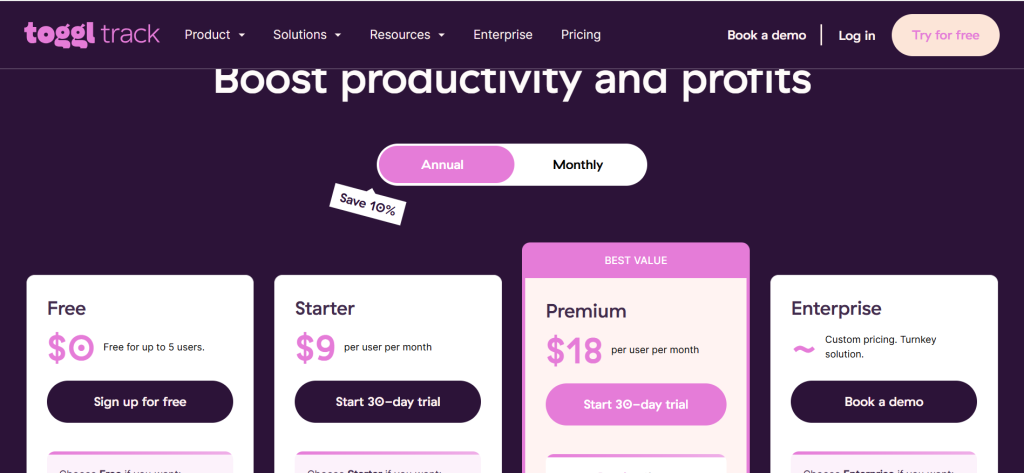
Pricing: Free (up to 5 users). Starter $9/user/mo. Premium $18/user/mo
Free Tier: Yes — the free tier covers all core time tracking features for solo freelancers
Key Strengths: One-click timer start/stop, browser extension that auto-detects apps and websites, powerful reporting across clients and projects, timeline for reconstructing unbillable time, idle detection, integrations with 100+ tools
Key Weaknesses: Invoice generation requires integration with billing tools, free tier lacks billable rate reports, mobile app less powerful than desktop
Best For Freelancers: Any freelancer billing by the hour, project-based freelancers who want to understand profitability per engagement, consultants tracking time for retainer clients
Output Consistency: Extremely high — timer mechanism is reliable and reporting is accurate
Best Pairing: FreshBooks or HoneyBook for converting tracked time to invoices, Notion for project task organization
Time tracking is the financial discipline that separates profitable freelancers from busy ones. The freelancer who charges a flat project fee without tracking hours discovers — often too late — that the project took three times as long as estimated, making the effective hourly rate embarrassing. The freelancer who tracks every hour has data to price future projects accurately, identify which client engagements are genuinely profitable, and build the case for rate increases.
Toggl Track makes this discipline as frictionless as possible. The browser extension sits in your toolbar and lets you start a timer with a single click, assign it to a client and project, and stop it when you switch tasks. The timeline feature reconstructs your day based on which apps and websites you used and when, letting you retroactively log time you forgot to track. For freelancers who find constant timer management disruptive to their flow, this reconstruction capability eliminates the all-or-nothing tradeoff.
The reporting layer is where Toggl Track provides its deepest business insight. Weekly and monthly summaries break down time by client, project, and task, revealing patterns that are invisible to subjective perception. Most freelancers who start tracking time discover that their two least favorite clients consume disproportionately more hours than their time feels like, and that their most enjoyable projects are often the most profitable per hour. This data is the foundation of strategic rate-setting and client selection decisions.
Where Toggl Track Falls Short
Toggl Track does not generate invoices natively on its free tier and requires integration with billing tools to convert tracked hours directly into client invoices. Freelancers who want a seamless time-to-invoice workflow need to connect Toggl Track with FreshBooks, HoneyBook, or Bonsai, adding a step that an all-in-one platform handles automatically. For freelancers who charge flat project rates and do not need granular billable hour reporting, the full value of Toggl Track may not justify adding another tool.
The Verdict on Toggl Track
Toggl Track’s free tier is the most capable among all free freelancer time tracking tools, and it covers every feature a solo freelancer needs for accurate billing. Even freelancers who charge flat fees benefit from the project profitability insight that comes from tracking hours against earnings. Install the browser extension, commit to running the timer for two weeks, and the resulting data will reshape how you price your next proposal.
3. Bonsai — Best Freelance Business Management Suite for Independent Contractors
Best For: Freelancers who want contracts, invoicing, time tracking, and project management in one purpose-built platform
Pricing: Starter $15/mo. Professional $25/mo. Business $59/mo
Free Tier: No — 7-day free trial
Key Strengths: Legally vetted contract templates by freelance specialty, automated invoice reminders, integrated time tracking, expense tracking, tax estimation, client portal, proposal templates
Key Weaknesses: No free tier, more expensive than single-purpose alternatives, accounting less comprehensive than FreshBooks, less client CRM functionality than HoneyBook
Best For Freelancers: Writers, developers, designers, and consultants who want a purpose-built freelance business tool rather than adapting general-purpose software
Output Consistency: High — purpose-built for freelancers means fewer irrelevant features and higher reliability for core use cases
Best Pairing: Toggl Track if you prefer its timer interface, Claude for drafting proposals before importing to Bonsai
Bonsai was built specifically for freelancers, which makes a tangible difference in the experience compared to general-purpose tools adapted for independent work. The contract templates are written for real freelance engagements — they include intellectual property assignment clauses, kill fee provisions, revision limit language, and late payment fee structures that actually protect independent contractors. A freelancer using a Bonsai contract template has better legal protection than one who found a generic template on Google.
The integrated workflow covers the full project lifecycle from proposal to payment. A freelancer sends a branded proposal from Bonsai, the client approves it, Bonsai automatically generates the contract, the client signs digitally, the project opens in the project management view, time is tracked against the project, and invoices are generated from tracked hours at the end of the billing period. No switching between tools, no data re-entry, no manual reconciliation.
Tax estimation is the feature that most surprises freelancers who discover it. Bonsai monitors your income, applies estimated self-employment tax rates, and maintains a running calculation of what you owe quarterly. For freelancers who have experienced the shock of an unexpectedly large tax bill in April, having a real-time estimate integrated into the same platform where income is tracked is genuinely useful financial infrastructure.
Where Bonsai Falls Short
Bonsai’s accounting capabilities, while adequate for simple freelance income tracking, are not a substitute for dedicated accounting software in complex situations. Freelancers with significant business expenses, multiple income streams, or S-corp election will find FreshBooks or QuickBooks provides more robust financial management. The monthly price also adds up — $21 to $32 per month is meaningful for freelancers in lower-rate markets or those just building their client base.
The Verdict on Bonsai
Bonsai is the best purpose-built freelance business management tool for independent contractors who want everything in one place and are willing to pay for that integration. The legal quality of the contract templates alone provides value that justifies the subscription for freelancers who have ever had a client dispute. For freelancers billing $3,000 or more per month who lack a structured client management system, Bonsai typically pays for itself through faster invoice collection and reduced administrative time.
4. FreshBooks — Best Accounting and Invoicing Tool for Freelancers
Best For: Freelancers who need professional invoicing, expense tracking, and financial reporting that integrates with their accountant’s workflow
Pricing: Lite $23/mo (up to 5 clients). Plus $43/mo. Premium $70/mo
Free Tier: No — 30-day free trial
Key Strengths: Professional invoice templates with automatic payment reminders, double-entry accounting for accurate financials, expense and receipt capture, time tracking, project profitability reports, accountant access, strong mobile app
Key Weaknesses: Client limits on lower tiers frustrating for high-volume freelancers, more expensive than simpler invoicing tools, more setup than basic invoicing apps
Best For Freelancers: Freelancers who want accountant-ready financials, those with significant business expenses, freelancers who need professional client-facing invoicing
Output Consistency: Very high — accounting accuracy and invoice delivery are consistently reliable
Best Pairing: Toggl Track for detailed time tracking, HoneyBook or Bonsai for client management upstream of invoicing
FreshBooks occupies a specific and important position in the freelance toolkit as the accounting tool designed to be used by people who are not accountants. Most small business accounting software was built for bookkeepers and then marketed to small businesses as sufficiently simple. FreshBooks was built for the opposite audience — service business owners who need accurate financial records without a finance background — and the difference in usability is apparent from the first invoice.
The double-entry accounting engine underneath the intuitive interface means FreshBooks produces financial statements that an accountant can actually use. Profit and loss reports, balance sheets, and accounts receivable aging reports are generated automatically from your invoicing and expense activity. At tax time, sharing FreshBooks access with your accountant or exporting the year’s financial data takes minutes rather than the hours consumed by reconstructing transactions from a shoebox of receipts.
Automatic payment reminders are quietly one of the highest-value features in FreshBooks. Late payment is one of the most common and damaging financial problems freelancers face — industry surveys suggest 40 percent of freelance invoices are paid late. FreshBooks sends configured reminders automatically at intervals you choose: three days before due, on the due date, three days after, one week after. Clients who would have let an invoice drift do not drift when they receive a professionally worded, automated reminder. Freelancers using FreshBooks consistently report shorter average payment cycles compared to manual invoice management.
Where FreshBooks Falls Short
FreshBooks’s Lite plan limits you to billing five clients simultaneously, which sounds reasonable but becomes a constraint quickly for freelancers with multiple small ongoing clients. Moving to the Plus plan at $33 per month for unlimited clients is often necessary within the first few months, pushing the effective entry price higher than the initial $19 suggests. For freelancers who need only basic invoicing without full accounting capability, simpler tools like Wave (free) or PayPal Invoicing provide adequate functionality at lower cost.
The Verdict on FreshBooks
FreshBooks is the right accounting tool for freelancers who are serious about their finances and want to operate like a business rather than a person who gets paid occasionally. The professional invoicing, automatic reminders, expense tracking, and accountant-ready reporting together constitute the financial management layer that transforms freelancing from a side hustle into a properly run independent business. Freelancers who have ever missed a deductible expense or gotten a surprise tax bill will find the investment in clean financial infrastructure pays back immediately.
5. Calendly — Best Scheduling Tool for Eliminating Client Booking Friction
Best For: Freelancers who schedule discovery calls, client check-ins, and consultation sessions regularly
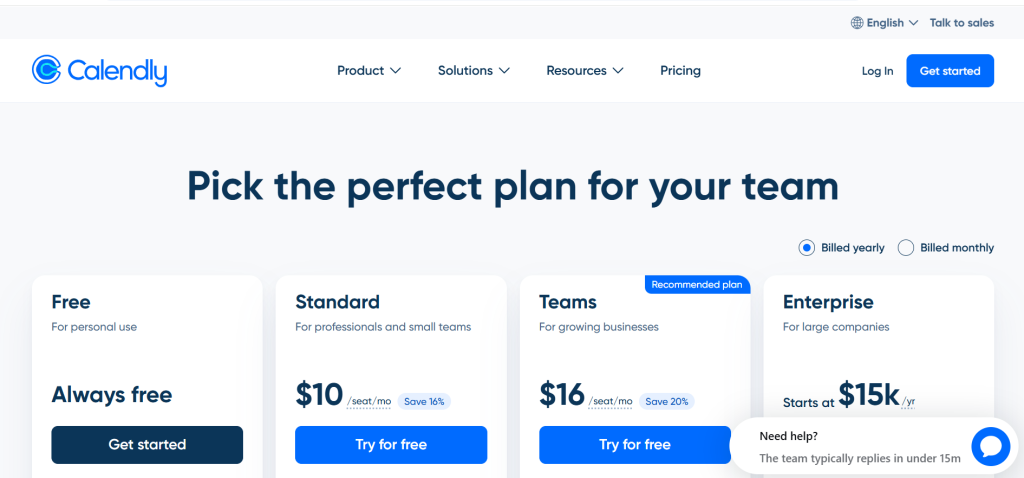
Pricing: Free (basic). Standard $10/mo. Teams $16/mo
Free Tier: Yes — one event type, unlimited bookings, basic integrations
Key Strengths: Eliminates back-and-forth scheduling emails entirely, integrates with Google and Outlook calendars, buffer times between meetings, automatic time zone detection, payment collection at booking, Zoom and Meet integration
Key Weaknesses: Free tier limited to one event type, some clients find third-party scheduling links impersonal, advanced routing requires paid tier
Best For Freelancers: Consultants, coaches, designers, and any freelancer who regularly schedules calls with prospective and active clients
Output Consistency: Extremely high — scheduling mechanism works reliably across all devices and time zones
Best Pairing: HoneyBook or Bonsai to trigger proposal workflow after discovery call, Loom to send pre-meeting context recordings
The scheduling email chain is one of the most absurd productivity losses in professional communication. Two busy people spend four to eight emails over two to three days figuring out when they are both available, a task that should take 30 seconds. Calendly eliminates this exchange completely. You send a link. The client sees your available times, picks one, and receives a calendar invite automatically. The entire interaction takes 90 seconds.
For freelancers, the compounding benefit goes beyond individual time savings. A frictionless scheduling experience is a client experience signal. A prospective client who clicks your Calendly link and books a discovery call in under two minutes has a qualitatively different first impression than one who navigates a four-day scheduling thread. The professionalism of your operational infrastructure communicates the professionalism of your work before you have said a word.
The payment collection feature at booking is particularly valuable for freelancers who offer paid consultations. Rather than following up after a call to collect a consultation fee, Calendly collects payment at the time of booking, with Stripe or PayPal integration. For consultants who charge $150 to $500 for initial strategy sessions, this eliminates the awkward payment conversation that sometimes prevents the call from happening at all.
Where Calendly Falls Short
The free tier’s single event type limitation becomes a constraint quickly. Most freelancers need at minimum a 30-minute discovery call type, a 60-minute project review type, and a 15-minute quick check-in type. Accessing multiple event types requires upgrading to Standard at $10 per month. For freelancers who schedule fewer than five calls per month, the free tier handles basic needs. For those with active client acquisition and regular client communication calls, the Standard plan is a practical necessity.
The Verdict on Calendly
Calendly is the highest-ROI tool on this list relative to its cost, particularly at the free tier. The time saved on scheduling coordination across a year of client communication is substantial, and the improvement to first-impression professionalism is immediate. Install it today, embed the link in your email signature, and never write “does Tuesday at 2 PM work for you?” again.
6. Loom — Best Async Video Tool for Client Communication and Deliverable Walkthroughs
Best For: Freelancers who need to explain work, present deliverables, or communicate complex information to clients without scheduling a call
Pricing: Starter free (up to 25 videos). Business $12.50/mo. Enterprise custom
Free Tier: Yes — 25 video limit with 5-minute cap per video; capable for regular use
Key Strengths: Screen + face recording in one take, shareable link generated instantly, viewer engagement analytics, auto-transcript and captions, comment and reaction features for clients, integrates with Slack and email
Key Weaknesses: 5-minute cap on free tier limits longer walkthroughs, video limit on free tier, some clients prefer written communication over video
Best For Freelancers: Designers presenting mockups, developers walking through code, writers explaining editorial decisions, consultants delivering strategic recommendations
Output Consistency: Very high — recording and sharing mechanism works reliably across all browsers
Best Pairing: Slack for sharing Loom recordings in client channels, Calendly to follow up with a live call if the video generates questions
Loom has solved one of the most persistent communication inefficiencies in client work: the deliverable handoff that requires a live call to explain but does not justify scheduling a 45-minute meeting. A designer who has completed a brand identity system spends 8 to 10 minutes recording a Loom walkthrough — showing each element, explaining the rationale, preempting the obvious questions — and sends the link alongside the files. The client watches the walkthrough at their convenience, reacts with timestamps, and arrives at the review call (if one is needed at all) already oriented and prepared.
The efficiency gain compounds across the entire client communication workflow. Status updates, scope change explanations, revision rationale, invoice walk-throughs, and onboarding instructions all become asynchronous video recordings that clients can watch, rewind, and reference rather than real-time verbal explanations that evaporate from memory immediately. For freelancers working across time zones, Loom collapses a 24-hour email cycle into a 10-minute video that communicates context no email could convey.
The viewer analytics reveal which parts of your video were re-watched, where viewers dropped off, and whether the client actually opened the link. For freelancers who have sent detailed deliverable explanations and suspected the client did not read them, Loom’s read receipt equivalent provides clarity. Clients who repeatedly re-watch the section explaining revision policy are telling you something worth knowing.
Where Loom Falls Short
The free tier’s 5-minute cap per video limits its usefulness for longer walkthroughs and the 25-video cap means active users hit the ceiling within weeks. The Business plan at $12.50 per month removes both limits and adds analytics, making it the practical baseline for freelancers using Loom regularly. Some clients — particularly in formal corporate or legal environments — find video communication less appropriate than written documentation, so reading the client culture before defaulting to Loom is worth doing.
The Verdict on Loom
Loom belongs in the communication toolkit of every freelancer who delivers visual, technical, or complex work to clients. The free tier is sufficient for occasional use. Freelancers who use it regularly will hit the free limits quickly and find the Business plan worth the investment. The time recaptured from calls that Loom replaces — and the quality improvement in client understanding — make it one of the most practically impactful tools on this list.
7. Notion — Best Project and Knowledge Management Workspace for Freelancers
Best For: Freelancers who want a single workspace to manage projects, client documentation, content calendars, SOPs, and business knowledge
Pricing: Free (personal). Plus $12/mo. AI add-on $10/mo
Free Tier: Yes — generous personal tier covers most solo freelancer needs
Key Strengths: Flexible databases for client and project tracking, template community for freelance-specific setups, client portal capabilities, linked databases that connect projects to clients to invoices, strong mobile app
Key Weaknesses: Time-consuming initial setup, no native invoicing or time tracking, can become disorganized without maintained structure, AI add-on costs extra
Best For Freelancers: Writers, consultants, content strategists, and any freelancer managing multiple clients and projects with significant documentation requirements
Output Consistency: High once set up; depends on how much structure investment the freelancer makes upfront
Best Pairing: Toggl Track for time tracking, FreshBooks or Bonsai for invoicing, Claude for drafting content and documents within the workspace
Notion functions as the connective tissue of a freelance business — the central workspace where every project, client, process, and piece of institutional knowledge lives. Where HoneyBook manages the client relationship pipeline and FreshBooks manages the financial layer, Notion manages everything in between: the active project tasks, the client brief documents, the content calendars, the SOPs for onboarding new clients, the swipe file of research and inspiration, and the quarterly business review that tracks revenue and goals.
The database functionality makes Notion particularly powerful for freelancers managing multiple simultaneous engagements. A client database linked to a project database linked to a deliverable tracker means you can look at any client and see every active project, or look at any project and see the client details, status, deadline, and linked deliverables simultaneously. Filtering by deadline shows everything due this week across all clients. Filtering by status shows every project awaiting client feedback. The same data, viewed from the angle most useful at that moment.
For freelancers who produce content — writers, strategists, researchers — Notion serves as the workspace where actual deliverables are created, edited, and organized. The writing editor is capable, the formatting options are extensive, and the linked structure means every piece of work lives connected to its client and project context. There is no hunting through folder structures or searching across multiple applications to find the first draft of a blog post you wrote for a client three months ago.
Where Notion Falls Short
Notion does not replace a CRM, an invoicing tool, or a time tracker. Freelancers who attempt to build invoice tracking, time logging, and financial reporting inside Notion spend significant setup time building something worse than a purpose-built tool. The right mental model is to use Notion for project and knowledge management while connecting it to dedicated tools for financial and time-critical workflows. The learning curve and setup overhead also mean new freelancers should start simple and add Notion once their core business processes are established.
The Verdict on Notion
Notion is the best workspace for freelancers who manage complex, multi-client engagements with significant documentation and process requirements. The free personal tier is genuinely capable for solo use. Freelancers who invest the setup time to build a workspace that reflects their actual workflow will find it eliminates the mental overhead of tracking everything in their head or across scattered documents and folders.
8. Claude — Best AI Assistant for Freelance Writing, Proposals, and Client Communication
Best For: Freelancers who want AI assistance for writing proposals, drafting client emails, creating deliverables, and synthesizing research
Pricing: Free (limited). Pro $20/mo. Max $100/mo
Free Tier: Yes — access to capable model with message limits during peak hours
Key Strengths: Best writing quality among AI tools, 200K token context for long documents, style customization, follows complex instructions precisely, excellent for proposal writing, email drafting, deliverable creation, and strategic analysis
Key Weaknesses: Free tier message limits, not a project management or financial tool, web search less reliable than Perplexity for citation-heavy research
Best For Freelancers: Writers, content strategists, consultants, marketers, and any freelancer for whom written communication and deliverable quality are primary business differentiators
Output Consistency: Highest among AI tools for writing quality and instruction following
Best Pairing: Perplexity for research and fact verification, Notion for organizing AI-generated drafts, Canva for visual elements alongside written deliverables
The freelancer who writes well wins more clients, commands higher rates, and retains clients longer than one who delivers equivalent work with weaker communication. Claude is the AI tool that most effectively elevates written communication across every part of the freelance business: the proposal that wins the project, the client email that manages scope creep professionally, the deliverable that exceeds expectations, and the case study that attracts the next client.
Proposal writing is where Claude delivers immediate, measurable value for most freelancers. Describe the client’s problem, your proposed solution, your relevant experience, and your pricing structure, and Claude drafts a proposal that is persuasive, clearly structured, and professionally written. What used to take two hours of staring at a blank document now takes 25 minutes of collaborative refinement. More importantly, the proposal quality is more consistent: the proposals you write on tired Friday afternoons perform as well as the ones you write on Monday mornings at full capacity.
For client communication, Claude handles the situations where freelancers most commonly undersell themselves or create conflict: raising rates, pushing back on scope expansion, explaining a missed deadline, requesting late payment, or declining a project that is not a fit. These emails carry professional and financial stakes that most freelancers find genuinely stressful to write. Claude drafts them from a neutral position, then you personalize the tone. The output is firmer, more professional, and less likely to damage the relationship than an emotionally charged draft written under pressure.
Where Claude Falls Short
Claude is an AI writing assistant, not a business management platform. It does not track projects, generate invoices, schedule meetings, or store client information. Freelancers who expect it to serve as a CRM or project management tool will be disappointed. The free tier’s message limits are a genuine friction point for freelancers who want to use it throughout the workday, making the Pro plan at $20 per month a practical necessity for daily use. For current web research and fact verification, Perplexity is a more reliable tool.
The Verdict on Claude
Claude is the best AI tool for freelancers whose primary value to clients is delivered through writing and strategic communication. For copywriters, content strategists, consultants, marketers, and any freelancer for whom word quality determines client perception, Claude Pro at $20 per month delivers one of the clearest returns on investment in the freelance toolkit. The combination of proposal quality, client communication support, and deliverable drafting capability means it earns its subscription within the first client engagement.
9. Canva — Best Design Tool for Freelancers Without Design Backgrounds
Best For: Freelancers who need professional visual assets — proposals, presentations, social media content, reports, and brand collateral — without hiring a designer
Pricing: Free (capable). Pro $15/mo. Teams $10/mo/user
Free Tier: Yes — extensive template library and design tools free; premium templates and brand kit require Pro
Key Strengths: Thousands of professional templates across every format, Brand Kit for consistent visual identity, AI image generation, background removal, presentation creation, social media scheduling, PDF export, team collaboration
Key Weaknesses: Pro required for full brand kit and premium elements, not a substitute for professional design in competitive visual fields, AI image quality trails Midjourney
Best For Freelancers: Consultants, marketers, content creators, coaches, and any non-designer freelancer who creates client-facing visual materials
Output Consistency: High — template quality is consistently professional across categories
Best Pairing: Claude for written content that goes into Canva designs, Loom for recording walkthroughs of Canva-created presentations
Canva democratizes professional visual communication for freelancers who are excellent at their core craft but were not trained as designers. A business consultant who delivers recommendations in a beautifully formatted Canva report positions their work as more valuable than an identical recommendation delivered in a plain Word document. A freelance marketer who shows up to prospect meetings with a polished deck competes differently than one who shows up with bullet points in Times New Roman. Perception is part of the deliverable.
The template library covers every format a freelancer regularly needs: proposals, case studies, presentations, invoices, social media graphics, email headers, portfolio pages, and brand guidelines. Canva’s AI has improved the design quality of outputs to the point where the professional threshold — the point at which output looks designed rather than templated — is achievable for non-designers within a few minutes of customization.
The Brand Kit, available on the Pro plan, stores your brand colors, fonts, and logo, then automatically applies them when you create new designs. For freelancers who maintain a consistent personal brand across client deliverables, this eliminates the manual re-application of brand elements to every new document and ensures visual consistency across every client touchpoint.
Where Canva Falls Short
Canva produces excellent visual design within the boundaries of its template system but cannot replicate the custom, conceptual design work that professional designers deliver. Freelancers who are hired specifically for visual design work should not use Canva as their primary production tool unless they are operating at the lower end of the market. For non-designer freelancers who need to produce their own marketing materials and client-facing documents, it is the right choice. For design professionals, Adobe Creative Suite, Figma, or Sketch are more appropriate production environments.
The Verdict on Canva
Canva belongs in the toolkit of virtually every non-designer freelancer who produces client-facing visual materials. The free tier is remarkably capable for most use cases. The Pro plan at $15 per month adds the Brand Kit and premium template access that elevate the output quality meaningfully for freelancers who invest in consistent personal branding. The time saved versus attempting to create equivalent designs in PowerPoint or Google Slides alone justifies the subscription.
10. QuickBooks Self-Employed — Best Tax and Expense Tracking Tool for Freelancers
Best For: Freelancers who want automatic income categorization, mileage tracking, and quarterly estimated tax calculations in one place
Pricing: Self-Employed $15/mo. Self-Employed Tax Bundle $25/mo (includes TurboTax filing)
Free Tier: No — 30-day free trial
Key Strengths: Automatically separates business and personal transactions from linked bank accounts, mileage tracking via GPS, Schedule C categorization, quarterly estimated tax reminders, TurboTax integration for direct filing
Key Weaknesses: Limited invoicing capabilities, does not grow well beyond simple freelance income, more expensive than free alternatives like Wave for basic bookkeeping, no project-based profitability reporting
Best For Freelancers: Freelancers with straightforward income from a small number of clients, those who want mileage tracking, and those who value TurboTax integration for self-filing
Output Consistency: Very high — bank integration and automatic categorization are reliable
Best Pairing: FreshBooks for professional invoicing, Toggl Track for time tracking that feeds into income records
Tax management is the financial chore that freelancers most commonly handle reactively rather than proactively, with predictably stressful results. QuickBooks Self-Employed is designed specifically for the simplest and most common freelance tax situation: sole proprietor income, Schedule C deductions, and quarterly estimated tax payments. It connects to your bank and credit card accounts, automatically pulls transactions, and prompts you to categorize each one as business or personal with a swipe.
The quarterly estimated tax calculation is the feature that prevents the most common and costly freelance financial mistake. Many freelancers, particularly those who came from salaried employment, underestimate their quarterly tax obligations and arrive at April 15 owing a lump sum they have not saved. QuickBooks Self-Employed calculates your running tax liability based on actual income and estimated deductions and reminds you when quarterly payments are due, with the estimated amount. For freelancers who have experienced the specific stress of an unexpected tax bill, this feature alone justifies the subscription.
Mileage tracking, using your phone’s GPS to automatically log business drives, adds up meaningfully for freelancers who visit client sites, attend networking events, or travel to coworking spaces. The IRS standard mileage deduction for 2026 is significant enough that consistent tracking delivers a tax deduction that more than offsets the tool’s monthly cost for freelancers who drive regularly for business purposes.
Where QuickBooks Self-Employed Falls Short
QuickBooks Self-Employed is purpose-built for the simplest freelance tax situation and does not scale gracefully to more complex ones. Freelancers who have formed an LLC, elected S-corp status, have employees or contractors, or manage complex multi-stream businesses will outgrow it quickly and need the full QuickBooks Online product or dedicated accounting software. The invoicing capabilities are basic compared to FreshBooks, making it unsuitable as a standalone invoicing solution for most freelancers.
The Verdict on QuickBooks Self-Employed
QuickBooks Self-Employed is the right tax tool for freelancers in straightforward sole-proprietor situations who want automatic transaction categorization, mileage tracking, and quarterly tax reminders without the overhead of full accounting software. The TurboTax bundle at $25 per month delivers additional value for self-filers. Freelancers with complex financial situations should use FreshBooks with a CPA instead.
11. Contra — Best Commission-Free Freelance Platform for Client Acquisition
Best For: Experienced freelancers who want to find clients and build a portfolio without paying platform commissions on earnings
Pricing: Free for freelancers
Free Tier: Yes — fully free, zero commission on all earnings
Key Strengths: Zero freelancer commission, professional portfolio builder, direct client relationships (not anonymized), built-in contracts and payments, growing client community, no race-to-the-bottom pricing environment
Key Weaknesses: Smaller client pool than Upwork or Fiverr, skews toward tech and creative industries, newer platform with less category coverage than established marketplaces
Best For Freelancers: Designers, developers, marketers, writers, and strategists with portfolios and experience who want to avoid the 20 percent commission platforms take on Upwork and Fiverr
Output Consistency: Moderate — platform outcomes depend on niche, portfolio quality, and client activity in your category
Best Pairing: HoneyBook or Bonsai for managing clients acquired through Contra off-platform, Claude for writing compelling Contra profile and portfolio descriptions
Contra’s core value proposition is simple and significant: it takes zero commission on freelancer earnings. Upwork charges up to 20 percent on the first $500 earned with each client before stepping down to 10 percent and eventually 5 percent. Fiverr charges 20 percent on every transaction. For a freelancer earning $100,000 annually through these platforms, commission costs represent $10,000 to $20,000 per year in foregone income. Contra keeps none of it.
The platform also changes the dynamics of the client relationship in important ways. Unlike Upwork, where client and freelancer identities are managed through the platform and communication is encouraged to stay in-platform to protect Upwork’s commission, Contra facilitates direct relationships. Clients know who you are, they can find you independently, and the relationship can continue off-platform without either party violating terms of service. This is how professional services relationships actually work, and Contra’s model reflects it.
The portfolio builder, which functions as a professional website within the platform, allows freelancers to showcase work samples, case studies, client testimonials, and skills in a format that serves both platform discovery and external sharing. A Contra profile URL sent in a cold email functions as a professional portfolio link that also enables direct project inquiry and booking, collapsing two separate tools into one.
Where Contra Falls Short
Contra’s client pool is smaller than established platforms, and its category coverage — strong in technology, design, marketing, and content — is less comprehensive than Upwork’s breadth across virtually every professional service. Freelancers in niche technical fields, local service industries, or categories outside Contra’s current strengths may find limited client activity. For freelancers just starting and needing volume of opportunities to build experience and testimonials, Upwork’s larger client base may justify the commission cost in the early stages.
The Verdict on Contra
Contra is the best platform for experienced freelancers who are losing meaningful income to commission fees on other platforms. The zero-commission model and direct relationship structure make it the right default for freelancers in tech, design, and creative fields who have portfolios worth showcasing. Use it alongside a professional website and warm referrals rather than as a replacement for all client acquisition channels.
12. Slack — Best Client Communication Tool for Ongoing Freelance Engagements
Best For: Freelancers who work in ongoing, collaborative client engagements where email is too slow and formal
Pricing: Free (limited history). Pro $7.25/mo. Business+ $12.50/mo
Free Tier: Yes — 90 days of message history, 10 app integrations, 1:1 calls
Key Strengths: Organized channels separate communication by project and topic, integrates with virtually every productivity tool, search across message history, file sharing, voice and video calls, status and notification controls
Key Weaknesses: Free tier’s 90-day message history limit is a genuine constraint, can create always-on communication expectations, clients may prefer email, notification management required to protect focus time
Best For Freelancers: Developers embedded in client teams, marketing and content freelancers with retainer clients, consultants in ongoing advisory relationships
Output Consistency: Very high — Slack’s reliability and message delivery are industry-leading
Best Pairing: Loom for sharing video updates within Slack channels, Notion for linking project documentation referenced in Slack
Slack transforms the communication dynamic of embedded freelance relationships from transactional email exchanges into something closer to team membership. For freelancers who work on retainer or in ongoing engagements where they are functionally part of a client’s team, Slack is often already the communication standard — the question is whether to use the client’s existing workspace or set up a separate channel for external collaborators.
For freelancers who manage their own client communication environment, creating a Slack workspace and inviting clients to dedicated channels per project provides an organized, searchable, professional communication layer that email cannot replicate. Channel-based organization separates strategic discussions from tactical feedback from administrative requests. Threaded replies keep context attached to the original message rather than scattered across a flat chronological feed. Pinned messages preserve project briefs, scope agreements, and key decisions at the top of every channel.
The integration ecosystem is where Slack compresses workflow across the freelance toolkit. Share a Loom recording and it previews inline. Link a Notion document and it shows the page title and summary. Set up notifications from project management tools so deadline updates appear in the relevant Slack channel. For freelancers using multiple tools, Slack becomes the communication layer that surfaces activity from all of them in one place.
Where Slack Falls Short
The free tier’s 90-day message history limit means that project communications older than three months become inaccessible — a significant problem for freelancers who need to reference earlier decisions or audit the full scope of a client relationship. The Pro plan removes this limitation at $7.25 per month. Slack also creates an implicit expectation of responsiveness that can erode the schedule boundaries that protect freelancer productivity. Setting clear availability hours and using Slack’s Do Not Disturb function proactively is necessary to prevent client communication from becoming an always-on obligation.
The Verdict on Slack
Slack is the right communication tool for freelancers in ongoing, collaborative client relationships where real-time coordination and organized project communication justify a dedicated workspace. For freelancers who handle most client work as discrete, time-limited projects with asynchronous communication, email plus Loom may be sufficient without the overhead of managing a Slack workspace. For retainer clients and embedded team work, Slack is the professional standard.
Which Freelance Tool Should You Choose? A Decision Framework
The right freelance tool depends on which part of your business is currently the biggest constraint on growth, income, or sanity. Here are the clearest recommendations based on our testing.
If you are just starting out and need the most important tool immediately: Install Toggl Track (free) and start tracking your time today. The data it generates over the first month will be the most valuable business intelligence you have ever had about your own work.
If client management is chaotic: HoneyBook or Bonsai at $19 to $21 per month brings proposals, contracts, and invoicing under one roof. Choose HoneyBook if your work is creative and client-relationship-driven; choose Bonsai if you want stronger contract protection and tax estimation.
If late payments are your biggest financial pain: FreshBooks with automated invoice reminders is a direct intervention. The automatic reminder system alone will shorten your average payment cycle measurably.
If you are losing 20 percent of earnings to platform commissions: Build your profile on Contra and begin migrating your best clients to direct relationships. The zero-commission model pays for your entire freelance software stack within one project.
If discovery calls and scheduling take too much time: Calendly free tier. Install it today, add the link to your email signature, and the time savings begin immediately.
If proposal quality is limiting your win rate: Claude Pro at $20 per month. Use it to draft every proposal from a structured brief, and track whether your conversion rate changes over the next 90 days.
If client deliverables require explanation every time: Loom free tier for all deliverable handoffs. Record a 5-minute walkthrough for every significant deliverable, and count how many follow-up calls you no longer need to schedule.
Recommended Freelance Tool Stacks by Role
| Freelancer Type | Primary Tool | Supporting Tools | Monthly Cost | Coverage |
| Creative (Photographer / Videographer) | HoneyBook | Toggl Track, Canva, Loom | $19–35 | Client pipeline + Time + Visual + Communication |
| Developer / Technical Freelancer | Bonsai | Toggl Track, Slack, Claude | $21–41 | Contracts + Time + Communication + AI |
| Writer / Content Strategist | Claude Pro | Notion, Zotero, FreshBooks | $20–40 | AI Writing + Organization + Invoicing |
| Consultant / Coach | Calendly + HoneyBook | Loom, Canva, QuickBooks SE | $29–54 | Scheduling + Client Mgmt + Video + Tax |
| New Freelancer (Budget) | Toggl Track | Canva Free, Calendly Free, Contra | $0 | Time + Design + Scheduling + Acquisition |
| High-Volume Freelancer | FreshBooks | Toggl Track, HoneyBook, Claude | $39–59 | Accounting + Time + Client Mgmt + AI |
Head-to-Head: Which Tool Wins Each Freelance Category?
| Category | Winner | Runner-Up | Notes |
| All-in-One Client Management | HoneyBook | Bonsai | HoneyBook for creatives; Bonsai for contract-heavy work |
| Time Tracking | Toggl Track | Harvest | Toggl’s free tier and reporting lead the category |
| Invoicing & Accounting | FreshBooks | Bonsai | FreshBooks on accounting depth; Bonsai on integration |
| Proposal & Contract | Bonsai | HoneyBook | Bonsai’s contract templates are purpose-built for freelancers |
| Scheduling | Calendly | Acuity | Calendly on simplicity; Acuity on customization |
| Client Communication | Slack | Email + Loom | Slack for ongoing; Loom for async deliverable updates |
| AI Writing & Communication | Claude | ChatGPT | Claude on writing quality; ChatGPT on breadth |
| Visual Design | Canva | Adobe Express | Canva on templates and ease; Adobe on brand consistency |
| Tax Management | QuickBooks SE | Wave | QBO SE on mileage and quarterly tax; Wave on free cost |
| Client Acquisition | Contra | Upwork | Contra on zero commission; Upwork on volume and breadth |
| Project & Knowledge Mgmt | Notion | ClickUp | Notion on flexibility; ClickUp on structured project mgmt |
| Free Tier Value | Toggl Track | Canva | Toggl Track free covers core needs; Canva free is extensive |
Frequently Asked Questions
What is the most important freelance tool to start with?
Toggl Track. It is free, it installs in five minutes, and the data it generates about how your time is actually distributed across clients and project types is more valuable than any other input for making better business decisions. Before you optimize anything else about your freelance workflow, you need to understand where your hours actually go. Most freelancers are surprised by what they find.
Do freelancers need separate tools for contracts and invoices?
Not necessarily. Bonsai and HoneyBook both handle contracts and invoicing in a single platform, which is the better setup for most freelancers. Keeping them separate — a contract template in Google Docs and invoices in a separate tool — creates reconciliation problems and increases the risk of using outdated contract versions. An integrated tool that links signed contracts to active projects to invoices provides cleaner audit trails and less administrative overhead.
How do I get clients as a new freelancer without paying Upwork commissions?
Warm outreach outperforms cold platform applications for most freelancers, regardless of experience level. Email former colleagues, professors, or employers who know your work quality. Post specifically about your services on LinkedIn with concrete examples of what you deliver. Build a Contra profile and direct any inbound interest there rather than to a platform that takes a commission. Once you have two or three satisfied clients, referrals become the primary acquisition channel, and the platform commission question becomes less relevant.
Is it worth paying for AI tools as a freelancer?
For freelancers who write — proposals, client emails, deliverables, case studies — Claude Pro at $20 per month delivers a return that is hard to match with any other single investment. The quality difference between AI-assisted proposals and unassisted proposals is visible in win rates over time. For freelancers in visual or technical fields where writing is not a primary deliverable, the free tiers of Claude and ChatGPT typically cover the occasional writing assistance they need.
How do I handle taxes as a freelancer?
The fundamental requirement is to set aside 25 to 30 percent of every payment received into a dedicated savings account for taxes, and to pay quarterly estimated taxes to avoid underpayment penalties. QuickBooks Self-Employed handles the calculation and reminds you of payment dates. Work with a CPA at least for your first year as a freelancer to ensure you understand which expenses are deductible and whether forming an LLC or electing S-corp status makes sense for your income level. The tax efficiency gains from proper business structuring often outweigh the cost of professional tax advice many times over.
What is the biggest mistake freelancers make with their tool stack?
Over-engineering it before they have consistent revenue. A freelancer who spends a weekend building an elaborate Notion workspace and integrating five tools before they have three clients has optimized a system that is not yet worth optimizing. The best freelance tool stack scales with your business. Start with Toggl Track (free) and Calendly (free) to solve the two most immediate practical problems. Add invoicing and contract tools when your volume justifies them. Add AI assistance when writing is taking meaningful time you could redirect to billable work.
Final Words: The Best Tools for Freelancers Are the Ones That Pay for Themselves
The freelance tools landscape in 2026 has matured past the point where you need to choose between functionality and affordability. The most impactful time tracking tool available is free. The most capable commission-free client acquisition platform is free. The scheduling tool that eliminates an entire category of email friction has a functional free tier. An AI writing tool that materially improves proposal quality and client communication costs $20 per month and pays for itself within a single won project.
The real investment in building a freelance tool stack is not financial. It is behavioral. Tools that require discipline to use consistently — Toggl Track’s timer that you have to remember to start, FreshBooks’s expenses you need to categorize weekly, Zotero’s citations you need to capture as you research — deliver their value only to the freelancers who integrate them genuinely into their workflow rather than installing them and forgetting them.
Two principles should guide your tool selection. First, identify the specific constraint that is most limiting your income or costing you the most time, and solve that problem before adding tools for problems that do not yet exist. Second, give each new tool a genuine 30-day trial before evaluating it. Most freelance tools have delayed payoffs — the time tracking insights, the faster invoice collection, the proposal quality improvement — that only become visible after consistent use.
The Freelance Stack That Works for Most Independents
If you want a concrete starting recommendation, this three-tool foundation covers the core operational needs of most freelancers: Toggl Track (free) for time intelligence, Calendly (free) for scheduling, and either HoneyBook or Bonsai ($19 to $21/month) for client management and invoicing. Add Claude Pro ($20/month) when writing and client communication become bottlenecks, and FreshBooks ($19/month) when your accounting needs outgrow the built-in invoicing of your client management platform.
Total cost at the starting tier: zero dollars. Total cost at full build-out: $40 to $60 per month, recoverable from a single additional billable hour per week. The best tools for freelancers do not cost money. They make it.


![Marketing Automation Case Study: 12 Real Examples, Strategy & ROI Results [2026]](https://marketingcasestudy.io/wp-content/uploads/2026/05/marketing-automation-case-study-featured-300x158.png)
