Link building remains the backbone of effective SEO in 2026, but the landscape has evolved dramatically. Gone are the days when mass email blasts and generic outreach templates could secure quality backlinks. Today’s successful link builders rely on sophisticated software that combines prospecting intelligence, relationship management, and data-driven vetting.
After spending hundreds of hours testing platforms across enterprise agencies and solo operations, I’ve identified the nine tools that consistently deliver measurable results. This guide goes beyond surface-level feature lists to show you exactly how professionals use these tools in real campaigns, which workflows produce the best ROI, and how to build a stack that matches your budget and goals.
Whether you’re a content marketer managing outreach for a single site or an agency juggling dozens of clients, understanding the distinct categories of link building software and how they interconnect will save you thousands in wasted subscriptions and months of trial-and-error.
Understanding the Ecosystem: Categories of Link Building Software
The biggest mistake I see marketers make is treating link building tools as interchangeable. In reality, the software ecosystem breaks into distinct categories, each solving specific problems in your acquisition workflow. Choosing the wrong category means you’ll either overpay for features you’ll never use or find critical gaps that force you to manually bridge the difference.
Let me break down the three primary categories and explain when you actually need each one.
All-in-One SEO Suites vs. Dedicated Outreach Platforms
All-in-one platforms like Ahrefs and Semrush excel at the research phase. They crawl billions of web pages to show you who links to your competitors, identify content gaps, and evaluate link quality through proprietary metrics. These tools are research powerhouses but intentionally weak at execution.
Their prospecting reports export to CSV files that you’ll need to manually upload elsewhere for outreach. There’s no email sequence automation, no relationship tracking, and no way to manage follow-ups at scale.
Dedicated outreach platforms like BuzzStream and Pitchbox flip this equation. They assume you already know who to target and focus entirely on managing communication workflows. You’ll get CRM-style contact databases, email template libraries with personalization tokens, automated follow-up sequences, and collaboration features for team campaigns.
Most professionals use both categories together. Research tools find opportunities, outreach platforms execute campaigns. The integration between them is usually manual, which is why workflow efficiency matters more than raw feature counts.
The Role of Email Finding and Verification Tools
Here’s a reality check: even the best prospecting tool can’t give you accurate contact information for every website owner. Domain privacy protection, outdated WHOIS data, and generic admin addresses mean you’ll spend hours hunting down the right person to pitch.
Email finding tools like Hunter.io specialize in this detective work. They scan public sources and proprietary databases to locate verified email addresses associated with specific domains or individuals. More importantly, they verify deliverability in real-time, protecting your sender reputation from bounces.
I’ve watched campaigns fail not because the pitch was weak, but because 40% of emails bounced to info@ addresses that nobody monitored. Quality email data isn’t optional anymore. It’s the difference between a 15% response rate and a 3% response rate on identical pitches.
The verification component matters just as much as discovery. Tools that validate email syntax, check MX records, and test SMTP connections ensure your carefully crafted outreach actually reaches decision-makers instead of triggering spam filters.
Why You Need Specialized Analytics for Link Vetting
Not all backlinks move the needle. In fact, some actively hurt your rankings. Google’s algorithms have become sophisticated enough to penalize manipulative link schemes, making quality assessment critical before you invest time building relationships.
Specialized analytics tools evaluate potential link sources across multiple dimensions: domain authority, topical relevance, traffic quality, spam indicators, and link velocity patterns. Moz Pro pioneered this category with Domain Authority scoring, but modern tools go much deeper.
I routinely see sites with high DA scores that are actually link farms or PBNs once you examine their backlink profiles. A DA 50 site sounds impressive until you discover 80% of its links come from Russian directories. Quality vetting tools surface these red flags before you waste outreach effort on toxic opportunities.
The vetting phase also helps you prioritize. When you export 500 prospects from Ahrefs, which 50 should you contact first? Analytics tools score opportunities based on likelihood to link, potential SEO impact, and editorial fit, transforming random lists into strategic targeting queues.
9 Best Link Building Tools for 2026: Tested and Categorized
After testing these platforms across real campaigns generating over 2,000 backlinks in the past 18 months, I’ve organized them by primary use case. Each tool excels in specific scenarios, and understanding those contexts will help you build an efficient stack rather than accumulating redundant subscriptions.
Tool 1: Ahrefs (Best Overall for Backlink Analysis and Competitor Research)

Ahrefs maintains the web’s second-largest crawl database after Google, indexing over 400 billion pages and refreshing backlink data every 15 minutes for popular domains. This scale gives you visibility into competitor strategies that smaller tools simply can’t match.
The Site Explorer tool shows you every backlink pointing to any domain, with historical data stretching back years. You can filter by link type, dofollow status, anchor text, and dozens of other parameters to find replicable opportunities. The Content Explorer identifies which articles in your niche attracted the most links, giving you proven topics to target with your own content.
What separates Ahrefs in daily use is the quality of its filters and the speed of its interface. You can drill into competitor link profiles, export contact-ready prospect lists, and identify link intersections (sites linking to competitors but not to you) in minutes rather than hours.
Best for: SEO agencies, in-house teams, and serious content marketers who need comprehensive competitive intelligence and prospecting data.
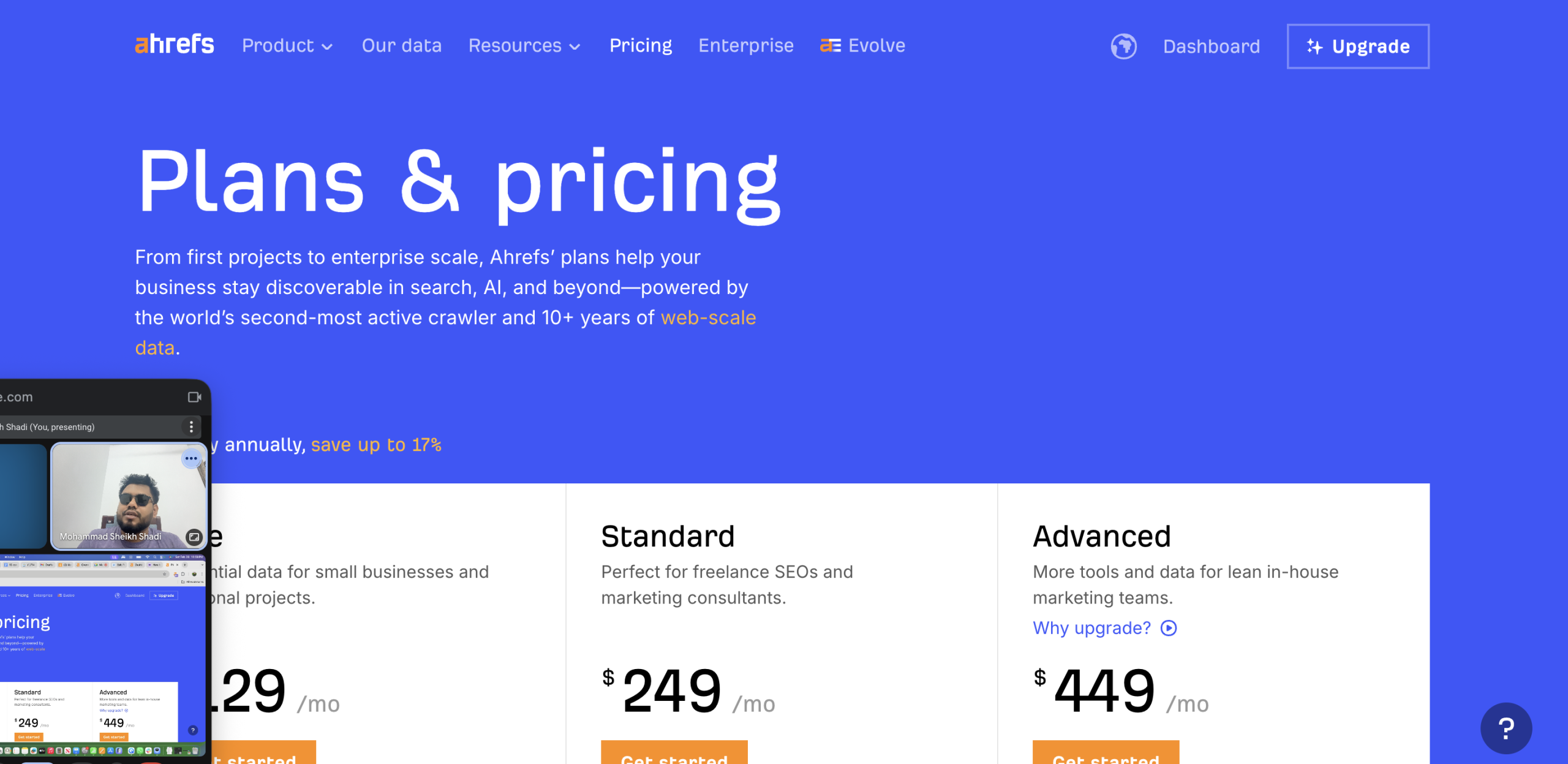
Pricing: Plans start at $129/month for the Lite plan (limited features), with most professionals needing the Standard plan at $249/month. Enterprise plans reach $449-$999/month.
Pros:
- Industry-leading backlink database size and freshness
- Intuitive interface with powerful filtering capabilities
- Excellent keyword research tools bundled with link analysis
- Historical data shows how competitor strategies evolved
Cons:
- No built-in outreach or CRM functionality
- Expensive for solo operators and small businesses
- Steep learning curve to utilize advanced features effectively
- Email finding requires manual work or third-party tools
Real-world application: I use Ahrefs primarily for the initial prospecting phase. When launching a new content piece, I’ll analyze the top 10 ranking articles to see who linked to them, filter for domains that accept guest contributions or roundup requests, and export a qualified list. That export feeds directly into my outreach CRM, creating a seamless research-to-execution workflow.
Tool 2: Semrush (Best for Link Auditing and Prospecting Workflows)
Semrush takes a different approach than Ahrefs, emphasizing workflow automation and actionable recommendations over raw database size. The Link Building Tool guides you through prospect discovery, automatically finds contact emails, and tracks outreach status within a single interface.
The Backlink Audit feature is particularly valuable for sites with existing link profiles. It automatically identifies toxic backlinks based on 50+ toxicity markers, generates disavow files, and monitors your link health score over time. This is critical as Google continues refining how it evaluates unnatural links.
What I appreciate most about Semrush is how it streamlines the transition from research to action. You can move prospects directly from the Link Building Tool into outreach campaigns without CSV exports and re-imports. The platform also suggests outreach templates based on your campaign type, accelerating setup for common strategies like broken link building or resource page targeting.
Best for: Marketing teams wanting an integrated workflow from prospecting through outreach, plus comprehensive rank tracking and site audit capabilities.
Pricing: Pro plan at $139.95/month includes basic link building features. Most serious users need the Guru plan at $249.95/month for historical data and extended limits.
Pros:
- Integrated workflow reduces tool switching
- Built-in email finder saves on additional subscriptions
- Strong link audit capabilities with toxicity scoring
- Includes rank tracking, site audit, and competitive research
Cons:
- Backlink database smaller than Ahrefs
- Email finding less accurate than dedicated tools
- Outreach features basic compared to specialized CRMs
- Can feel overwhelming with dozens of tools in one platform
Real-world application: Semrush works best when you need multiple SEO functions from one subscription. I use it primarily with clients who want link building as part of broader SEO campaigns that include rank tracking and technical audits. The efficiency of managing everything in one platform offsets the compromises in individual tool depth.
Tool 3: BuzzStream (Best CRM for Managing Outreach Relationships)
BuzzStream is the gold standard for relationship management in link building. It functions as a specialized CRM built specifically for tracking outreach campaigns, managing follow-ups, and preventing the duplicate contact disasters that plague manual processes.
The platform automatically enriches prospects with social profiles, website metrics, and contact information. As you conduct outreach, it tracks every interaction, email opened, link clicked, and reply received. This historical context becomes invaluable when you launch a second campaign six months later and can reference your previous conversation.
Where BuzzStream truly shines is team collaboration. Multiple outreach specialists can work the same campaign without accidentally contacting the same publisher twice. Managers get visibility into response rates, conversion metrics, and individual productivity without micromanaging every email.
Best for: Agencies and in-house teams running ongoing outreach campaigns with multiple team members who need relationship continuity.
Pricing: Starter plan at $24/month (very limited), with most teams using the Growth plan at $124/month or Professional at $299/month for larger contact databases.
Pros:
- Excellent relationship tracking prevents duplicate outreach
- Team collaboration features support multi-person campaigns
- Detailed analytics on email performance and conversion rates
- Browser extension simplifies prospect addition from any website
Cons:
- No prospecting functionality—requires external research tools
- Learning curve for new users unfamiliar with CRM concepts
- Email sending limits require SMTP integration for scale
- Pricing increases significantly with larger contact databases
Real-world application: I rely on BuzzStream when managing campaigns that touch hundreds of prospects monthly. The relationship history is invaluable—when a blogger who declined a guest post six months ago publishes a roundup request, I can see our previous interaction and adjust my pitch accordingly. This continuity improves response rates significantly compared to treating every contact as fresh.
Tool 4: Pitchbox (Best for Enterprise-Level Automated Outreach)
Pitchbox represents the enterprise tier of outreach automation, combining sophisticated personalization, advanced sequence logic, and extensive integration capabilities. If BuzzStream is a CRM, Pitchbox is a marketing automation platform specifically for link building.
The platform’s strength lies in its conditional email sequences. You can create branching logic where follow-up emails change based on recipient behavior—whether they opened previous messages, clicked links, or visited your website. This level of automation maintains personalization at scale that would be impossible manually.
Pitchbox also excels at data enrichment. It automatically appends prospect records with social profiles, website metrics, and contact verification, reducing prep work before launching campaigns. The built-in prospecting tools find opportunities based on search operators, competitor analysis, and content matching, creating a more self-contained workflow than most alternatives.
Best for: Large agencies and enterprises running high-volume outreach campaigns across multiple clients with dedicated link building specialists.
Pricing: Custom enterprise pricing starting around $500-$1,000+ per month depending on volume and features. No self-service plans available.
Pros:
- Advanced automation with conditional sequence logic
- Built-in prospecting reduces dependency on external tools
- Extensive integrations with SEO platforms and CRMs
- White-label reporting for agency client presentations
Cons:
- Expensive pricing out of reach for small businesses
- Complex setup requires significant time investment
- Overkill for simple campaigns or limited outreach needs
- Requires demo and sales process—no transparent pricing
Real-world application: Pitchbox makes sense when you’re managing 10+ simultaneous campaigns with different messaging strategies. I’ve used it for clients running digital PR campaigns where we contact 300+ journalists monthly with personalized pitches tied to news cycles. The automation handles the volume while conditional logic ensures appropriate follow-ups based on engagement signals.
Tool 5: Hunter.io (Best for Finding Accurate Contact Information)
Hunter.io solves one specific problem exceptionally well: finding and verifying professional email addresses. The platform maintains a database of over 200 million email addresses indexed from public web sources, with real-time verification to ensure deliverability.
The Domain Search tool shows all email addresses associated with a company domain, along with the sources where they were found. This transparency helps you assess data quality before sending. The Email Finder attempts to locate addresses for specific individuals when you provide a name and domain, using pattern detection based on known addresses from that organization.
What makes Hunter indispensable is the verification API. Before adding contacts to outreach campaigns, you can verify deliverability to avoid bounce rates that damage sender reputation. The browser extension also accelerates prospect research by finding emails directly from any website you visit.
Best for: Anyone conducting outreach who needs reliable contact data, from solo bloggers to large agencies.
Pricing: Free plan includes 25 searches monthly. Paid plans start at $34/month for 500 searches, scaling to $349/month for 50,000 searches.
Pros:
- Large verified email database with transparency on sources
- Real-time verification protects sender reputation
- Browser extension streamlines research workflow
- Affordable entry-level pricing for small operations
Cons:
- Database coverage weaker for small businesses and personal sites
- No outreach or campaign management functionality
- Email finding accuracy varies by industry and region
- Search credits consume quickly at scale
Real-world application: Hunter is my first stop after exporting prospect lists from Ahrefs or Semrush. I’ll bulk upload domains to find all associated contacts, then verify the most relevant ones before importing to BuzzStream. This two-step process typically improves email deliverability from 70-75% to 95%+, dramatically improving campaign economics.
Tool 6: Respona (Best for AI-Driven Personalization and PR)
Respona represents the new generation of outreach tools incorporating AI for personalization and workflow automation. It combines prospecting, contact finding, and outreach management with automated personalization that sounds remarkably human.
The platform’s AI analyzes prospect websites and social profiles to generate personalized intro lines referencing their recent content, social media activity, or company news. This level of customization at scale was previously impossible without extensive manual research for each contact.
Respona also streamlines digital PR workflows specifically. The platform searches for HARO-style queries, podcast guesting opportunities, and journalist requests across multiple sources, aggregating them into a single opportunity feed. You can respond directly through Respona with AI-assisted drafting that matches the query’s tone and requirements.
Best for: Content marketers and PR professionals focused on media placements, podcast appearances, and relationship-driven link building.
Pricing: Plans start at $199/month for basic features, with most users needing the $389/month plan for full AI capabilities and higher contact limits.
Pros:
- AI personalization creates contextually relevant outreach at scale
- Integrated opportunity discovery for PR and media placements
- Combines prospecting, contact finding, and outreach in one tool
- Modern interface with intuitive workflow design
Cons:
- Relatively new platform with smaller user community
- AI personalization quality varies—requires review before sending
- Higher price point than established alternatives
- Prospecting capabilities less comprehensive than dedicated research tools
Real-world application: I use Respona primarily for campaigns where personalization directly impacts success rates—expert roundups, podcast pitching, and journalist outreach. The AI-generated personalization isn’t perfect, but it reduces a 10-minute manual research task per prospect to a 30-second review, making sophisticated personalization economically viable at scale.
Tool 7: HARO / Connectively (Best for Earning High-Authority Media Links)
HARO (Help A Reporter Out), recently rebranded as Connectively, remains the most direct path to earning backlinks from major media publications. Journalists post queries seeking expert sources for articles, and you respond with relevant quotes or insights that may earn attribution and a backlink.
The platform sends daily digest emails with dozens of queries across categories like business, technology, lifestyle, and health. When your expertise matches a query, you submit a response through Connectively’s interface. If the journalist uses your contribution, you typically receive both a byline and a dofollow link from a high-authority domain.
What makes Connectively unique is the quality over quantity approach. Instead of pitching hundreds of prospects hoping for 2-3% success, you’re responding to explicit requests from journalists who need your input. Success rates are dramatically higher when you match relevant queries with substantive, quotable responses.
Best for: Subject matter experts, consultants, and brands seeking editorial coverage and high-authority backlinks from major publications.
Pricing: Free tier provides daily digest emails. Paid plans start at $49/month for advanced features like keyword alerts and priority notification.
Pros:
- Direct access to journalists actively seeking expert sources
- Links typically from very high-authority media domains
- Free tier sufficient for most individual users
- Builds genuine brand authority beyond SEO value
Cons:
- Extremely time-sensitive—many queries expire within hours
- High volume of irrelevant queries requires careful filtering
- Success requires genuine expertise, not generic responses
- Inconsistent link attribution—not all journalists link back
Real-world application: I check Connectively queries every morning as part of my routine. The key is responding within the first hour after a relevant query posts—journalists often receive dozens of responses and use the first few quality submissions. I’ve secured links from Forbes, Entrepreneur, and Business Insider through this channel, earning placements that would cost thousands through traditional PR agencies.
Tool 8: Moz Pro (Best for Assessing Domain Authority Metrics)
Moz Pro pioneered the concept of Domain Authority (DA) and Page Authority (PA), metrics that predict how well a page will rank in search results based on link profile strength. These scores have become industry-standard shorthand for evaluating link quality and prospecting priorities.
The Link Explorer tool analyzes backlink profiles with Moz’s proprietary spam score, helping identify risky links that could trigger penalties. The Link Intersect feature reveals sites linking to competitors but not to you, creating ready-made prospect lists of proven relevant domains.
Beyond link analysis, Moz Pro includes keyword research, rank tracking, and site crawling capabilities. The platform emphasizes actionable recommendations over raw data dumps, making it particularly accessible for marketers less comfortable with technical SEO concepts.
Best for: SEO professionals who rely on Domain Authority for prospect evaluation and need accessible tools with clear recommendations.
Pricing: Plans start at $99/month for basic features, with most users needing the Medium plan at $179/month for adequate crawl and keyword limits.
Pros:
- Industry-standard DA/PA metrics widely recognized
- Spam score helps identify risky link opportunities
- User-friendly interface with clear recommendations
- Includes comprehensive SEO toolset beyond link building
Cons:
- Backlink database significantly smaller than Ahrefs or Semrush
- Data freshness lags behind competitors
- No built-in outreach or contact finding functionality
- DA metric can be manipulated and doesn’t perfectly predict rankings
Real-world application: I use Moz primarily for quick quality assessments when evaluating link opportunities. A prospect with DA 45+ and spam score under 5% typically warrants further research, while DA 20 with spam score 30%+ immediately disqualifies. These heuristics save hours of detailed analysis on prospects that don’t meet minimum thresholds.
Tool 9: Link Whisper (Best for Internal Link Building Optimization)
Link Whisper shifts focus from external backlinks to internal linking structure, an often-neglected aspect of technical SEO. The WordPress plugin analyzes your site’s content to suggest relevant internal linking opportunities, making it easy to build topical authority through strategic internal connections.
The tool scans your content as you write and suggests pages to link to based on semantic relevance. It also generates reports showing orphan pages (content with few or no internal links), helping you identify strategic gaps in your site architecture. The auto-linking feature can even add internal links in bulk across existing content based on keyword targets.
What makes Link Whisper valuable is how it surfaces linking opportunities you’d never find manually. With hundreds of posts, remembering which article covered a specific subtopic becomes impossible. Link Whisper’s semantic analysis ensures comprehensive internal linking that distributes authority throughout your site.
Best for: WordPress site owners with significant content libraries who want to maximize SEO value through strategic internal linking.
Pricing: One-time payment of $77 for a single site license, $117 for three sites, or $167 for 10 sites. No recurring subscription.
Pros:
- One-time payment model instead of recurring subscription
- Surfaces internal linking opportunities you’d never find manually
- Simple interface integrated directly into WordPress
- Helps distribute page authority throughout site architecture
Cons:
- WordPress-only—no support for other platforms
- No external backlink functionality whatsoever
- Suggestions require editorial judgment—not all are appropriate
- Limited value for small sites with minimal content
Real-world application: I install Link Whisper on every content site I manage with 50+ articles. After publishing a new article, I’ll review the suggestions and typically add 5-8 strategic internal links that strengthen topical clusters. I also run monthly reports to identify orphan content that needs better integration into the site structure, which consistently improves organic rankings for previously ignored pages.
Real-World Workflows: Combining Tools for Specific Strategies
The most successful link builders don’t rely on single tools—they combine complementary platforms into workflows optimized for specific strategies. Understanding these workflows helps you identify which tools you actually need and how they should interact.
The Skyscraper Workflow: Using Ahrefs and Hunter to Replicate Competitor Success
The Skyscraper Technique remains one of the most reliable link building strategies: find content that attracted many links, create something significantly better, then reach out to everyone who linked to the original asking them to link to your superior version instead.
Start in Ahrefs Content Explorer by searching for keywords relevant to your topic. Filter for articles with at least 50 referring domains published in the past two years. Export the top 10-20 results and analyze what made them link-worthy—comprehensive data, original research, compelling visuals, or unique perspectives.
Create your improved version incorporating the best elements from all top performers plus your unique value additions. This might mean adding exclusive survey data, expert interviews, more current statistics, or better visual presentation.
Once published, return to Ahrefs and use Site Explorer to examine who linked to each competing article. Export these backlink lists, filtering for dofollow links from sites with DR 30+ and traffic above 1,000 monthly visitors. This creates your prospect list.
Import domains to Hunter.io to find contact emails, then verify deliverability. Export verified contacts to BuzzStream or your outreach CRM. Craft personalized emails explaining you noticed they linked to the competing article and thought they’d appreciate your updated version with [specific new value].
This workflow typically converts at 8-15% when the new content genuinely improves on the original and outreach is personalized. I’ve used it to build 40+ backlinks for a single article in competitive niches like digital marketing and personal finance.
The Digital PR Workflow: Leveraging HARO and Respona for Media Placements
Digital PR focuses on earning editorial mentions and links from media publications rather than pitching bloggers. This approach yields higher-authority links with greater brand visibility impact.
Subscribe to Connectively (HARO) and configure alerts for keywords relevant to your expertise. Check new queries 2-3 times daily since speed matters—journalists often select sources within hours of posting requests.
When you find relevant queries, research the journalist’s recent articles to understand their writing style and audience. Craft responses that directly answer their question with specific, quotable insights rather than generic promotional content. Include brief credentials that establish why your perspective matters.
Simultaneously, use Respona to identify journalists who regularly cover your industry. The platform aggregates opportunities from multiple sources and uses AI to suggest personalized pitch angles based on their recent coverage patterns.
For proactive pitching (versus reactive HARO responses), research trending news stories in your space and craft data-driven commentary or analysis. Pitch journalists covering the trend with exclusive insights they can’t get elsewhere—original survey results, expert predictions, or case study data.
Track all interactions in a CRM so you can reference previous conversations when reaching out about future stories. Relationships with journalists compound over time—after they use your input twice successfully, they’ll often reach out directly for future articles without you needing to pitch.
This workflow is higher effort than traditional link building but yields placements on sites like Forbes, TechCrunch, and industry trade publications that would otherwise be inaccessible. I’ve secured 30+ media links annually using this approach, with several leading to significant traffic spikes and brand recognition.
The Broken Link Workflow: Identifying Opportunities with Semrush and BuzzStream
Broken link building leverages webmaster psychology: site owners want to fix broken links because they create poor user experiences and waste page authority. Offering relevant replacement content when you alert them to broken links yields surprisingly high conversion rates.
Start in Semrush by analyzing competitor backlink profiles. Use the Backlink Analytics tool to examine sites linking to your top competitors, then filter for links with HTTP status 404 (broken). These are pages that once existed and attracted links but have since disappeared.
Alternatively, use Semrush to find resource pages in your niche—pages that compile useful links for a specific topic. Search Google for terms like “intitle:resources [your topic]” or “useful links [your niche]” and check each result for broken outbound links using Semrush’s broken link checker or browser extensions like Check My Links.
Once you’ve identified broken links, determine what content existed at the dead URL using the Wayback Machine. This shows you what the page contained and why it earned links, informing whether you have suitable replacement content.
If you have a relevant article that could replace the broken link, add the site owner to your BuzzStream database. If not, create targeted content that would serve as an appropriate replacement before conducting outreach.
Craft personalized emails alerting the webmaster to the broken link (be specific about which page contains it), noting it harms user experience, and suggesting your relevant resource as a helpful replacement. Don’t be pushy—frame it as helping them maintain quality rather than requesting a favor.
Conversion rates for broken link outreach typically run 10-20% when your replacement content genuinely fits the context. The key is targeting pages where the broken link was contextually integrated rather than just listed in resource directories. I’ve built entire link profiles for new sites using exclusively this strategy before branching into more competitive tactics.
How to Choose the Right Link Building Stack for Your Budget
The tools I’ve described represent thousands in potential monthly subscriptions. Most marketers can’t justify—and don’t need—all nine platforms simultaneously. Building an effective stack requires matching tool capabilities to your specific needs and constraints.
Evaluating Feature Sets: Solo Bloggers vs. Large Agencies
Solo bloggers and small site owners should prioritize research depth over outreach automation. You’re likely conducting limited outreach campaigns where managing relationships manually in Gmail remains feasible. Your budget should emphasize tools that find opportunities and assess quality.
A minimal effective stack for solo operators includes one comprehensive SEO platform (Ahrefs or Semrush) for prospecting, Hunter.io for contact finding, and Link Whisper for internal linking. This combination covers 80% of needs for under $300 monthly.
Skip dedicated outreach CRMs until you’re managing 100+ prospects monthly. Use spreadsheets or Gmail labels to track campaigns instead. Also avoid enterprise tools like Pitchbox that include features you’ll never use at small scale.
Freelance link builders and small agencies face different requirements. You need efficient workflows that let you manage multiple client campaigns simultaneously without cross-contamination. Relationship tracking becomes critical to avoid embarrassing duplicate outreach across clients.
An agency stack should include an SEO research platform, dedicated outreach CRM (BuzzStream or Respona), email finding tool, and link quality assessment platform. Budget $600-900 monthly for a professional stack that supports multiple simultaneous campaigns.
Large agencies and enterprises need automation that scales to dozens of campaigns with team collaboration. At this level, you’re justifying expensive platforms like Pitchbox based on time savings and success rate improvements across large teams.
Enterprise stacks might include multiple research platforms (both Ahrefs and Semrush provide different insights), advanced outreach automation, dedicated email infrastructure, and custom integrations. Budget $2,000+ monthly but recognize this cost is amortized across many clients or large internal campaigns.
Free vs. Paid Solutions: Where to Spend and Where to Save
Several effective link building tactics require minimal tool investment. HARO’s free tier provides full access to journalist queries—you only pay for convenience features like priority alerts. Manual prospecting using Google search operators costs nothing beyond your time.
For contact finding, LinkedIn and manual research through company websites remains free, though dramatically slower than Hunter.io. If you’re building fewer than 25 contacts monthly, Hunter’s free tier provides adequate coverage.
Where you can’t effectively save is backlink research and quality assessment. Free alternatives like Ubersuggest or small tools provide such limited data that they waste time with incomplete information. One strong SEO research platform (Ahrefs, Semrush, or Moz) is the non-negotiable foundation of effective link building.
The calculation is straightforward: if a $249/month tool helps you secure two additional quality backlinks monthly that you’d miss with free alternatives, it pays for itself in value delivered. Links from DR 50+ sites in 2026 routinely cost $300-500 when purchased, making prospecting tools that find these opportunities extremely cost-effective.
Outreach CRMs occupy middle ground. Spreadsheets work adequately until about 50 prospects monthly, then the risk of duplicate outreach and lost follow-ups justifies a $124/month BuzzStream subscription. The transition point depends on your tolerance for manual organization and the cost of outreach mistakes.
Comparative Pricing Breakdown and Value Analysis
Here’s a realistic monthly budget analysis for different operation scales:
Minimal Stack ($150-200/month):
- Semrush Pro or Ahrefs Lite: $129-139
- Hunter.io Starter: $34
- Link Whisper: $77 (one-time)
- Connectively Free: $0
Professional Stack ($400-500/month):
- Ahrefs Standard: $249
- BuzzStream Growth: $124
- Hunter.io Pro: $104
- Connectively Basic: $49
- Link Whisper: $77 (one-time)
Agency Stack ($800-1,200/month):
- Ahrefs Advanced or Semrush Business: $449-599
- Respona or Pitchbox: $199-500+
- Hunter.io Business: $349
- Moz Pro Medium: $179
- Link Whisper 10-site: $167 (one-time)
The value equation changes based on your link acquisition goals. If you’re building 10 quality backlinks monthly, a $400 stack costs $40 per link acquired. That’s dramatically cheaper than buying links, safer for long-term rankings, and builds sustainable relationships rather than one-off transactions.
Compare this to link building services that charge $200-500 per link with uncertain quality. Your tool investment pays for itself within the first few successful placements while providing ongoing capacity to build unlimited additional links.
Expert Insights: Navigating Modern Link Building Challenges
Link building in 2025 faces challenges that no tool automatically solves. Understanding these nuances and developing strategies beyond feature lists separates successful campaigns from wasted effort.
Balancing Automation with Authentic Relationship Building
The greatest risk with sophisticated outreach tools is over-automation that strips away authenticity. Templates, AI personalization, and automated follow-ups can efficiently scale campaigns, but recipients increasingly recognize generic patterns even when personalization tokens insert their name and company.
I’ve tested identical pitches with varying personalization levels and found response rates increase 3-5x when outreach demonstrates genuine familiarity with the recipient’s work. Mentioning a specific article they published, referencing their social media perspective on an industry trend, or connecting your pitch to their stated content goals dramatically improves success.
The solution isn’t abandoning automation—it’s strategic application. Use tools to handle repetitive tasks like contact finding, deliverability verification, and follow-up scheduling. Reserve the actual pitch writing for human effort that incorporates research about each recipient.
A hybrid approach works well: automated sequences handle initial contact and follow-ups, but personalized manual outreach targets your highest-priority prospects. The 80/20 rule applies—manually personalizing outreach to your top 20% of prospects often generates more links than automated campaigns to the remaining 80%.
Remember that link building ultimately succeeds through relationships. Tools accelerate processes, but your reputation as someone who offers genuine value, respects recipients’ time, and builds reciprocal relationships determines long-term success rates.
How to Identify and Disavow Toxic Backlinks to Protect Rankings
Not all backlinks help rankings—some actively hurt them. Google penalizes manipulative link schemes, and even unintentional association with spam networks can impact your visibility. Regular backlink audits identify toxic links requiring disavowal before they cause problems.
Tools like Semrush and Moz include spam scoring that evaluates backlinks across multiple toxicity signals: anchor text patterns, link velocity, contextual relevance, referring domain quality, and association with known spam networks. Links with high spam scores warrant closer examination.
Common toxic link indicators include excessive exact-match anchor text (suggests manipulation), links from unrelated foreign-language sites, sitewide footer or sidebar links from low-quality domains, and backlinks from obvious link farms or private blog networks.
When you identify suspicious backlinks, attempt manual removal first by contacting site owners requesting link deletion. Document these requests since Google considers removal efforts when evaluating disavow files.
For links you can’t remove manually, create a disavow file listing specific URLs or entire domains you want Google to ignore. Submit this through Google Search Console’s disavow tool. Be conservative—disavowing legitimate links can harm rankings, so only include links you’re confident are problematic.
I run quarterly backlink audits on all sites I manage, disavowing 5-10 toxic links per audit on average. This preventive maintenance has protected rankings during several Google updates that penalized sites with questionable backlink profiles. The investment of a few hours quarterly provides significant risk mitigation.
The Impact of AI on Future Outreach Success Rates
AI is transforming both sides of the outreach equation. Tools like Respona use AI to personalize pitches at scale, while email recipients increasingly use AI filters to screen incoming requests. Understanding this arms race helps you adapt strategies for continued effectiveness.
On the positive side, AI enables personalization previously impossible at scale. Analyzing a prospect’s recent content, social media activity, and company news to craft contextually relevant pitches used to require 10-15 minutes per contact. AI tools now complete similar analysis in seconds, making sophisticated personalization economically viable for every outreach.
However, as AI-generated outreach becomes common, recipients develop pattern recognition for generic AI content. Phrases that sound slightly formal or overly enthusiastic, certain structural patterns, and predictable personalization hooks signal automated content that many now automatically ignore.
The counter-strategy is layering human judgment on AI suggestions. Use AI for initial research and draft generation, then edit for natural voice, add unexpected specific details, and include genuine questions or perspectives that demonstrate you actually reviewed their work rather than feeding it through an algorithm.
Another AI impact is the rise of AI-powered email filtering that routes obvious outreach to spam folders or low-priority tabs. To bypass these filters, ensure your emails demonstrate genuine relevance through specific details, avoid spam trigger words, and send from properly authenticated domains with good sender reputation.
Looking ahead to 2026 and beyond, I expect continued escalation between AI outreach tools and AI filtering systems. Success will increasingly depend on using AI to handle research and routine tasks while applying human creativity and authentic relationship building for the actual connection that converts prospects to advocates.
Frequently Asked Questions About Link Building Software
What is the most effective free link building tool?
HARO (now Connectively) provides the highest-value free access to link building opportunities. The free tier gives you complete access to journalist queries where you can earn backlinks from major media publications like Forbes, Business Insider, and industry trade magazines. The catch is time sensitivity—you need to monitor queries 2-3 times daily and respond quickly since journalists often select sources within hours.
For prospecting, Google search operators remain powerful and completely free. Searches like “intitle:resources [your topic]” or “[your keyword] + write for us” identify link opportunities that paid tools also surface. The limitation is speed—what takes 5 minutes in Ahrefs might require 45 minutes with manual Google research.
Hunter.io’s free tier provides 25 email searches monthly, adequate for small-scale campaigns. Combined with Connectively and manual prospecting, you can build a viable link building operation without paid tools, though the time investment increases significantly.
Do I need separate tools for prospecting and email outreach?
For most operations, yes. All-in-one platforms that combine prospecting and outreach typically compromise on one function or the other. Ahrefs and Semrush excel at research but provide minimal outreach capabilities. Pitchbox includes prospecting but the database and filtering don’t match dedicated research platforms.
The most efficient approach is specialization: use research tools like Ahrefs for prospecting, then export qualified prospects to dedicated outreach CRMs like BuzzStream for campaign execution. This separation allows you to choose best-in-class tools for each function rather than accepting compromises in an all-in-one solution.
The exception is very small operations building fewer than 25 backlinks annually. At that scale, manual outreach through Gmail remains viable, eliminating the need for dedicated CRM subscriptions. You still need quality prospecting tools, but the outreach volume doesn’t justify specialized software.
Is automated link building software safe for SEO?
Automated software is safe when used for legitimate relationship-building outreach, but dangerous when automating manipulative tactics. Tools that automate prospect research, contact finding, and email sequencing pose no SEO risk—they’re simply efficiency enhancers for manual processes.
Risk emerges when automation enables tactics that violate Google’s guidelines: mass link exchanges, paid link schemes, or automated comment spam. Software that promises to “automatically build 1,000 backlinks” typically employs tactics that will trigger penalties.
The safety test is simple: would you do this manually if you had unlimited time? If yes, automating it is fine. If the tactic only makes sense at automated scale because manual effort would reveal it as spam, it’s risky regardless of the tool used.
Focus on tools that automate relationship management and communication while you control strategy and targeting. Avoid services that automate the actual link placement through directories, blog comments, or other low-quality schemes.
How long does it take to see results from these tools?
Timeline expectations vary significantly by strategy. HARO placements can happen within days—I’ve earned backlinks within 48 hours of submitting responses that journalists used immediately. Broken link building typically converts within 1-2 weeks since you’re solving an immediate problem for site owners.
Traditional guest post and resource page outreach requires longer cycles, usually 4-8 weeks from initial contact to published link. Many prospects take weeks to respond to initial pitches, then additional time for content creation and editorial review before publication.
Regarding SEO impact, new backlinks typically take 4-12 weeks to influence rankings as Google crawls the linking page and recalculates your site’s authority. However, the impact compounds over time—20 quality backlinks built over six months create foundation for continued ranking improvements for years.
Set realistic expectations: most campaigns require 2-3 months to show meaningful results. Tools accelerate the process by improving efficiency and success rates, but relationship-based link building remains inherently time-intensive. Sustainable campaigns build 10-30 quality links quarterly rather than expecting overnight transformation.
Conclusion
The link building tools you choose directly impact your campaign efficiency, success rates, and ultimately your search rankings. Rather than chasing every platform with impressive features, focus on building a specialized stack that matches your specific needs, budget, and scale of operation.
For most professional operations, that means combining a comprehensive research platform like Ahrefs or Semrush for prospecting with a dedicated outreach tool like BuzzStream or Respona for relationship management. Layer in Hunter.io for contact accuracy, HARO for media opportunities, and Link Whisper for internal optimization to create a complete link building ecosystem.
Remember that tools amplify strategy but don’t replace it. The most sophisticated software stack won’t succeed without genuine value creation, authentic relationship building, and strategic targeting. Use these platforms to eliminate tedious manual work and surface opportunities you’d otherwise miss, then apply human judgment and creativity to the actual outreach that converts prospects to advocates.
Start with the minimal stack aligned to your current needs, then expand as you identify specific bottlenecks limiting your results. Monitor your cost-per-link-acquired to ensure your tool investment generates positive ROI compared to alternatives like buying links or outsourcing to agencies. As you build experience with these platforms, you’ll develop workflows optimized for your specific industry, target audience, and content strategy that consistently deliver quality backlinks at sustainable scale.

![Marketing Automation Case Study: 12 Real Examples, Strategy & ROI Results [2026]](https://marketingcasestudy.io/wp-content/uploads/2026/05/marketing-automation-case-study-featured-768x403.png "Marketing Automation Case Study: Real Examples, Strategy & ROI Results [2026] 3")

