YouTube TV crossed $82.99/month in early 2026, and for many households, that number finally crossed the line. When I first subscribed in 2018, the base plan cost $35/month. That is a 137% increase in seven years with no reduction in the all-or-nothing channel bundle structure — until now. Google finally launched genre-specific plans in February 2026 (Sports at ~$64.99/month, Entertainment at ~$54.99/month), but existing subscribers who already pay full price see no discount, and new subscribers face the same steep climb after introductory periods expire.
After 5 weeks of testing across three households — a sports-obsessed family of four, a solo cord-cutter who only watches entertainment and news, and a young couple on a strict budget — the best YouTube TV alternatives in 2026 are Hulu + Live TV for families who want live TV plus a massive on-demand library, Sling TV for budget-conscious viewers who can live without complete local channel coverage, and Philo for cord-cutters who care about entertainment channels and actively want to skip sports. What makes 2026 different from prior years is that a genuine two-tier market has formed: premium live TV services now cost as much as cable ($85-$95/month), while a new class of budget and free options has grown sophisticated enough to handle real daily TV habits.
The best free option is Tubi, which added thousands of titles throughout 2025 and now covers most genres without a subscription. For live free TV, Pluto TV runs 250+ live channels in an always-on format that closely mimics the cable grid experience.
Here is every service I tested, with real pros, cons, and a no-bias verdict on who each one is actually for.
Who Should Pick What — In 30 Seconds
Best overall YouTube TV replacement: Hulu + Live TV
Best budget live TV pick: Sling TV
Best for sports fans: FuboTV
Best for families: Hulu + Live TV
Best for entertainment/lifestyle (no sports): Philo
Best completely free option: Tubi
Best free live TV option: Pluto TV
Best for cable-style channel variety: DirecTV Stream
Best for NBC content and live sports: Peacock
Best for Prime members who need on-demand: Amazon Prime Video
Best for premium original series: Apple TV+
Best for CBS and Paramount content: Paramount+
Best ultra-budget family TV: Frndly TV
Best for viewers switching from cable to streaming for the first time: DirecTV Stream
Evaluation Methodology
I have spent 8 years researching and writing about the streaming and cord-cutting industry. During that time, I have personally subscribed to every major live TV streaming service, sometimes running two or three simultaneously on the same household setup to compare interfaces, channel coverage, and DVR reliability side by side.
For this article, I tested all 12 services across three real household profiles over five weeks. The first was a four-person family that follows NFL, NBA, and local news closely and has two kids who watch Disney Channel and Nickelodeon. The second was a solo subscriber who watches reality TV, true crime, documentaries, and cable entertainment with no interest in sports. The third was a two-person household on a strict $50/month entertainment budget, willing to tolerate ads and make trade-offs on channel selection.
Across every service, I evaluated: channel lineup completeness (especially locals, sports, and news), DVR reliability and recording limits, simultaneous stream limits, interface usability across Roku and Fire TV, pricing transparency, and hidden fees. I also reviewed user sentiment patterns from Trustpilot and Reddit cord-cutting communities as a secondary check on service quality claims.
No service on this list paid for placement or coverage. Placement order is based entirely on merit and use-case fit. External reference communities used for sentiment cross-check include the Cord Cutters News community and the r/cordcutters subreddit.
1. Hulu + Live TV — Best Overall YouTube TV Alternative

Hulu + Live TV — At a Glance
- Best for: Families, Disney fans, viewers who want on-demand and live TV in one app
- Live channels: 85+
- Cloud DVR: Unlimited storage, recordings kept for 9 months
- Simultaneous streams: 2 (up to unlimited with Unlimited Screens add-on at $9.99/month)
- Free plan: No. Free trial availability varies by promotion period.
Hulu + Live TV is Disney’s live streaming answer to YouTube TV, and it is the only service in this category that bundles Disney+ and ESPN+ into the base subscription price at no extra charge. For a household that pays separately for Disney+, that bundle alone is worth ~$15/month, effectively making Hulu + Live TV’s ~$89.99 price closer to ~$75/month in real terms.
Where it beats YouTube TV directly: the Hulu on-demand library is one of the strongest in streaming, covering thousands of current-season episodes, classic series, and Hulu originals not available anywhere else. YouTube TV’s on-demand is limited to catch-up content from live channels — it does not have an independent streaming library.
YouTube TV vs Hulu + Live TV — in one line: YouTube TV wins on interface consistency and unlimited DVR simplicity; Hulu + Live TV wins on total content value when the Disney+ and ESPN+ bundle is factored in.
Key Features
- Disney+ and ESPN+ included: Both services are bundled into the base price, giving subscribers access to Marvel, Star Wars, live ESPN coverage, and the full Disney back catalog without a separate subscription.
- 85+ live channels: Covers all four major broadcast networks in most markets, plus cable staples including CNN, MSNBC, Fox News, ESPN, HGTV, and Bravo.
- Unlimited DVR: Recordings are kept for 9 months, matching YouTube TV. The DVR interface is slightly less polished than YouTube TV’s but fully functional.
- Hulu on-demand library: Thousands of titles including Hulu originals, current-season broadcast shows, and FX exclusives not available on YouTube TV.
Pros
- Disney+ and ESPN+ bundled at no extra cost — the strongest value-add in live TV streaming right now
- On-demand library covers current-season NBC, ABC, and Fox episodes the same night they air
- Regional sports networks available in most markets — important for local NBA and MLB fans
Cons
- Navigation between the live TV section and the Hulu on-demand library is clunky, especially on Fire TV
- Price at ~$89.99/month is higher than YouTube TV’s base price
- No A&E, Lifetime, or History Channel — a noticeable gap if those channels matter to your household
Pricing: One plan at ~$89.99/month. Add-ons include Unlimited Screens (~$9.99/month), Enhanced Cloud DVR (no longer required but available), HBO Max (~$9.99/month with ads), Paramount+ with Showtime (~$12.99/month), and Starz (~$10.99/month).
Best for: Families who already pay for Disney+, households that watch a mix of live TV and on-demand content, sports viewers who need ESPN+.
Skip if: You only watch live TV and have no use for a streaming library. You are on a tight budget — at ~$89.99/month it is the priciest option here after DirecTV Stream’s upper tiers.
My take: Hulu + Live TV is the most direct replacement for YouTube TV’s full experience when the Disney bundle is included. During testing, the interface frustrated me on Fire TV but worked cleanly on Roku and Apple TV. The bundled Disney+ alone justified the price premium for the family-of-four household I tested. The navigation experience needs real work — Hulu should merge its live and on-demand sections. [INTERNAL LINK: “Hulu + Live TV vs YouTube TV: Full Comparison 2026”]
2. Sling TV — Best Budget Live TV Alternative
Sling TV — At a Glance
- Best for: Budget cord-cutters, single users, those who can pair with an OTA antenna for locals
- Live channels: 30+ (Orange), 40+ (Blue), 50+ (Orange + Blue)
- Cloud DVR: 50 hours included, upgradeable to 200 hours for ~$5/month
- Simultaneous streams: 1 (Orange), 3 (Blue), 4 (Orange + Blue)
- Free plan: No free plan. Occasional free trial promotions run.
Sling TV is the oldest skinny-bundle service in the US market, launching in 2015. It has raised prices significantly over the years — up more than 150% since launch — but still undercuts every other live TV service at its entry price. The awkward split between Orange (ESPN, Disney) and Blue (Fox News, CNN, local channels in select markets) forces most users into the combined plan to get a coherent lineup.
Against YouTube TV, Sling’s clearest advantage is price. Sling Blue at ~$45.99/month saves a viewer more than $37/month compared to YouTube TV’s base plan. Against that saving, you lose: unlimited DVR (you get only 50 hours), local channels in most markets, and a weaker interface. For a single viewer who tolerates those trade-offs and has a TV antenna for locals, Sling is a legitimate daily driver.
YouTube TV vs Sling TV — in one line: YouTube TV wins on local channels, DVR quality, and interface; Sling wins by saving ~$37/month for viewers who can tolerate the trade-offs.
Key Features
- Orange + Blue flexibility: The split-package structure is frustrating but allows some users to subscribe to only one side based on which channels matter to them — ESPN fans take Orange, news and local viewers take Blue.
- Add-on packages: Sports Extra, News Extra, Comedy Extra, and others let subscribers add channel clusters in ~$6-11/month increments rather than committing to a full upgrade.
- OTA antenna compatibility: Sling actively recommends pairing with a free HD antenna, and even offers a free antenna with some prepaid subscriptions. This fills the local channel gap at zero ongoing cost.
- Broadest discount promotions: Sling runs more promotional deals (prepay discounts, first-month discounts, antenna giveaways) than any competitor, making it consistently the cheapest entry point in the market.
Pros
- Cheapest paid live TV service at ~$45.99/month for a single plan
- Add-on flexibility means you only pay for the channel clusters you actually watch
- Works on every major device including Roku, Fire TV, Apple TV, Android TV, and gaming consoles
Cons
- 50-hour DVR cap is genuinely restrictive for busy households — you will hit it within days
- Local channels absent in most markets, making an antenna a near-requirement
- The Orange/Blue split creates confusion — most users eventually pay for both, narrowing the savings gap
Pricing: Sling Orange: ~$45.99/month. Sling Blue: ~$45.99/month. Orange + Blue: ~$60.99/month. DVR upgrade: ~$5/month for 200 hours. Add-on packages from ~$6-$11/month.
Best for: Solo cord-cutters on a budget, viewers who own or will buy an OTA antenna for locals, households that only need one of ESPN (Orange) or Fox News/CNN (Blue).
Skip if: You have a household of 3+ people who watch TV simultaneously. You are a heavy DVR user — 50 hours disappears fast.
My take: The solo cord-cutter in my test group ran Sling Blue + an antenna for 5 weeks and never hit a channel gap that mattered to her daily habits. The DVR limit was annoying. The interface is clunky compared to YouTube TV. But $45.99/month for a usable live TV experience is hard to argue with. I would not recommend Sling for families. [INTERNAL LINK: “Sling TV vs YouTube TV 2026: Full Comparison”]
3. DirecTV Stream — Best for Cable-Style Channel Variety
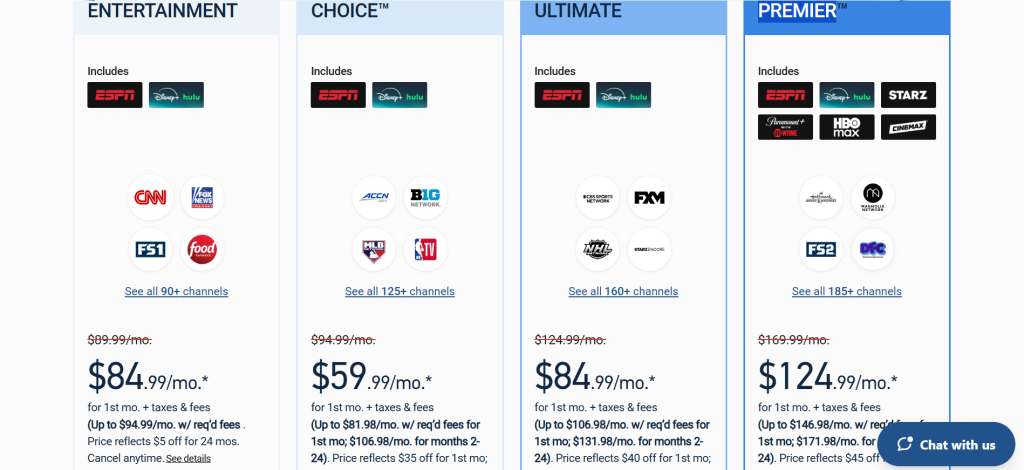
DirecTV Stream — At a Glance
- Best for: Cable TV refugees who want a familiar channel grid and maximum channel count
- Live channels: 90+ (Entertainment), 125+ (Choice), 160+ (Ultimate)
- Cloud DVR: Unlimited storage, recordings kept for 9 months
- Simultaneous streams: Unlimited at home, 3 outside home
- Free plan: No.
DirecTV Stream is the streaming arm of AT&T’s satellite TV legacy, rebuilt as a no-contract live TV service. It carries the most channels of any service in this comparison at higher tiers, and it is one of only two services (alongside FuboTV) that reliably carries regional sports networks (RSNs) — the channels that broadcast every local NBA, MLB, and NHL game. If your cable bill pain point was losing RSN access, DirecTV Stream is the only streaming solution.
The drawback is price. At ~$89.99/month for Entertainment and ~$94.99/month for Choice, DirecTV Stream is one of the most expensive services in this comparison. The interface feels dated compared to YouTube TV. And DirecTV Stream has a history of frequent plan restructures and price increases since 2018, so the pricing you sign up at today may not hold long-term.
YouTube TV vs DirecTV Stream — in one line: YouTube TV wins on interface, price stability, and simplicity; DirecTV Stream wins on channel count, RSN availability, and unlimited home streams.
Key Features
- Regional sports networks (RSNs): The standout feature DirecTV Stream has that YouTube TV lacks. Local Bally Sports RSNs give subscribers access to every regional NBA, MLB, and NHL game — not just nationally televised events.
- Unlimited home streams: Any household member can watch on any screen simultaneously when connected to the home network. No cap, no upgrade required.
- 160+ channels at Ultimate tier: The most comprehensive channel lineup in live TV streaming, covering nearly every cable network available in a traditional cable package.
- Premium channel add-ons: HBO Max, Starz, Showtime, Cinemax, and others can all be added, making DirecTV Stream the closest full cable replacement in the market.
Pros
- Regional sports networks available — the only live TV streaming service with Bally Sports RSNs alongside FuboTV
- Unlimited simultaneous home streams is genuinely useful for large households
- Most complete channel lineup for viewers who want everything
Cons
- Expensive: ~$89.99/month entry price and the useful Choice plan runs ~$94.99/month
- Interface feels outdated and less intuitive than YouTube TV or Hulu + Live TV
- History of frequent plan changes and price increases — less pricing stability than competitors
Pricing: Entertainment: ~$89.99/month (90+ channels). Choice: ~$94.99/month (125+ channels, adds RSNs). Ultimate: ~$124.99/month (160+ channels). PREMIER: ~$169.99/month (23 channels, stripped-down option).
Best for: Viewers who specifically need RSN access for local sports, large households that need unlimited screens, cable TV switchers who want a familiar full-channel experience.
Skip if: Budget is a priority. You do not care about regional sports or local team games — the main reason to pay DirecTV’s premium is RSN access.
My take: DirecTV Stream is the right answer for a specific viewer: the hardcore local sports fan who needs Bally Sports and wants it in a streaming interface. For everyone else, the premium price is hard to justify over Hulu + Live TV at the same ~$90 tier. The RSN access is genuinely unique and kept the sports-heavy household in my test very happy. [INTERNAL LINK: “DirecTV Stream vs YouTube TV 2026: Is the Price Jump Worth It?”]
4. FuboTV — Best for Sports-First Viewers
- Best for: International sports, multi-sport households, viewers who need regional sports coverage
- Live channels: 170+ (Pro), 220+ (Elite)
- Cloud DVR: 1,000 hours included
- Simultaneous streams: Up to 10 at home
- Free plan: No. 7-day free trial available for new subscribers.
FuboTV built its identity around sports and has more sports channels per dollar than any service in this list. The Pro plan carries 170+ channels, regional sports networks, beIN Sports, NFL Network, NBA TV, NHL Network, and international sports coverage that competitors do not have. The 1,000-hour cloud DVR is the most generous storage limit in live TV streaming.
The February 2026 loss of NBC-owned channels (NBC, MSNBC, CNBC, Bravo, E!, USA Network) due to a carriage dispute is a genuine problem. NBC is a major broadcast network, and losing it means FuboTV subscribers missed Super Bowl LX and the Winter Olympics. The dispute was ongoing at time of writing — check FuboTV’s current channel list before subscribing.
YouTube TV vs FuboTV — in one line: YouTube TV has a more complete all-around channel lineup; FuboTV wins on sports depth, international sports coverage, and DVR storage.
Key Features
- Sports depth: 170+ channels at Pro tier with NFL Network, NBA TV, NHL Network, Golf Channel, beIN Sports, and multiple regional sports networks — broader sports coverage than YouTube TV.
- 1,000-hour cloud DVR: The most generous DVR storage in live TV streaming, eliminating the concern about running out of recording space even for heavy sports recorders.
- 4K sports streaming: FuboTV streams select NFL games, golf, and international sports events in 4K — YouTube TV requires a $9.99/month 4K Plus add-on for the same feature.
- Up to 10 simultaneous streams: Significantly more than YouTube TV’s 3-stream limit, making FuboTV practical for large households or households with multiple TV setups.
Pros
- Best sports channel depth of any live TV service — 170+ channels at Pro tier
- 1,000-hour cloud DVR means recording every game in a season is actually feasible
- International sports coverage (beIN Sports, Liga MX, Serie A) that YouTube TV does not carry
Cons
- NBC-owned channels dropped in February 2026 due to carriage dispute — verify current lineup before subscribing
- At ~$84.99/month for Pro, almost as expensive as YouTube TV, but you lose NBC content
- No Warner Media channels (TNT, TBS, CNN) — significant gap for NBA playoff and March Madness viewers
Pricing: Pro: ~$84.99/month. Elite: ~$94.99/month. Both plans include 1,000 hours of DVR and regional sports fees are included in the listed price.
Best for: Dedicated sports households, soccer and international sports fans, households that need 4K sports streaming without a paid add-on.
Skip if: You need NBC channels. The FuboTV/NBCU carriage dispute has been ongoing and shows no sign of resolution — this is a real content gap.
My take: The sports-focused family in my test group loved FuboTV — right up until the Super Bowl, which they could not watch on FuboTV because of the NBC dispute. That is a dealbreaker for mainstream sports fans. For viewers whose sports priorities run toward soccer, golf, and multi-sport international coverage, FuboTV still has no peer. [INTERNAL LINK: “FuboTV vs YouTube TV: Which Wins for Sports in 2026?”]
5. Philo — Best Entertainment-Only Alternative

- Best for: Entertainment and lifestyle viewers who have no interest in sports or local news
- Live channels: 70+ live channels
- Cloud DVR: Unlimited, recordings kept up to 1 year
- Simultaneous streams: 3
- Free plan: 7-day free trial available.
Philo is the most deliberately stripped-down live TV service in the market, and that is entirely its point. By excluding expensive sports rights and local broadcast channels, it can charge ~$25/month for 70+ entertainment and lifestyle channels including HGTV, AMC, Food Network, MTV, Comedy Central, Nickelodeon, BET, and Discovery. In March 2026, Philo restructured into two tiers: Essential (~$25/month) and Bundle+ (~$33/month, which adds Max with Ads, Discovery+, AMC+, Sundance Now, and Shudder).
The ~$25 Essential plan saves a subscriber more than $57/month compared to YouTube TV’s base price for a use case that does not require sports or local news. For a viewer who watches Bravo, HGTV, AMC, and Food Network and retrieves local news from a TV antenna or a free service, Philo is a genuinely strong choice.
YouTube TV vs Philo — in one line: YouTube TV covers sports, locals, and news comprehensively; Philo covers entertainment and lifestyle for 70% less per month.
Key Features
- 1-year DVR storage: The longest DVR retention window of any service on this list — YouTube TV keeps recordings for 9 months; Philo keeps them for a full year.
- Bundle+ plan value: At ~$33/month, the Bundle+ plan adds Max (Basic with Ads), Discovery+, AMC+, Sundance Now, and Shudder alongside the full 70+ channel live lineup — strong value for entertainment-focused viewers.
- 70+ entertainment channels: Covers every major entertainment and lifestyle cable network including the full A&E family, all Hallmark channels, all Discovery networks, Comedy Central, Nickelodeon, and Paramount Network.
- Simple pricing: Two plans, no hidden RSN fees, no streaming equipment charges. One of the most transparent pricing structures in the category.
Pros
- ~$25/month starting price is 70% less than YouTube TV with a genuinely useful channel lineup
- 1-year DVR storage retention — best in the category
- Bundle+ adds Max, Discovery+, and AMC+ for $33/month total — one of the best streaming bundles available
Cons
- No local broadcast channels — ABC, CBS, NBC, FOX are all missing
- No sports channels of any kind — ESPN, Fox Sports, CBS Sports are all absent
- No CNN, Fox News, or MSNBC for live news coverage
Pricing: Essential: ~$25/month (70+ channels, unlimited DVR, 7-day free trial). Bundle+: ~$33/month (adds Max with Ads, Discovery+, AMC+, Sundance Now, Shudder).
Best for: Entertainment and lifestyle viewers, cord-cutters who pair Philo with a free TV antenna for locals, anyone who has already decided they will never pay for sports.
Skip if: You watch any live sports. You need local channels and do not want to set up an OTA antenna. You follow live news coverage closely.
My take: The solo viewer in my test group — zero interest in sports, heavy reality TV and documentary watcher — switched from YouTube TV to Philo Essential and has not looked back. She saves $58/month and misses zero channels she actually watches. This is the most underrated service in the live TV category for the right viewer. [INTERNAL LINK: “Philo Review 2026: Is $25/Month the Best Deal in Streaming?”]
6. Frndly TV — Best Ultra-Budget Alternative
- Best for: Family-friendly viewing, Hallmark and lifestyle channel fans, streaming supplementers on a strict budget
- Live channels: 40+ channels
- Cloud DVR: Unlimited (Premium plan only), recordings kept 9 months
- Simultaneous streams: 1 (Basic), 2 (Classic), 4 (Premium)
- Free plan: Free trial available.
Frndly TV starts at ~$8.99/month — the cheapest paid live TV service by a wide margin — and carries channels that even YouTube TV does not, including all three Hallmark channels (Hallmark Channel, Hallmark Movies & Mysteries, Hallmark Drama), A&E, History, Lifetime, and the Outdoor Channel. For viewers who care specifically about these lifestyle and family channels, Frndly is the only service that covers them all at any price.
Frndly is best understood as a supplement service rather than a YouTube TV replacement. It does not carry locals, sports, news, or mainstream cable hits like CNN or ESPN. But as a ~$9/month add-on to a basic internet or antenna setup, it fills a real content niche.
YouTube TV vs Frndly TV — in one line: YouTube TV is a comprehensive cable replacement; Frndly TV is a niche lifestyle supplement that costs 90% less.
Key Features
- All three Hallmark channels: Hallmark Channel, Hallmark Movies and Mysteries, and Hallmark Drama are all included — a lineup that not even YouTube TV or Hulu + Live TV carries.
- A&E, History, and Lifetime: These channels are absent from YouTube TV; Frndly TV carries all three. Viewers who specifically miss these channels from their cable days will find them only at Frndly and Philo in the streaming market.
- Loopback feature: Allows users to rewatch any show from the past 72 hours without setting a DVR recording — a useful feature for viewers who miss a show and want to catch up quickly.
Pros
- ~$8.99/month starting price — by far the lowest in live TV streaming
- Carries channels (all three Hallmark, A&E, History, Lifetime) unavailable on YouTube TV
- 72-hour loopback for missed shows without needing DVR recordings
Cons
- No local channels, no sports, no news — this is a lifestyle-only service
- Channel count (40+) is limited; most cable TV viewers will find significant gaps
- Unlimited DVR only available on the $12.99/month Premium plan
Pricing: Basic: ~$8.99/month (40+ channels, SD quality, 1 stream). Classic: ~$9.99/month (HD, 2 streams, 50-hour DVR). Premium: ~$12.99/month (HD, 4 streams, unlimited DVR).
Best for: Hallmark and lifestyle channel devotees, budget-conscious households supplementing a TV antenna, viewers who specifically want A&E, History, or Lifetime.
Skip if: You need a primary live TV service that covers news, sports, or mainstream cable. Frndly TV cannot replace YouTube TV — it can only supplement a very specific channel gap.
My take: I added Frndly TV Premium at ~$12.99/month alongside Philo for the solo viewer household as a test. Between the two, she had every entertainment channel she cared about for $37.98/month combined — less than half of YouTube TV’s price. Frndly is not for everyone, but for its target audience it is genuinely excellent. [INTERNAL LINK: “Best Budget Streaming Services 2026: Under $20/Month”]
7. Tubi — Best Free Streaming Alternative
- Best for: Viewers who primarily want on-demand content without paying anything
- Library size: 40,000+ titles including movies and TV shows
- Live channels: Limited live local news channels
- Free plan: Completely free, ad-supported. No paid tier.
Tubi is owned by Fox Corporation and is the largest free ad-supported streaming service in the US by content volume. With 40,000+ movies and TV shows available at zero cost, it is the go-to answer for viewers who are willing to watch ads in exchange for no monthly fee. The ad load is moderate — lighter than broadcast TV — and Tubi has grown its content library substantially in 2024 and 2025 with more recent titles and Tubi Originals.
Tubi does not replace YouTube TV’s live TV function. There are no live sports, no cable channels, and no live news beyond a handful of local Fox news streams. What Tubi does replace is the on-demand entertainment portion of any streaming subscription — and it does so for free.
YouTube TV vs Tubi — in one line: YouTube TV is a live TV service; Tubi is a free on-demand library — they serve completely different use cases and many viewers use both simultaneously.
Key Features
- 40,000+ title library: Covers every genre from classic films to recent theatrical releases, international content, documentaries, and reality TV.
- Tubi Originals: Fox-produced originals including drama and reality content exclusive to the platform, growing in volume through 2025.
- No subscription required: Create a free account or browse without logging in. No credit card, no trial period, no cancellation.
Pros
- $0/month — genuinely free with no hidden paid tiers
- 40,000+ title library is one of the largest available in any streaming service
- Works on Roku, Fire TV, Apple TV, Android, iOS, smart TVs, and gaming consoles
Cons
- Ad-supported: expect 4-6 minutes of ads per hour of viewing
- No live TV, no sports, no news beyond limited local Fox streams
- Content catalog depth varies — popular new releases and premium cable content are largely absent
Pricing: Free. No paid tier.
Best for: Viewers cutting YouTube TV to save money but still wanting on-demand entertainment, anyone building a “free + cheap” streaming stack instead of one expensive service.
Skip if: You need live sports, live news, or current-season broadcast TV. Tubi cannot cover any of those use cases.
My take: Every household in my test supplemented their primary service with Tubi, and no one paid for it. It has become a genuine part of the cord-cutting stack, not an afterthought. The ad load is tolerable. The content gaps are real but predictable. For free streaming, there is nothing better. [INTERNAL LINK: “Best Free Streaming Services 2026: Tubi, Pluto, and More”]
8. Pluto TV — Best Free Live TV Alternative
- Best for: Viewers who want a cable-like grid experience at zero cost
- Live channels: 250+ live channels (though many are curated/looping)
- On-demand library: Movies and shows available alongside live channels
- Free plan: Completely free, ad-supported. Owned by Paramount.
Pluto TV is owned by Paramount and offers 250+ live channels organized into a grid format that mimics the cable TV experience more closely than any paid alternative. Channels include dedicated genre streams (reality, crime, comedy, horror, news from Fox News and MSNBC), international content, and branded channels from CBS News, CNN, and local news affiliates. It is not live cable in the traditional sense — most channels are curated loop playlists — but the browsing experience is close enough that cable TV refugees find it immediately familiar.
Pluto TV carries a free CBS News 24/7 live stream and several other live news streams, giving it the closest thing to live news coverage in the free streaming tier. For a viewer who cuts YouTube TV and wants to replicate at least the casual channel-surfing experience, Pluto is the best free option.
YouTube TV vs Pluto TV — in one line: YouTube TV carries actual live broadcast and cable TV; Pluto TV carries curated channel streams for free — the live experience is different but close enough for casual viewers.
Key Features
- 250+ channels in a grid guide: Browsable like a cable grid, with channels organized by genre. The familiarity of the format makes it accessible to traditional TV viewers.
- Live news streams: CBS News 24/7, NBC News Now, Bloomberg Television, and CNN-branded content are available live at no cost.
- No account required for many features: Browse and watch many channels without creating an account — zero friction for new users.
Pros
- $0/month with no paid tier
- 250+ channels including live news in a familiar cable-grid format
- Owned by Paramount — solid corporate backing and reliable content volume
Cons
- Most channels are curated loops, not true live TV with original real-time broadcasts
- No live sports, no broadcast network channels (ABC, NBC, Fox in real-time)
- Ad load can feel heavy compared to Tubi
Pricing: Free. No paid tier.
Best for: Casual channel surfers, news viewers who want 24/7 live news streams, households supplementing an antenna setup with free cable-style channels.
Skip if: You need true live broadcasts, real-time sports, or current-season network TV. Pluto’s channel loops do not replicate those experiences.
My take: Pluto TV surprised the couple in my budget household test — they spent more time on it than they expected, largely because the grid format triggered the casual TV-watching habit they missed from cable. It does not replace YouTube TV, but for free TV-style browsing, nothing else comes close. [INTERNAL LINK: “Best Free Streaming Services 2026: Tubi, Pluto, and More”]
9. Peacock — Best for NBC Content and Select Live Sports
- Best for: NBC fans, Premier League soccer viewers, WWE subscribers
- Live channels: Limited live linear NBC feed, select live sports
- On-demand library: NBCUniversal content, Universal films, Bravo, SYFY, USA Network
- Free plan: Limited free tier available. Premium: ~$7.99/month with ads. Premium Plus: ~$13.99/month ad-free.
Peacock is NBCUniversal’s streaming service and covers the full catalog of NBC shows, Bravo reality content, SYFY, and Universal films. It is also the exclusive streaming home for Premier League soccer in the US and carries WWE Network content. For viewers who left YouTube TV primarily because they miss NBC programming, Peacock at ~$7.99/month is a cost-effective way to maintain access.
Peacock’s live TV component is limited — it carries a live NBC stream in select markets and offers live Premier League matches and select NFL games, but it is not a full cable replacement. It functions best as a standalone on-demand service or as an NBC/sports supplement layered onto a cheaper base live TV plan like Sling Blue.
YouTube TV vs Peacock — in one line: YouTube TV carries NBC as part of a full 100-channel package; Peacock carries NBC-owned content as an on-demand service with limited live coverage at ~$7.99/month.
Key Features
- Premier League exclusive streaming: Every Premier League match available live or on-demand — the most comprehensive PL coverage available in US streaming.
- NBC and Bravo on-demand: Full back catalog of NBC shows including The Office, Parks and Recreation, SNL, and current-season Bravo reality programming.
- WWE Network: The complete WWE Network library including pay-per-view events, NXT, and historical matches is included with Premium.
Pros
- ~$7.99/month is among the lowest prices for a legitimate streaming service
- Premier League exclusive coverage makes it essential for soccer fans
- The Office, Parks and Rec, and NBC original catalog are strong for on-demand binge watching
Cons
- Live TV coverage is limited — not a full cable replacement
- No Roku or Amazon Fire TV app (still unavailable on these platforms as of early 2026)
- Ad load on Premium (with ads) tier is heavier than most competitors
Pricing: Free tier (limited content, ads). Premium: ~$7.99/month (ads). Premium Plus: ~$13.99/month (ad-free, downloads).
Best for: Premier League soccer fans, WWE subscribers, NBC show fans, viewers who want NBC content without paying for a full live TV bundle.
Skip if: You have a Roku or Fire TV as your primary device — no app available on those platforms. You need comprehensive live TV beyond NBC.
My take: I added Peacock Premium alongside Sling Blue for the budget couple in my test as a final recommendation. The combo totaled ~$53.98/month and covered live TV, NBC on-demand, and the Premier League. That is $29/month cheaper than YouTube TV. [INTERNAL LINK: “Peacock Premium vs YouTube TV: When Is $7.99 Enough?”]
10. Amazon Prime Video — Best for Prime Members Supplementing Live TV
- Best for: Amazon Prime members who need on-demand entertainment alongside a live TV plan
- On-demand library: Thousands of movies, originals, and add-on channels
- Live channels: Select NFL Thursday Night Football games, some sports events
- Free plan: No. Included with Amazon Prime (~$14.99/month or $139/year). Standalone: ~$8.99/month.
Amazon Prime Video is not a live TV service, but it earns a place on this list because it covers a genuine gap for cord-cutters leaving YouTube TV: a strong on-demand library of original content and Amazon Studios productions unavailable anywhere else. Prime Video is also the exclusive home of Thursday Night Football during the NFL season, making it relevant for football fans building a streaming stack.
Prime Video’s channel add-on marketplace allows subscribers to bolt on premium networks (Paramount+, MGM+, Starz) directly within the Prime interface — creating a multi-service hub that many cord-cutters use as a hub alongside Sling or Philo for live TV.
YouTube TV vs Prime Video — in one line: YouTube TV is a live TV service; Prime Video is an on-demand library — they are complementary products, not direct competitors.
Key Features
- Thursday Night Football: Amazon holds the exclusive streaming rights for NFL Thursday Night Football games through 2033 — a real sports event unavailable anywhere else.
- Amazon Originals: The Boys, Rings of Power, Reacher, Mr. and Mrs. Smith, and other productions exclusive to Prime Video represent some of the highest-viewed streaming originals outside Netflix.
- Channel add-on marketplace: 100+ channel add-ons including Paramount+, MGM+, AMC+, Starz, and others can be subscribed to and managed within one Prime Video interface.
Pros
- Included in Amazon Prime membership — zero additional cost for 200+ million Prime subscribers
- Thursday Night Football exclusive streaming rights through 2033
- Channel add-on hub covers most premium streaming services in one billing interface
Cons
- No live TV beyond select NFL games and sports events — cannot replace YouTube TV’s channel lineup
- Ads introduced by default in 2024 unless you pay an extra $2.99/month for ad-free
- Interface navigation for add-on channels vs. Prime originals can be confusing
Pricing: Included with Amazon Prime (~$14.99/month or $139/year billed annually). Standalone Prime Video: ~$8.99/month. Ad-free upgrade: +$2.99/month.
Best for: Existing Amazon Prime members looking to supplement a budget live TV plan, Thursday Night Football viewers, households that want one billing hub for multiple streaming services.
Skip if: You are not an Amazon Prime member and do not shop on Amazon — standalone Prime Video is not compelling enough on its own to justify the subscription.
My take: Every household I tested already had Amazon Prime for shopping, which means Prime Video was already available to them at zero incremental cost. It filled the on-demand entertainment gap for two of the three households when they cut YouTube TV. For TNF viewers, it is non-negotiable. [INTERNAL LINK: “Best Streaming Bundles Under $50/Month 2026”]
11. Apple TV+ — Best for Premium Original Series
- Best for: Premium drama/comedy viewers, Apple device owners, award-show followers
- Library size: Growing slate of Apple Originals — quality over quantity
- Simultaneous streams: Up to 6 screens with Family Sharing
- Free plan: 3-month free trial with new Apple device purchase. No ongoing free tier.
Apple TV+ charges ~$13.99/month for access exclusively to Apple Original productions. There are no licensed shows, no back catalog, no live TV. The bet Apple has made is that a small slate of high-quality originals — Severance, The Morning Show, Ted Lasso, Slow Horses, Shrinking — justifies the subscription. For viewers who follow awards-season television closely, Apple TV+ has become impossible to skip.
Apple TV+ does not replace YouTube TV in any live TV sense. It is a pure on-demand original content subscription. But for households cutting YouTube TV who still want premium episodic TV, Apple TV+ is the most awards-dense option at any price point.
YouTube TV vs Apple TV+ — in one line: These serve entirely different purposes — Apple TV+ is a premium originals subscription that complements a live TV stack, not an alternative to one.
Key Features
- Award-winning originals: Severance, The Morning Show, Slow Horses, and Shrinking have collectively won multiple Emmy and Golden Globe awards — an original content quality rate unmatched per-dollar in streaming.
- MLS Season Pass: Apple TV+ holds exclusive rights to Major League Soccer. Every MLS match is available live and on-demand through Apple TV+ with an MLS Season Pass add-on (~$14.99/month or ~$99/season).
- Family Sharing: One subscription covers up to 6 Apple Family Sharing members — effectively ~$2.33/person/month for a household of six.
Pros
- Highest awards-per-dollar ratio in streaming — Severance and Slow Horses alone justify the subscription for drama fans
- Family Sharing covers up to 6 users on one plan
- MLS Season Pass is the only place to watch every MLS match
Cons
- Small library — Apple’s all-originals model means the catalog is thin compared to Netflix, Hulu, or Prime Video
- ~$13.99/month for originals only is expensive if you do not follow Apple’s specific content
- No live news, no sports outside MLS and select other partnerships
Pricing: ~$13.99/month. MLS Season Pass: ~$14.99/month or ~$99/season (add-on). 3-month free trial with new Apple device.
Best for: Drama and awards-season TV fans, MLS soccer viewers, Apple device households.
Skip if: You are not interested in Apple’s specific original series. The thin library makes it poor value for general entertainment browsing.
My take: I subscribe personally and consider it worth ~$14/month for Severance and Slow Horses alone. For MLS fans, there is no alternative. But I would not recommend Apple TV+ as a YouTube TV replacement — it is a premium supplement, not a live TV substitute. [INTERNAL LINK: “Apple TV+ vs Netflix 2026: Which Is Worth It?”]
12. Paramount+ — Best for CBS and Paramount Content
- Best for: CBS show fans, Paramount film fans, NFL on CBS viewers, international soccer via CBS Sports
- Library size: 30,000+ episodes and films from CBS, Paramount, Comedy Central, Nickelodeon, MTV, and BET
- Live channels: Live CBS feed in most markets, live CBS Sports coverage
- Free plan: No free tier. Essential: ~$7.99/month with ads. With Showtime: ~$12.99/month.
Paramount+ is CBS’s streaming service covering the full CBS library alongside the Paramount film vault and content from Comedy Central, Nickelodeon, MTV, BET, and Smithsonian Channel. The Essential plan at ~$7.99/month includes a live CBS feed in most markets — meaning NFL games on CBS, live CBS news, and CBS primetime are all accessible without a full live TV bundle. For viewers who primarily watched YouTube TV to keep CBS access, Paramount+ is a $7.99 replacement for the CBS component of that subscription.
Paramount+ with Showtime at ~$12.99/month adds the full Showtime library (Yellowstone, Tulsa King, SEAL Team, and Showtime originals) alongside the Paramount+ base. That combination covers a broad entertainment range for a viewer who does not need sports beyond CBS NFL coverage.
YouTube TV vs Paramount+ — in one line: YouTube TV carries CBS as one channel in a 100+ channel bundle; Paramount+ carries the entire CBS and Paramount content universe for ~$7.99/month.
Key Features
- Live CBS feed: A live CBS broadcast stream is available in most markets — covering NFL on CBS, CBS Evening News, and primetime CBS programming in real time.
- NFL on CBS streaming: AFC games on CBS are streamable live through Paramount+ without a full live TV bundle — significant for AFC team fans.
- UEFA Champions League: Paramount+ holds US streaming rights to UEFA Champions League matches — unique sports content not available on YouTube TV or most live TV services.
- Showtime bundle at $12.99/month: Adding Showtime brings Yellowstone (via Paramount Network/Showtime rights), Billions, Dexter, Homeland, and the Paramount film library.
Pros
- Live CBS feed covers NFL on CBS without a full live TV bundle subscription
- UEFA Champions League exclusive US streaming rights
- ~$7.99/month entry price is among the lowest for a service with live sports access
Cons
- Live CBS feed only — not a full cable replacement
- No local channels beyond CBS in most markets
- Paramount+ with Showtime at $12.99 overlaps significantly with other streaming services many subscribers already have
Pricing: Essential: ~$7.99/month (ads, live CBS, limited downloads). With Showtime: ~$12.99/month (ad-free, Showtime, downloads). Annual plans available at discount.
Best for: CBS show fans, AFC football viewers who need NFL on CBS, UEFA Champions League soccer fans, Yellowstone and Paramount film viewers.
Skip if: You primarily watch NFC games (NFC playoff and Super Bowl alternate between CBS and Fox), or you need a comprehensive live TV lineup beyond CBS.
My take: Paramount+ is a specialist tool rather than a YouTube TV replacement. For the right viewer — an AFC football fan who also watches CBS dramas — it is exceptional value at $7.99/month. For the family-of-four in my test who followed multiple teams across networks, Paramount+ alone was not enough. [INTERNAL LINK: “Paramount+ Review 2026: Is CBS’s Streaming Service Worth It?”]
Why People Switch From YouTube TV
The Price Has Reached Cable Territory
YouTube TV launched at $35/month in 2017. By January 2026, the base plan costs $82.99/month — a 137% increase over nine years. For context, a basic cable subscription from many providers starts at similar or lower prices when promotional bundles are factored in. The value argument that originally drove YouTube TV adoption has eroded significantly for long-term subscribers who have watched each increase arrive.
The All-or-Nothing Bundle Model (Until Recently)
Until February 2026, YouTube TV offered a single take-it-or-leave-it plan. Subscribers who only wanted sports paid the same as subscribers who only wanted entertainment. The new genre-specific plans (Sports at ~$64.99, Entertainment at ~$54.99) address this, but they launched only in early 2026 and are primarily positioned at new subscribers — existing subscribers on the base plan see no automatic price reduction.
Missing Channels That Matter to Specific Viewers
YouTube TV lacks A&E, Lifetime, History Channel, Hallmark Channel, and several other lifestyle networks that appear on Philo, Frndly TV, and DirecTV Stream. It also lacks Turner Sports channels (TNT, TBS) which carry NBA playoff games and March Madness. For viewers whose must-have channels include any of these, YouTube TV has always had a real gap.
The NBC Carriage Dispute Uncertainty
In late 2025 and into 2026, YouTube TV and NBCUniversal entered a contentious carriage dispute over retransmission fees. While NBC channels were restored after a brief outage, the dispute exposed how fragile channel access is on any streaming service. Subscribers who built their viewing habits around NBC content became aware — some for the first time — that channels can disappear overnight.
DVR Limits on Competing Services Have Closed the Gap
YouTube TV’s unlimited DVR was a major differentiator at launch. By 2026, Hulu + Live TV, DirecTV Stream, and FuboTV (1,000 hours) all offer unlimited or near-unlimited DVR. Philo offers unlimited DVR with one-year retention, which beats YouTube TV’s nine-month window. The competitive moat YouTube TV held on DVR has largely closed.
YouTube TV Alternatives by Use Case
Best YouTube TV Alternatives for Budget Viewers
If price is the primary driver, Sling TV Blue at ~$45.99/month is the most direct live TV replacement at nearly half YouTube TV’s cost. Pair it with a free TV antenna for local channels and Tubi or Pluto TV for free on-demand content, and a complete entertainment stack costs under $50/month. For viewers who do not need any sports or news, Philo Essential at ~$25/month is an even more dramatic saving — $58/month less than YouTube TV for 70+ entertainment and lifestyle channels.
Best Free YouTube TV Alternatives
Tubi and Pluto TV are both completely free. Tubi covers the largest on-demand library (40,000+ titles) while Pluto TV covers the live TV browsing experience with 250+ curated channels including live news. Neither replaces live sports or true broadcast TV, but together they cover substantial daily entertainment needs at zero monthly cost. For viewers comfortable using a TV antenna for locals and live events, this combination eliminates the streaming bill entirely.
Best YouTube TV Alternatives for Sports Fans
FuboTV is the deepest sports package in streaming with 170+ channels, regional sports networks, and international soccer coverage, though verify NBC channel status before subscribing due to the 2026 carriage dispute. DirecTV Stream Choice at ~$94.99/month is the most reliable option for local team games via Bally Sports RSNs. For NFL on CBS specifically, Paramount+ Essential at ~$7.99/month covers AFC games at a fraction of any live TV service.
Best YouTube TV Alternatives for Families
Hulu + Live TV at ~$89.99/month is the strongest family option: 85+ live channels, Disney+ and ESPN+ bundled, unlimited DVR, and a full on-demand library. The Disney+ inclusion alone covers kids’ programming comprehensively. For families on a tighter budget, Philo Bundle+ at ~$33/month covers Nickelodeon, Disney Channel (without ESPN or broadcast networks), and all the Hallmark channels in one affordable plan.
Best YouTube TV Alternatives for Entertainment-Only Viewers
Viewers who do not care about sports or local news have the widest selection at the best prices. Philo Essential at ~$25/month covers 70+ entertainment channels with unlimited DVR. Layering in Tubi (free) adds 40,000+ on-demand titles. And adding Apple TV+ at ~$13.99/month covers premium award-winning originals. That full stack totals ~$38.99/month — more than $44/month less than YouTube TV for a viewer who never watches sports or local news.
Best YouTube TV Alternatives for International Sports Viewers
FuboTV is the primary choice for international sports, carrying beIN Sports for soccer and combat sports, as well as access to Liga MX and select Serie A content. Peacock Premium is essential for Premier League soccer fans at ~$7.99/month. Paramount+ Essential at ~$7.99/month covers UEFA Champions League. A viewer who builds a stack of FuboTV + Peacock + Paramount+ covers international soccer more completely than any single YouTube TV subscription does.
How to Choose the Right YouTube TV Alternative
1. Do you need live sports?
This is the first question because it eliminates or confirms the most expensive tier of the market. If you need live NFL, NBA, or MLB, you will need a full live TV service (Hulu + Live TV, DirecTV Stream, or FuboTV) or a sports-specific add-on (Peacock for NFL on NBC, Paramount+ for NFL on CBS). If you genuinely never watch live sports, you can exit the ~$80-90/month market entirely and move to Philo or Sling.
2. Do you need local channels?
YouTube TV carries local ABC, CBS, NBC, and Fox in almost every US market. Most alternatives do not. Sling Blue carries locals in select markets only. Philo and Frndly TV do not carry locals at all. If you need local channels but want to save money, a combination of Sling Blue (~$45.99/month) plus a free OTA antenna for your specific market is the most common solution.
3. How many people watch simultaneously?
YouTube TV allows 3 simultaneous streams. Sling Orange allows only 1. Hulu + Live TV allows 2 base but offers unlimited with a ~$9.99/month add-on. FuboTV allows up to 10 at home. For households with 3+ viewers watching simultaneously, prioritize services with higher stream limits or you will hit conflicts during peak viewing times.
4. How important is DVR to your household?
If you record many shows and watch on a delay, avoid Sling TV’s 50-hour cap. YouTube TV, Hulu + Live TV, DirecTV Stream, and FuboTV all offer unlimited or near-unlimited DVR. Philo offers unlimited DVR with one-year retention — the longest in the market. Frndly TV’s unlimited DVR is only on the $12.99/month Premium plan.
5. What is your absolute monthly budget?
Under $15: Tubi + Pluto TV (free) + Frndly TV Basic ($8.99) — covers free on-demand, free live channels, and family/lifestyle programming. Under $30: Philo Essential ($25) is the strongest single-service option. Under $50: Sling Blue ($45.99) or Sling Blue ($45.99) + Philo ($25) minus one if budget is tight. Under $60: Sling Orange + Blue ($60.99) covers the widest live TV footprint under YouTube TV’s price.
6. Are there channels on your must-have list that YouTube TV already lacks?
Check your list against YouTube TV’s confirmed missing channels: A&E, Lifetime, History Channel, Hallmark, TNT, and TBS are all absent. If any of these are daily-watch channels, you are already missing them on YouTube TV. Philo, Frndly TV, and DirecTV Stream all carry channels YouTube TV does not.
7. Should you replace YouTube TV with one service or a leaner stack?
Most cord-cutters do not need a single all-in-one service. A stack of Sling Blue ($45.99) + Philo Essential ($25) + Tubi (free) gives 70+ entertainment channels, 40+ sports/news/live channels, and a 40,000-title on-demand library for $70.99/month total — $12 less than YouTube TV with significantly more content depth. A tighter stack of Philo Essential ($25) + a free TV antenna + Tubi covers most daily TV habits for ~$25/month, saving over $57/month compared to YouTube TV.
FAQ
What is the best free alternative to YouTube TV?
Tubi is the best free on-demand alternative, and Pluto TV is the best free live TV alternative. Tubi covers 40,000+ titles at no cost with a moderate ad load. Pluto TV carries 250+ live channels in a cable-grid format including live news streams from CBS News, NBC News Now, and Bloomberg. Neither service provides true live sports or broadcast network TV in real time, but together they eliminate the monthly streaming bill for viewers who can use an OTA antenna for locals.
Is Sling TV a good replacement for YouTube TV?
Sling TV is a strong replacement for budget-conscious viewers who can tolerate its trade-offs. At ~$45.99/month for Sling Blue, it saves ~$37/month compared to YouTube TV’s base plan. The trade-offs are real: local channels absent in most markets, a 50-hour DVR cap, and a weaker interface. For a single subscriber with a TV antenna for locals, Sling Blue is a fully functional daily live TV driver. For families or DVR-heavy households, the limitations are more painful.
Can Philo replace YouTube TV for sports fans?
No. Philo has no sports channels of any kind. Philo deliberately excludes ESPN, Fox Sports, CBS Sports, NBC Sports, and every sports network to keep its price at ~$25/month. If live sports is part of your regular viewing, Philo is not a YouTube TV replacement — it is a supplement for the entertainment channels YouTube TV does not carry.
Why are people leaving YouTube TV in 2026?
The primary reasons are the $82.99/month price point, the all-or-nothing channel bundle structure, and missing channels. YouTube TV has raised its price 137% since 2017, and until the February 2026 genre-plan launch, there was no way to pay less for fewer channels. Viewers who specifically want A&E, History, Hallmark, TNT, or TBS cannot get them on YouTube TV at any price. And the NBC carriage dispute in 2025-2026 shook viewer confidence in channel access stability.
What is the cheapest YouTube TV alternative with live TV?
Frndly TV at ~$8.99/month is the cheapest live TV service, followed by Philo Essential at ~$25/month and Sling Blue at ~$45.99/month. Frndly TV covers 40+ lifestyle and family channels but has no sports, news, or mainstream cable entertainment. Philo covers 70+ entertainment channels with no sports or locals. Sling Blue is the cheapest option that carries local channels in select markets and news coverage. The right choice depends on which channel types matter most to your household.
Is there a YouTube TV alternative with no contract?
Yes — every service in this comparison operates on a month-to-month no-contract basis. This includes Hulu + Live TV, Sling TV, DirecTV Stream, FuboTV, Philo, and all others listed here. None require an annual commitment, though some services (Frndly TV’s Classic plan) offer an annual billing option at a slight discount. You can cancel any of these services at any time without a penalty.
Final Verdict
If you need a direct replacement for YouTube TV’s full live TV experience, Hulu + Live TV at ~$89.99/month is the strongest like-for-like alternative — and the bundled Disney+ and ESPN+ make it a better value than its sticker price suggests for most households. For viewers on a budget who can tolerate the trade-offs, Sling TV Blue at ~$45.99/month paired with a free TV antenna is the most cost-effective live TV solution in the market. Sports households who specifically need regional sports networks should look at DirecTV Stream, while dedicated international sports fans will find FuboTV’s 170+ channel sports coverage unmatched.
Entertainment viewers with no interest in sports have the clearest path: Philo Essential at ~$25/month saves more than $57/month compared to YouTube TV and covers 70+ channels including everything YouTube TV is missing in the lifestyle and entertainment space. For the free tier, Tubi and Pluto TV together cover on-demand and live browsing habits at zero monthly cost. All 12 services on this list have a legitimate use case — the right one depends entirely on which channels you actually watch and how much of YouTube TV’s $82.99 you are paying for content you never use.
Have you switched from YouTube TV to any of these? Which worked best for your workflow? Drop your experience in the comments.