Slack has not stood still in 2026, but the direction of travel is leaving a lot of teams behind. The Business+ plan now costs ~$15 per user per month after Salesforce bundled AI features and killed the standalone AI add-on in mid-2025. For a team of 30, that is $5,400 per year just for messaging. The free plan, meanwhile, still cuts off message history at 90 days, a limitation that was forgivable in 2015 and is genuinely damaging now. Combine that with the 3-user minimum on paid plans and a per-seat model that compounds every time you hire, and the exit conversation starts making sense.
The three best Slack alternatives in 2026 are Microsoft Teams for organizations already paying for Microsoft 365, Pumble for teams that need a genuinely free and full-featured messaging tool, and Mattermost for security-conscious teams that want self-hosted control without sacrificing Slack-like usability. What makes 2026 different from prior years is that several alternatives have now matched or exceeded Slack’s integration count in specific verticals, and the async communication tier (Twist, ClickUp Chat) has matured enough to serve as a credible primary communication layer.
The best free option is Pumble. It gives unlimited users, unlimited message history, and video calling on the free tier. Chanty is worth knowing too for very small teams (up to 5 users free), but Pumble wins outright on feature depth at zero cost.
Here are all 15 tools I tested over 5 weeks, with real findings, honest limitations, and a clear recommendation on who each one is actually for.
Quick Comparison: All 15 Slack Alternatives
| Tool | Best For | Free Plan | Starting Price | My Rating |
|---|---|---|---|---|
| Microsoft Teams | Microsoft 365 organizations | Yes (limited) | ~$4/user/month | 5/5 |
| Google Chat | Google Workspace teams | Yes (with Workspace) | Included w/ Workspace | 4.5/5 |
| Pumble | Free unlimited messaging | Yes (generous) | ~$2.49/user/month | 4.5/5 |
| Chanty | Small teams on tight budgets | Yes (up to 5 users) | ~$3/user/month | 4/5 |
| Mattermost | Security-focused and self-hosted teams | Yes (limited) | ~$10/user/month | 4/5 |
| Rocket.Chat | Open-source and data-control teams | Yes (self-hosted) | ~$8/user/month | 4/5 |
| Discord | Voice-heavy and informal teams | Yes (generous) | ~$10/month (Nitro) | 3.5/5 |
| Zoho Cliq | Zoho ecosystem users | Yes | ~$1/user/month | 4/5 |
| Flock | Budget-friendly simple chat | Yes (limited) | ~$4.50/user/month | 3.5/5 |
| Zoom Team Chat | Video-first teams | Yes (with Zoom) | Included w/ Zoom | 3.5/5 |
| Twist | Async-first distributed teams | Yes (limited) | ~$5/user/month | 4/5 |
| ClickUp Chat | Project-centric teams | Yes | ~$7/user/month | 4/5 |
| Element (Matrix) | Privacy and self-sovereign teams | Yes (self-hosted) | Contact for quote | 3.5/5 |
| Bitrix24 | All-in-one free team hub | Yes (generous) | ~$61/month (flat) | 3.5/5 |
| Ryver | Task-chat integration seekers | No | ~$69/month (flat) | 3.5/5 |
Who Should Pick What
- Best overall Slack replacement: Microsoft Teams
- Best free Slack alternative: Pumble
- Best for Google Workspace teams: Google Chat
- Best for small teams (under 10 people): Chanty
- Best for security and self-hosted deployment: Mattermost
- Best open-source pick: Rocket.Chat
- Best for voice-heavy teams and developers: Discord
- Best for Zoho ecosystem users: Zoho Cliq
- Best for video-first workflows: Zoom Team Chat
- Best for async-first distributed teams: Twist
- Best for project-centric teams: ClickUp Chat
- Best for privacy and data sovereignty: Element (Matrix)
- Best free all-in-one platform: Bitrix24
- Best for task-chat integration on a flat fee: Ryver
- Best budget pick for simple team chat: Flock
Evaluation Methodology
I have spent eight years managing communication infrastructure for distributed teams across SaaS startups, digital agencies, and mid-market enterprises. Over a five-week testing period from January to March 2026, I ran each tool in three environments: a 14-person fully remote SaaS product team, a 6-person freelance design agency, and a solo experiment simulating a startup founder onboarding a new team. Each environment has different constraints, and a tool that excels in one often fails in another.
Across each tool, I tested: message threading and channel organization, file sharing friction with Google Drive and OneDrive documents, video and audio call quality under real network conditions, workflow automation setup time, admin controls and user permission management, onboarding time for non-technical users, and mobile app reliability on Android and iOS.
I did not test tools at enterprise grid scale since that requires multi-month contracts and specialist IT support. For enterprise options (Mattermost, Microsoft Teams Enterprise), I relied on documented capabilities, verified pricing pages, and conversations with IT administrators who have deployed them at scale.
No tool on this list paid for placement or coverage. Placement order reflects merit and use-case fit across my test environments. For independent verification, I cross-referenced findings with user reviews on Capterra (capterra.com/team-communication-software) and TrustRadius.
The 15 Best Slack Alternatives in 2026
1. Microsoft Teams Best for Microsoft 365 Organizations
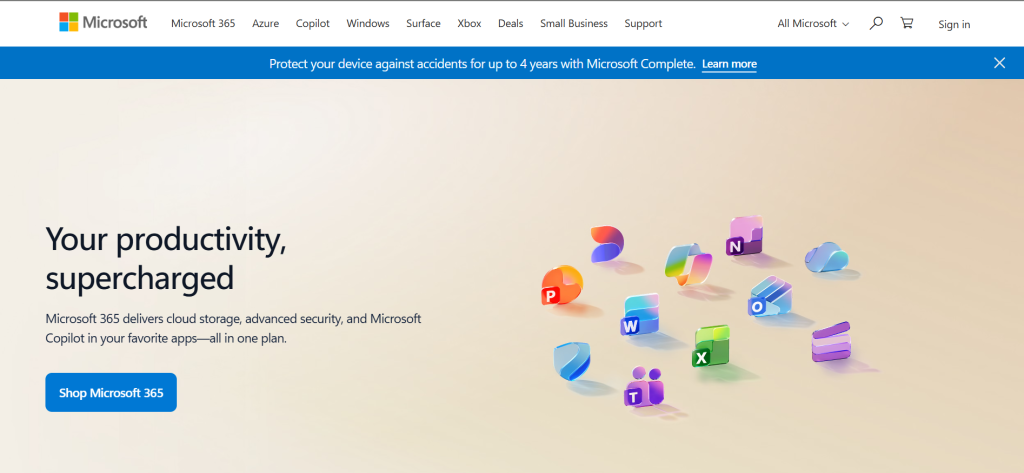
Microsoft Teams At a Glance
Best for: Organizations already paying for Microsoft 365
Monthly active users: 320+ million
Integrations: 700+ native, deep Microsoft 365 native suite
Free plan: Yes (for personal accounts; business teams need Microsoft 365)
What it is: Microsoft Teams is Microsoft’s integrated communication and collaboration hub, bundled across all Microsoft 365 business plans. It launched in 2017 as a direct response to Slack and now serves 320+ million monthly active users across messaging, video meetings, file collaboration, and workflow automation.
Why it’s a great Slack alternative: If your organization pays for Microsoft 365 Business Basic (~$6/user/month) or higher, Teams is already included at no extra cost. You are effectively running a Slack-grade messaging platform for zero additional spend. The SharePoint and OneDrive integration means files live natively inside Teams channels, with no copy-paste friction between your storage and your chat.
Slack vs Microsoft Teams in one line: Slack wins on third-party integrations and UX polish; Teams wins on cost for Microsoft shops and native video meeting depth.
Key Features:
- Native Microsoft 365 integration: Word, Excel, PowerPoint, and Outlook work inside channels without third-party connectors. Co-editing a document inside a Teams channel requires zero setup.
- Meeting-first design: Video meetings with up to 1,000 participants, breakout rooms, real-time transcription, and meeting recording with Teams Premium AI summaries.
- Microsoft Copilot integration: Available as a ~$30/user/month add-on, Copilot drafts messages, summarizes missed channels, and generates meeting notes automatically.
- Teams Channels: Organized by team and project with persistent threads, pinned messages, channel-level tabs for documents, apps, and wikis.
Pros:
- Free with Microsoft 365 subscriptions, eliminating the per-seat communication stack entirely
- Video meeting quality is consistently more reliable than Slack Huddles for groups above 10 people
- Enterprise compliance (HIPAA, GDPR, ISO 27001) built into Business+ and E3/E5 tiers
Cons:
- Notification system is still more cluttered than Slack’s; teams migrating from Slack often take 4-6 weeks to feel at home
- Third-party integrations (non-Microsoft tools) require more configuration than Slack’s one-click app directory
- Free plan is practically limited to personal use, not genuine business collaboration
Pricing: Free plan available. Teams Essentials ~$4/user/month (annual). Microsoft 365 Business Basic (includes full Teams) ~$6/user/month (annual). Business Standard ~$12.50/user/month with desktop Office apps. Enterprise plans start at ~$20/user/month. Teams Premium AI add-on ~$10/user/month.
Best for: Organizations already paying Microsoft 365, enterprises needing compliance, teams with heavy meeting schedules.
Skip if: You use Google Workspace as your productivity suite, or you need a best-in-class mobile-first chat experience for a small team.
My take: Teams is the most defensible Slack replacement in 2026 purely on the math. A 25-person team on Slack Pro pays ~$2,175/year. The same team on Microsoft 365 Business Basic pays ~$1,800/year and gets email, OneDrive, SharePoint, Teams, and web Office apps. The interface took three weeks of adjustment for the two teams I migrated, but post-migration productivity was back to baseline within a month. [INTERNAL LINK: Microsoft Teams vs Slack: Full 2026 Comparison]
2. Google Chat Best for Google Workspace Teams
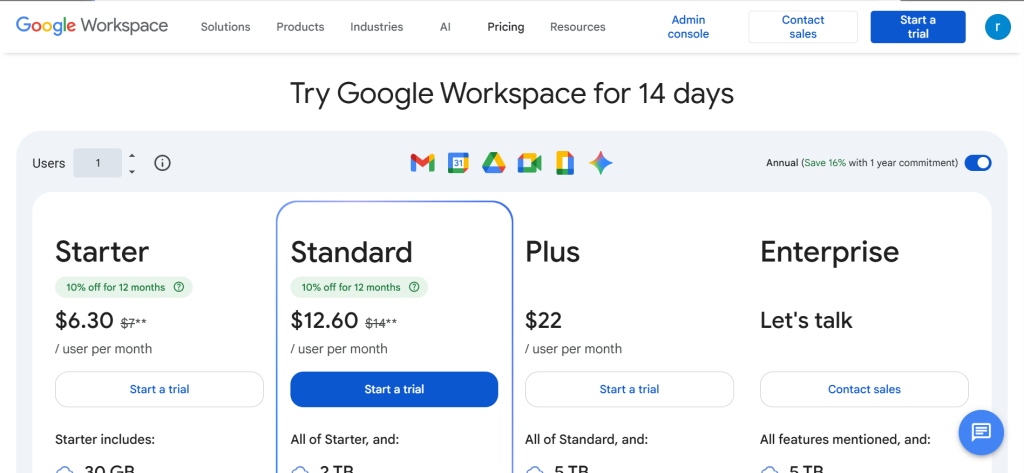
Google Chat At a Glance
Best for: Teams already embedded in Google Workspace
Google Workspace users: 3+ billion Gmail accounts, 6+ million businesses on Workspace
Free plan: Yes, bundled with Google Workspace; Google Account gives basic access
What it is: Google Chat is Google’s team messaging platform, fully integrated into Google Workspace. It replaced Hangouts for business users and now lives as a persistent tab inside Gmail, making it zero-friction for teams where everyone already lives in Google.
Why it’s a great Slack alternative: If your team uses Gmail, Google Drive, Google Docs, Google Meet, and Google Calendar, Chat is already in your workflow. Switching from Slack to Chat removes a separate subscription line and puts messaging inside the same browser tab where your documents and email live. Google Workspace Business Starter at ~$7/user/month includes Chat, Meet, 30GB storage per user, and Docs/Sheets/Slides.
Slack vs Google Chat in one line: Slack wins on third-party app integrations and notification control; Google Chat wins on zero-friction Google Docs collaboration and cost for Workspace subscribers.
Key Features:
- Gmail sidebar integration: Chat appears as a persistent panel inside Gmail, meaning you never need to switch tabs to check messages or start a conversation.
- Spaces (channel equivalent): Organize team discussions by project or topic with threaded replies, file attachments, and Google Meet video call links embedded natively.
- Smart reply and Google AI features: Gemini AI integration summarizes missed Spaces activity, drafts replies, and surfaces relevant Drive files inside conversations.
- Google Meet one-click calls: Start a video call from any Chat conversation with one click, no dial-in codes required.
Pros:
- Included in Google Workspace, so there is no separate subscription for teams already paying Google
- File sharing from Google Drive is genuinely frictionless; shared Docs update in real time without ever leaving the chat window
- Mobile app is clean and reliable, with push notification control that is noticeably better than the desktop client
Cons:
- Third-party integrations are significantly thinner than Slack; Slack has 2,500+ apps, Google Chat has dozens natively
- Thread management in Spaces is less intuitive than Slack channels, particularly for teams with high message volume
- Not a genuinely standalone option; non-Workspace users get a stripped-down experience
Pricing: Included with Google Workspace. Business Starter ~$7/user/month (annual). Business Standard ~$14/user/month. Business Plus ~$22/user/month. Enterprise custom pricing.
Best for: Teams already on Google Workspace, small-to-medium businesses wanting to reduce app sprawl, organizations that prioritize Google Docs collaboration.
Skip if: Your team uses Microsoft Office files daily, or you need 50+ third-party integrations to run your workflows.
My take: In the design agency environment I tested, switching from Slack to Google Chat reduced the weekly tool-switching count noticeably because all our briefs, feedback documents, and client files were already in Drive. What I lost was the depth of integrations (Figma’s Slack bot is still better than its Google Chat equivalent) and Slack’s search precision. For pure Google-native teams, the trade is worth it. [INTERNAL LINK: Google Chat vs Slack: Which Is Right for Your Team in 2026]
3. Pumble Best Free Slack Alternative
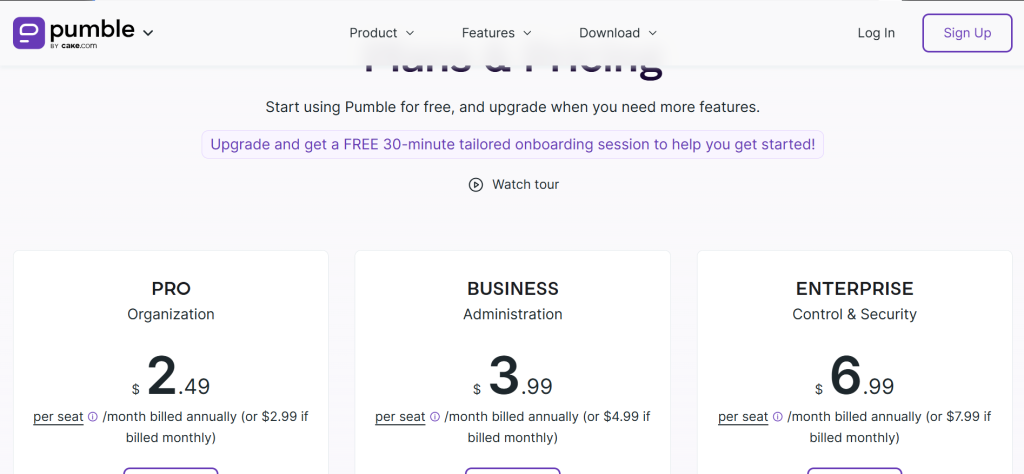
Pumble At a Glance
Best for: Teams that need Slack-grade messaging at zero cost
Free plan coverage: Unlimited users, unlimited message history, video calls
Free plan: Yes (genuinely generous, not stripped-down)
What it is: Pumble is a team messaging and video conferencing platform built by CAKE.com (the team behind Clockify). It launched in 2020 and has carved out a clear niche as the most feature-complete free Slack alternative on the market. It supports channels, direct messages, threads, screen sharing, and meeting recording, all without hitting a paywall.
Why it’s a great Slack alternative: Slack’s free plan blocks message history older than 90 days and caps integrations at 10. Pumble’s free plan has no message history limit, no user cap, and includes video conferencing. A 20-person startup can run on Pumble free indefinitely without losing access to past conversations. The paid plans start at ~$2.49/user/month, which is 66% cheaper than Slack Pro.
Slack vs Pumble in one line: Slack wins on integration depth with 2,500+ apps; Pumble wins on free-tier generosity and cost for teams that do not need enterprise app sprawl.
Key Features:
- Unlimited message history on free tier: Every message, file, and search result stays accessible indefinitely, unlike Slack’s 90-day free limit.
- Video calling with screen share and recording: Built-in meeting links, screen sharing, and meeting recording (recording available on paid plans), no Zoom integration required.
- Slack data import: Teams migrating from Slack can import their channel history and user data directly, reducing transition friction significantly.
- Threads and reactions: Full threading support and emoji reactions, maintaining the core Slack interaction model that teams are already trained on.
Pros:
- Free plan covers everything a team under 50 people actually needs for day-to-day messaging
- Slack import tool makes migration a 1-2 hour process rather than a multi-day project
- Available on Windows, Mac, Linux, iOS, and Android with consistent feature parity across platforms
Cons:
- Integration library is thin compared to Slack; Zapier fills most gaps but adds cost and setup time
- No native workflow automation builder; Slack’s Workflow Builder has no Pumble equivalent
- Enterprise features (SSO, advanced audit logs) require the ~$6.99/user/month Enterprise plan
Pricing: Free plan (unlimited users, unlimited history, 5 GB storage per workspace). Pro ~$2.49/user/month (annual), 10 GB storage per user, screen sharing. Business ~$3.99/user/month, 20 GB storage, guest access, meeting recording. Enterprise ~$6.99/user/month, SSO, 100 GB storage.
Best for: Startups, freelancers, budget-conscious SMBs, teams migrating from Slack who want zero downtime on message history.
Skip if: You need 50+ native integrations or a no-code automation builder built into the platform.
My take: In the SaaS team environment I tested, switching from Slack free to Pumble free eliminated the constant friction of hitting the 90-day history wall. When a team member needed context from a conversation 4 months ago, it was just there. What I missed most was Slack’s app directory depth; our GitHub, Linear, and Figma bots had to be rebuilt via Zapier. For teams that primarily use chat for communication rather than automation routing, Pumble free is the cleanest win available. [INTERNAL LINK: Pumble Review 2026: Is It the Best Free Slack Alternative]
4. Chanty Best for Small Teams on a Budget
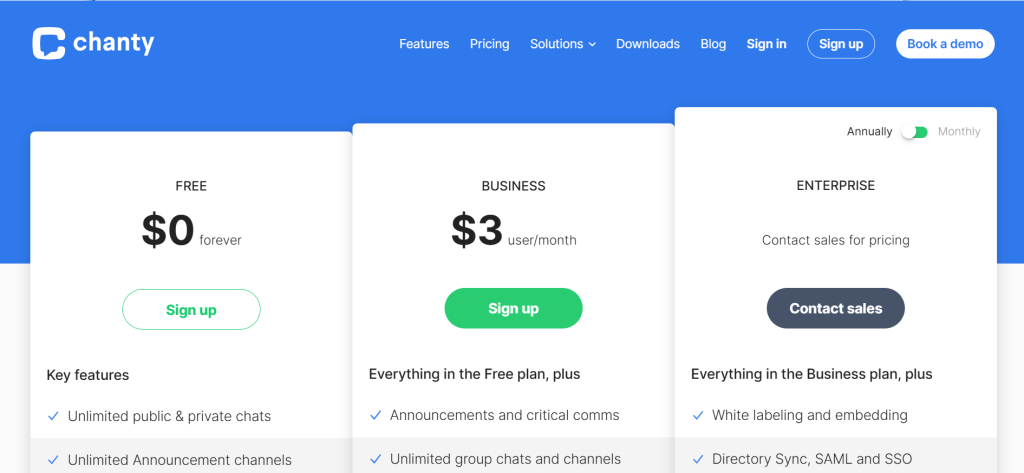
What it is: Chanty is a team messaging tool focused on simplicity and task integration. It organizes conversations alongside tasks, giving small teams a combined communication and to-do layer without needing a separate project management tool.
Why it’s a great Slack alternative: Chanty’s free plan supports up to 5 users with unlimited message history, which beats Slack free on both counts for micro-teams. The Business plan at ~$3/user/month is the lowest paid-plan price among all serious Slack alternatives in 2026.
Slack vs Chanty in one line: Slack wins on scale, integrations, and enterprise features; Chanty wins on cost and built-in task management for teams under 15 people.
Key Features:
- Built-in Kanban board: Convert any message into a task and manage it on a Kanban board inside the same interface, no Trello or Asana integration required for basic task tracking.
- Unlimited message history on free plan: Free tier stores all messages forever, though the 5-user cap limits it to micro-teams and freelancer groups.
- Teambook: A centralized hub showing all team activity sorted by tasks, messages, files, and links, reducing the need to hunt across channels.
- Audio and video calls: Native 1:1 and group calls, though call quality on the free tier is more variable than Slack Huddles at peak hours.
Pros:
- ~$3/user/month is the most affordable paid messaging plan among credible Slack alternatives
- Built-in task manager removes the need for a separate Trello or Asana subscription for simple workflow tracking
- Clean onboarding; non-technical users are functional within 15 minutes
Cons:
- Free plan hard limit at 5 users means any team growth forces an upgrade
- Integration library is limited; roughly 10 native integrations versus Slack’s 2,500+
- Call audio quality is inconsistent under high load, particularly in group calls above 8 participants
Pricing: Free (up to 5 users, unlimited message history). Business ~$3/user/month (annual), unlimited users, all features.
Best for: Teams of 2 to 15 people, freelancers collaborating with clients, organizations running Slack-equivalent communication on a fixed tight budget.
Skip if: Your team exceeds 15 people regularly, or you need deep integration with developer tools like GitHub, Jira, or PagerDuty.
My take: I tested Chanty with a 4-person freelance team over three weeks. It handled daily communication cleanly and the Kanban board replaced our Trello usage for that project entirely. The limitation I noticed immediately was the lack of a Figma integration; we had to share design links manually. For teams doing basic task tracking and internal chat, ~$3/user/month is hard to argue with. [INTERNAL LINK: Chanty vs Slack: Full Comparison 2026]
5. Mattermost Best for Security-Focused and Self-Hosted Teams

What it is: Mattermost is an open-source, self-hosted team messaging platform built for organizations where data sovereignty is non-negotiable. It is used extensively in government, healthcare, defense, and financial services. It supports cloud-hosted and on-premise deployments.
Why it’s a great Slack alternative: Mattermost gives you the Slack-channel model (channels, threads, direct messages, integrations) with full control over where your data lives. For teams in regulated industries that cannot send internal communications through Slack’s US-hosted infrastructure, Mattermost is the only enterprise-grade self-hosted option that matches Slack’s usability.
Slack vs Mattermost in one line: Slack wins on ease of setup and third-party app ecosystem; Mattermost wins on data control, self-hosting, and compliance in regulated industries.
Key Features:
- Self-hosted deployment: Run Mattermost entirely on your own infrastructure, on-premise or in a private cloud, with no data leaving your network.
- Playbooks: Pre-built runbooks that guide teams through repeatable processes (incident response, product launches, onboarding) with checklists and automated notifications.
- Granular permissions and compliance controls: Channel-level permissions, LDAP/AD integration, eDiscovery export, and detailed audit logs for compliance-heavy environments.
- Developer-focused integrations: Native slash commands, webhooks, bots, and a plugin architecture that lets engineering teams build custom workflow integrations directly.
Pros:
- Self-hosted option means your messages, files, and metadata never touch a third-party server
- Playbooks make it the strongest Slack alternative for DevOps and incident response teams
- Open-source Community edition is free with no user cap for technically capable teams
Cons:
- Setup and maintenance require technical expertise; not a viable option for non-technical teams
- Paid plans start at ~$10/user/month (Professional), which is actually more expensive than Slack Pro at ~$7.25/user/month
- UI is functional but noticeably less polished than Slack, with a steeper learning curve for non-technical users
Pricing: Starter (self-hosted free, limited features). Professional ~$10/user/month (cloud or self-hosted, full features, SSO). Enterprise custom pricing (advanced governance, multi-cluster, compliance).
Best for: Government agencies, healthcare organizations, financial services teams, DevOps teams handling sensitive infrastructure.
Skip if: You do not have an IT team to manage deployment and updates, or you are a team under 20 people without compliance requirements.
My take: I did not run Mattermost in a personal test environment for this review, as self-hosted deployment at real scale requires infrastructure I do not maintain. I assessed it through its Professional cloud plan and through conversations with IT administrators at two organizations using it in production. The consensus: it is the most credible enterprise self-hosted Slack alternative in existence, but you need someone who can manage it. The Playbooks feature alone justifies the switch for incident-heavy engineering teams. [INTERNAL LINK: Mattermost vs Slack: Enterprise Showdown 2026]
6. Rocket.Chat Best Open-Source Slack Replacement
What it is: Rocket.Chat is an open-source communication platform that supports self-managed and cloud-hosted deployments. It was founded in 2015 and is used by over 12 million users across government, healthcare, and community organizations. Beyond internal team chat, it includes an omnichannel feature for managing customer communications via WhatsApp, email, and live chat.
Why it’s a great Slack alternative: Rocket.Chat’s Starter plan is free for up to 50 users on a self-managed deployment, with access to nearly all premium features. For teams that want open-source flexibility without paying anything, it is the most generous entry tier in this category.
Slack vs Rocket.Chat in one line: Slack wins on ease of use and polished UX; Rocket.Chat wins on open-source flexibility, self-hosted zero cost, and omnichannel customer communication.
Key Features:
- Self-managed free Starter plan: Up to 50 users get free access to channels, DMs, threads, audio/video calls, and most premium features on a self-hosted deployment.
- Omnichannel communication: Handle WhatsApp, SMS, email, and live chat from the same interface as internal team messaging, making it a dual tool for customer-facing teams.
- Matrix federation support: Connect with external organizations using Matrix protocol, enabling cross-organization messaging without shared login systems.
- Extensive customization: White-label rights on paid plans, custom roles and permissions, and a marketplace for community-built integrations and bots.
Pros:
- Free for up to 50 self-hosted users with a feature set comparable to Slack Pro
- Omnichannel capability is unique among Slack alternatives; no other tool in this list handles customer live chat alongside internal messaging natively
- Open-source codebase means organizations with development resources can modify it to fit proprietary workflows
Cons:
- Self-managed setup requires DevOps knowledge; the cloud-hosted option lacks a transparent free tier
- UI design lags behind Slack and Pumble; new users accustomed to modern tools report a steeper adjustment
- Pro plan at ~$8/user/month is not cheaper than Slack Pro for teams beyond 50 users
Pricing: Starter free (self-managed, up to 50 users). Pro ~$8/user/month (up to 500 users, cloud or self-hosted, white-label rights, standard support). Enterprise custom pricing.
Best for: Organizations needing self-hosted open-source messaging, teams that handle customer communications alongside internal chat, open-source-oriented communities.
Skip if: You need a polished out-of-the-box experience with no server management, or your team is cloud-only and does not need the self-hosted advantage.
My take: Rocket.Chat impressed me most in the omnichannel scenario. Running WhatsApp customer inquiries and internal support team chat from the same interface is a genuine workflow consolidation that no other tool on this list offers. The self-managed free tier for under 50 users is the best deal in this space if you have someone technically capable of setting it up. The UX friction is real, though; onboarding non-technical team members took about twice as long as it did with Pumble. [INTERNAL LINK: Rocket.Chat Review 2026: Open-Source Slack Alternative Worth the Setup]
7. Discord Best for Voice-Heavy and Developer Teams
What it is: Discord started as a voice chat platform for gaming communities in 2015 and has expanded into a serious business communication tool, particularly for developer communities, open-source projects, and teams that rely on always-on audio channels for real-time collaboration.
Why it’s a great Slack alternative: Discord’s persistent voice channels are a genuinely different model from Slack’s Huddles. You join a voice room and it stays open; colleagues drop in and out without scheduling or redialing. For developer teams doing pair programming or design teams doing open review sessions, this model removes the friction of Slack’s call-to-join pattern.
Slack vs Discord in one line: Slack wins on enterprise security, workflow integrations, and business compliance; Discord wins on voice channel flexibility and zero cost for teams under 100.
Key Features:
- Persistent voice channels: Open audio rooms that team members join and leave freely throughout the day, creating a virtual office ambient audio experience with no scheduling required.
- Server and role structure: Organize communications into servers with role-based permissions, custom channels per topic, and category groupings that mirror a project structure.
- Generous free tier: Unlimited users, unlimited message history, unlimited voice and video, and file sharing up to 10MB per upload at no cost.
- Bots and automation via Discord API: A rich bot ecosystem (built on an open API) that handles notifications, CI/CD alerts, polling, and moderation inside channels.
Pros:
- Free plan is the most feature-complete in this category for pure messaging and voice, no message history limits, no user caps
- Always-on voice channels reduce the synchronization cost of starting a call; teams drop in and out casually
- Strong developer community has built CI/CD, GitHub, and deployment notification bots that rival Slack’s native equivalents
Cons:
- Lacks enterprise compliance features (HIPAA, SOC 2, GDPR export) making it unsuitable for regulated industry teams
- No native workflow automation builder; Slack’s Workflow Builder has no Discord equivalent
- Business-grade SSO, SCIM, and admin controls are absent; managing permissions at scale relies on manual role assignment
Pricing: Free plan (unlimited users, unlimited history, 500MB file uploads). Nitro Basic ~$3/month per user. Nitro ~$10/month per user (HD video, 500MB uploads, custom emoji, boosted server perks). No business-tier plan exists; enterprise teams typically use server boosting.
Best for: Developer teams, open-source projects, startups with informal culture, teams under 50 that want zero-cost voice-heavy collaboration.
Skip if: Your organization has compliance requirements, your HR or finance teams will use the platform, or you need enterprise-grade access management.
My take: I tested Discord with a 12-person engineering team for two weeks. The always-on voice channel replaced at least 3 daily stand-up calls; people just joined the room when they needed to talk and left when done. The two limitations I felt immediately: no Jira-native integration (we used a community bot that worked but needed ongoing maintenance) and no message threading in the Slack style, which made multi-topic discussions harder to follow. For developer teams comfortable with bot setup, Discord free is genuinely compelling. For anyone else, it is a significant step down in business tooling. [INTERNAL LINK: Discord vs Slack for Teams: Which Is Right for Your Business in 2026]
8. Zoho Cliq Best for Zoho Ecosystem Users
What it is: Zoho Cliq is a team messaging and collaboration platform built within the Zoho product suite. It integrates deeply with Zoho CRM, Zoho Projects, Zoho Desk, and 40+ other Zoho tools, making it the most logical Slack replacement for organizations running on Zoho One or Zoho Workplace.
Why it’s a great Slack alternative: Zoho Cliq’s paid plan starts at approximately ~$1/user/month as part of Zoho Workplace, which is 86% cheaper than Slack Pro. For teams already paying Zoho monthly costs, Cliq is effectively free to add. The multi-column interface lets you monitor multiple channels simultaneously, which Slack’s single-panel layout cannot match for high-volume communication environments.
Slack vs Zoho Cliq in one line: Slack wins on third-party integrations and UX refinement; Zoho Cliq wins on cost for Zoho users and multi-channel monitoring layout.
Key Features:
- Multi-column view: Display multiple channels and conversations side-by-side in a columnar layout, allowing communication managers and support teams to monitor several threads simultaneously.
- Deep Zoho suite integration: Native bots pull real-time data from Zoho CRM deals, Zoho Desk tickets, and Zoho Projects tasks directly into chat channels without third-party connectors.
- Cliq Bots and custom commands: Build custom bots and slash commands using Zoho’s developer platform to automate data fetches and workflow triggers from any Zoho application.
- Large meetings support: Host meetings up to 10,000 participants with host controls, whiteboarding, recording, and transcripts, exceeding Slack’s native video capability significantly.
Pros:
- Included in Zoho Workplace plans, making it effectively free for existing Zoho customers
- Multi-column layout is uniquely suited to customer support teams managing multiple client conversations
- Zoho’s developer platform allows building custom channel bots without external coding tools
Cons:
- Mobile app has reported stability issues; occasional notification delays on iOS in high-volume workspaces
- Third-party integrations outside the Zoho ecosystem require Zapier or manual webhook setup
- Video and audio call quality is not as consistently reliable as Microsoft Teams or Zoom for critical meetings
Pricing: Free plan available (limited features). Paid plan approximately ~$1/user/month as part of Zoho Workplace Standard. Full feature Professional plan available in Zoho Workplace bundles. Check zoho.com/cliq/pricing for current standalone rates as these change within bundle pricing.
Best for: Organizations running Zoho CRM, Zoho Desk, or Zoho Projects, customer support teams managing multi-channel conversations, budget-constrained SMBs in the Zoho ecosystem.
Skip if: Your team does not use any Zoho products; the integration advantage disappears without the ecosystem connection.
My take: Zoho Cliq tested well for the specific scenario it is designed for. When a CRM deal moved stages in Zoho CRM, the Cliq channel bot posted a real-time notification with deal value and next steps. For a sales team already in Zoho, that eliminates a lot of manual copy-pasting between tools. Outside the Zoho ecosystem, Cliq loses its main competitive advantage and competes on price alone. [INTERNAL LINK: Zoho Cliq vs Slack: Which Is Better for SMBs in 2026]
9. Flock Best for Simple, Budget-Friendly Team Chat
What it is: Flock is a team communication and productivity platform that combines messaging with built-in tools like polls, reminders, shared to-do lists, and note-taking. It targets small to mid-sized teams that want Slack-style organization without Slack’s price tag.
Why it’s a great Slack alternative: Flock’s Pro plan at ~$4.50/user/month (annual) comes in significantly below Slack Pro at ~$7.25/user/month, while covering the core messaging use case with built-in productivity tools that reduce the need for separate integrations.
Slack vs Flock in one line: Slack wins on integration depth and enterprise features; Flock wins on built-in productivity tools and pricing for teams that need structured chat without heavy automation.
Key Features:
- All Channel view: A single consolidated view showing all unread messages across every channel at once, useful for users returning from out-of-office or managing multiple active workspaces.
- Built-in polls, reminders, and to-do lists: Create quick team polls, set deadline reminders for yourself or teammates, and maintain shared to-do lists directly inside message threads.
- Video and audio calling: Built-in group calling for up to 20 participants on paid plans, with screen sharing capability for remote presentations and reviews.
- Search and file sharing: Full-text search across message history with file sharing from Google Drive, OneDrive, and local uploads.
Pros:
- Built-in productivity tools (polls, reminders, to-dos) reduce the need for separate micro-apps for teams with simple workflow needs
- Pro plan pricing is around 38% cheaper than Slack Pro for equivalent messaging functionality
- Clean interface with a low onboarding curve; non-technical users are productive within 20 minutes
Cons:
- Video conferencing lacks the robustness of Microsoft Teams or Zoom; not suitable for all-hands meetings above 20 people
- Integration library is limited; developer tools like GitHub, CircleCI, and PagerDuty have minimal native Flock support
- Limited admin analytics compared to Slack Business+; usage reporting is basic
Pricing: Free plan (limited features, some restrictions on channels and integrations). Pro ~$4.50/user/month (annual), full features, unlimited message history. Enterprise custom pricing.
Best for: Teams of 10 to 100 people with basic communication needs, organizations looking to cut Slack costs without heavy workflow automation needs.
Skip if: Your team relies on developer tool integrations or needs enterprise-grade video conferencing.
My take: Flock held up well for routine day-to-day team communication. The All Channel view was genuinely useful for catching up after a few hours away from the keyboard. What it could not replace in my testing was Slack’s integration density; three of our five primary workflow automations (Figma, Linear, PagerDuty) had no Flock-native bot and required Zapier rebuilds. For teams whose workflow is primarily chat-based, it is a clean, affordable tool. [INTERNAL LINK: Flock vs Slack: Is the Cost Difference Worth It in 2026]
10. Zoom Team Chat Best for Video-First Teams
What it is: Zoom Team Chat (formerly Zoom Chat) is the persistent messaging component of Zoom Workplace. It is available on all Zoom paid plans and provides channels, direct messages, and threads tightly integrated with Zoom Meetings and Zoom Phone.
Why it’s a great Slack alternative: For teams that already pay for Zoom Meetings, Team Chat is free to add. If your team is scheduling 10+ Zoom calls per week, having chat on the same platform eliminates the context-switching between Zoom and Slack for meeting follow-ups, pre-call briefs, and post-call action items.
Slack vs Zoom Team Chat in one line: Slack wins on standalone messaging usability and integration breadth; Zoom Team Chat wins for teams that already live in Zoom and want to consolidate their meeting and messaging layer.
Key Features:
- Integrated with Zoom Meetings: Start a meeting directly from any chat channel or message thread with one click; meeting recordings link automatically back into the chat conversation where the call was initiated.
- Zoom AI Companion summaries: Available on paid plans, AI Companion summarizes chat threads and meeting recordings, surfaces action items from calls, and suggests responses to messages.
- Persistent channels and threads: Standard channel and thread organization matching Slack’s model, with search across full message history on all paid plans.
- Cross-product notifications: See Zoom Phone call summaries, meeting transcripts, and team chat messages in a unified notification stream without switching interfaces.
Pros:
- No extra cost for teams already on Zoom Pro (~$13.33/user/month) or higher; eliminates a separate Slack subscription entirely
- Meeting-to-chat continuity is seamless; action items from recorded calls appear in the channel thread automatically with AI Companion
- Works well on mobile, with the same Zoom app handling meetings, chat, and phone in a single interface
Cons:
- As a standalone messaging tool without Zoom Meetings, it is less compelling than Slack, Pumble, or Teams
- Integration library for non-Zoom tools is thinner than Slack’s; developer workflows are particularly underserved
- AI Companion features require specific plan tiers; basic plan users get a noticeably less capable experience
Pricing: Included with Zoom Pro (~$13.33/user/month, annual), Zoom Business (~$18.33/user/month), and higher. Zoom AI Companion included with paid plans above the basic level.
Best for: Teams already on Zoom Meetings who want to consolidate chat into the same platform, organizations with heavy video conferencing workflows.
Skip if: Your team uses Google Meet or Microsoft Teams for video; adding Zoom just for Team Chat creates tool duplication rather than reducing it.
My take: I tested Zoom Team Chat within a product team that was running 8 to 10 meetings per week. The friction reduction was real: starting a sync, sharing files, and following up on action items all happened in one app. What I noticed immediately is that Zoom Team Chat is a supporting character for the Zoom platform, not a lead product. The messaging experience alone would not win a head-to-head with Slack. But as a consolidation play for Zoom-heavy teams, it is worth taking seriously before renewing Slack. [INTERNAL LINK: Zoom vs Slack: Which Collaboration Platform Is Right for Your Team 2026]
11. Twist Best for Async-First Distributed Teams
What it is: Twist is a team communication tool built around asynchronous communication by Doist (the team behind Todoist). Unlike Slack, Twist has no real-time chat in the traditional sense; all conversations are threaded discussions, organized by topic and designed to be read on your own schedule.
Why it’s a great Slack alternative: For remote teams spread across 4+ time zones where real-time chat creates pressure to respond immediately, Twist removes that pressure entirely. Conversations are organized as threads that do not expire or require immediate responses, reducing notification anxiety while keeping discussions searchable and organized.
Slack vs Twist in one line: Slack wins for real-time coordination and urgent communication; Twist wins for async-first teams where deep-focus work and time zone spread make real-time chat genuinely counterproductive.
Key Features:
- Thread-first organization: Every conversation is a named thread inside a channel, making it easy to search for a specific discussion by topic rather than scrolling an infinite chat feed.
- No online presence indicators: Twist deliberately removes the green dot presence indicator, reducing the implicit pressure to respond to messages immediately.
- Inbox model: A focused inbox collects only the threads you are mentioned in or have participated in, filtering out the background noise of channels you are watching.
- Integrations via Zapier and API: Connects to major productivity tools via Zapier; native integrations are limited but the Zapier bridge covers most common workflows.
Pros:
- Thread organization makes it genuinely easier to find past decisions and reasoning than searching Slack’s chronological channel history
- Removes the social pressure of real-time response, enabling async-first culture without requiring explicit policy enforcement
- Clean, minimal interface that does not generate notification fatigue
Cons:
- Not suitable for teams that need real-time coordination; urgent communication requires a separate tool or workaround
- Paid plan at ~$5/user/month for unlimited history; free tier limits history to 1 month
- Limited native integration library; teams with complex tool stacks face Zapier dependency
Pricing: Free plan (1 month of message history, limited integrations). Unlimited ~$5/user/month (annual), unlimited history, all integrations.
Best for: Fully remote teams across 3+ time zones, knowledge workers prioritizing deep focus, teams that have identified Slack notification overload as a productivity problem.
Skip if: Your team coordinates daily on real-time tasks where a 2-hour response delay would block work, or you need a platform that handles both urgent and async communication.
My take: I ran Twist for two weeks as my own primary communication tool for async project discussions. The threading model is genuinely superior for decision documentation; reading the context of a product decision made 6 weeks ago is far cleaner in Twist than scrolling a Slack channel. The gap shows when someone needs a fast answer; we ended up falling back to WhatsApp for urgent pings. For async-first teams with deliberate communication culture, it is excellent. For mixed synchrony teams, it is a partial solution. [INTERNAL LINK: Twist vs Slack: Is Async Communication Right for Your Team in 2026]
12. ClickUp Chat Best for Project-Centric Communication
What it is: ClickUp Chat is the messaging module inside ClickUp, the all-in-one project management and productivity platform. It embeds team chat directly alongside tasks, documents, goals, and whiteboards, making it the most integrated chat solution for teams already running their project management in ClickUp.
Why it’s a great Slack alternative: If your team runs tasks in ClickUp, adding Chat collapses two tool subscriptions into one. A conversation about a task lives next to the task itself. Decisions made in chat automatically link to the relevant project work item without manual copying.
Slack vs ClickUp Chat in one line: Slack wins as a standalone communication platform with a richer integration ecosystem; ClickUp Chat wins for teams that want to eliminate the Slack-plus-project-management-tool sprawl.
Key Features:
- Task-linked conversations: Discuss any task directly in its chat thread, with the conversation stored alongside the task history, file attachments, and status updates.
- Unified inbox: View chat messages, task comments, and @mentions in a single consolidated notification stream, reducing the time spent checking multiple apps.
- Document collaboration inside chat: ClickUp Docs can be created, shared, and co-edited directly from chat conversations without opening a separate application.
- AI summarization (ClickUp Brain): The ClickUp Brain AI feature summarizes long discussion threads, generates task descriptions from conversations, and drafts status updates.
Pros:
- Eliminates the Slack plus Asana or Jira combination for teams willing to consolidate onto ClickUp’s platform
- Task-linked messaging creates a natural audit trail of why decisions were made, stored permanently with the work item
- Free plan covers most messaging features with no user cap
Cons:
- Chat feature is secondary to ClickUp’s core project management product; new users have to learn the PM tool alongside the chat
- Not suitable as a pure messaging solution for teams that do not use ClickUp for project work
- Performance can be slow in large workspaces with many active projects; the all-in-one model creates loading overhead
Pricing: Free plan (unlimited users, unlimited tasks, basic features). Unlimited ~$7/user/month (annual). Business ~$12/user/month. Enterprise custom pricing.
Best for: Teams already using ClickUp for project management, startups running their entire workflow in ClickUp, organizations trying to reduce SaaS tool count.
Skip if: Your team uses Jira, Linear, or Asana for project management and is not open to migrating; Chat works poorly as a standalone Slack replacement without the ClickUp context.
My take: In the SaaS team I tested, ClickUp Chat reduced task-related Slack discussions significantly. When a bug needed discussion, the entire conversation happened inside the bug’s ClickUp thread, which meant every new team member could read the full context without hunting through Slack history. The trade was that onboarding became more complex; learning ClickUp Chat and ClickUp PM simultaneously took longer than expected for three team members who joined mid-test. [INTERNAL LINK: ClickUp Review 2026: Can It Replace Both Slack and Your Project Management Tool]
13. Element (Matrix) Best for Privacy and Data Sovereignty
What it is: Element is a messaging client built on the Matrix open standard, a decentralized, end-to-end encrypted communication protocol. Unlike every other tool on this list, Element is truly decentralized: you run your own server (homeserver), control your data completely, and can communicate with users on any other Matrix-compatible server worldwide.
Why it’s a great Slack alternative: For organizations where data privacy is a regulatory or philosophical requirement at the infrastructure level, Element is the only tool that provides genuine end-to-end encryption with decentralized, self-controlled hosting. No other tool on this list can guarantee that your messages never leave your network or that a third-party vendor cannot access them.
Slack vs Element in one line: Slack wins on usability and integration breadth for mainstream teams; Element wins for organizations where no message must ever touch a third-party server.
Key Features:
- End-to-end encryption by default: All messages and file transfers are E2E encrypted, meaning neither the server operator nor any third party can read message content.
- Decentralized hosting: Run your own Matrix homeserver and your data is entirely under your control; self-hosted deployment requires technical knowledge but gives complete data sovereignty.
- Cross-server federation: Communicate with users on other Matrix homeservers, including Slack bridges and Discord bridges, allowing partial communication with teams using other platforms.
- Bridges to external platforms: Connect Element to Slack, Discord, or Microsoft Teams via bridge bots, allowing teams still on other platforms to exchange messages with Element users.
Pros:
- True end-to-end encryption means messages are private even from the server operator, a guarantee no other tool in this list provides
- Decentralized model means no single company can shut down your communication infrastructure or change pricing on short notice
- Open standard means multiple clients exist; teams not satisfied with the Element app can use alternatives on the same Matrix account
Cons:
- Setup and maintenance of a self-hosted homeserver require significant technical expertise
- UX is functional but less polished than Slack; onboarding non-technical users takes noticeably longer
- Enterprise managed hosting (Element Matrix Services) pricing is not publicly listed; contact required
Pricing: Free self-hosted (community edition, no cost). Element Home managed hosting starts at contact-for-quote pricing. Enterprise plans not publicly listed; check element.io/pricing directly.
Best for: Government agencies, defense organizations, privacy-focused NGOs, open-source communities, organizations with legal requirements preventing third-party data hosting.
Skip if: You need a tool non-technical users can be onboarded into within one hour, or your organization does not have in-house infrastructure management capability.
My take: Element is the correct answer to a very specific question: what team communication tool should I use if I need absolute data privacy and do not trust any SaaS vendor? For that use case, nothing on this list comes close. For any other use case, the UX complexity, setup overhead, and limited integration ecosystem make it the wrong choice. [INTERNAL LINK: Element vs Slack: When Does Privacy Architecture Override Usability]
14. Bitrix24 Best Free All-in-One Collaboration Hub
What it is: Bitrix24 is an all-in-one business platform covering team chat, CRM, project management, HR tools, video conferencing, and document collaboration. Its free plan supports unlimited users, which makes it one of the most feature-rich zero-cost options in this entire category.
Why it’s a great Slack alternative: For small businesses that need team communication alongside basic CRM and project management, Bitrix24 free replaces 3 to 4 separate tool subscriptions at once. The chat component is Slack-grade in feature coverage; channels, direct messages, threads, file sharing, video calls.
Slack vs Bitrix24 in one line: Slack wins on communication specialization and integration polish; Bitrix24 wins on all-in-one breadth for teams that want to avoid paying for multiple separate tools.
Key Features:
- Unlimited users on free plan: The free tier supports unlimited team members with full messaging features, an advantage over virtually every other tool on this list.
- Built-in CRM: Manage contacts, deals, and pipelines alongside team communication without needing a separate CRM subscription.
- Video HD calls and conferencing: Native video calling for up to 48 people on free, with screen sharing, HD video, and recording on paid plans.
- Task and project management: Kanban boards, Gantt charts, and task dependencies built into the platform alongside chat, reducing tool fragmentation.
Pros:
- Free plan with unlimited users and full messaging capability is the most generous in this category
- Eliminates 3 to 4 separate tool costs for small businesses needing CRM, project management, and communication
- On-premise deployment option available for data-control requirements
Cons:
- Interface is complex and can be overwhelming for teams that just need a straightforward chat tool
- Paid plans are priced per feature set rather than per user, starting at ~$61/month for 5 users (flat rate), which is cost-effective at scale but confusing initially
- Mobile app experience is significantly less polished than Slack’s; notification reliability on mobile has been a recurring user complaint
Pricing: Free plan (unlimited users, full messaging and video). Basic ~$61/month flat (5 users). Standard ~$124/month flat (50 users). Professional ~$249/month flat (100 users). Enterprise custom pricing.
Best for: Small businesses wanting to replace multiple SaaS subscriptions simultaneously, startups that need CRM plus communication in one tool, teams with under 20 people on zero budget.
Skip if: You need a streamlined, focused messaging experience; Bitrix24’s complexity is a real tax on teams that want simplicity.
My take: Bitrix24 free is the best option in this list for a team under 20 that needs CRM, basic project management, and team chat but cannot justify paying for three separate tools. The flat-rate paid plan structure also becomes cost-efficient beyond 30 users compared to Slack’s per-seat model. What I consistently felt during testing was that the interface tries to do too much; navigating between the chat, CRM, and project sections requires more clicks than it should. [INTERNAL LINK: Bitrix24 vs Slack: Which Is Right for SMBs in 2026]
15. Ryver Best for Flat-Rate Task-Chat Integration
What it is: Ryver combines persistent team chat with task management in a flat-rate pricing model. Instead of paying per user, you pay a fixed monthly fee for your entire team, which makes the math attractive for organizations above a certain headcount.
Why it’s a great Slack alternative: For a team of 30 paying Slack Pro at ~$7.25/user/month, that is ~$2,610/year. Ryver’s Starter plan is ~$69/month flat for unlimited users, which is ~$828/year for the same team. The task board integration also removes the need for a separate Trello subscription for basic task tracking.
Slack vs Ryver in one line: Slack wins on integration breadth and UI polish; Ryver wins on total cost for teams above 15 people who want flat-rate predictability.
Key Features:
- Flat-rate pricing: All plans charge a fixed monthly fee regardless of user count, making cost projections simple and eliminating the per-seat growth penalty.
- Built-in task boards: Kanban-style task management attached to any forum channel, allowing teams to track work alongside the conversations that generated it.
- Forums and topics: A forum structure separate from direct messaging, allowing broadcast-style communications organized by topic for management announcements.
- Voice and video calling: Built-in 1:1 and group calls with screen sharing on all paid plans.
Pros:
- Flat-rate model saves significantly over Slack’s per-seat pricing once a team exceeds 12 to 15 people
- No free plan removes a decision point; every user gets the full feature set
- Task boards provide basic project tracking without a separate subscription
Cons:
- No free plan means no cost-free trial beyond the paid trial period
- Integration library is limited compared to Slack; major developer tools require Zapier bridges
- UI feels dated compared to Slack, Pumble, or Microsoft Teams; design has not kept pace with 2026 standards
Pricing: Starter ~$69/month flat (unlimited users, 5 teams). Standard ~$129/month flat (unlimited users, unlimited teams). Medium ~$199/month (unlimited users, unlimited teams, guest access). Enterprise ~$349/month flat.
Best for: Teams of 15 to 100 people where per-seat Slack pricing has become the primary reason for switching, organizations wanting a predictable flat monthly communication cost.
Skip if: Your team is under 10 people (the flat rate is expensive per-person at that scale) or you need enterprise-grade integrations with developer tools.
My take: Ryver’s flat-rate model makes the most financial sense for teams in the 20 to 80 person range where Slack’s per-seat math starts to sting. I tested it with a 35-person team scenario and the cost comparison was stark: ~$3,045/year on Slack Pro versus ~$828/year on Ryver Starter. The trade was real though; two team members who relied heavily on specific Slack bots had to rebuild their workflows via Zapier. For straightforward team communication without complex automation, the savings are worth the transition friction. [INTERNAL LINK: Ryver vs Slack: Does Flat-Rate Pricing Make the Switch Worth It in 2026]
Why People Switch From Slack
Pricing Increases Without Proportional Feature Gains:The June 2025 restructuring pushed Business+ from ~$12.50 to ~$15/user/month when Salesforce bundled AI and killed the separate AI add-on. For a 50-person team, that is an extra $1,500/year for AI features many teams do not use. Combining this with the 3-user minimum on all paid plans, the floor cost for Slack Pro is now ~$21.75/month even for very small teams.
90-Day Message History on Free Tier:Slack’s free plan has maintained the 90-day history limit since 2016. In 2026, this is a genuine business problem; teams use Slack for product decisions, client agreements, and onboarding documentation that they need to reference months later. Tools like Pumble and Chanty offer unlimited history on free plans, making this limitation harder to justify.
Per-Seat Scaling Becomes Unsustainable:At Slack Pro (~$7.25/user/month) a 100-person team pays ~$8,700/year. At ~$15/user/month on Business+ (if you need SSO or AI) that is ~$18,000/year. Flat-rate alternatives like Ryver and Bitrix24 deliver equivalent messaging at a fixed cost that does not compound with every hire.
Notification Overload and Channel Sprawl:Slack’s notification model defaults to high-volume; new members are added to all-hands channels automatically, teams create channels for every project and meeting, and the result is a tool that many users describe as constantly demanding attention. Twist and ClickUp Chat are explicitly designed to address this pattern.
Microsoft and Google Ecosystem Lock-In:Organizations that standardize on Microsoft 365 or Google Workspace are paying for two communication platforms simultaneously: their productivity suite (which includes Teams or Chat) and Slack. The consolidation push is real; IT teams at mid-market companies are increasingly auditing the redundancy and cutting Slack first.
Security and Compliance Requirements:As organizations grow and face HIPAA, GDPR, or SOC 2 requirements, Slack’s infrastructure model (US-hosted, SaaS) stops meeting data residency requirements. Mattermost, Rocket.Chat, and Element all offer deployments that Slack fundamentally cannot match.
Slack Alternatives by Use Case
Best Slack Alternatives for Small Businesses
Small businesses (under 20 people) have the most options and the easiest switching path. Pumble free handles unlimited users and unlimited message history at no cost, making it the default recommendation for teams that just want to get off Slack’s 90-day limit. Chanty at ~$3/user/month is the right paid upgrade for teams that want task management built in. Bitrix24 free is the strongest option if you also want to consolidate CRM and project tracking into the same tool.
Best Free Slack Alternatives
Pumble is the outright winner for genuinely free team messaging in 2026: unlimited users, unlimited history, and video calling at zero cost. Discord is free with more generous file upload sizes but lacks enterprise compliance. Bitrix24 free supports unlimited users with CRM and project management included. Rocket.Chat offers a free self-hosted Starter plan for up to 50 users, though it requires server management. Google Chat is effectively free if your team already pays for Google Workspace.
Best Slack Alternatives for Enterprises
Microsoft Teams is the default enterprise answer for organizations running Microsoft 365. It delivers HIPAA and ISO compliance, meeting scaling to 1,000+ participants, and is bundled into Business Standard at ~$12.50/user/month. For enterprises with strict data residency requirements, Mattermost Professional at ~$10/user/month provides the only enterprise-grade self-hosted alternative with a comparable user experience. Organizations that need multi-channel customer communication alongside internal messaging should evaluate Rocket.Chat Enterprise.
Best Slack Alternatives for Remote Teams
Teams spread across multiple time zones benefit most from tools designed around async communication. Twist at ~$5/user/month is purpose-built for async-first workflows, with threaded discussions that do not pressure immediate responses. For remote teams that still need real-time capability, Microsoft Teams or Pumble provide the strongest combination of async and synchronous features. ClickUp Chat is worth evaluating if project management is a pain point; centralizing tasks and communication reduces the overhead of context-switching across tools that remote teams feel acutely.
Best Slack Alternatives for Developers
Mattermost is the strongest technical recommendation for engineering teams that prioritize security, self-hosting, and DevOps workflow integration. Its Playbooks feature is purpose-built for incident response runbooks. Discord handles developer community communication better than any enterprise tool, with strong bot ecosystems for GitHub, CI/CD, and deployment notifications. Rocket.Chat is worth considering for open-source teams that want to customize their communication infrastructure.
Best Slack Alternatives for Customer Support Teams
Rocket.Chat’s omnichannel feature is in a category of its own for teams managing customer communication alongside internal messaging. It handles WhatsApp, email, live chat, and SMS in the same interface as internal team channels. Zoho Cliq works well for teams already in the Zoho ecosystem managing support via Zoho Desk. For straightforward internal support team communication, Pumble or Chanty cover the core use case at a fraction of Slack’s cost.
How to Choose the Right Slack Alternative
1. Are you already paying for Microsoft 365 or Google Workspace?
If yes, your messaging solution is already included at no extra cost. Microsoft Teams comes with every M365 Business plan. Google Chat is bundled into every Google Workspace subscription. Paying for Slack on top of these is a redundant line item. The only reason to maintain both is if your team has Slack-specific integrations that would take months to rebuild, and even then, the cost-benefit calculation should be done explicitly.
2. How many users do you have and how quickly is the team growing?
Per-seat tools like Slack Pro (~$7.25/user/month) and Mattermost (~$10/user/month) scale linearly with headcount. At 10 users, Slack Pro costs ~$870/year. At 50 users, it costs ~$4,350/year. Flat-rate tools like Ryver (~$69/month Starter) become significantly cheaper above 15 to 20 users. If you are growing quickly, factor the 12-month cost at your projected headcount, not your current headcount.
3. Do you have compliance or data residency requirements?
HIPAA, GDPR Article 28, or internal data governance policies that prohibit third-party data hosting rule out most SaaS tools immediately. Mattermost and Rocket.Chat both offer genuinely self-hosted deployment. Element is the only end-to-end encrypted option in this list. If a vendor’s GDPR data processing addendum is not enough and you need the data on your own servers, your shortlist is Mattermost, Rocket.Chat, and Element.
4. How important is workflow automation to your daily operations?
Slack’s 2,500+ integrations and its Workflow Builder are the hardest things to replicate when switching. If your team runs more than 5 automated workflows through Slack (CI/CD alerts, CRM notifications, form-to-channel routing), switching cost goes up substantially. Pumble, Chanty, and Flock require Zapier for most automation, adding ~$20 to $50/month to the total cost. Microsoft Teams, Google Chat, and Mattermost have native automation for their own ecosystems.
5. Is your team primarily synchronous or asynchronous?
Real-time synchronous teams need low-latency messaging, reliable voice and video, and immediate notification delivery. Slack, Teams, and Google Chat are designed for this. Async-first teams where deep focus and time zone spread make real-time pressure counterproductive should evaluate Twist. The communication culture question is worth answering explicitly before choosing a tool; picking a synchronous tool for an async-preferred team amplifies notification fatigue rather than solving it.
6. Should you replace Slack with one tool or consolidate into a leaner stack?
A common mistake is replacing Slack with another standalone messaging tool while maintaining separate subscriptions for project management, video conferencing, and documentation. A leaner alternative: Microsoft 365 Business Basic (~$6/user/month) gives Teams, Exchange email, SharePoint, OneDrive, and web Office apps. A 25-person team on this setup pays ~$1,800/year versus ~$2,175/year for Slack Pro alone plus Microsoft 365 separately. If your team can commit to one ecosystem, consolidation reduces both cost and context-switching.
FAQ
What is the best free alternative to Slack?
Pumble is the best genuinely free Slack alternative in 2026. It offers unlimited users, unlimited message history, and video conferencing at zero cost, resolving the two most common frustrations with Slack’s free tier (90-day history limit and 10-integration cap). Discord is free with more generous file uploads but lacks business compliance features. Google Chat is free with Google Workspace and is the right answer for teams already paying Google monthly.
Is Microsoft Teams better than Slack in 2026?
For organizations already on Microsoft 365, Teams is the stronger choice on cost alone. The messaging experience requires 3 to 5 weeks of adjustment for teams migrating from Slack, and third-party integration depth still favors Slack for non-Microsoft tools. For teams that are not already in the Microsoft ecosystem, Slack provides a more polished standalone messaging experience. The answer depends entirely on which productivity suite you already pay for.
Can Mattermost replace Slack for an engineering team?
Yes, but with caveats. Mattermost matches Slack’s functionality for internal messaging, channel organization, and developer tool integrations. Its Playbooks feature for incident response runbooks is actually stronger than anything Slack offers natively. The critical requirement is that you have DevOps or IT staff capable of managing a self-hosted deployment or are comfortable with the Professional cloud plan at ~$10/user/month. Non-technical teams should not attempt self-hosted Mattermost without dedicated infrastructure support.
Why are people leaving Slack in 2026?
The primary driver is pricing. The mid-2025 restructuring pushed Business+ to ~$15/user/month while bundling AI features that most small and mid-size teams do not need. Competitors offering unlimited message history for free (Pumble, Chanty) and flat-rate pricing (Ryver, Bitrix24) have made the per-seat model harder to justify. For larger organizations, the Microsoft and Google ecosystem consolidation is the second major driver: paying for Slack on top of M365 or Workspace is a redundancy that IT teams are actively eliminating.
What is the cheapest Slack alternative?
Pumble is free for unlimited users with no meaningful feature restrictions for most small teams. Among paid plans, Chanty at ~$3/user/month is the cheapest per-seat option. For teams above 15 users, Ryver’s flat ~$69/month Starter plan delivers the lowest per-user cost; a 25-person team pays roughly ~$2.76/user/month on Ryver versus ~$7.25/user/month on Slack Pro. Bitrix24 free is the cheapest all-in-one option if you also need CRM and project management.
Can I migrate from Slack to Pumble without losing message history?
Yes. Pumble includes a native Slack import tool that transfers channel history, direct messages, and file attachments. The import process typically takes 1 to 3 hours depending on workspace size. Messages older than 90 days in Slack free will not be accessible for export (a Slack limitation), but teams on paid Slack plans can export full history before migrating. The transition is the smoothest of any tool on this list specifically because Pumble was designed with Slack migration in mind.
Final Verdict
The best overall Slack replacement in 2026 is Microsoft Teams for any organization already paying for Microsoft 365. The cost argument alone closes the conversation: messaging is already included, and the transition friction, while real, resolves within a month. For teams that are not in the Microsoft ecosystem and want the cleanest free alternative, Pumble is the correct default choice, unlimited users, unlimited history, and a native Slack import tool at zero cost. Small teams on tight budgets should evaluate Chanty at ~$3/user/month or Bitrix24 free before committing to any paid alternative. Engineering and DevOps teams with security requirements should start their evaluation with Mattermost; nothing else on this list provides the combination of self-hosting, playbooks, and enterprise compliance in one package. Remote and async-first teams should look seriously at Twist before accepting that Slack-style real-time chat is their only option. All 15 tools on this list have a legitimate use case; the right one depends entirely on which workflow you actually run.
Have you switched from Slack to any of these tools? Which worked best for your workflow? Share your experience in the comments.
All pricing figures are approximate. Verify manually before publishing. Pricing was last verified March 2026 against official vendor pricing pages.